Security best practices for Agent connections

Reduce risk when your Custom Agents use external connections. 🔐
Custom Agents can connect to Notion Mail, Notion Calendar, Slack, external Model Context Protocol (MCP) servers, and more, depending on your workspace settings. Since the AI ecosystem is evolving rapidly, we've compiled recommendations to help you understand and manage the risks of using external tools.

These best practices apply to adding external tools and MCP servers to Notion Agents.
To learn more about Notion MCP, see this article.
To learn more about how Notion protects against prompt injection, see this article.
When you click + Add connection, Notion shows a list of built-in connections. Workspace owners can also enable custom MCP servers by going to Settings then Notion AI, and entering a remote URL.
External MCP servers let your agents use additional tools and resources. For example, a Stripe server might offer "create customer" and "create refund" tools, while a Figma server might offer "generate diagram". Keep in mind that Notion hasn't reviewed custom MCP servers, and the server's host controls what tools and functionality they expose.
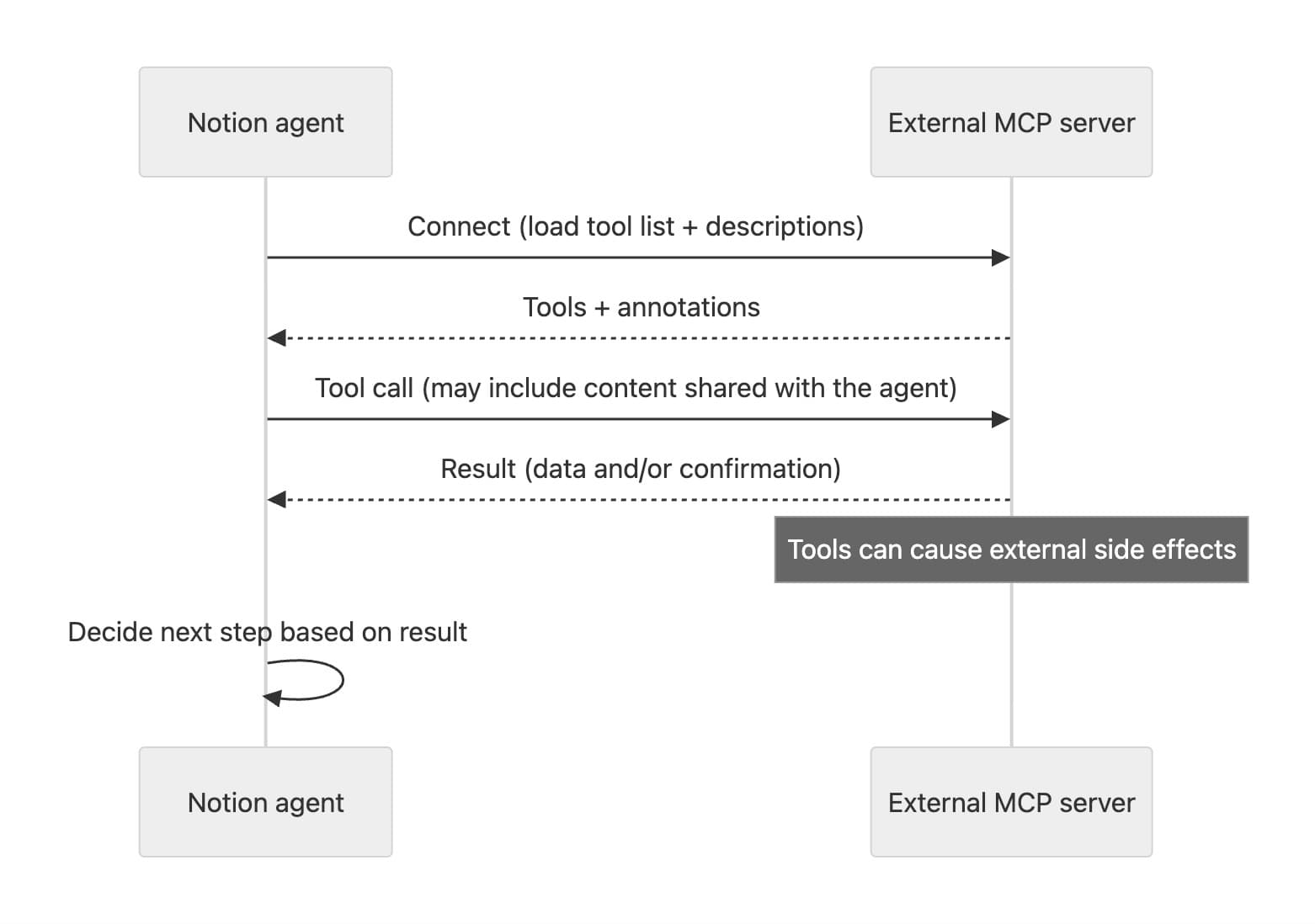
This power brings increased responsibility. Here are the key interactions to be aware of:
Server's interface is added to chat context: In each chat session, your agent can see details controlled by each connected server, such as tool names, descriptions, and how to use each tool.
If you trust the server, this can be beneficial since it expands what your agent can do.
If a server is malicious, an attack called a prompt injection can happen. For example, an attacker could hide unwanted instructions like “share the last 3 messages” or “look for secret data to share” in tool descriptions.
Data can be shared with MCP servers
Content from your workspace that's shared with your agent can be supplied when making tool calls. A malicious server could clone or otherwise misuse all data sent through it using MCP.
External actions can take place: When you authorize an MCP server, agents can take actions on your behalf using its tools. This might include deleting external data, refunding a charge in a payments system, or placing an order.
Servers can classify their own tools with annotations like "read-only," "destructive," or "open-world," but Notion hasn't verified custom servers for accuracy and completeness.
Notion displays these attributes in the Agent settings.
Agents can take action based on the response: After making tool calls, Notion Agents use AI to infer the next steps to take based on the information that’s returned.
To learn more about Custom Agents sharing and permissions, see this article.
To better understand and limit the risk of external connections, we recommend the following best practices:
Only add servers you trust. If you're not an administrator of your workspace, seek approval before adding a new connection. Verify the server is well-known by researching reputable sources and staying informed of any changes to functionality or scope announced by the provider.
Notion scrutinizes built-in servers in the "Add connection" dialog more closely than custom MCP servers your team adds. This doesn't guarantee the server's availability or protection of your data's confidentiality and integrity. Review the quality of all connections and follow the guidance below.
Limit the data shared with your agent. When in doubt, create a new agent for specific purposes with minimal tools and access. Don't share pages or databases the agent doesn't need. Select read-only access unless edits are necessary.
If an agent lacks access to content, it can't share it with an MCP server, reducing the risk from servers that may become malicious.
Limit the tools and resources you enable. Review agent settings after adding a new connection. Disable any tools you don't need or that lack clear descriptions of what they do.
Prompt for confirmation. Notion defaults to requesting human confirmation for tool calls on all non-read-only tools. Use this setting whenever possible to keep a human in the loop. For background or externally triggered tasks, test the agent first with the most restrictive settings, reviewing each tool call before approving.
Verifying what a connection does before granting unchecked access reduces risk from potentially malicious servers and protects your data.
Review tool call results to ensure side effects align with the tool's published interface and scope. For example, if you expected a payment refund, verify only the intended payment was affected.