커스텀 에이전트용 Notion 크레딧 구매 및 사용량 모니터링

커스텀 에이전트 사용 시 적용되는 Notion 크레딧에 관해 알아야 할 모든 것(예: 가격 책정 방식, 구매 및 사용량 모니터링 방법, 청구가 시작되면 발생하는 일 등)을 살펴보세요 💳
자주 묻는 질문(FAQ)으로 이동Notion 크레딧은 비즈니스 및 엔터프라이즈 요금제에서 이용할 수 있는 정기 결제형 추가 기능입니다. 커스텀 에이전트가 작업을 수행할 때마다 Notion 크레딧이 사용됩니다. 일반적으로 더 복잡한 작업일수록 더 많은 크레딧이 사용됩니다.
제품 내에서 청구를 관리하는 경우 관리자는 Notion 크레딧 대시보드에서 크레딧을 구매하고 사용량을 모니터링할 수 있습니다. 월간 Notion 크레딧에서는 1,000크레딧당 US$10의 가격이 적용되며, 구독과 함께 청구됩니다. 또한, 필요에 따라 매월 유연하게 조정할 수 있습니다. 크레딧은 워크스페이스 전체에서 공유되며 매월 초기화됩니다.
회계 담당 팀이 있다면, 크레딧 사용 계획을 세우거나 추가 크레딧 옵션을 확인하는 데 도움을 받을 수 있습니다.

참고: 비즈니스 또는 엔터프라이즈 요금제를 사용 중이며 Notion 크레딧이 모두 소진된 경우에도, 공정 사용 한도 내에서 다른 AI 기능(예: AI 노트, Notion 에이전트)을 계속 사용할 수 있습니다.
Notion 크레딧을 구매하기 전에 알아두어야 할 사항은 다음과 같습니다.
구매한 크레딧의 전체 금액을 즉시 사용할 수 있습니다. 월간 크레딧을 구매하면 전체 크레딧 금액을 워크스페이스에서 즉시 사용할 수 있습니다. 크레딧은 일할 계산되지 않습니다.
매월 크레딧 초기화: 구매한 금액만큼 크레딧이 초기화됩니다. 사용하지 않은 크레딧은 다음 달로 이월되지 않습니다.
크레딧은 워크스페이스 전체에서 공유되어 사용됩니다. 크레딧은 워크스페이스 단위로 합산되어 관리됩니다. 워크스페이스 내의 커스텀 에이전트는 누가 생성했는지, 또는 누가 실행했는지와 관계없이 모두 동일한 크레딧 잔액을 사용합니다.
크레딧은 매달 조정 가능합니다. 관리자는 각 청구 주기마다 실제 사용량에 맞추어 구매 크레딧의 양을 늘리거나 줄일 수 있습니다.
크레딧은 월간 주기로 청구됩니다. 월간 구독자의 경우 Notion 크레딧은 월간 구독 요금과 함께 청구됩니다. 연간 구독자의 경우에는 매월 별도로 청구됩니다.
언제든지 구매할 수 있습니다. 크레딧이 초기화되기 전에 크레딧이 부족해지면 주기 중 언제든지 크레딧을 추가로 구매하여 에이전트를 중단 없이 계속 실행할 수 있습니다.
커스텀 에이전트는 다음 월간 서비스 날짜(2026년 5월 4일 또는 그 이후)까지 무료로 실행할 수 있습니다. 크레딧을 미리 구매했는지 여부와 관계없이 다음 월간 서비스 날짜부터 청구 및 크레딧 사용이 시작됩니다.
월간 서비스 날짜는 언제인가요?
월간 서비스 날짜는 Notion 월간 또는 연간 구독을 시작한 날짜를 기준으로 합니다. 월간 또는 연간 요금제와 관계없이 매월 Notion 크레딧이 초기화되고 크레딧 변경 사항이 적용되는 날짜입니다.
월간 Notion 크레딧을 구매하는 경우 이 날짜가 청구일이기도 합니다. 해당 날짜는 Notion 크레딧 대시보드에서 확인하실 수 있습니다.
언제 요금이 청구되나요?
처음 Notion 크레딧을 구매하면 다음 월간 서비스 날짜에 요금이 청구되며, 이 날짜부터 크레딧 사용이 시작됩니다. 예를 들어, 월간 서비스 날짜가 5월 9일이라면 크레딧 사용 또한 5월 9일부터 시작됩니다.
청구 및 크레딧 사용이 시작되면 이후의 신규 구매에 대해서는 즉시 요금이 청구됩니다.
크레딧을 충분히 구매하지 않으면 어떻게 되나요?
커스텀 에이전트는 다음 월간 서비스 날짜에 자동으로 일시정지되며, 관리자가 크레딧을 추가하거나 크레딧이 초기화될 때까지 정지 상태로 유지됩니다. 커스텀 에이전트를 다시 실행하려면 관리자가 크레딧을 구매하고 에이전트를 다시 활성화해야 합니다.
베타 기간 동안 커스텀 에이전트를 사용한 경우
에이전트는 첫 번째 월간 서비스 날짜(2026년 5월 4일 또는 그 이후)까지 계속 실행됩니다.
관리자는 Notion 크레딧 대시보드를 통해 언제든지 Notion 크레딧을 구매할 수 있습니다.
Notion 크레딧 대시보드에서 크레딧 구매
설정→사용 권한 및 청구→Notion 크레딧으로 이동하세요.Notion 크레딧 추가하기를 선택하세요.금액을 선택하세요.
수백에서 수천 단위까지 원하는 만큼 구매 수량을 설정할 수 있습니다.
회계 담당 팀을 통해 구매
크레딧 사용 계획을 세우거나 추가 옵션을 확인하는 데 회계 담당 팀의 도움을 받을 수 있습니다.
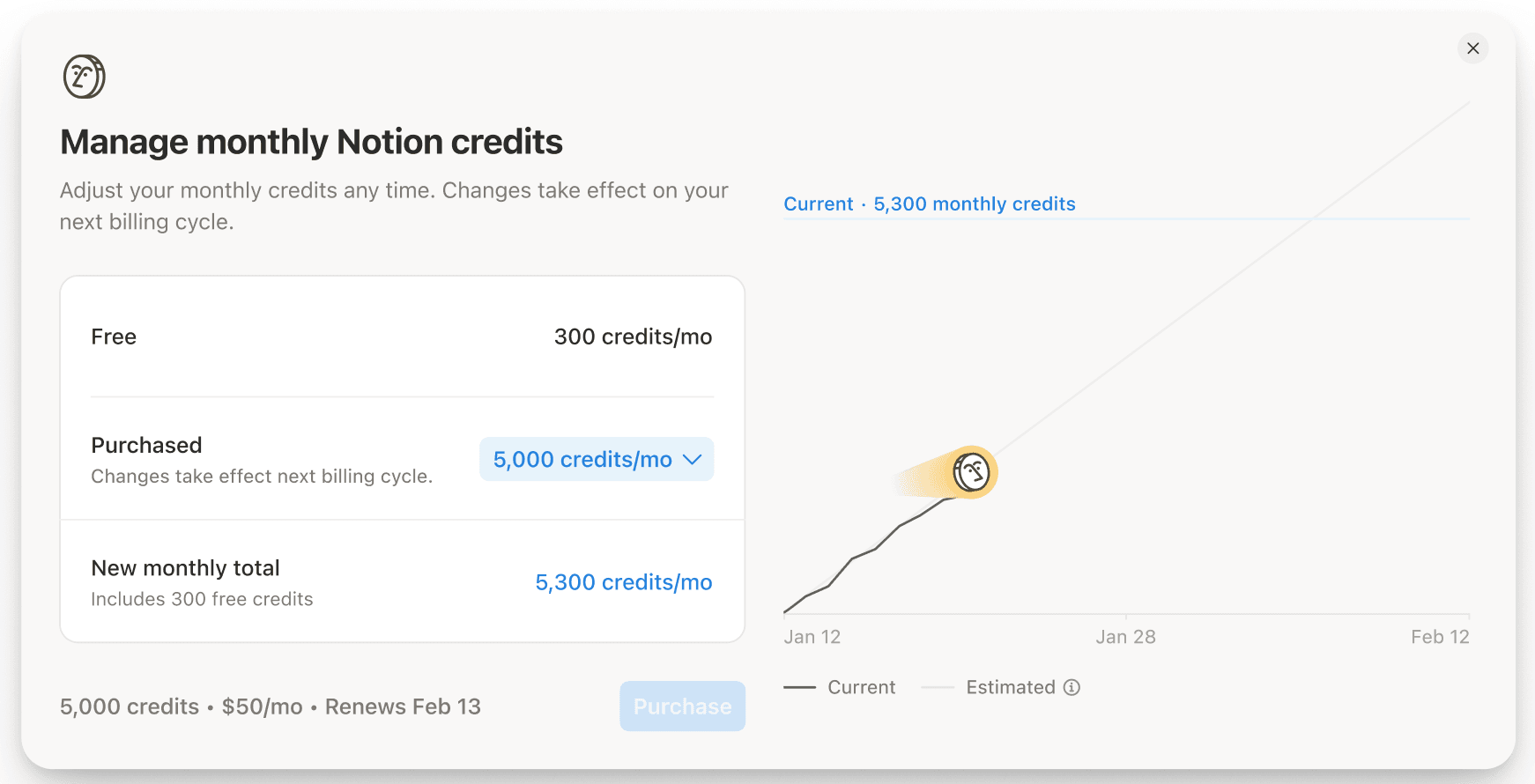
관리자는 설정에서 월간 Notion 크레딧을 관리할 수 있습니다.
설정→사용 권한 및 청구→청구로 이동하세요.크레딧 관리를 선택하세요.금액을 선택하세요.
커스텀 에이전트는 실행을 완료하는 데 필요한 작업에 따라 크레딧을 사용합니다. 일반적으로 에이전트가 콘텐츠를 많이 읽거나, 많은 작업을 수행하거나, 실행 횟수가 빈번할수록 크레딧 사용량도 늘어납니다.
사용되는 Notion 크레딧의 양은 다음 주요 요소에 따라 달라집니다.
에이전트가 읽는 양: 긴 페이지를 읽거나, 많은 콘텐츠를 검색하거나, 큰 데이터베이스를 스캔하는 경우 일반적으로 더 많은 크레딧을 사용합니다.
필요한 단계 수: 도구 호출 횟수가 많고 여러 단계로 구성된 워크플로인 경우 더 많은 크레딧을 사용합니다.
실행 빈도: 주기에 따라 실행되거나 자주 트리거되는 에이전트는 시간이 지남에 따라 더 많은 크레딧을 사용합니다.
모델 선택: 고급 모델은 더 복잡한 추론을 처리하므로 더 많은 크레딧을 사용합니다. 일반적인 경우에는 Notion이 작업에 가장 적합한 모델을 자동으로 매칭해 주는 '자동' 설정을 권장합니다.
각 실행 후 관리자 및 에이전트 제작자는 Notion 크레딧 대시보드에서 정확한 사용량을 볼 수 있습니다.
다음은 유사한 목표를 가진 두 커스텀 에이전트가 서로 다른 양의 Notion 크레딧을 사용하는 상황의 예시입니다. 두 개의 커스텀 에이전트가 매월 동일한 횟수만큼 실행되더라도, 실행별로 더 복잡한 단계를 수행하는 에이전트에서 더 많은 Notion 크레딧을 사용합니다.
예시 | 에이전트 워크플로 | 일반적인 단계 | 크레딧 영향 |
|---|---|---|---|
간단한 작업 배정 에이전트 | 수집된 제품 피드백을 올바른 제품 영역으로 전달 | • Slack 채널에서 메시지 읽기 | 처리하는 정보의 양과 거쳐야 할 단계가 적으므로 실행당 사용하는 크레딧이 적음 |
보다 복잡한 작업 배정 에이전트 | 수집된 제품 피드백을 전달하고, 후속 조치의 우선순위를 정하고, 실행 계획을 작성 | • Slack 채널에서 메시지 읽기 | 더 많은 내용을 읽고, 더 많은 결정을 내리고, 실행 시마다 더 많은 단계를 완료하므로 실행당 사용하는 크레딧이 더 많음 |
크레딧 사용량은 커스텀 에이전트가 수행하는 작업에 따라 다릅니다. 아래 예시는 일반적인 사용 사례를 기반으로 합니다. 그러나 실제 사용량은 에이전트 실행 빈도, 필요한 단계 수, 사용하는 모델 등의 요인에 따라 달라집니다.
비용을 가늠해 볼 수 있도록 아래의 표를 참고해 보세요.
가장 유사한 사용 사례를 찾으세요.
'실행당 비용'에 월간 예상 실행 횟수를 곱하세요.
예를 들어, 에이전트가 '프로젝트 보고 에이전트'와 유사하고 매월 60회 실행되는 경우, 월간 비용은 약 USD $4.80~$10.80입니다.
예시 | 에이전트 워크플로 | 실행당 비용 | 1,000 크레딧($10)당 실행 횟수 |
Q&A 에이전트 | 내부 문서를 활용하여 정책 및 사용 방법에 관한 일반적인 질문에 답변합니다. Slack 채널에서 직접 응답합니다. | ~$0.03–$0.11 | ~90–333 |
작업 배정 에이전트 | 들어오는 요청을 검토하고 작업을 생성한 뒤 적절한 담당자나 팀에 배정합니다. 그런 다음 요청자에게 알립니다. | ~$0.05–$0.15 | ~65–190 |
프로젝트 보고 에이전트 | 메모와 프로젝트에서 주요 업데이트 내용을 가져온 다음, 검토용 주간 상태 보고서 초안을 작성합니다. | ~$0.08–$0.18 | ~57–133 |
메일 분류 에이전트 | 수신 이메일을 긴급도와 주제별로 정렬합니다. 답장 초안을 작성하고, 필요할 때 액션 아이템을 작업으로 전환합니다. | ~$0.04–$0.10 | ~100–250 |
일일 브리핑 에이전트 | 우선순위와 액션 아이템에 대한 일일 요약본을 생성합니다. 사용자의 캘린더와 이메일에서 얻은 맥락 정보를 사용합니다. | ~$0.10–$0.30 | ~33-100 |

필요한 크레딧을 가장 정확하게 예측할 수 있는 방법은 실제로 커스텀 에이전트를 사용해 보는 것입니다. 각 실행 후 크레딧 대시보드에 정확한 사용량이 표시됩니다.
최상의 결과를 얻으려면
먼저 작은 범위로 시작한 다음, 커스텀 에이전트를 미세 조정하세요.
필요한 크레딧을 정확히 파악하려면 1~2회의 청구 주기 동안 실제 사용량을 검토해 보세요.
필요에 따라 크레딧 사용량을 늘리거나 줄이세요.
이 추정치는 현재 사용량을 기반으로 합니다. 에이전트 효율성이 개선됨에 따라, 시간이 지날수록 비용은 점차 감소할 것으로 예상됩니다. 이 기준은 정기적으로 업데이트될 예정입니다.
크레딧 사용량 관리에 관한 더 많은 팁은 커스텀 에이전트 시작하기에 관한 가이드를 참고해 주세요.
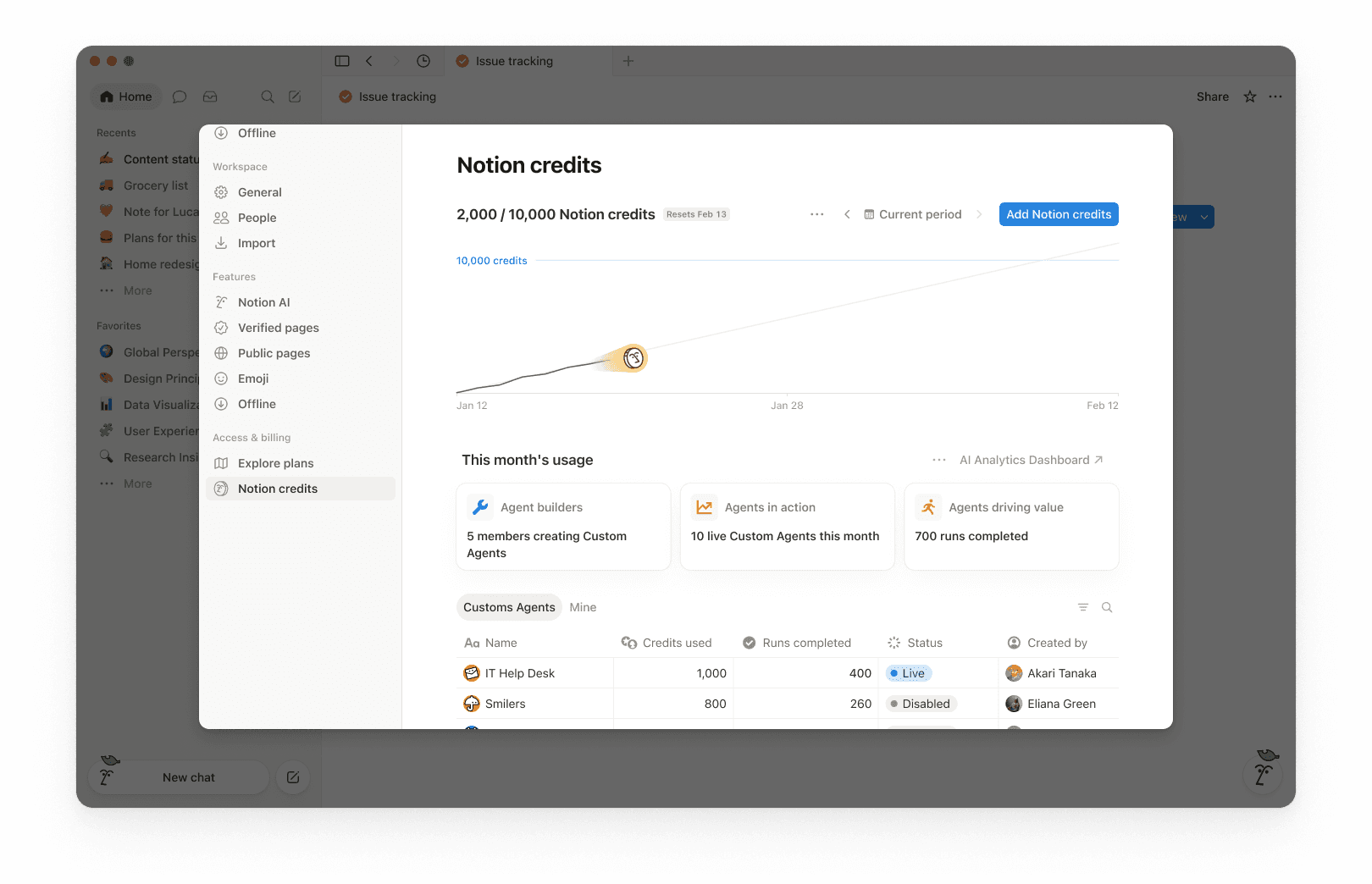
Notion 크레딧 대시보드를 통해 커스텀 에이전트가 워크스페이스 전반에서 Notion 크레딧을 사용하는 방식을 명확하게 파악할 수 있습니다. 이 대시보드를 사용하여 사용 현황을 트래킹하고, 향후 필요한 크레딧을 계획하고, 지속적으로 발생하는 지출을 관리할 수 있습니다.
Notion 크레딧 대시보드에 접근하려면 설정 → 사용 권한 및 청구 → Notion 크레딧으로 이동하세요.
비즈니스 및 엔터프라이즈 요금제의 관리자는 대시보드에서 에이전트 사용량을 모니터링할 수 있습니다. 에이전트 제작자 또한 워크스페이스 수준의 크레딧 사용 속도를 확인할 수 있으며, 에이전트 테이블에는 본인이 직접 생성한 커스텀 에이전트만 표시됩니다.
대시보드에서 다음과 같은 사항을 모니터링할 수 있습니다.
실시간 크레딧 사용량
월간 서비스 갱신일까지의 예상 사용량
에이전트 수준의 실행과 크레딧 사용 현황을 통해 지출을 발생시키는 에이전트를 파악하고 필요에 따라 조정할 수 있습니다.
여러 워크스페이스를 관리하는 경우, 관리자 콘솔에서 Notion 크레딧 대시보드를 사용하여 조직 전체의 크레딧 사용량 및 커스텀 에이전트 사용량을 트래킹할 수 있습니다.
1. 사용량 요약
대시보드 상단에는 선택한 기간 동안 사용한 총 Notion 크레딧과 크레딧 초기화 날짜가 표시됩니다. 선택한 기간은 워크스페이스의 청구 주기를 기준으로 보여집니다.
이 정보를 통해 지금까지의 사용량과 월간 청구 주기가 종료되는 시점을 빠르게 파악할 수 있습니다.
2. 기간 제어
오른쪽 상단 모서리에서 기간 선택 도구(예: 현재 기간)와 탐색 화살표를 사용하여 과거 기간을 검토합니다.
3. 사용량 차트
사용량 차트는 시간 경과에 따른 크레딧 사용량을 보여줍니다.
'현재'에는 지금까지 사용한 실제 크레딧이 표시됩니다.
현재 사용 패턴이 유지될 경우 초기화 날짜까지 사용될 것으로 추정되는 프로젝트 수입니다. 본 추정치는 정보 제공용으로, 실제 향후 사용량은 다를 수 있습니다.
이 항목을 활용해 크레딧이 초기화 전에 부족해질지 여부를 확인합니다.
4. 워크스페이스 사용량 카드
이번 달 사용량에서 다음과 같은 도입 현황 및 활동 지표를 확인할 수 있습니다.
에이전트 빌더: 커스텀 에이전트를 생성한 멤버 수입니다.
활동 중인 에이전트: 해당 기간 동안 실행 중인 실시간 커스텀 에이전트의 수입니다.
실행 완료됨: 워크스페이스 전체에서 에이전트가 완료한 작업 수입니다.
5. 에이전트 수준 세부 정보
요약 섹션 아래에는 에이전트별로 사용량을 세분화한 표가 표시됩니다. 여기에는 일반적으로 다음 항목이 포함됩니다.
사용한 Notion 크레딧
실행 완료됨
상태
생성자
관리자는 크레딧 사용량을 모니터링하고 커스텀 에이전트의 실행 방식을 제어하여 비용 지출을 예측 가능한 범위 내에서 유지할 수 있습니다.
관리자가 크레딧 사용량을 관리하는 방법에는 여러 가지가 있습니다.
가시성: Notion 크레딧 대시보드에서 사용량과 동향을 트래킹할 수 있습니다.
보호 장치: 에이전트를 생성할 수 있는 사용자를 결정하고 제한을 설정합니다.
제어: 에이전트를 점검하거나 설정을 변경하는 동안에는 언제든지 에이전트를 일시 정지하거나 꺼서 크레딧 사용을 멈출 수 있습니다.
최적화: 에이전트를 미세 조정하여 불필요한 단계를 줄이고 효율성을 높입니다.
1. 사용량을 모니터링하여 지출을 발생시키는 요인을 파악하세요
Notion 크레딧 대시보드를 통해 기간별 사용량을 트래킹하고, 크레딧을 가장 많이 사용하는 에이전트를 확인하세요. 워크스페이스의 크레딧 한도에 가까워지거나 한도에 도달했을 때 Notion에서 관리자에게 알림을 전송하므로, 관리자가 적절한 조치를 취할 시간을 확보할 수 있습니다.
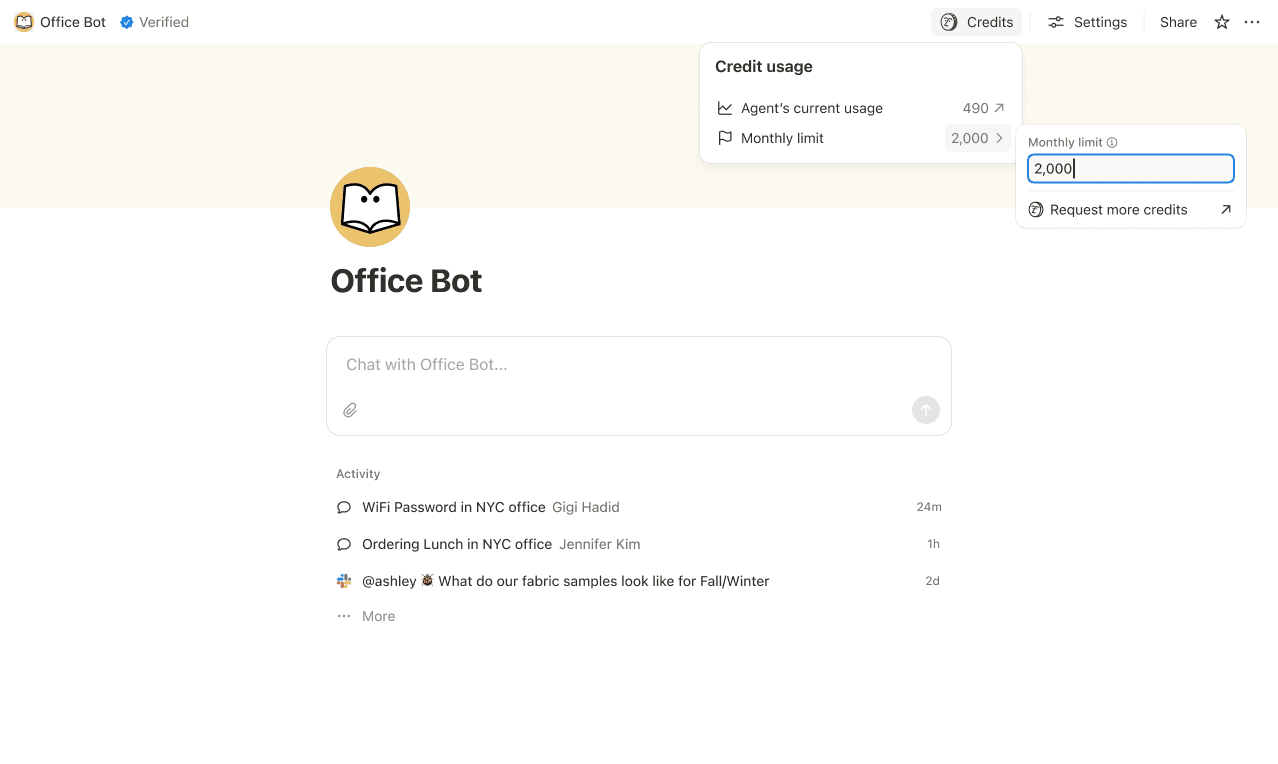
2. 예상치 못한 지출을 방지하기 위해 한도를 설정하세요
개별 에이전트별로 크레딧 한도를 설정하여 해당 한도에 도달하면 일시적으로 정지되도록 할 수 있습니다.
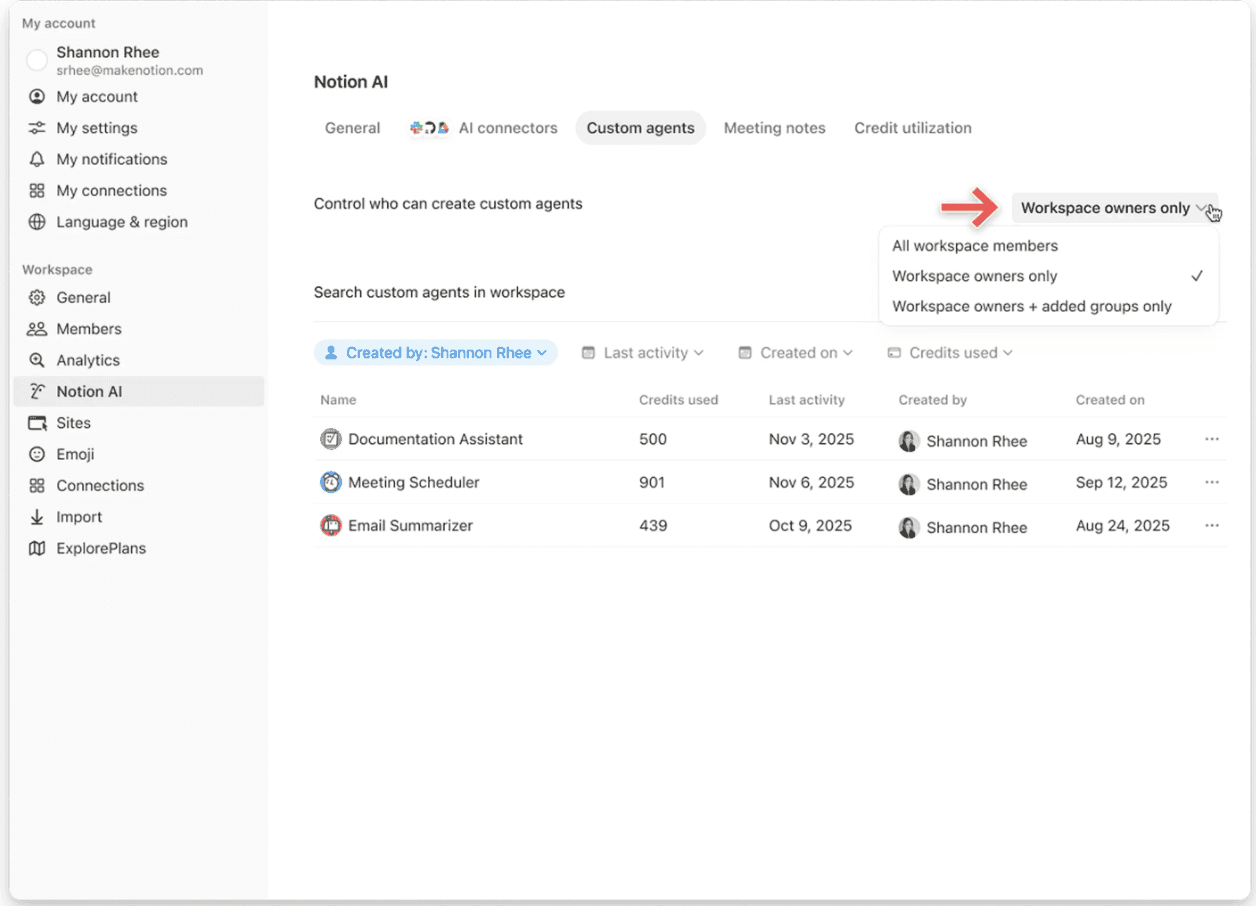
에이전트를 생성할 수 있는 사용자(모든 사용자, 워크스페이스 소유자만 또는 일부 멤버만)를 제한하세요.
3. 신속한 개입으로 사용을 중단하세요
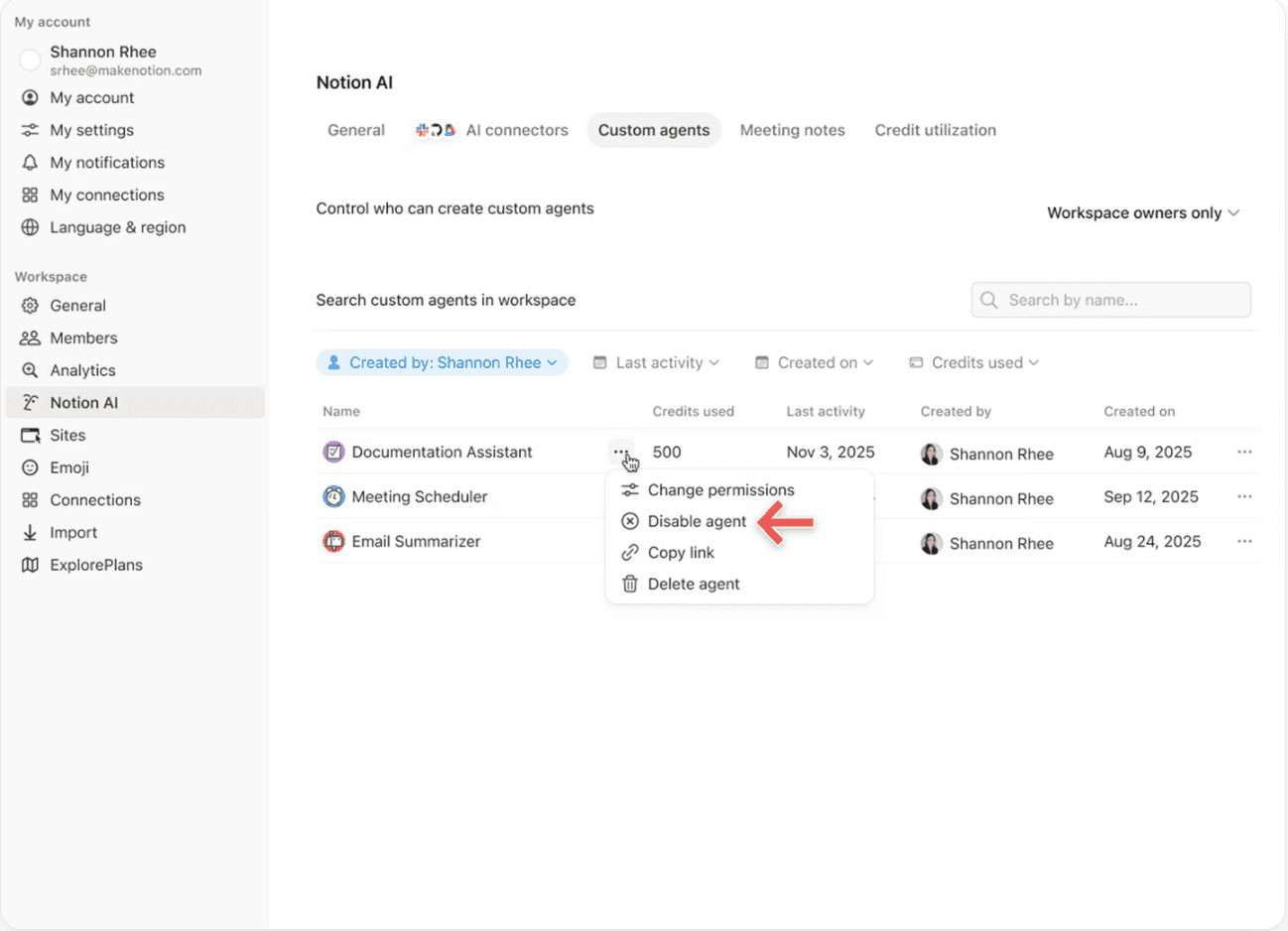
에이전트의 활동을 검토하거나 설정을 조정하는 동안에는 언제든지 커스텀 에이전트를 일시 정지하거나 꺼서 크레딧 사용을 즉시 중단할 수 있습니다.
4. 실행당 소모 크레딧을 줄일 수 있도록 효율성을 최적화하세요
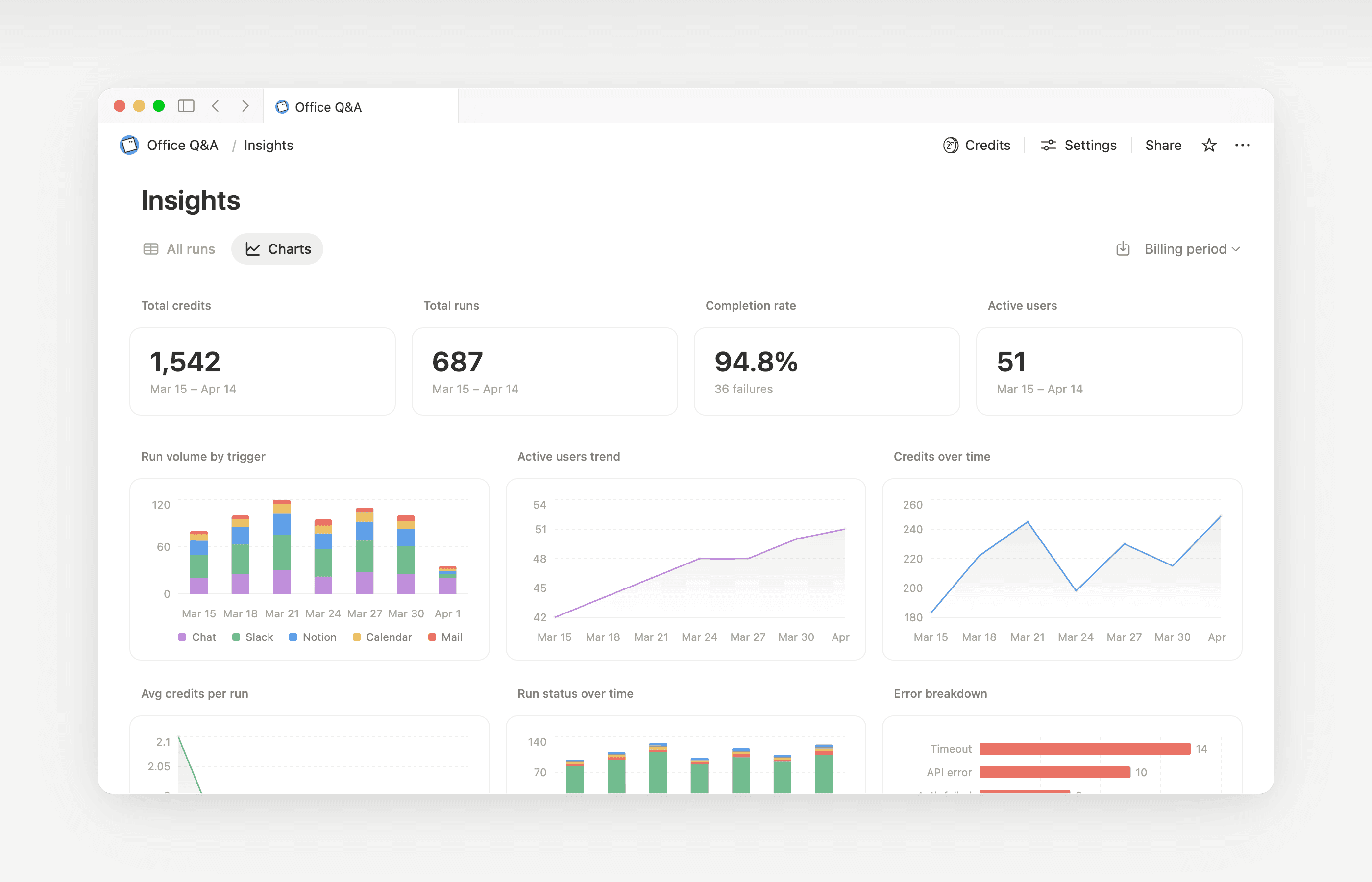
에이전트별 인사이트 기능이 곧 출시될 예정입니다. 이 기능을 통해 워크스페이스 전체의 총 실행 횟수와 성능을 파악하고, 크레딧 사용량이 많은 에이전트를 찾아내어 불필요한 실행이나 중복 단계를 줄일 수 있습니다.

추가 정보
커스텀 에이전트의 정의와 작동 방식을 알아보세요.
커스텀 에이전트가 정보에 접근하는 방법, 공유 작동 방식, 관리자가 제어할 수 있는 사항(커스텀 에이전트 공유 및 권한)에 대해 알아보세요.
커스텀 에이전트 사용 시 Notion 크레딧 최적화 및 효율성 향상을 위한 더 많은 모범 사례는 이 가이드를 참고해 주세요.
자주 묻는 질문(FAQ)
Notion 크레딧이 모두 소진되면 어떤 일이 발생하나요?
Notion 크레딧이 모두 소진되면 어떤 일이 발생하나요?
워크스페이스에 Notion 크레딧이 충분하지 않으면 크레딧이 초기화되거나 관리자가 더 많은 크레딧을 추가할 때까지 커스텀 에이전트가 자동으로 일시정지됩니다.
Notion 크레딧이 소진되기 전에 관리자에게 알림이 전송되는 기준은 무엇인가요?
Notion 크레딧이 소진되기 전에 관리자에게 알림이 전송되는 기준은 무엇인가요?
워크스페이스의 Notion 크레딧 사용량이 80%와 100%에 도달하면 관리자에게 앱 내 알림 및 이메일 알림이 전달됩니다. 이를 통해 관리자는 에이전트가 일시정지되기 전에 크레딧을 조정할 수 있습니다.
Notion 크레딧을 더 구매하려면 어떻게 해야 하나요?
Notion 크레딧을 더 구매하려면 어떻게 해야 하나요?
관리자는 제품 내 또는 회계 담당 팀을 통해 Notion 크레딧을 구매할 수 있습니다. Notion 크레딧 구매 방법에 대해 자세히 알아보세요.
월 중간에 Notion 크레딧을 변경하는 경우 어떻게 되나요?
월 중간에 Notion 크레딧을 변경하는 경우 어떻게 되나요?
월간 서비스 기간 중간에 크레딧을 증액하는 경우, 추가 크레딧은 현재 서비스 기간에 즉시 적용됩니다. 다음 월간 서비스 날짜 시작 시점에 더 높은 정기 크레딧 금액이 청구됩니다.
월간 서비스 기간 중간에 크레딧 금액을 줄이는 경우, 다음 서비스 기간 시작 시점에 더 적은 금액이 적용됩니다. 그 이후부터는 매월 더 적은 금액의 정기 크레딧이 청구됩니다.
저는 회계 담당 팀과 협력하여 Notion 크레딧을 구매합니다. 연간 Notion 크레딧이 포함된 비즈니스 또는 엔터프라이즈 요금제를 청구 주기 중간에 업그레이드, 확장 또는 갱신하는 경우 어떻게 되나요?
저는 회계 담당 팀과 협력하여 Notion 크레딧을 구매합니다. 연간 Notion 크레딧이 포함된 비즈니스 또는 엔터프라이즈 요금제를 청구 주기 중간에 업그레이드, 확장 또는 갱신하는 경우 어떻게 되나요?
사용하지 않은 연간 선불 Notion 크레딧에 대해서는 다음 중 더 적은 금액으로 일할 계산된 크레딧이 제공됩니다.
미사용 연간 Notion 크레딧 금액(USD) 또는
구독 잔여 기간에 대해 일할 계산된 연간 Notion 크레딧 요금
이 크레딧은 구독 기간이 종료되기 전에 새로운 비즈니스 또는 엔터프라이즈 주문서가 기존 주문서를 대체할 때 적용됩니다. Notion 크레딧은 현금 가치를 가지지 않습니다. 모든 크레딧은 새로운 요금제에 적용됩니다.
자동 채우기 기능은 Notion 크레딧을 사용하나요?
자동 채우기 기능은 Notion 크레딧을 사용하나요?
자동 채우기에는 기본 및 커스텀 에이전트, 두 가지 옵션이 있습니다.
기본 자동 채우기 기능은 비즈니스 및 엔터프라이즈 요금제에 포함되어 있으며, Notion 크레딧을 사용하지 않습니다.
커스텀 에이전트 자동 채우기 기능의 경우 풍부한 컨텍스트와 고도의 추론 기능 등을 사용하는 커스텀 에이전트와 함께 실행되므로, Notion 크레딧을 사용합니다.