Best practices for improving your Custom Agent
Learn how to optimize your agent's model, triggers, scope, and instructions for efficient results and costs.
Your agent's performance comes down to three things: the model it runs on, how its triggers and scope are configured, and how its instructions are written. Adjusting any one of them can make your agent more reliable, more consistent, and more cost-efficient.
This guide walks through how to:
Choose a model that fits the task
Control your agent's triggers and scope
Let your agent help you debug and optimize itself

Building your first Custom Agent?
This guide is for agents that are already up and running. If you haven't built one yet, start with Build your first Custom Agent, then come back here.
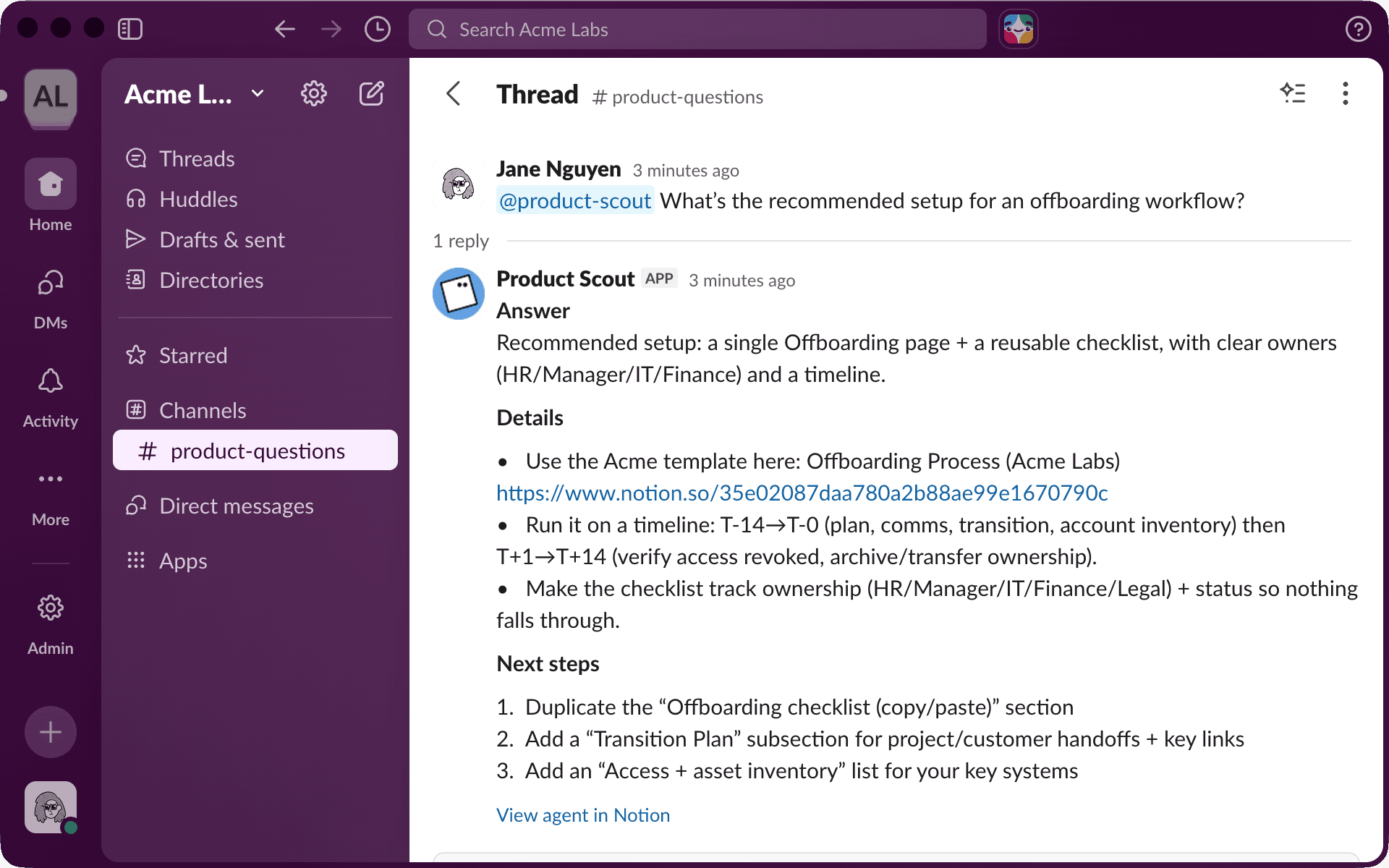
Product Scout is a Custom Agent built to answer internal product questions. Its job is to help teammates get quick, accurate answers like "Does feature X support bulk exports?" by pulling from docs and past conversations.
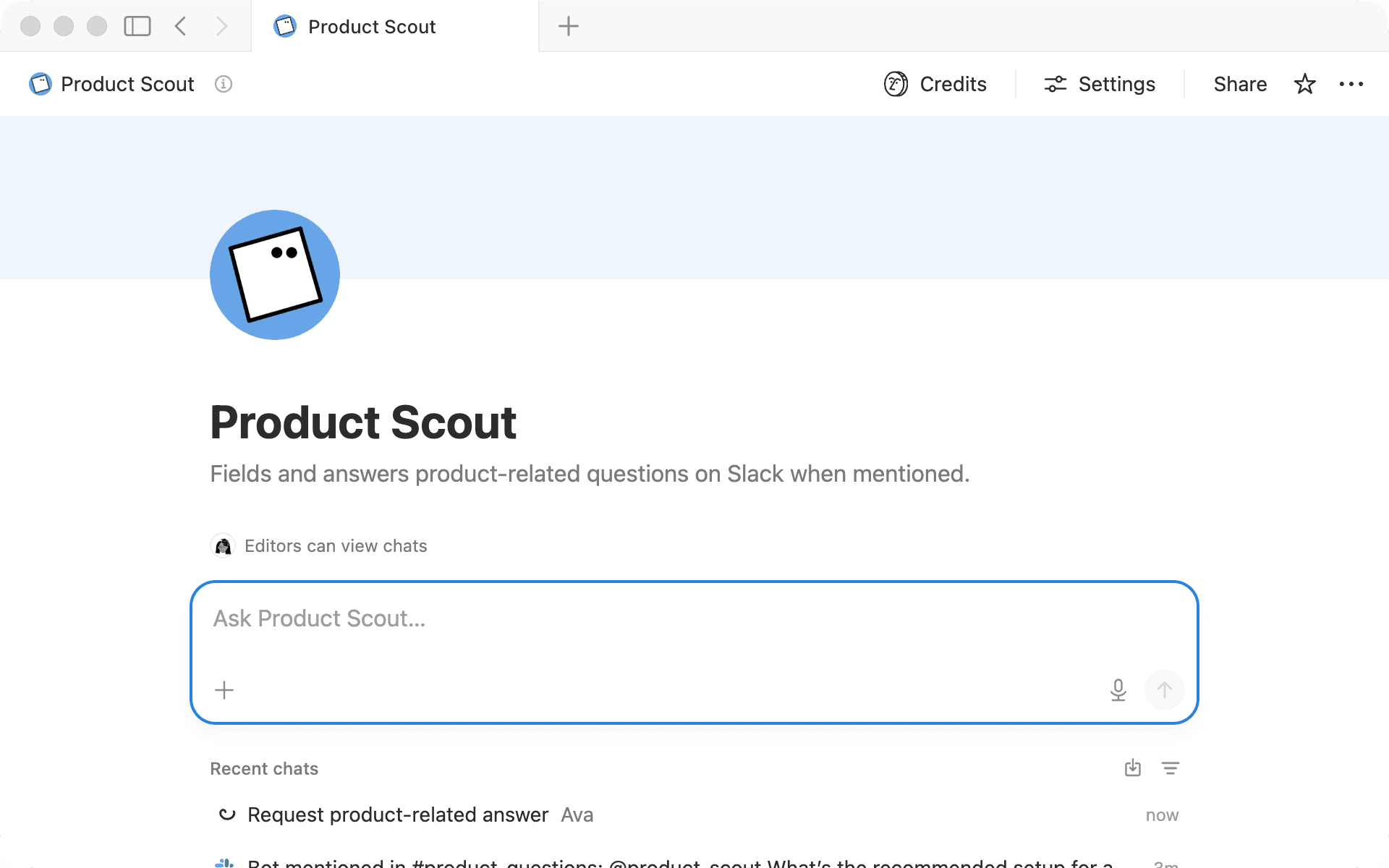
Right now, Product Scout triggers on every message in a Slack channel, searches the entire workspace for context, and runs on the most powerful model available. It works, but three things stand out: answers aren't always consistent, it runs more often than needed, and there's room to cut costs. We'll use it throughout this guide to show how each adjustment plays out in practice.
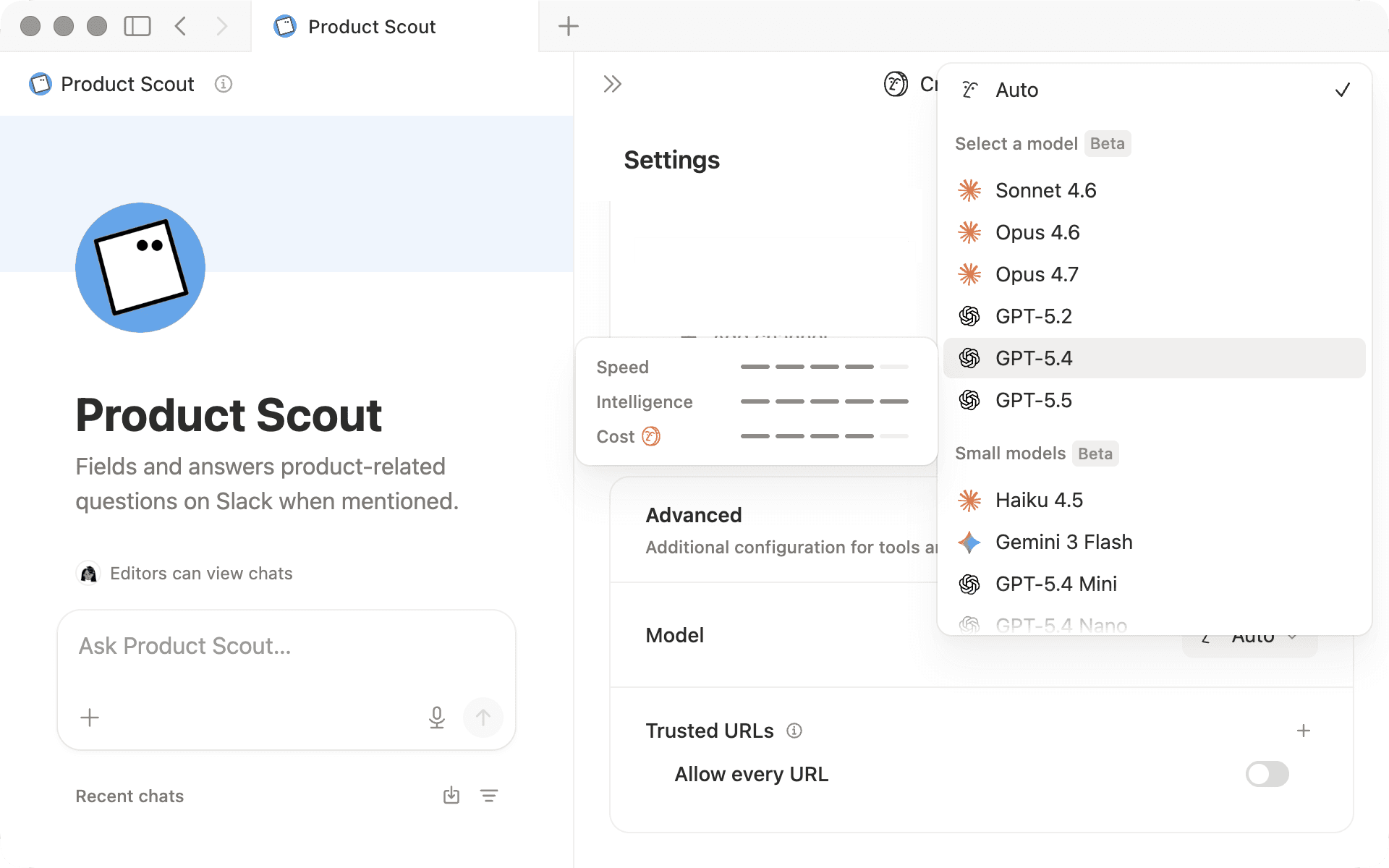
Notion lets you choose which model your Custom Agent runs on, and that choice is one of the biggest factors affecting cost. The goal isn’t to pick the most powerful model available. It’s to find the model that consistently gives you results that meet your quality bar.
When selecting a model, hover over each option in the model picker to compare speed, intelligence, and cost.
Here's a general framework:
Auto lets Notion select the best model for each request. This is the recommended default for most agents.
Lightweight models work well for repetitive, lower-stakes workflows like routine drafting, simple routing and triage, or structured content generation. They're a good fit when speed, consistency, and cost-efficiency matter more than complex reasoning.
Powerful models (e.g., Opus) are best for tasks that require nuanced writing, complex reasoning, or high accuracy, but they use more credits per run.
Test a few different models to see which one consistently meets your quality bar. If output quality dips as the task gets more complex, you can always switch to a more powerful model.
Product Scout was originally running on the most powerful model available. But its core job, finding relevant docs and summarizing them, doesn't require complex reasoning. Switching to a lightweight model reduced costs without any loss in quality.
Your agent's triggers and scope work together. Triggers control when it runs. Scope controls what it reads. If either one is too broad, you'll burn credits on runs that produce noisy or irrelevant output.
Tighten when it runs
A good trigger is frequent enough to be useful and specific enough that it only runs when needed. Every time your agent triggers, it uses credits, even if no action is taken. Focus your trigger on the moments where the agent's help is actually needed.
In Product Scout's setup, it triggered on every message in #product-questions, including replies, reactions, and "thanks!" That meant burning credits on runs that produced nothing useful.
Start by defining when your agent should step in:
What questions should this agent answer? Define the small set of in-scope question types, and write down a few examples.
What should it ignore? Reactions, "thanks," general chatter, and off-topic messages should not trigger a run.
Once you've defined those boundaries, tune your triggers to match. For example, limit your trigger to @mentions, filter by keywords, or trigger on a specific property change instead of every edit.
Switching Product Scout's trigger to @mentions means it only runs when someone is actually asking it a question.
Tighten what it reads
Your agent reads everything you give it access to. If that scope is broad, it sorts through a lot of irrelevant information and the output quality suffers.
Product Scout was searching the entire workspace and all of its connected tools: marketing pages, HR docs, old meeting notes, and months of Slack history from unrelated channels. None of these contain product answers, but the agent was reading through them anyway. That meant noisier results and less consistent answers.
Here's how to think about scope for your own agent:
Start with where the answers actually live: If your agent answers product questions, connect it to your product docs and relevant Slack channels, not your entire workspace and every connected tool.
Don't add context "just in case": Every extra page, database, or channel is more content for your agent to sort through. If it doesn't regularly contain useful answers, remove it.
If your agent still covers too many unrelated topics, split it into two focused agents: An agent that handles both product questions and billing inquiries is doing two jobs. Two separate agents with narrow scopes will give you better results from each.
Narrowing Product Scout's scope to just the Product Launches database and #product-questions Slack history gave the agent a clearer picture of where to look. Answers got more consistent because the agent had less noise to sort through.
You don't have to get your instructions right on the first try. The fastest way to improve them is to show your Custom Agent a few "bad" outputs and ask it to help you rewrite them.
Here's a simple workflow:
Collect 3 to 5 real examples where the agent's response was too long, off-topic, or too confident.
Ask the agent what went wrong: Was the scope too broad? Are the rules for when to respond unclear?
Have it propose improved instructions that add in-scope question types, "don't answer" rules, or a response template.
Test the new instructions on the same examples and keep the smallest change that fixes the issue.
For example, you might paste a response where Product Scout pulled from an unrelated HR doc and tell it: "This answer referenced a page outside of Product Launches. How should I update your instructions to prevent that?" The agent might suggest adding a boundary like "Only reference pages in the Product Launches database."
Each round of feedback helps you spot what's missing, and the instructions get sharper as you go.
Product Scout's original instructions were broad: "Answer product questions using workspace content." After a few rounds of testing and feedback, they became much sharper: "Answer using Product Specs and Slack history. If the answer isn't in our docs, say so. Keep answers under 3 paragraphs."
Before rolling your agent out to your team, test it yourself by clicking Run agent at the top of your settings page. Ask it the kinds of questions your team would actually ask and see how it responds.
Insights gives Custom Agent creators and admins a clear view into agent-level cost, performance, and adoption. It's where you spot the runs that are costing the most, check whether your changes are working, and figure out which failures to fix first.
The Insights dashboard has two views:
Charts shows trends across cost, performance, and adoption over time.
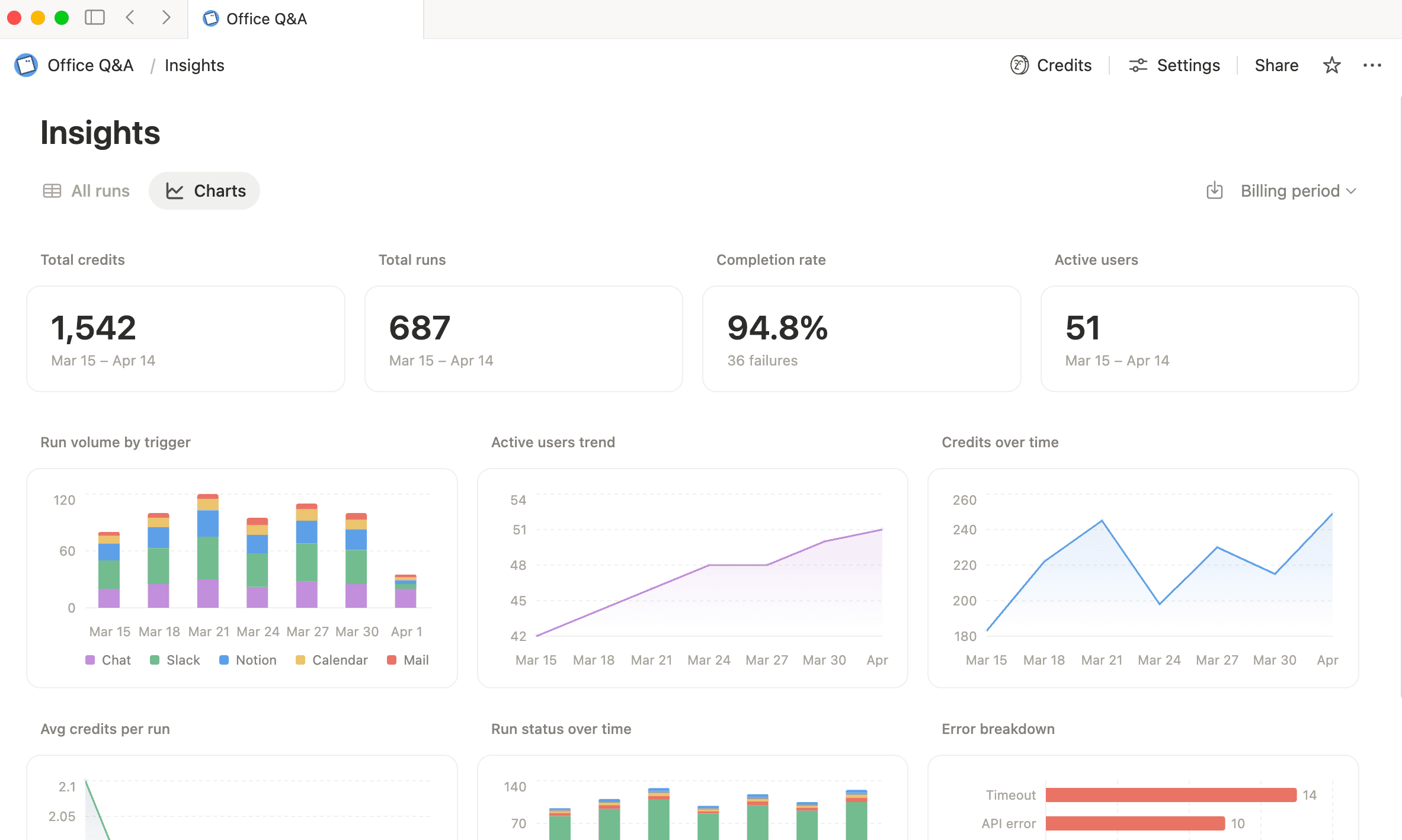
All chats shows a granular view of your agent's activity, including status, triggers, credits consumed, number of runs, model used, and more.
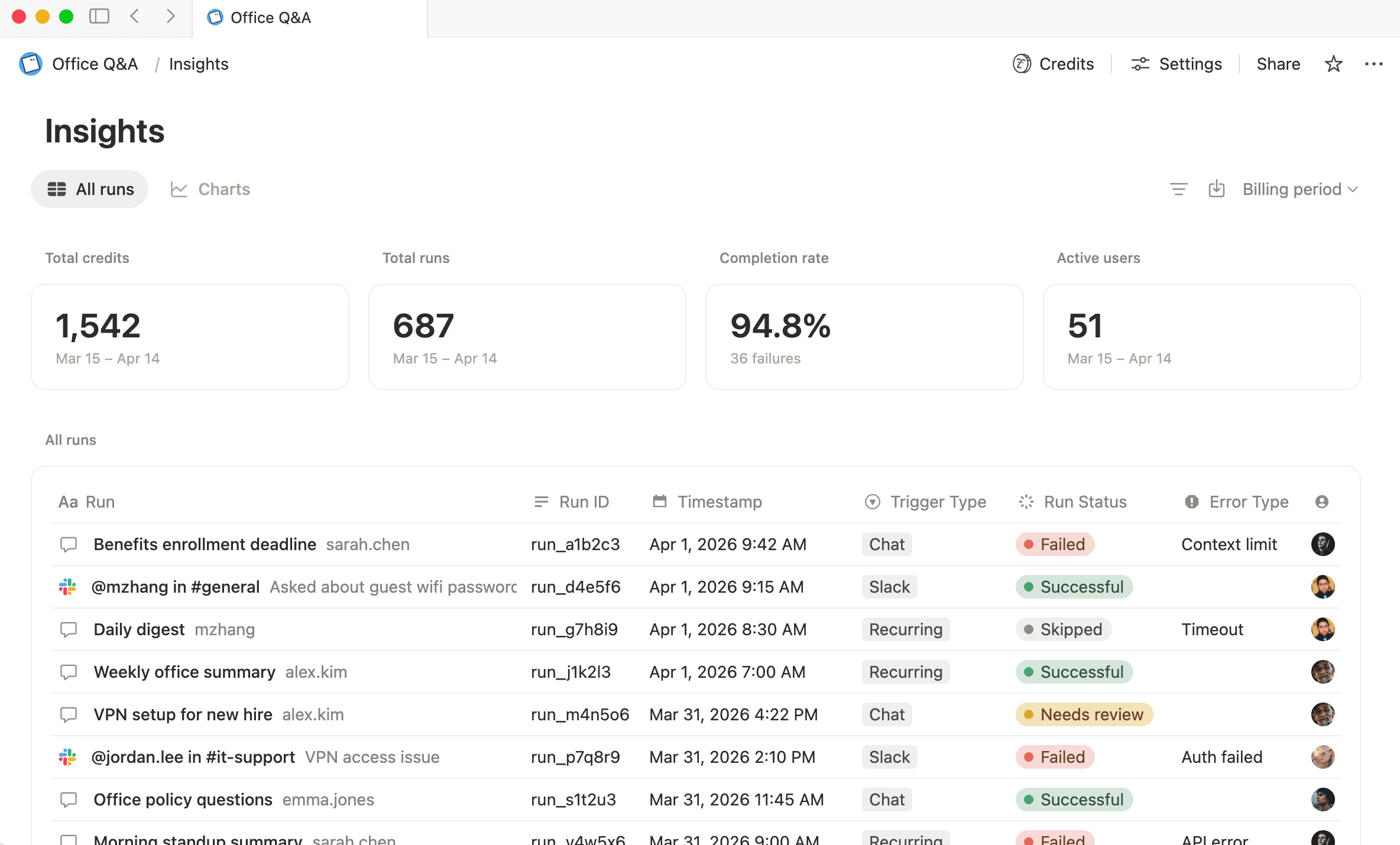
Here's how to put Insights to work:
Measure cost and performance as you iterate: Check credits per run, adjust one lever (instructions, model, or triggers), then compare results over time. That tighter feedback loop is what tells you if a change actually moved the needle.
Optimize high-spend agents: Start from the Credit dashboard to find your highest-spend agents, then use the All chats view to surface the most expensive runs and repeated patterns. The most common fixes are narrowing scope and choosing a model better matched to the task.
Troubleshoot failed runs faster: When a run fails, Insights pinpoints the cause quickly, like a specific tool call or a missing permission. Fixing the root cause once keeps the same failure from showing up again.
To see how these practices look with a different agent, watch this walkthrough:

The best Custom Agents are shaped over time. Each small adjustment compounds, and before long, you have an agent that's more reliable, more consistent, and more cost-efficient.

More resources
Learn what Custom Agents are and how to set one up
Understand how credits work and what each run costs
Manage agent access and rollout with our guide for admins
มีอะไรที่เรายังไม่ได้ทำไหม?