
Notionพื้นที่ทำงาน AI ของคุณ
Notion Calendar
Notion Mail
Notion AIเครื่องมือ AI สำหรับการทำงาน
เอเจนต์ใหม่สร้างระบบอัตโนมัติไว้จัดการงานที่จำเจ
AI Meeting Notesให้ AI ช่วยเขียนได้อย่างเพอร์เฟ็กต์
Enterprise Searchค้นหาคำตอบทันที
ฐานความรู้รวบรวมความรู้ไว้ในที่เดียว
เอกสารเรียบง่ายและทรงพลัง
โปรเจ็กต์จัดการโปรเจ็กต์
การรวมระบบเชื่อมต่อแอพของคุณ
การรักษาความปลอดภัยปลอดภัยและปรับขยายได้
. ดูว่ามีอะไรใหม่→
ดาวน์โหลด แอพ Notion→

ฟีเจอร์ AI

Notion AIเครื่องมือ AI สำหรับการทำงาน
เอเจนต์ใหม่สร้างระบบอัตโนมัติไว้จัดการงานที่จำเจ
AI Meeting Notesให้ AI ช่วยเขียนได้อย่างเพอร์เฟ็กต์
Enterprise Searchค้นหาคำตอบทันที

สำรวจกรณีการใช้งาน

สำหรับงาน
สำหรับชีวิต

ทีม

วิศวกรรมและผลิตภัณฑ์
การออกแบบ
การตลาด
IT

ขนาดบริษัท

สตาร์ทอัพ
ธุรกิจขนาดเล็ก
Enterprise

กรณีใช้งาน

การศึกษา
ส่วนตัว
มืออาชีพ
กรณีการใช้งาน AI

เลือกดู

เทมเพลต
ที่ปรึกษา
การรวมระบบ

ค้นพบ

มีอะไรใหม่
เรื่องราวของลูกค้า
บล็อก
เว็บบินาร์

เรียนรู้

แหล่งเรียนรู้
ทัวร์ชมผลิตภัณฑ์
ช่วยเหลือ
Enterpriseราคาขอรับการสาธิต
เข้าสู่ระบบใช้ Notion ฟรี
  1. ศูนย์ช่วยเหลือ
  2. Help Docs
  1. ← Help Docs

14. Notion AI Connectors

Notion AI Connectors
ข้อมูลในบทนี้

Bring your team’s knowledge into Notion AI with connectors. This section walks through setting up connectors across popular tools (docs, tickets, chat, email, and calendars) so you can find answers and work with information without switching apps.


บทความ

Notion AI Connectors

With Notion AI Connectors, you can use Notion as a single place to find the information you need — even if it lives outside your workspace 👣

Microsoft Teams AI Connector

Connect Notion AI to Microsoft Teams to keep all your work in context.

Slack AI Connector

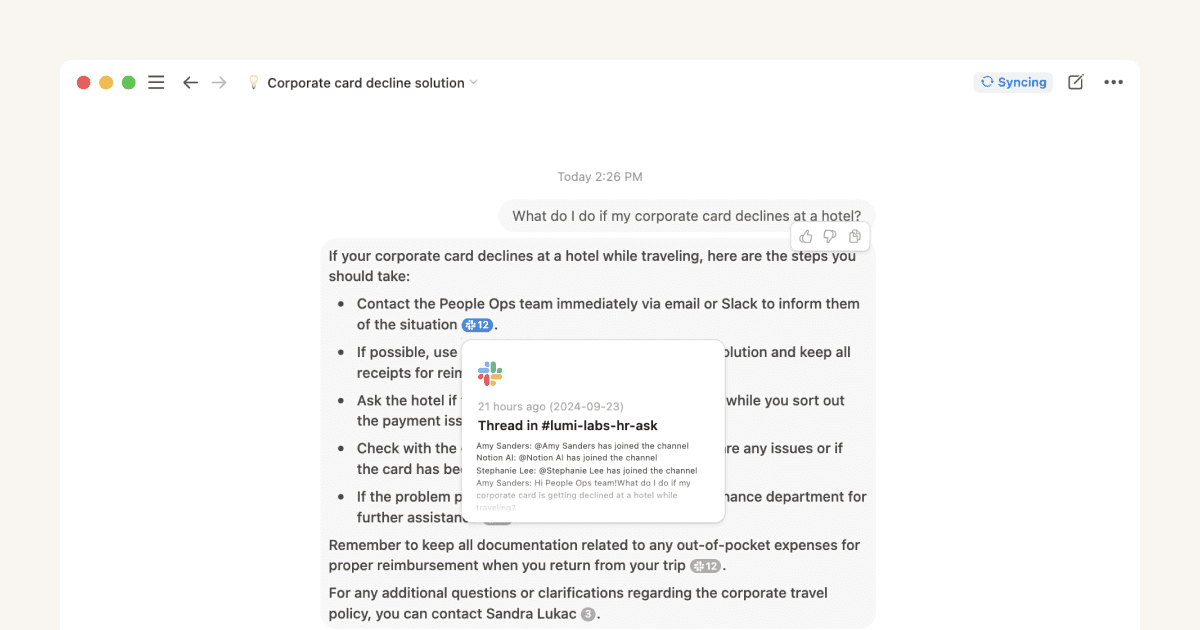
Learn how to connect your Slack workspace to your Notion workspace so that you can find quick answers in Notion using information from your Slack conversations 💬

Gmail AI Connector (Beta)

Google Calendar AI Connector

Learn how to connect Google Calendar events to Notion AI 🗓️

Microsoft Outlook AI Connector

Connect your emails from Microsoft Outlook to Notion AI 📮


ยังมีคำถามใช่ไหม?

👋

เข้าร่วมชุมชนของเรา

มาหาคำตอบกัน

💼

จ้างที่ปรึกษาที่ผ่านการรับรอง

ค้นหาผู้เชี่ยวชาญที่ตอบโจทย์ความต้องการ

Help Center Contact Illustration
  • เอกสารอ้างอิง
      • Start here
      • Intro to workspaces
      • บล็อคคืออะไร?
      • สร้างหน้า
      • Create a subpage
      • What is a database?
      • Create a database
      • Start with a template
      • Share your work
      • Collaborate with people
      • Badges & certifications
      • ดูทั้งหมด
      • Navigate with the sidebar
      • Manage your Library
      • Create, join & leave workspaces
      • Create, join & leave teamspaces
      • Search in your workspace
      • Home & My tasks
      • Workspaces on mobile
      • Delete a workspace
      • ดูทั้งหมด
      • การแชร์และสิทธิ
      • จัดการสมาชิกและผู้ใช้ชั่วคราว
      • Collaborate in a workspace
      • Inbox & notifications
      • ความคิดเห็นและการกล่าวถึง
      • การเตือน
      • Suggested edits
      • Page analytics
      • Intro to teamspaces
      • Create & manage groups
      • People profiles
      • People Directory
      • Who’s who in a workspace
      • ดูทั้งหมด
      • Intro to writing & editing
      • Format your page
      • Style & customize your page
      • รูปภาพ ไฟล์ และสื่อ
      • Links & backlinks
      • Wikis & verified pages
      • Move & duplicate content
      • ลบและคืนค่าเนื้อหา
      • Synced blocks
      • Code blocks
      • Math equations
      • ทางลัดคีย์บอร์ด
      • Presentation mode
      • Archive pages
      • Use pages offline
      • Duplicate public pages
      • ดูทั้งหมด
      • ความรู้เบื้องต้นเกี่ยวกับฐานข้อมูล
      • Views, filters, sorts & groups
      • พร็อพเพอร์ตี้ฐานข้อมูล
      • ความสัมพันธ์และโรลอัพ
      • Database settings
      • เทมเพลตฐานข้อมูล
      • Sub-items & dependencies
      • Task databases & sprints
      • Data sources
      • Optimize database load times & performance
      • Table view
      • มุมมองบอร์ด
      • Timeline view
      • Calendar view
      • List view
      • Gallery view
      • Dashboards view
      • มุมมองแผนภูมิ
      • Forms
      • Map view
      • Layouts
      • Feed view
      • Unique ID
      • ดูทั้งหมด
      • Custom Agents
      • Best practices for creating and optimizing a Custom Agent
      • MCP connections for Custom Agents
      • Mobile Custom Agents
      • Connect Mail to Custom Agents
      • Connect Calendar to Custom Agents
      • Custom Agents sharing and permissions
      • ดูทั้งหมด
      • Import data into Notion
      • Export your content
      • Back up your data
      • Embeds, bookmarks & link mentions
      • Add & manage connections
      • Notion API integrations
      • Link previews
      • Synced databases
      • Connected properties
      • Import from Asana
      • Import from Confluence
      • Import from Monday.com
      • Integrate GitHub
      • Integrate Slack
      • Integrate Jira
      • Common Jira Sync issues
      • ดูทั้งหมด
      • Buttons
      • Database buttons
      • Database automations
      • Webhook actions
      • ดูทั้งหมด
      • ความรู้เบื้องต้นเกี่ยวกับสูตร
      • Formula syntax & functions
      • ดูทั้งหมด
      • Notion สำหรับเดสก์ท็อป
      • Notion for web
      • Notion for mobile
      • System requirements for Notion
      • Notion beta program
      • Mobile widgets
      • Web Clipper
      • Notion New Tab extension
      • ดูทั้งหมด
      • Account settings & preferences
      • Notification settings
      • Workspace settings
      • Two-step verification
      • Notion IP addresses & domains
      • HIPAA configuration
      • Data access consent
      • Delete your account
      • Secondary emails
      • Passkeys
      • Log in & out
      • Change your language
      • Notion Faces
      • ดูทั้งหมด
      • What is Notion AI?
      • Notion AI for databases
      • Notion Agent
      • AI Meeting Notes (beta)
      • Enterprise Search
      • GitHub AI Connector
      • Google Drive AI Connector
      • Jira AI Connector (beta)
      • Linear AI Connector
      • Microsoft SharePoint & OneDrive AI Connector
      • Notion MCP
      • Salesforce AI Connector
      • Create & edit images with Notion AI
      • Research Mode
      • Asana AI Connector
      • Notion Mail AI Connector (beta)
      • Notion Calendar AI Connector (beta)
      • Instructions for Notion Agent
      • Skills for Notion Agent
      • Box AI Connector
      • ดูทั้งหมด
      • Reset Notion
      • I can't log in
      • I can’t access Notion
      • Common formula errors
      • I can't access my own page
      • I can’t upload or view a file
      • Common Notion errors
      • Record HAR files for troubleshooting
      • ดูทั้งหมด
      • Notion AI Connectors
      • Microsoft Teams AI Connector
      • Slack AI Connector
      • Microsoft Outlook AI Connector
      • Google Calendar AI Connector
      • Gmail AI Connector (Beta)
      • ดูทั้งหมด
      • Security practices
      • Privacy practices
      • GDPR at Notion
      • Security best practices for Agent connections
      • Custom Agents security features
      • Enterprise Search security & privacy practices
      • Data accessible by your workspace owner
      • Report inappropriate content
      • How Notion 3.0 protects against prompt injection risks
      • Data residency for Notion
      • Dormant account policy
      • Shared Responsibilities Model
      • How to protect yourself from malvertising
      • ดูทั้งหมด
      • สร้างบัญชีปฏิทิน Notion
      • จัดการปฏิทินและกิจกรรม
      • Scheduling & availability
      • Blocking
      • Time zones
      • Manage your linked Notion account
      • Notion Calendar settings
      • Notion Calendar integrations & API
      • Use Notion Calendar with Notion
      • Notion Calendar for teams
      • Notion Calendar keyboard shortcuts
      • Notion Calendar apps
      • Notion Calendar security practices
      • ดูทั้งหมด
      • SAML SSO
      • Set up Identity Provider (IdP) for SAML SSO
      • Manage your Enterprise workspace
      • Domain management
      • Provision users & groups with SCIM
      • Set up Identity Provider (IdP) for SCIM
      • Content search
      • Transfer content from a deprovisioned user
      • Audit log
      • Add security & compliance integrations
      • Workspace analytics
      • Managed users
      • Enterprise connection settings
      • Custom data retention settings
      • Deploy Notion for macOS
      • IP address restrictions
      • Set up Microsoft Intune with Notion (iOS and Android)
      • Organization level controls
      • Legal holds
      • Manage teamspaces
      • Deploy Notion for Windows
      • Network control
      • ดูทั้งหมด
      • เผยแพร่ Notion Sites
      • Edit & customize your Notion Sites
      • Manage your Notion Sites
      • Connect a custom domain with Notion Sites
      • Notion Sites availability & pricing
      • ดูทั้งหมด
      • Notion AI security & privacy practices
      • Notion’s commitment to AI safety
      • Notion AI complimentary responses
      • ดูทั้งหมด
      • Finding templates on Marketplace
      • Selling templates on Marketplace
      • Getting featured in Marketplace
      • Marketplace guidelines & terms
      • Finding services on Marketplace
      • Offering services on Marketplace
      • Become a Notion Solutions Partner
      • Template localization on Marketplace
      • ดูทั้งหมด
      • Get started with Notion Mail
      • Navigate your inbox
      • Compose an email
      • Views, groups, filters & properties
      • Schedule meetings with Notion Mail
      • Use Notion AI with Notion Mail
      • Notion Mail settings
      • Notion Mail keyboard shortcuts
      • Notion Mail security practices
      • Can’t log into Notion Mail
      • Notion Mail for mobile
      • ดูทั้งหมด
      • Change your plan
      • Billing
      • How adding & removing members impacts billing
      • Invoices
      • Custom Agent pricing
      • Payment methods
      • Refunds
      • Notion for education
      • Notion for startups
      • Notion for creators
      • Paid plan trials
      • Understanding block usage
      • What happens when I downgrade my plan?
      • Sales tax
      • Can’t upgrade to the Plus Plan for students and educators
      • Notion credits dashboard
      • ดูทั้งหมด
  • คู่มือ
      • Notion AI
      • เอกสารประกอบ
      • บันทึก
      • การจัดการโปรเจ็กต์
      • Wiki
      • ผลิตภัณฑ์
      • วิศวกรรม
      • การออกแบบ
      • ทรัพยากรบุคคลและบุคลากร
      • การตลาด
      • ส่วนตัว
      • องค์กร
      • สตาร์ทอัพ
      • การสาธิต
      • แกลเลอรีเทมเพลต
      • ระบบอัตโนมัติ
  • เติบโตด้วย Notion

  • Notion Academy
  • API

  • สร้างการผสานการทำงาน
  • การสนับสนุน

  • เข้าร่วมชุมชนของเรา
  • หาที่ปรึกษา

    © 2026 Notion Labs, Inc.
    • บริษัท

    • เกี่ยวกับเรา
    • ร่วมงานกับเรา
    • ความปลอดภัย
    • สถานะ
    • เงื่อนไขและความเป็นส่วนตัว
    • สิทธิความเป็นส่วนตัวของคุณ
    • ดาวน์โหลด

    • iOS และ Android
    • Mac และ Windows
    • อีเมล
    • ปฏิทิน
    • Web Clipper
    • แหล่งข้อมูล

    • ศูนย์ช่วยเหลือ
    • ราคา
    • บล็อก
    • ชุมชน
    • การรวมระบบ
    • เทมเพลต
    • โปรแกรมพาร์ทเนอร์
    • Notion สำหรับ

    • Enterprise
    • ธุรกิจขนาดเล็ก
    • ส่วนตัว
    • สำรวจเพิ่ม→