Tìm hiểu về giá của Workers (bản beta)
Tìm hiểu cách Workers sử dụng tín dụng Notion, những yếu tố ảnh hưởng đến việc sử dụng tín dụng của Worker, cách lập kế hoạch chi phí và nơi xem mức sử dụng.
Chuyển đến Câu hỏi thường gặpWorkers chạy mã trong nền để tự động hóa các tác vụ trong Notion. Chúng phù hợp nhất cho các tác vụ không yêu cầu khả năng suy luận của AI, chẳng hạn như đồng bộ hóa dữ liệu, viết cập nhật và xử lý sự kiện. Workers thường được kết hợp với trợ lý tùy chỉnh, trong đó trợ lý quyết định việc cần làm và Workers thực hiện các bước cụ thể một cách đáng tin cậy.
Trong thời gian beta, Workers được miễn phí dùng thử các gói Business và gói Enterprise (bao gồm cả dùng thử Business). Sau này, chúng sẽ yêu cầu tín dụng Notion. Quản trị viên không gian làm việc có thể mua tín dụng Notion dưới dạng tiện ích bổ sung cho các gói Business và gói Enterprise.
Thời gian thử nghiệm beta miễn phí chỉ áp dụng cho Workers. Các Hành động của trợ lý tùy chỉnh sẽ tiêu tốn tín dụng theo gói và cài đặt tín dụng của không gian làm việc của bạn.
Workers sử dụng tín dụng Notion, được tính theo số lần chạy. Mỗi lần chạy đại diện cho một đơn vị công việc được hoàn thành thay cho bạn. Số lượng tín dụng cho mỗi lần chạy có thể thay đổi tùy thuộc vào khối lượng công việc mà Worker thực hiện, chẳng hạn như thời gian chạy hoặc khối lượng xử lý cần thiết. Nhìn chung, công việc càng nhiều thì càng tốn nhiều tín dụng.
Workers có thể chạy theo một vài cách khác nhau (chúng tôi sẽ tiếp tục mở rộng danh sách này):
Đồng bộ hóa (Lịch trình): Mỗi lần đồng bộ hóa chạy sẽ được tính là một lần chạy.
Lệnh gọi công cụ (do trợ lý kích hoạt): Mỗi lần trợ lý tùy chỉnh kích hoạt lệnh gọi công cụ Worker sẽ được tính là một lần chạy.
Webhook (theo sự kiện): Mỗi sự kiện mà Worker xử lý sẽ được tính là một lần chạy.
Workers thường có giá $0.0023 mỗi lần chạy, tương đương với khoảng 4.348 lượt chạy cho mỗi 1,000 tín dụng Notion hàng tháng ($10). Chúng rẻ hơn so với trợ lý tùy chỉnh vì giá được tính dựa trên khối lượng công việc thực hiện khi chạy và không yêu cầu khả năng ra quyết định của AI.
Các bảng biểu dưới đây phân tích các tiêu chuẩn chi phí cho từng loại Hành động của Worker. Hãy sử dụng thông tin này làm điểm khởi đầu để hiểu về chi phí. Mức sử dụng thực tế của bạn có thể khác, và đây là cách tốt nhất để ước tính số tín dụng.
Các ví dụ dưới đây cho thấy các loại sử dụng đồng bộ hóa. Mức sử dụng thực tế của bạn phụ thuộc vào tần suất đồng bộ hóa và khối lượng công việc mà Worker thực hiện trong mỗi lượt chạy.
Việc đồng bộ hóa nhiều dữ liệu hơn hoặc xử lý nhiều cập nhật sẽ tốn kém hơn. Nếu bạn có nhiều đồng bộ hóa, nhiều Worker hoặc các Worker chạy để phản hồi nhiều sự kiện, tổng mức sử dụng có thể cao hơn.
Ví dụ 1: Một lần đồng bộ hóa hàng đêm kéo các vé Jira đã đóng vào nhật ký kỹ thuật của Notion để nhận xét hàng tuần.
Tần suất đồng bộ hóa: Hàng ngày (Thấp)
Số lần chạy mỗi ngày: 1
Chi phí mỗi tháng: $0.07
Ví dụ 2: Đồng bộ Zendesk hàng giờ sẽ làm mới các phiếu hỗ trợ đang mở và rủi ro SLA trong bảng tổng quan Support Ops trên Notion, để trưởng nhóm có thể cân bằng lại phạm vi bao phủ trong suốt cả ngày.
Tần suất đồng bộ hóa: Hàng giờ (Trung bình)
Số lần chạy mỗi ngày: 24
Chi phí mỗi tháng: $1.66
Ví dụ 3: Đồng bộ quy trình giúp trình theo dõi bán hàng trên Notion luôn được cập nhật các giai đoạn cơ hội của Salesforce trong suốt ngày làm việc.
Tần suất đồng bộ: Mỗi 15 phút (Cao)
Số lần chạy mỗi ngày: 96
Chi phí mỗi tháng: $6,62

Ví dụ về ước tính tín dụng hàng tháng
Bạn đồng bộ hóa các cơ hội Salesforce vào cơ sở dữ liệu Notion 15 phút một lần và chi phí là $0.0023 cho mỗi lần chạy.
Số lần chạy Worker mỗi tháng: 24 giờ × 4 lần/giờ x 30 ngày = 2880 lần/tháng
Chi phí hàng tháng: 2880 × $0.0023 = $6.62/tháng
Tín dụng hàng tháng cần thiết: $6.62/$0.01 mỗi tín dụng = 662 tín dụng/tháng
Worker cũng có thể hỗ trợ các công cụ tùy chỉnh mà trợ lý tùy chỉnh sử dụng. Ví dụ, một trợ lý tùy chỉnh có thể gọi một Worker để lấy dữ liệu từ hệ thống khác, chạy tính toán hoặc cập nhật bản ghi.
Việc sử dụng lệnh gọi công cụ phụ thuộc vào tần suất trợ lý gọi Worker. Mỗi lệnh gọi công cụ được tính là một lượt chạy Worker riêng (vì vậy một lượt chạy trợ lý có thể tạo ra nhiều lượt chạy Worker).
Ví dụ 1: Một trợ lý theo dõi lỗi hàng ngày sẽ nhận xét các vấn đề Jira đang mở. Mỗi lượt chạy sẽ kích hoạt worker để lấy Trạng thái vấn đề, kiểm tra các yếu tố chặn và viết bản tóm tắt vào /trang Dự án Notion.
Khối lượng lệnh gọi công cụ: Theo lịch trình (thấp)
Số lần chạy Worker: 3 lần mỗi lần chạy Custom Agent
Số lần chạy trợ lý tùy chỉnh: 30 lần mỗi tháng
Chi phí mỗi tháng:$0.21
Ví dụ 2: Một tác nhân RevOps chạy khi một giao dịch chuyển giai đoạn trong Salesforce. Mỗi lần chạy sẽ kích hoạt worker để xác thực các trường bắt buộc, gọi Clearbit để làm giàu dữ liệu và ghi lại bản ghi vào trình theo dõi quy trình Notion.
Khối lượng lệnh gọi công cụ: Kích hoạt theo hoạt động (Trung bình)
Số lần chạy Worker: 4 lần mỗi lần chạy trợ lý tùy chỉnh
Lượt chạy trợ lý tùy chỉnh: 3.000 mỗi tháng
Chi phí mỗi tháng: $27.60
Ví dụ 3: Một tác nhân Kỹ sư Hỗ trợ chạy trên mọi phiếu hỗ trợ Zendesk gửi đến. Mỗi lượt chạy kích hoạt worker để tìm nạp phiếu, lấy ngữ cảnh tài khoản Salesforce, áp dụng các quy tắc định tuyến từ Notion và đăng lên kênh Slack phù hợp.
Khối lượng lệnh gọi công cụ: Liên tục (Cao)
Lượt chạy Worker: 5 cho mỗi lượt chạy trợ lý tùy chỉnh
Lượt chạy trợ lý tùy chỉnh: 9.000 mỗi tháng
Chi phí mỗi tháng:$103.50
Ví dụ về ước tính tín dụng hàng tháng
Một trợ lý tùy chỉnh thực hiện 4 lệnh gọi công cụ mỗi lượt chạy và chạy 50 lượt mỗi ngày. Mỗi lần thực thi lệnh gọi công cụ có giá $0.0023.
Số lượt chạy Worker mỗi tháng: 4 x 50 x 30 = 6000 lượt chạy/tháng
Chi phí hàng tháng: 6000 x $0.0023 = $13.80/tháng
Số tín dụng hàng tháng cần thiết:$13.80/$0.01 mỗi tín dụng = 1380 tín dụng/tháng
Các ví dụ dưới đây cho thấy khối lượng webhook điển hình và chi phí có thể phát sinh. Mức sử dụng thực tế của bạn phụ thuộc vào số lượng sự kiện mà các công cụ của bạn gửi và số lượng trình kích hoạt webhook bạn đã thiết lập. Mỗi sự kiện đến mà bạn xử lý được tính là một lượt chạy Worker, vì vậy tổng chi phí sẽ tăng theo khối lượng sự kiện của bạn.
Ví dụ 1: Webhook của Stripe kích hoạt khi tạo và hủy đăng ký. Worker cập nhật thông tin chi tiết sự kiện vào trình theo dõi thanh toán trên Notion.
Khối lượng sự kiện đến: Thấp
Sự kiện mỗi ngày: 20
Chi phí mỗi tháng: $1.38
Ví dụ 2: Webhook của GitHub kích hoạt trên mỗi lần hợp nhất PR trên 10 kho lưu trữ. Worker ghi lại mỗi lần hợp nhất vào nhật ký thay đổi trên Notion và thông báo cho kênh Slack liên quan.
Khối lượng sự kiện đến: Trung bình
Sự kiện mỗi ngày: 200
Chi phí mỗi tháng: $13.80
Ví dụ 3: Webhook của Zendesk kích hoạt trên mỗi lần tạo và thay đổi trạng thái phiếu hỗ trợ. Worker làm phong phú mỗi sự kiện bằng dữ liệu tài khoản Salesforce và cập nhật bảng tổng quan hỗ trợ trên Notion.
Khối lượng sự kiện đến: Cao
Sự kiện mỗi ngày: 5.000
Chi phí mỗi tháng: $345.00
Ước tính tín dụng hàng tháng
Một webhook Stripe kích hoạt khi tạo và hủy đăng ký, và bạn nhận được 300 sự kiện mỗi ngày. Mỗi lần chạy có giá $0.0023.
Số lượt chạy Worker mỗi tháng: 300 × 30 = 9000 lượt chạy/tháng
Chi phí hàng tháng:6000 × $0.0023 = $20.70/tháng
Số tín dụng hàng tháng cần thiết:$20.70/$0.01 mỗi tín dụng = 2070 tín dụng/tháng
Trong thời gian thử nghiệm miễn phí, bạn có thể theo dõi mức sử dụng tín dụng Worker trong 30 ngày qua trực tiếp trong CLI.
Xem mức sử dụng cho một Worker cụ thể (chi tiết)
Hiển thị bảng phân tích chi tiết về mức sử dụng của một Worker trong 30 ngày qua. Thông tin này bao gồm các tín dụng xem trước ước tính, số lần thực thi và các chỉ số thời gian chạy/mạng giúp giải thích nguyên nhân dẫn đến mức sử dụng.

Xem mức sử dụng trên tất cả Workers (tóm tắt)
Hiển thị tóm tắt của tất cả Workers, bao gồm các tín dụng xem trước ước tính đã sử dụng và số lần thực thi trong 30 ngày qua.

Theo dõi mức sử dụng trong bảng tổng quan tín dụng Notion
Bạn có thể xem mức sử dụng Worker trong bảng tổng quan tín dụng Notion:
Đi tới
Cài đặttrong thanh bên.Chọn
Truy cập & thanh toán→Tín dụng Notion.
Quản trị viên và người tạo Worker có thể xem các thông tin sau cho mỗi Worker:
Tín dụng Notion đã sử dụng
Lượt chạy đã hoàn tất
Trạng thái
Người tạo
Trong thời gian thử nghiệm, các Workers xuất hiện trong bảng tổng quan với huy hiệu Miễn phí. Di chuột qua huy hiệu để xem thời gian miễn phí kết thúc. Việc sử dụng Worker không được tính vào số dư tín dụng của bạn trong thời gian thử nghiệm.
Cột Giới hạn chi tiêu hiển thị N/A cho các Workers cho đến khi có giới hạn tín dụng.
Bạn có thể quản lý các Workers trên toàn bộ không gian làm việc của mình bằng cách đi tới Cài đặt và chọn tab Workers.
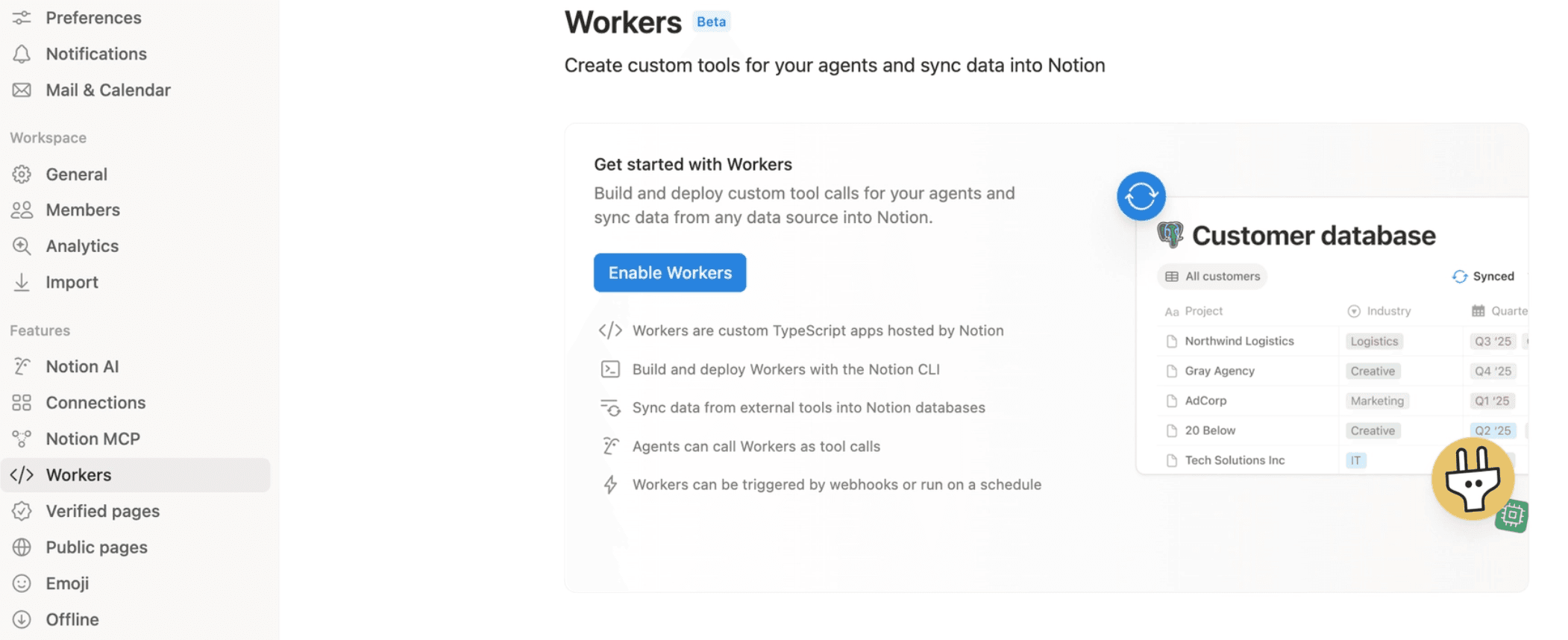
Từ đây, bạn có thể:
Bật hoặc tắt Workers cho không gian làm việc của bạn. Theo mặc định, Workers được bật cho chủ sở hữu.
Kiểm soát những ai có thể sử dụng Workers, bao gồm những người cụ thể hoặc các nhóm người dùng.
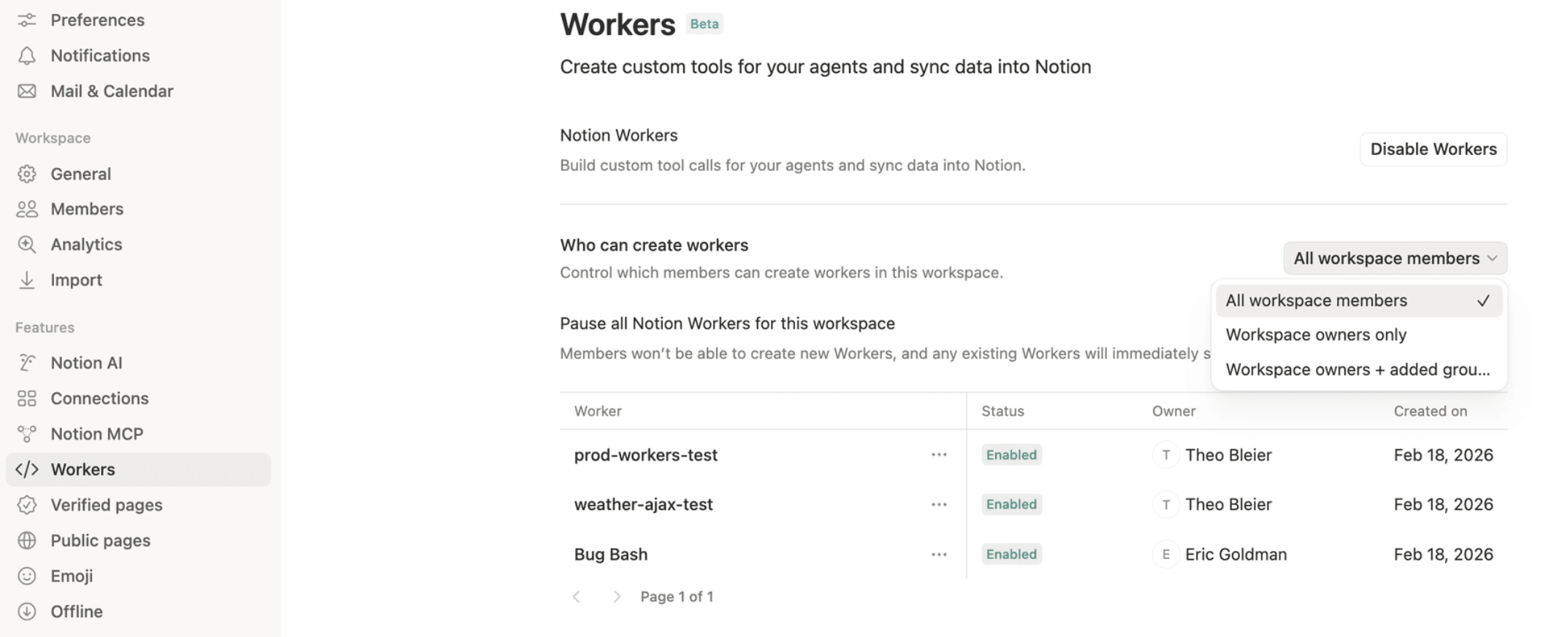
Theo dõi và quản lý từng Worker riêng lẻ.
Xem tất cả Worker trong không gian làm việc của bạn, bao gồm chủ sở hữu và trạng thái của chúng.
Tắt hoặc xóa Worker bất cứ lúc nào.
Tạm dừng tất cả Worker.
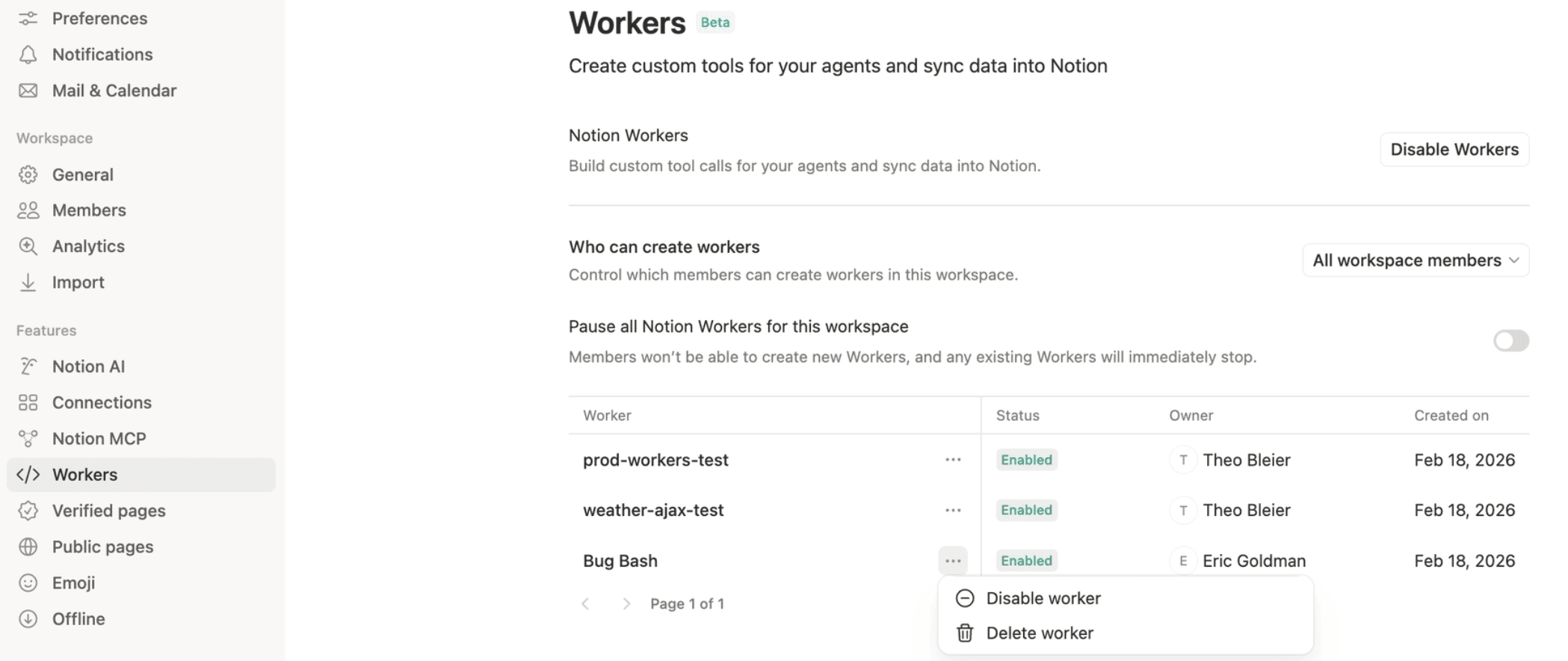
Workers được miễn phí trong giai đoạn thử nghiệm, vì vậy bạn có thể tận dụng thời gian này để chạy các quy trình làm việc thực tế và ước tính số lượng tín dụng bạn sẽ cần khi áp dụng tính phí.
Hãy thử các phương pháp hay nhất sau đây để giữ cho mức sử dụng Worker ở mức có thể dự đoán được:
Bắt đầu với lịch trình chậm. Đối với các bản đồng bộ hóa, hãy bắt đầu với các lần chạy hàng giờ hoặc hàng ngày nếu không yêu cầu cập nhật theo thời gian thực.
Chỉ tăng tần suất khi cần thiết. Chỉ chuyển sang 15 phút, 5 phút hoặc mỗi phút một lần nếu quy trình làm việc yêu cầu.
Gộp công việc khi có thể. Thay vì chạy Worker cho mỗi thay đổi nhỏ, hãy nhóm các bản cập nhật lại với nhau.
Chỉ đồng bộ hóa những gì bạn cần. Chỉ đồng bộ hóa các cơ sở dữ liệu, bản ghi hoặc trường thông tin cần thiết.
Tránh thử lại không cần thiết. Nếu một Worker bị lỗi, hãy đảm bảo rằng nó không thử lại quá thường xuyên mà chưa giải quyết được vấn đề cơ bản.
Xem lại mức sử dụng thường xuyên. Kiểm tra mức sử dụng CLI trong quá trình thiết lập và sau những thay đổi lớn về quy trình làm việc.
Câu hỏi thường gặp
Micro credit là gì?
Micro credit là gì?
Micro credit là các đơn vị tiêu thụ tín dụng Notion nhỏ hơn. Workers sử dụng micro credit vì chúng chạy mã có thể dự đoán và lặp lại. Các trợ lý tùy chỉnh thường sử dụng nhiều tín dụng hơn vì họ dựa vào AI để đưa ra các quyết định và bước tiếp theo.
Workers có sử dụng cùng loại tín dụng Notion như trợ lý tùy chỉnh không?
Workers có sử dụng cùng loại tín dụng Notion như trợ lý tùy chỉnh không?
Có. Workers là một phần của hệ thống tín dụng Notion rộng lớn hơn. Tuy nhiên, các hành động của Workers được thiết kế để tiêu thụ lượng tín dụng ít hơn so với các hành động của trợ lý tùy chỉnh.
Tại sao tần suất đồng bộ lại ảnh hưởng đến chi phí?
Tại sao tần suất đồng bộ lại ảnh hưởng đến chi phí?
Mỗi lần chạy đồng bộ theo lịch trình được tính là một lần chạy Worker. Một quá trình đồng bộ chạy mỗi phút sẽ chạy 1.440 lần mỗi ngày, trong khi một quá trình đồng bộ chạy hàng ngày chỉ chạy một lần mỗi ngày. Càng nhiều lần chạy thì càng tốn nhiều tín dụng.
Tôi có thể xem mức sử dụng tín dụng của Worker ở đâu?
Tôi có thể xem mức sử dụng tín dụng của Worker ở đâu?
Bạn có thể xem mức sử dụng tín dụng của Worker trong CLI.
Quản trị viên và người tạo cũng có thể xem mức sử dụng trực tiếp trong bảng tổng quan tín dụng Notion. Truy cập Cài đặt → Truy cập & thanh toán → Tín dụng Notion và chọn tab Workers.