A guide to project management: For teams who build together
Building a product is rarely the hardest part of a project—working with others is.
Oftentimes, engineering is juggling technical complexity and dependencies, product is balancing priorities, feedback, and timelines, and design is shaping experiences while adapting to constant change. Everyone is moving fast, but not always in the same direction.
Project management aims to bring that work together—but in reality, it often adds more tools and status updates and requires more time to explain work instead of doing it. As a result, the larger your team grows, the harder it is to see progress.
But project management doesn’t have to feel like overhead. When you instead build it around shared context so plans, tasks, decisions, and updates live together, it can become something that you and your teams can actually rely on, not something you just tolerate.
What is project management?
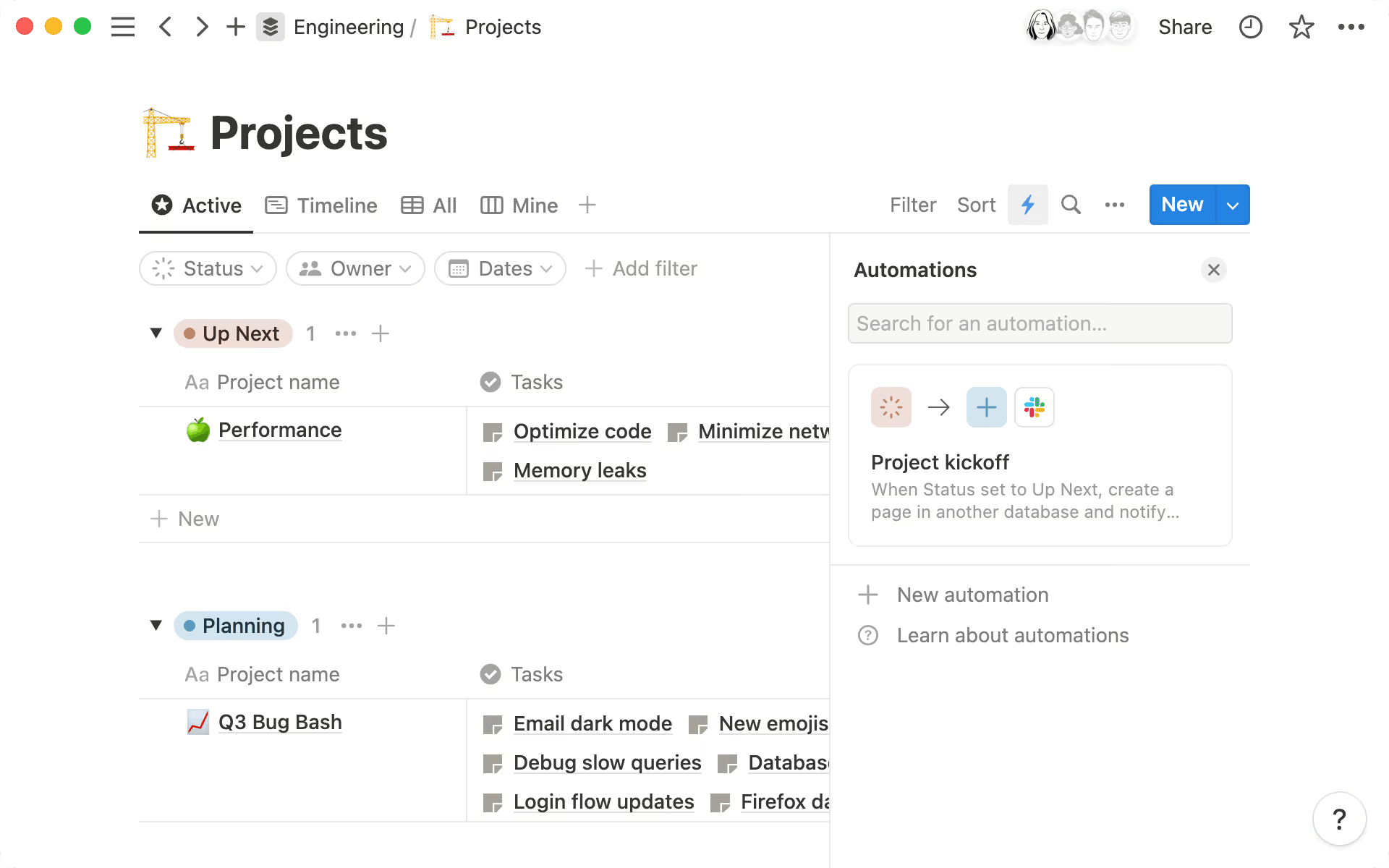
Notion’s workflows streamline project management using database automations. (Source)
Project management is the practice of turning ideas into outcomes so you can do these things:
Decide what to build.
Plan the work.
Coordinate project execution.
Learn from the results.
For engineering, product, and design (EPD) teams, project management isn’t just about deadlines or Gantt charts, though. Instead, it involves making sure that everyone understands why the work matters, clarifying ownership, and keeping context tied to execution. It also means adapting as project requirements, timelines, and priorities change.
Traditionally, teams tend to treat project management as a separate layer—a system that you update rather than a place where the work lives. That separation creates friction in these ways:
Engineers context-switch between tickets, specs, and code reviews.
Product managers chase updates across tools to understand progress.
Designers lose visibility once work leaves Figma.
No one knows who owns what.
But an AI-connected workspace changes that dynamic. Instead of scattering information across tools, you can use project management to create a network of connected knowledge. That way, goals link to tasks, tasks to docs, and docs to decisions. AI can then surface what matters by summarizing updates, flagging risks, and answering questions in context.
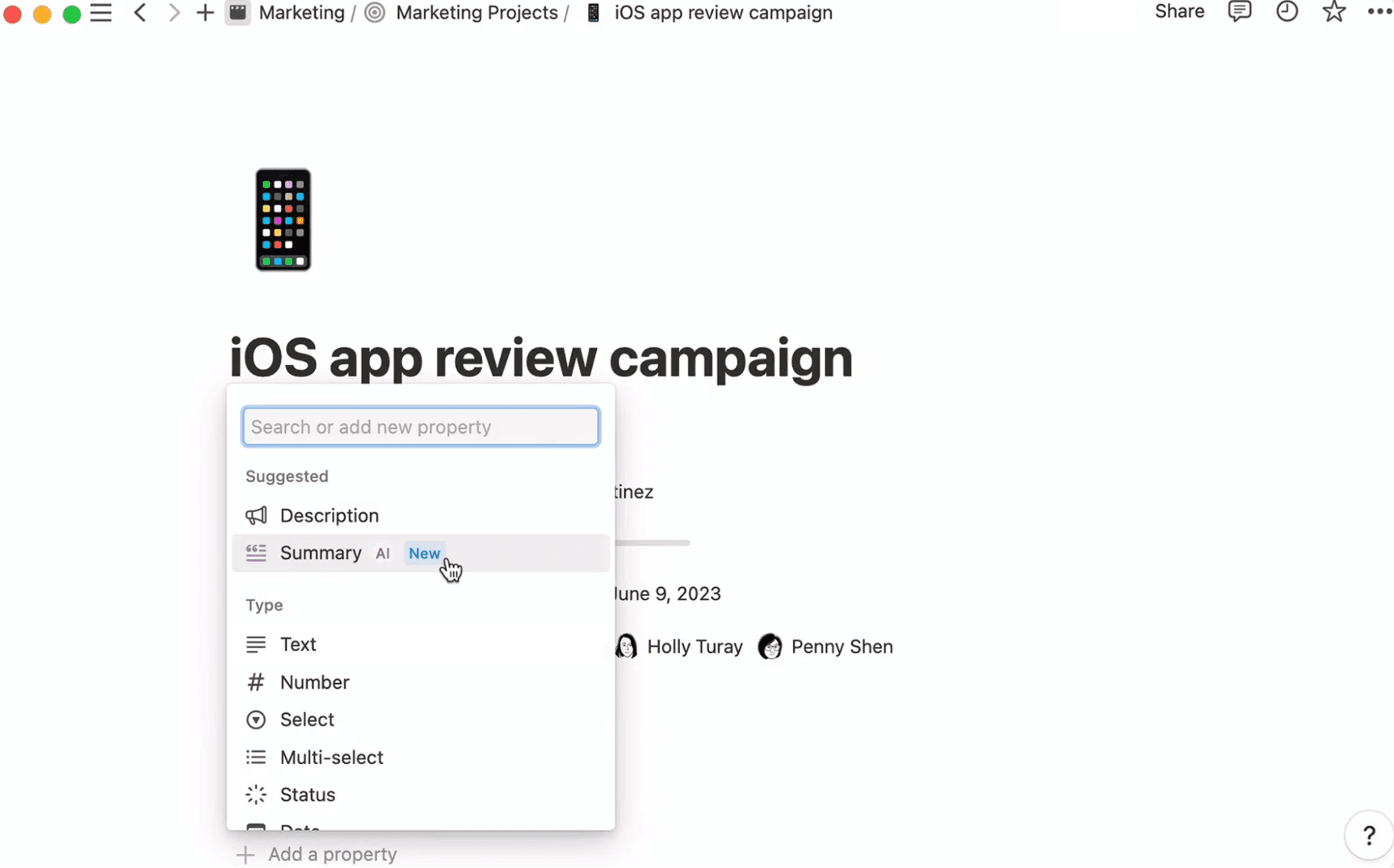
An AI-generated database summary in Notion (Source)
Traditional vs. agile project management
There are two different types of project management: traditional and agile.
Traditional project management often follows a linear path—define the project scope, plan everything up front, execute, then deliver. This works well in predictable environments, but product development is rarely predictable.
Agile project management, on the other hand, embraces iteration and proactive collaboration, according to the Project Management Institute. It involves breaking work into smaller pieces, which allows teams to learn as they go and plan based on feedback. Most modern product teams already operate in this way, even if their tools don’t reflect it. Scrum, a common team collaboration framework in software development, is one type of agile project management.
But frameworks alone aren’t the real differentiator. Rather than merely choosing a traditional or agile methodology, you should focus on supporting how your team works with shared context, adaptability, and visibility in a connected workspace.
What does an effective project management workflow look like?
According to a report from Wellingtone, many organizations struggle to deliver consistent project management success. In fact, only 36 percent of project management professionals believe that their projects mostly or always deliver on their full value, and the numbers remain low for completing projects on time and within budget, too.
But what does good project management look like, then?
The best project management approaches should feel nearly invisible, not heavy. Instead of rigid processes or one-size-fits-all methodologies, effective workflows support these connected project activities:
Aligning on goals and criteria for project success
Translating those goals into executable work and project deliverables
Tracking progress and adapting to change
Sharing updates and capturing learning along the way
In Notion, this means treating project management as a system of interconnected building blocks, not a single template that you have to force to fit your process. That way, the workflow flexes as the project evolves—without losing context or alignment.
For example, you might start a project with a brief that captures the problem, goals, and constraints. That brief then links to a task database where the team assigns and tracks work, updates roll automatically into dashboards, and AI summarizes progress and highlights what’s changed.
What are the 4 key components of project management?
Project management methodologies contain four core components. Here’s what each one means through the lens of real product team bottlenecks—and how you can use Notion to address them:
1. Clear goals and success criteria
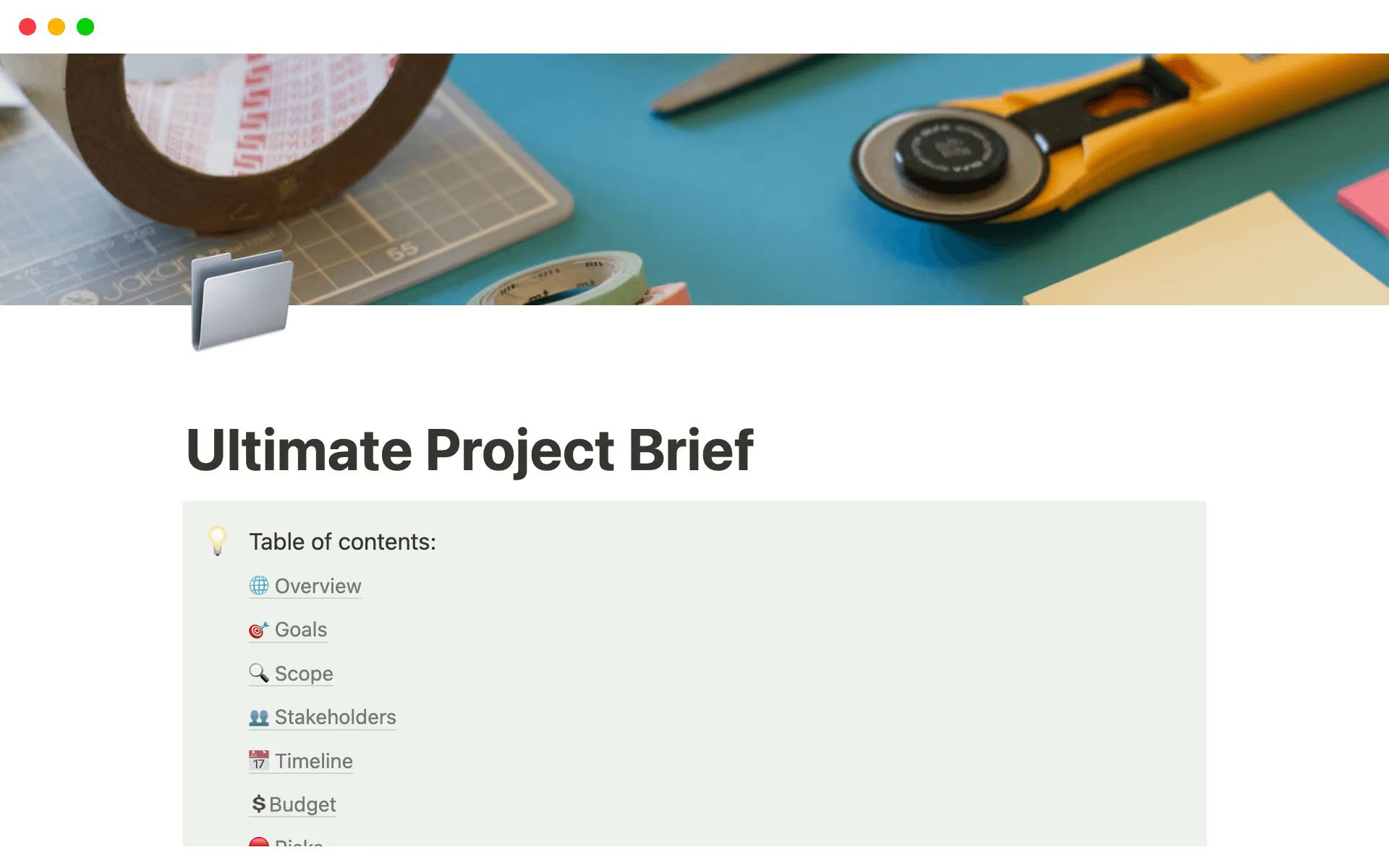
A project brief template, available in Notion (Source)
The problem: Project teams often jump into execution without a shared understanding of what success looks like. For example, engineers optimize for technical excellence, designers focus on usability, and product managers track metrics. These goals all matter, but they can sometimes conflict.
What good looks like: Every project should start with clear project documentation that defines goals and success criteria. In Notion, this might look like a project brief that includes these components:
The problem you’re solving
The target user
Success metrics (both qualitative and quantitative)
Non-goals (to help you avoid scope creep)
With Notion AI, you can quickly draft or refine these briefs, summarize stakeholder input, or generate a clear goals section from messy notes.
2. A shared plan the whole team understands
The problem: When plans live in slide decks or Excel spreadsheets, they quickly become outdated, which causes team members to struggle to understand how everything fits together.
What good looks like: Teams should use a shared living plan that shows the sequencing of different tasks, what depends on what, and how it all connects to the project goals.
In Notion, this plan might be a database that tracks initiatives or milestones, each linked to tasks, specs, and designs. Different views—like timelines, boards, and lists—also help each role see the plan in a way that makes sense to them.
3. Tasks with owners, timelines, and context
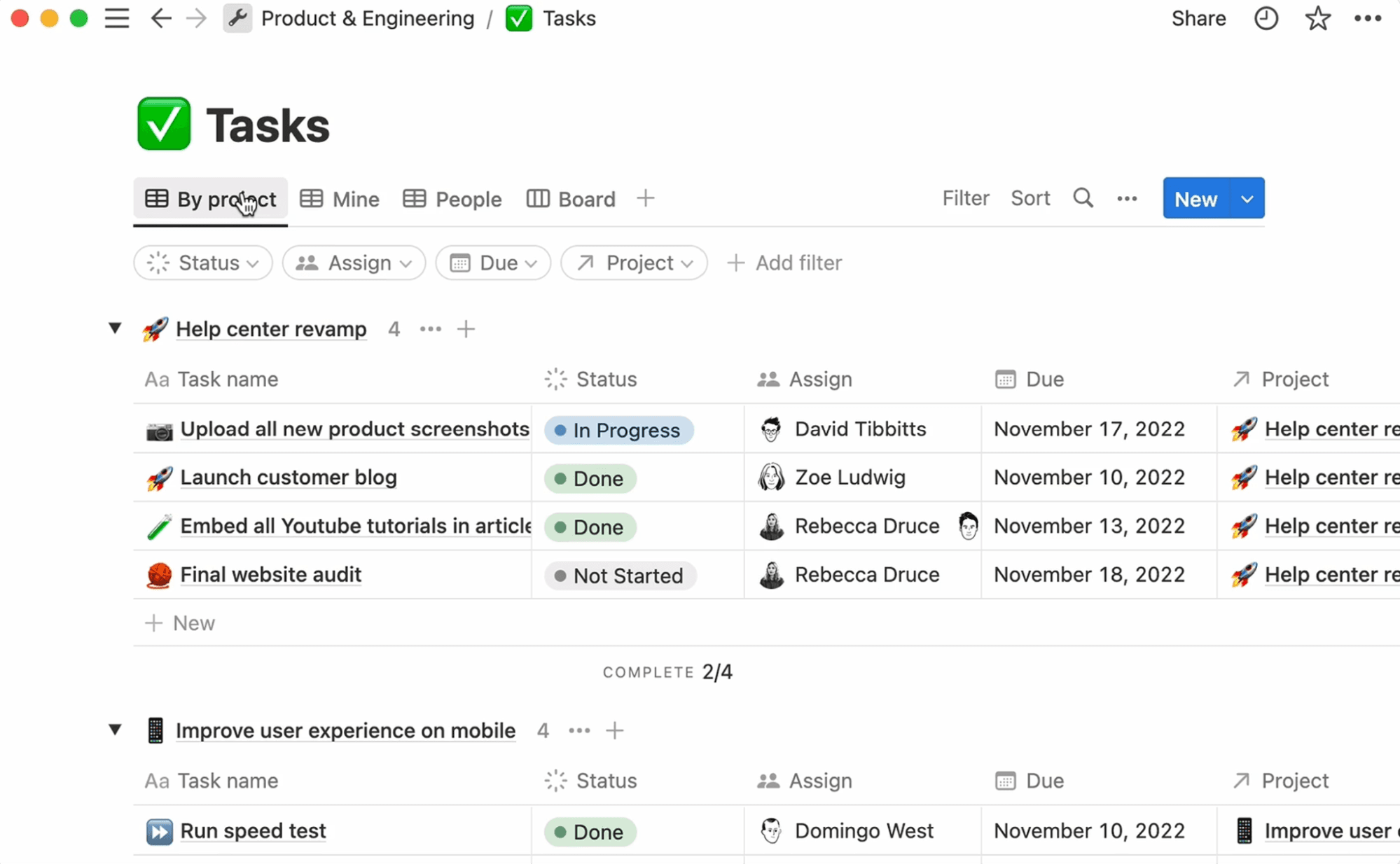
Tasks are linked to owners and due dates in Notion (Source)
The problem: Project tasks often exist without enough context. For instance, engineers get tickets but don’t understand the “why,” and designers aren’t sure how their work fits into the larger effort.
What good looks like: Every task should have a clear owner, a realistic timeline, and links to relevant context, like docs, designs, and decisions. And instead of a bare checklist item, each task should connect to these items:
A description of the problem
Links to specs or Figma files
Related discussions or decisions
Notion helps here by organizing tasks alongside rich content and letting you use AI to generate task descriptions, break down large initiatives, and answer questions like, “What’s blocking this task?”
4. Visibility into progress, risks, and changes
The problem: When status updates are manual, inconsistent, and outdated by the time teams share them, leaders will lack confidence in what’s actually happening.
What good looks like: Leaders should get real-time visibility into progress with minimal manual reporting.
In Notion, dashboards roll up task statuses, surface risks, and highlight recent changes. Notion AI can also summarize weekly progress, generate stakeholder-ready updates, or flag changes that might impact project schedules to keep leadership up-to–date on what’s happening.
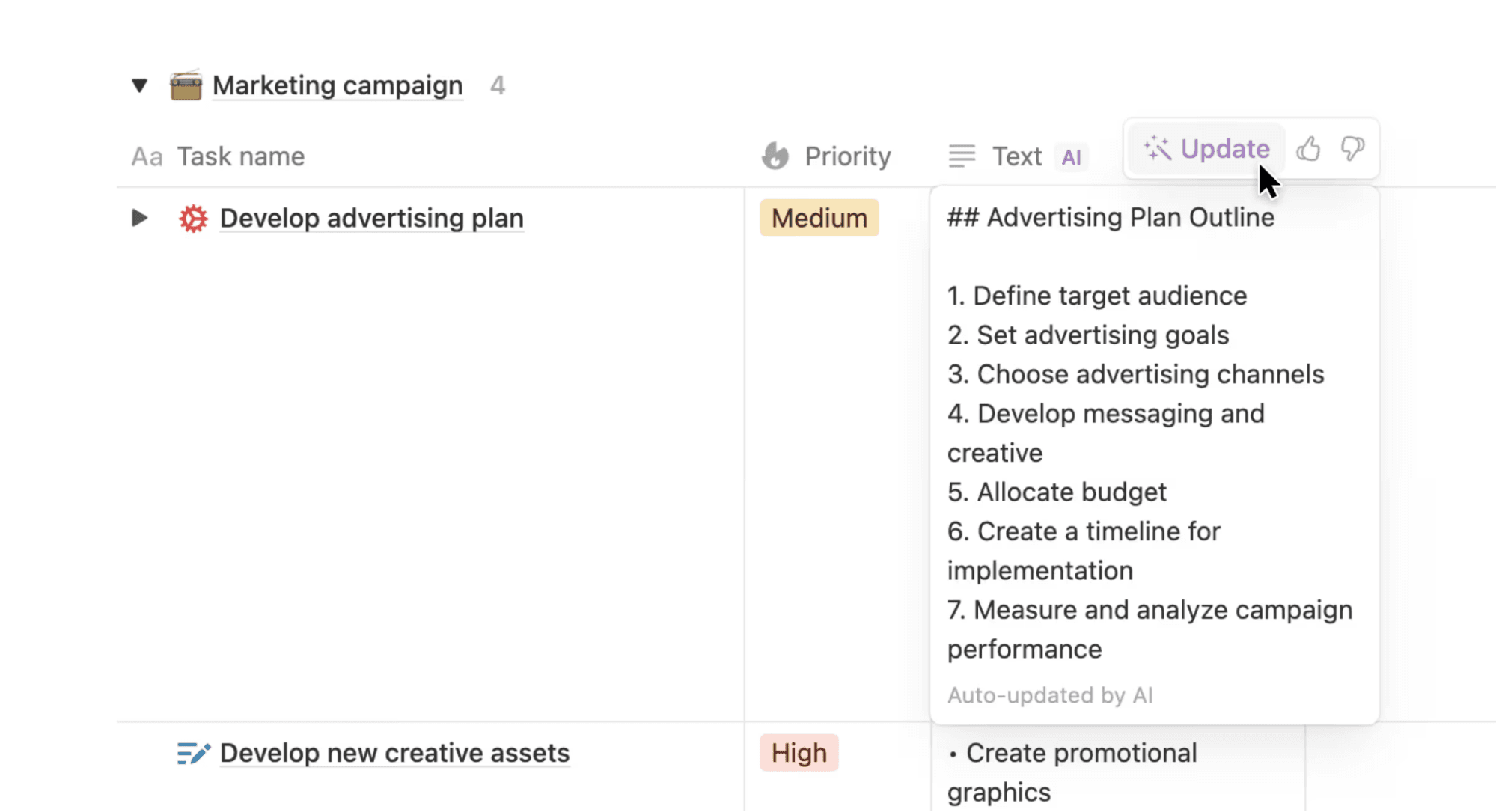
Notion AI can auto-generate progress summaries for projects and tasks (Source)
How to build a project management workflow in 5 steps
Successful project management processes are often simple, flexible, and able to evolve. But if yours isn’t, that doesn’t mean you need to redesign your entire process overnight. Here’s a five-step playbook to help get you started:
1. Organize your project brief and goals
To start, you’ll want to create a single source of truth. The first step in doing so is making a project brief for kickoff that answers these questions:
“What problem are we solving?”
“Why does it matter now?”
“What does success look like?”
While in Notion, this is just a page, it’s a powerful one—you can embed research, link related projects, and document decisions in it as they happen. To create one, you can use a project brief template, or you can go a step further by setting up a project management command center.
Notion AI can speed up this process, too—here’s what it can do:
Drafting a project brief from bullet points or the project charter
Summarizing customer research into key insights
Rewriting goals to be clearer and more measurable
2. Break work into tasks and assign ownership
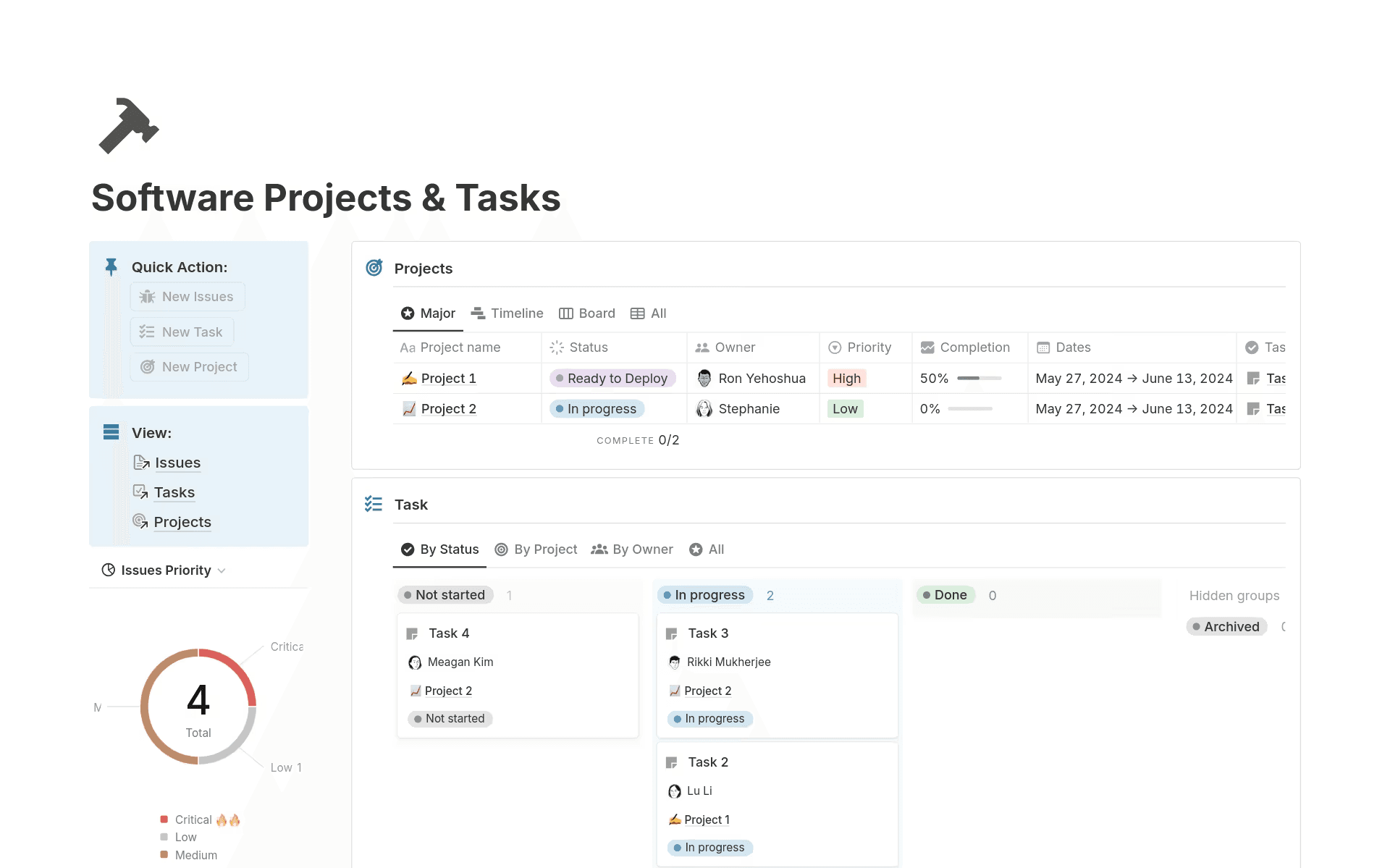
A software projects and tasks template, available in Notion (Source)
Next, you’ll want to translate the plan into actionable tasks. This means creating a task database where each assignment includes these components:
A clear owner
A status
A due date or sprint
Links that redirect to the project brief
Including this information will reduce confusion and misunderstandings in the long run.
Here’s how you can use Notion AI to enhance this process:
Breaking a large initiative into smaller tasks
Suggesting task owners based on previous work
Generating acceptance criteria from specs

Helpful Resource
Check out our guide to getting started with projects and tasks, and our software development projects and tasks template for more information.
3. Choose views that match how your team works
Different roles require different perspectives on the same work to best accomplish different tasks. These different views keep everyone aligned without duplicating information. In Notion, you can view your task database in these ways:
A board for sprint planning
A timeline for roadmap discussions
A list for daily execution
You can also incorporate Notion AI to accomplish these tasks:
Asking questions like, “What’s at risk this week?”
Generating summaries with specific information for engineers, project managers, or designers
4. Track progress with updates and async check-ins
Instead of relying on meetings for status updates, you’ll want to make project progress visible by default. Additionally, having team members post async updates directly on projects or tasks ensures that they become part of the project’s history.
Notion AI can help here, too, by performing these tasks:
Summarizing async updates in a weekly digest
Turning raw updates into polished stakeholder reports
Highlighting blockers or overdue tasks automatically
5. Close the loop with retros and learnings
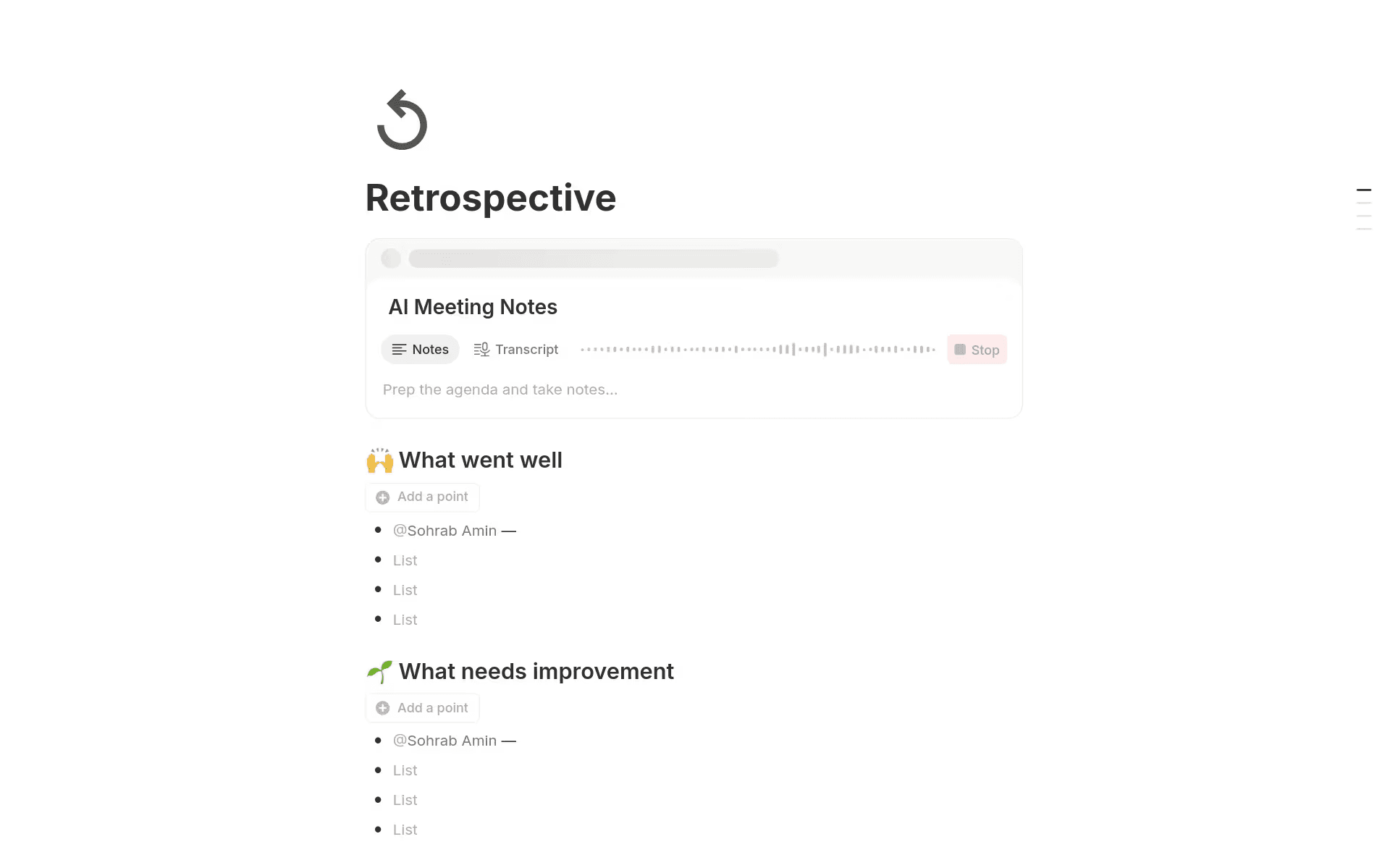
A retrospective template, available in Notion (Source)
Projects don’t end when something ships—the real value comes from learning what worked and what didn’t. Over time, these learnings will compound into better processes.
To aggregate this information in one place, you can create a simple retro page linked to the project that provides these insights:
What went well
What you could improve
What you’ll do differently next time
To learn even more, you can have Notion AI do the following:
Summarize retro notes into key takeaways.
Identify recurring themes across multiple projects.

Template
Here are 9 free retrospective templates you can start using in Notion right now.
Common project management challenges—and how to solve them
Even the most experienced project management professionals run into well-known challenges. Here’s how a connected workspace can help you address them:
Scattered information slows down decision-making
The challenge: Project knowledge is fragmented across tools—PRDs in docs, tasks in a ticketing system, design rationale in Figma comments, and key decisions in Slack. Then, when engineers or designers need context, they spend more time searching than they do building.
The solution: In Notion, tasks live directly inside project pages with links to specs, designs, and decisions. Notion AI makes that context even more accessible by answering questions like, “Why did we choose this approach?” or “What decisions did we make last sprint?” without requiring teams to dig through multiple tools.
Plans become outdated quickly
The challenge: Roadmaps and project plans that teams created at the start of a project often drift out of sync with reality. That’s because dependencies change, priorities shift, and timeframes move—but the plan doesn’t. As a result, teams lose trust in the roadmap and stop using it.
The solution: Notion plans update automatically when tasks change. This means timelines and dashboards reflect live progress and AI-powered summaries highlight what’s actually happening.
Teams don’t have shared visibility into work
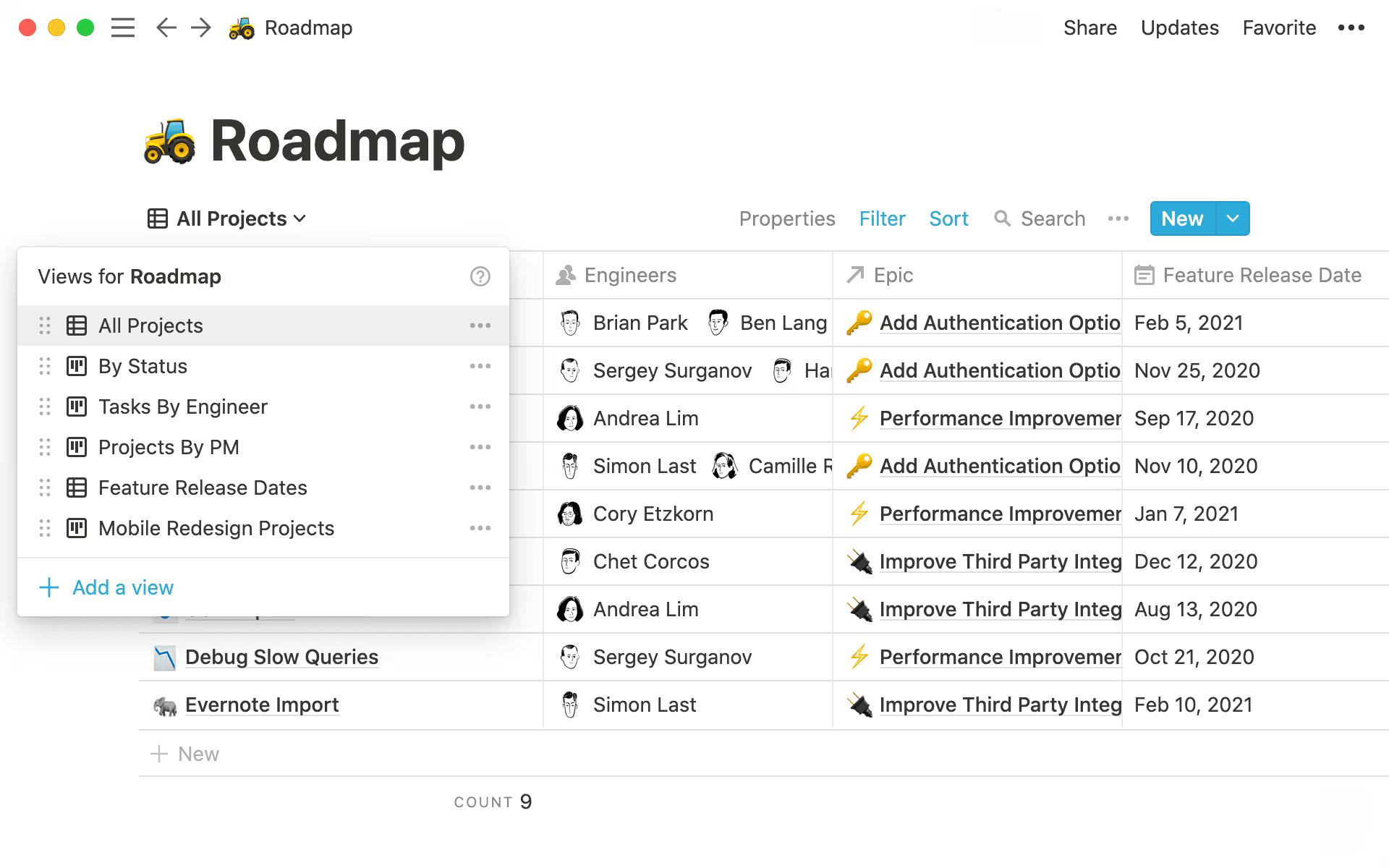
The different views available in a Notion product roadmap (Source)
The challenge: EPD teams typically track work differently—engineers think in tickets and pull requests, designers in files and feedback, and product managers in milestones and outcomes. Without a shared view, these teams will operate in parallel rather than together.
The solution: In Notion, you can view the same underlying data as a sprint board, timeline, or high-level progress dashboard. That way, each role gets the perspective they need without duplicating information or creating silos. Notion AI can also tailor summaries so everyone gets the right level of detail for their role.
Check out our guide on when to use each type of database view.
Rituals feel heavy and time-consuming
The challenge: Status meetings, standups, and check-ins often turn into long recaps of information that could have been an email instead. And as teams grow or work asynchronously, these rituals start to feel more like a tax than a benefit.
The solution: Notion lets you shift updates into async check-ins to encourage sharing progress that’s easy to reference later. Then, Notion AI can summarize weekly updates, extract decisions from meeting notes, and highlight blockers so meetings focus on discussion rather than reporting.
Project management examples that teams can adapt
Here are a few simple workflows that you can build in Notion:
Feature launch workflow: Project brief → tasks by function → launch checklist → retro
Sprint planning workflow: Backlog database → sprint board → async updates → AI-generated sprint summary
Design-to-dev handoff: Design spec → linked engineering tasks → shared feedback and decisions
Each workflow uses the same underlying building blocks—pages, databases, and AI—that you can configure to match how your team works.
Start building your project management workflow in Notion
A well-managed project doesn’t happen just by layering on more processes. The goal should instead be to create shared understanding throughout the project lifecycle so you can focus on building great products.
For EPD teams, that means establishing these components:
Plans that evolve with the work
Clear project objectives that everyone understands
Tasks that connect to real context
Visibility without constant meetings
That’s where Notion can help—it brings all of these pieces together into a connected workspace and provides AI and project management tools that help you move faster and stay aligned.
Are you ready to build a calmer, more effective project management process? Try Notion AI for free today to start connecting your work in a way that actually reflects how your team builds.


