How Notion AI helps teams execute a software development strategy
A software development strategy is only effective when it connects to day-to-day work. But too often, teams align on priorities and roadmaps, only for that clarity to fade once execution begins. As a result, strategy lives in decks and documents, while development happens in tickets, sprints, and code. And as timelines shift and requirements change, engineers lose sight of why the work matters and teams default to what’s urgent over what’s important.
However, teams that execute well treat strategy as part of the development process, not a planning artifact. By keeping it visible, adaptable, and in sync with real work, they stay aligned as priorities evolve.
What is a software development strategy?
A software development strategy defines how an organization turns business goals into shipped, high-quality software. It sets priorities, clarifies trade-offs, and guides planning, building, testing, and delivery work across the development lifecycle.
The problem, though, is that strategy only works when it connects seamlessly to execution. When it’s stuck in static documents or disconnected planning tools, it instead directly contributes to wasted time, shifting priorities, and employee overload. In fact, Harness’ 2024 State of Developer Experience report found that 97 percent of developers context-switch throughout their day, 62 percent experience scope creep, and 23 percent work at least 10 days of overtime a month.
Those numbers point to a recurring issue: when strategy isn’t visible or actionable where work actually happens, priorities change, timelines shift, and teams lose confidence in how to execute.
The solution is a software development strategy that integrates into daily workflows. By connecting strategy, projects, and documentation in one workspace, teams gain real-time visibility that enables them to act faster. And with the help of AI, they can summarize decisions, surface misalignment, and keep the strategy current as work evolves.
Why software development strategies often fail
Software development strategies often break down during implementation, and as a result, they never become part of day-to-day delivery. But what looks like a strategy problem is usually a tooling and workflow problem in disguise.
Here’s what that looks like in practice:
Strategy lives in slides while execution lives elsewhere
Before work begins, you may take time to align on goals, initiatives, and a roadmap. But once tasks move into tickets, sprints, and code, that alignment can go missing. When that disconnect happens, strategy becomes background noise because engineers instead focus on deliverables and forget to consider intent.
To avoid this issue, you should embed strategy directly into your project management workflows so everyone can see priorities while completing tasks.
Priorities change faster than documentation
In modern software development, priorities shift constantly, especially when you’re using agile methodology. And according to DORA’s 2024 Accelerate State of DevOps report, when priorities aren’t stable, productivity suffers.
In practice, that’s often because development teams have to sift through outdated docs and messages just to understand what changed and which work matters now. When decisions move faster than documentation, though, context disappears.
Resolving this problem involves linking priorities and documentation to the work itself. If your strategic decisions, project updates, and execution live in the same system, changes will stay visible. AI can then summarize any shifts and identify misalignment across projects to help you adjust plans in real time without chasing updates.
Teams lack a single source of truth
According to Temporal’s 2025 State of Development report, 21 percent of developers, architects, and engineering leaders cite lack of visibility as a core workflow issue. This often results in rework as developers implement features based on outdated context, only to revisit them once priorities or requirements change.
To reduce rework, you’ll want to use a shared system to keep context in one place. This will give everyone visibility to the information they need.
Feedback loops are slow or fragmented
Temporal’s report also found that only 25 percent of teams say their workflows run smoothly. The other 75 percent spend their time reacting to issues instead of executing plans.
Typically, missing feedback isn’t the issue—it’s that teams scatter feedback across tools. When reviews happen in one tool, decisions live in another, and metrics sit somewhere else, each handoff forces you to pause, translate context, and wait. That fragmentation then slows learning and increases rework.
Defragmenting feedback loops means pulling those signals back together. To do this, you should keep reviews, decisions, and delivery status close to the work itself so feedback arrives while it’s still useful.
Engineers don’t see how their work ladders up
When engineers can’t connect user stories, initiatives, and code to business goals, motivation and decision-making suffer. But by instead making strategy visible at the task level, you can prioritize the work that moves engineering closer to business objectives. That way, your teams can work smarter and faster.
Core software development strategy frameworks to rely on
Most effective software development strategies follow a few proven frameworks because they ground strategy in real execution across workflows, sprints, and the full application development lifecycle.
Here’s a breakdown of some of the most reliable frameworks:
Outcome-driven development
Outcome-driven development shifts your focus from output to impact. Rather than measuring success by the number of deliverables shipped, you can prioritize business goals, customer satisfaction, and the end-user experience. This makes it easier to pick the right initiatives and evaluate feasibility so you can avoid building functionality that doesn’t move meaningful metrics.
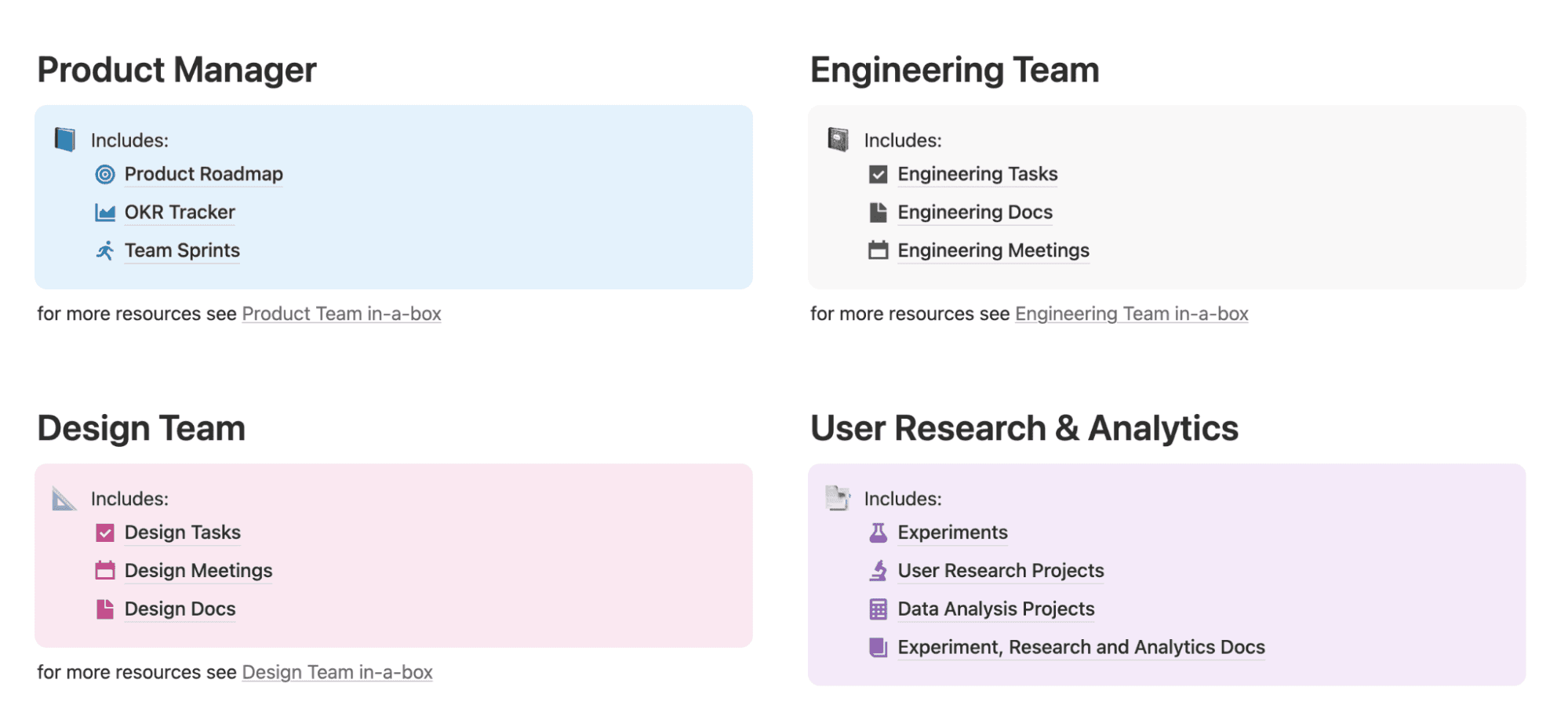
A Notion template, showing product, engineering, design, and research workspaces connected to roadmaps, tasks, and OKRs (Source)
For outcome-driven development to work, your strategy needs to stay visible once work begins. A template like Notion’s software product development in-a-box helps you keep outcomes connected to execution by bringing roadmaps, OKRs, delivery work, and user research into one system.
Iterative delivery and continuous learning
In modern agile development, strategy evolves alongside delivery. That means you plan, ship, learn, and adjust, often within the same sprint. But that only works when feedback appears during execution, not after the fact in retrospective notes or scattered docs.
A template like Notion’s IT software development project dashboard helps here by making incremental changes visible. With it, you can see all of the following in one place:
What’s in progress
What’s waiting for review
What needs revision
What’s blocked
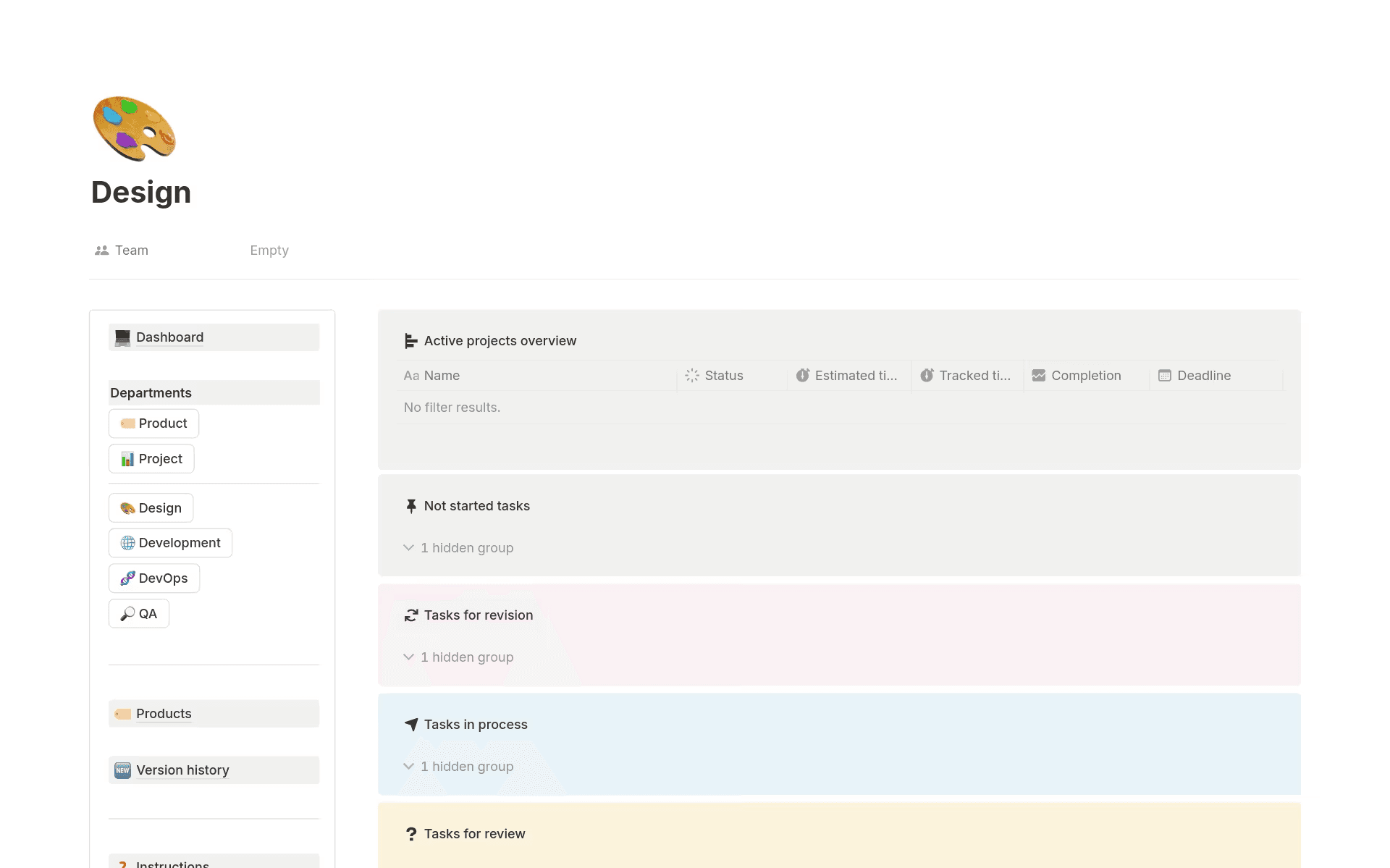
Notion’s software project dashboard, showing tasks by status to support iterative delivery and continuous feedback (Source)
Keeping planning, delivery, quality assurance, and feedback connected to the work reduces handoffs, shortens feedback loops, and supports continuous learning. That, in turn, makes it easier to adapt based on real user input without slowing time to market.
Capacity-based planning
Capacity-based planning grounds your development strategy in reality. That way, instead of overcommitting, you can plan around real constraints—such as available engineers, dependencies, and risk management—and make trade-offs explicit.
For this to work, though, capacity needs to be visible across the development lifecycle. To help with this, you can use Notion’s Software Development Lifecycle template to show you where work sits across planning, build, testing, and release. That visibility makes it easier to spot overload early and align project management decisions with what your team can actually deliver.
Platform and product alignment
Strong strategies balance product features with platform work, technical debt, and scalability. But when that balance disappears, strategy defaults to backlog churn and short-term delivery.
Templates like Notion’s Engineering Strategy template let you keep product and platform priorities in one place. By tying initiatives to goals and success metrics, you can make trade-offs visible and ensure that feature work doesn’t crowd out long-term health.
How to operationalize your software development strategy in Notion
To operationalize your software development strategy, you’ll need to turn it into a system that you can update as work changes. Here’s how you can do that:
Write your strategic goals in Notion’s connected engineering workspace.
Translate those goals into a roadmap that you can review regularly, not a document that you publish once and then forget.
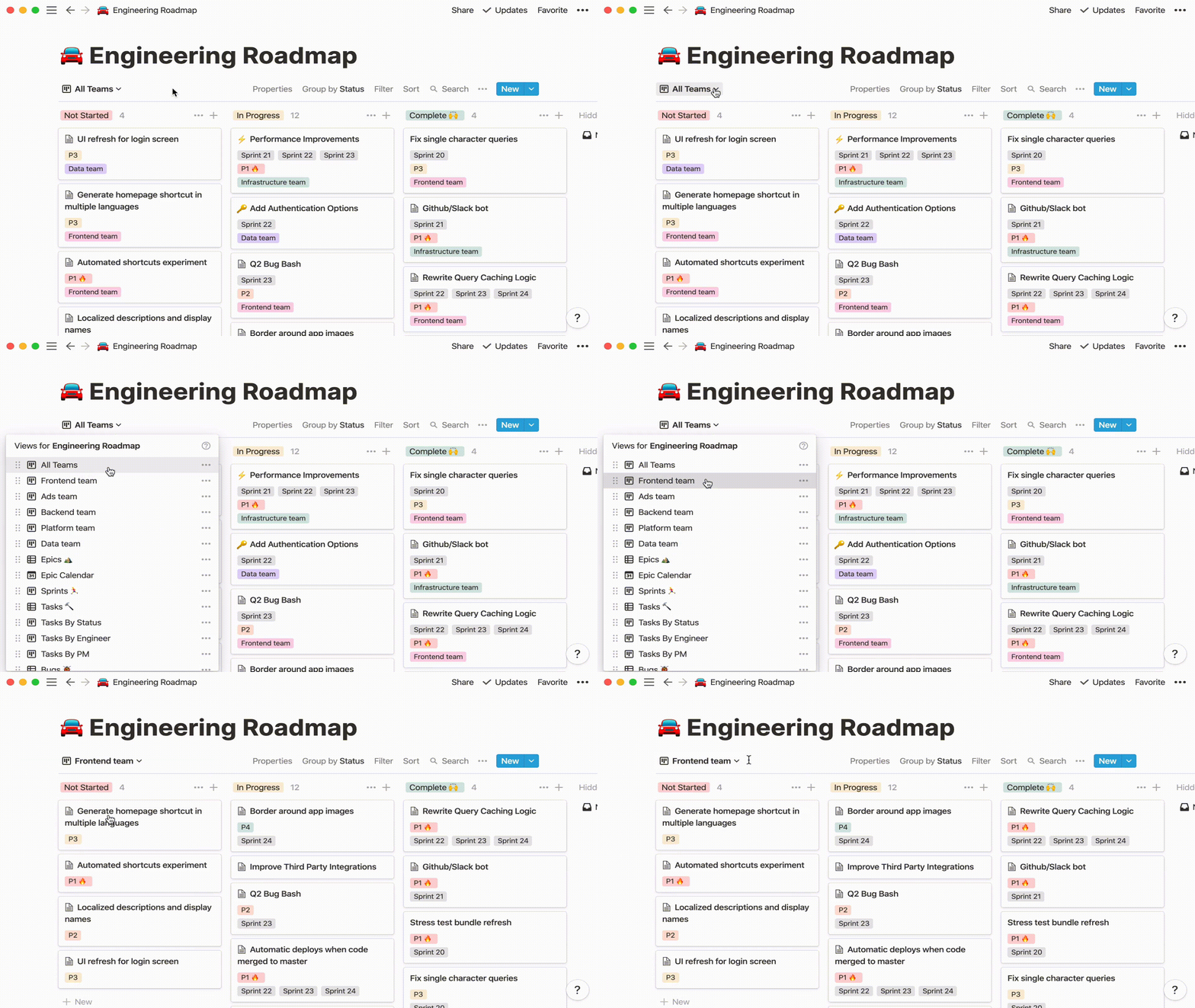
Branch’s Notion roadmap, showing tasks by status across various teams (Source)
Break the roadmap’s themes into concrete initiatives, then into epics and milestones. This is where strategy becomes actionable and allows you to agree on scope, ownership, and timelines.
Create a lightweight milestone rhythm so progress stays visible without extra process. Linktree can help with this by running a “scorecard” ritual in Notion. This streamlined OKR approach shows key milestones, project timelines, and accountability while staying flexible so you can have a consistent pulse check without freezing plans in place.
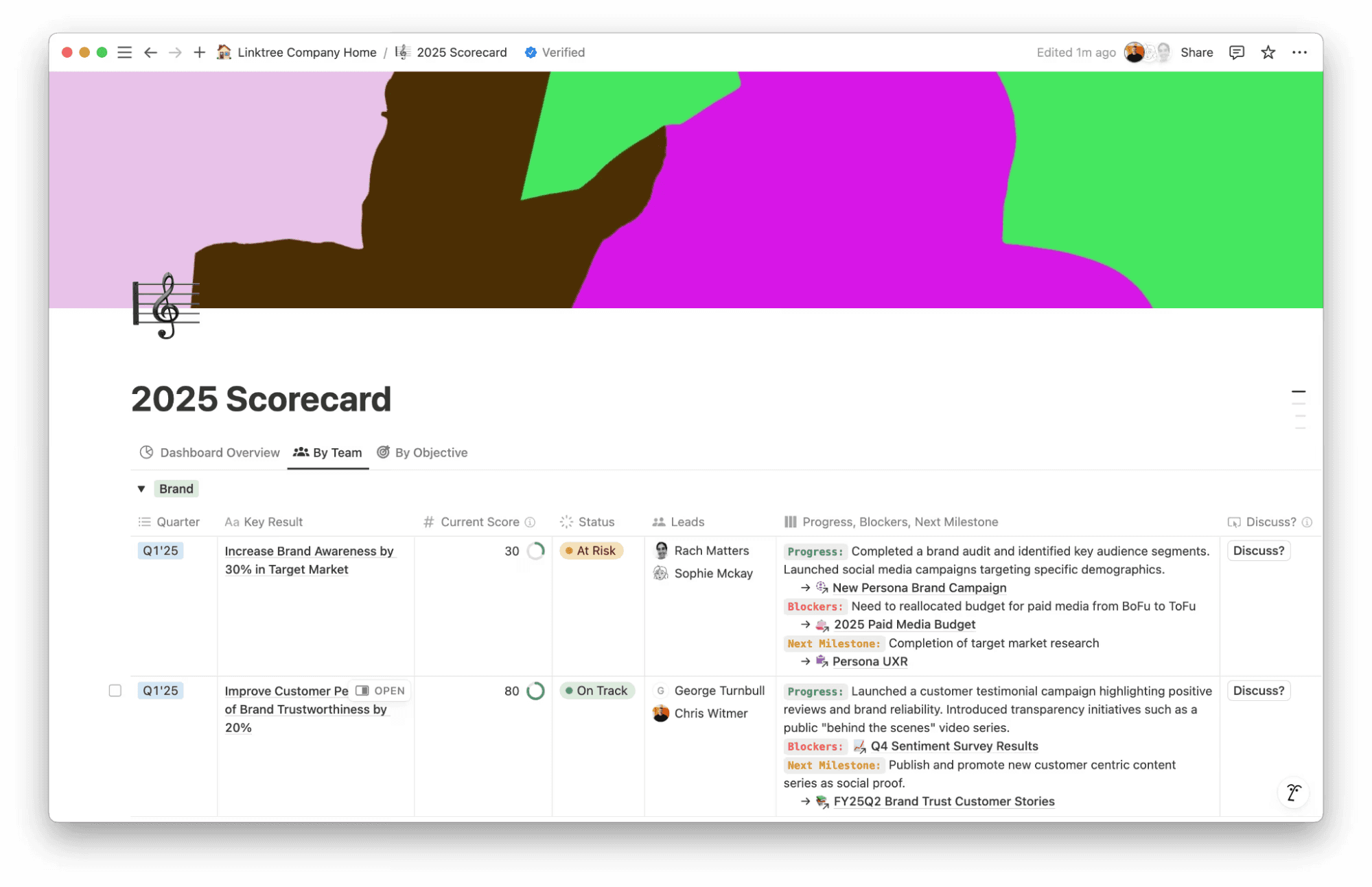
Linktree’s Notion scorecard, which shows OKRs, owners, progress, blockers, and next milestones in one view (Source)
By connecting goals, roadmaps, and milestones to the tasks your team is carrying out, you can spend less time chasing updates and more time executing what matters.
A software development strategy in action: 3 common scenarios
Seeing strategy on paper is one thing—but making it work under real conditions is another.
The following scenarios show how strategy holds up once execution begins and how connected docs and projects can help you adapt without losing momentum:
Aligning engineering work to product strategy
When strategy breaks down, it’s usually because roadmap themes drift away from day-to-day work. As a result, you can’t see which software projects support which goals, and trade-offs often happen quietly.
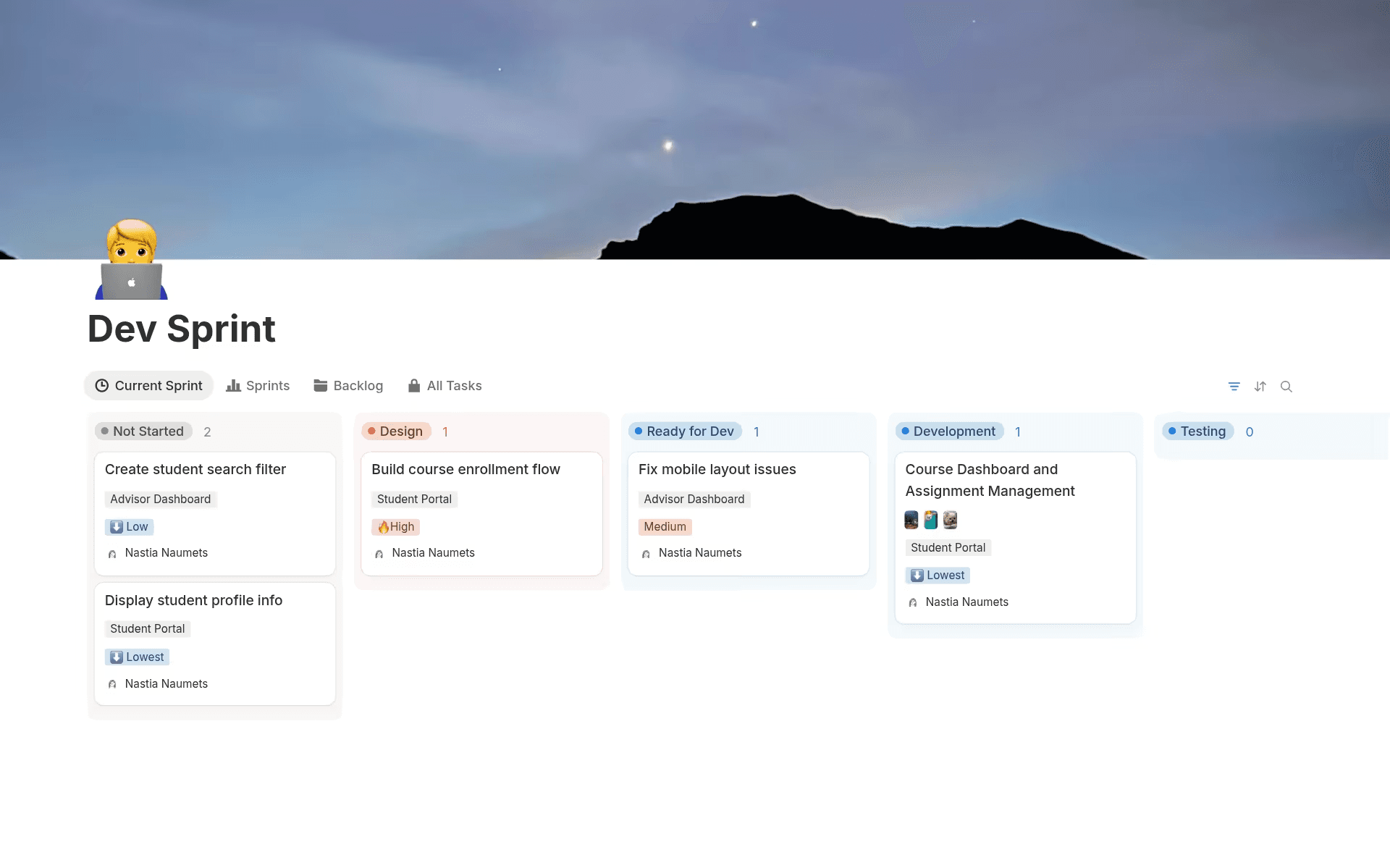
Notion’s dev sprint roadmap, showing tasks and their current status (Source)
By connecting roadmap themes directly to initiatives, epics, and tasks, you can make those trade-offs more visible and allow engineers to see why the work matters, not just what to ship. Notion AI supports this goal by helping you surface misalignment and stay in sync by summarizing changes across docs and projects as priorities shift.
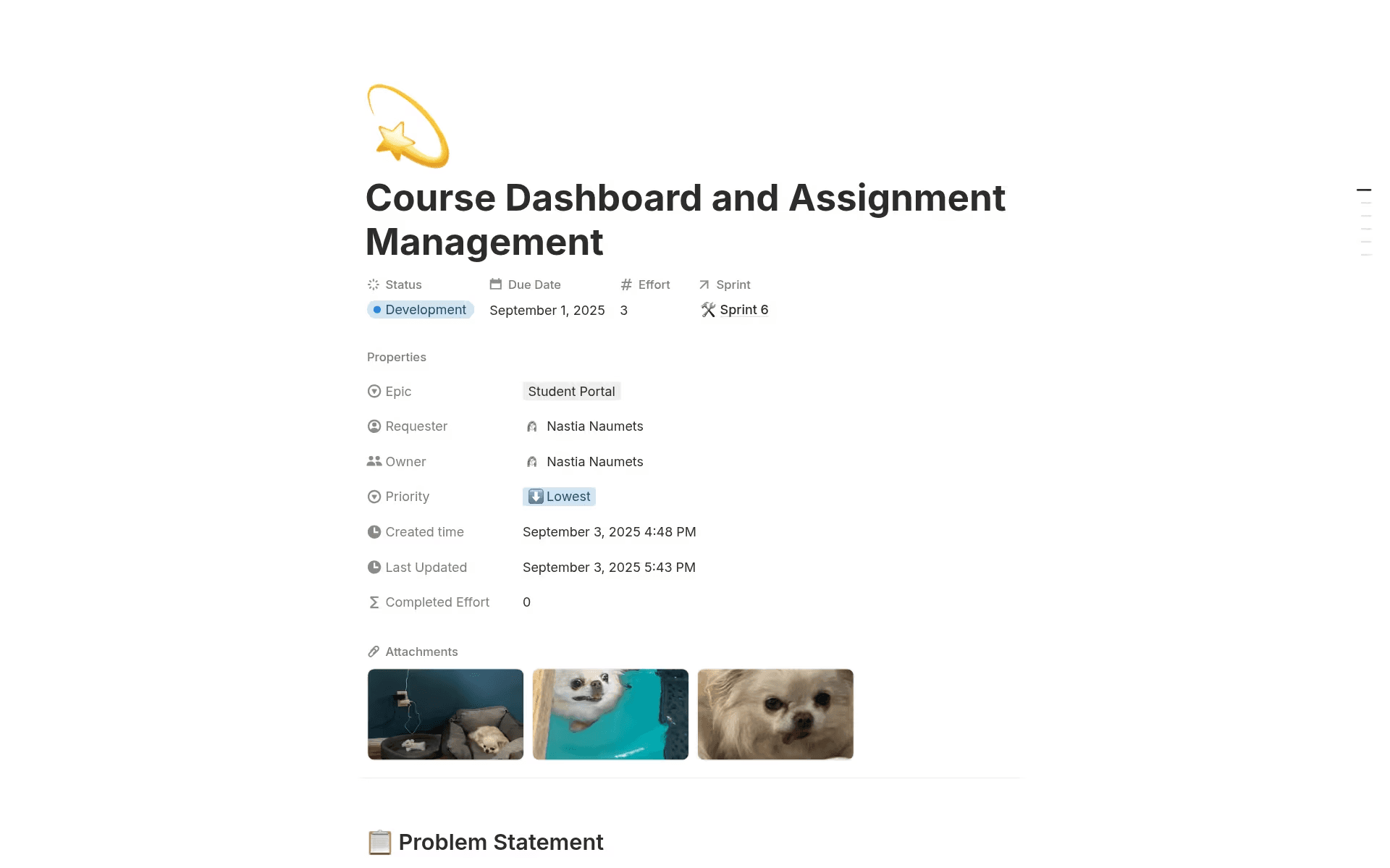
Notion’s dev sprint template, which shows inside a task with connected information and assets (Source)
Managing technical debt without stalling delivery
Technical debt rarely feels urgent until it slows delivery, especially when you manage it outside normal product work. If you instead track tech debt as a strategic investment—alongside features, timelines, and owners—it’ll be easier to balance short-term delivery with long-term scalability.
Connected views make that possible by showing how debt reduction affects capacity and priorities. And as plans shift, AI summaries can also surface the changes across related docs and projects so engineers stay aligned without digging through weeks of past discussion.
Adapting strategy as teams scale
As your organization grows, informal alignment often stops working. Having more teams, handoffs, and dependencies in the loop also makes it harder to understand what’s changing and why.
Instead of adding more layers of process, though, you need a shared system of goals, projects, and documentation so everyone has access to the same source of truth. When strategy, work, and decisions link together in this way, updates happen once and remain visible across teams. This keeps engineers in sync without extra meetings or coordination overhead.
What tools and systems support an effective software development strategy?
An effective software development strategy depends less on individual tools and more on how well your systems work together. That’s why problems often arise when planning, execution, and feedback live in disconnected places. This allows context fragments, visibility drops, and rework to creep in because updates don’t propagate across tools. As a result, teams start making decisions based on outdated information and alignment shifts from shared systems to constant meetings.
To avoid this disconnect and support your strategy, your tooling needs the following features:
Shared context so goals, decisions, and execution connect
A flexible structure that adapts to different workflows and stages of the software development process
Real-time visibility into progress, blockers, and changing priorities
A connected workspace like Notion helps you run strategy where work happens. That means goals link to initiatives, initiatives to execution, and documentation evolves alongside delivery. And with Notion AI summarizing changes across docs and projects, you’ll spend less time chasing updates and more time executing. The result is stronger cross-functional collaboration, clearer strategy execution, and continuous improvement built into everyday work.
Evolve your software development strategy over time with Notion
Strong software engineering strategies evolve as team members respond to changing requirements, ship through continuous delivery, and refine work incrementally toward a better final product. But that evolution depends on your strategy staying connected to execution. When context, priorities, and progress sync across your workflows, it’s far easier to streamline decisions, optimize workflows, and build real adaptability into delivery without adding overhead.
Ready to get started? Try out Notion AI to learn how you can keep your software development strategy aligned with real work and connect context across your engineering workflows.