Build a product prioritization framework step by step with Notion AI
Does your team spend more time debating priorities than actually making progress? Feature ideas live in spreadsheets, Slack threads, and meeting notes. Meanwhile, decisions are made in a planning call, then a quarter later, no one can reconstruct why one initiative won and another slipped.
A product prioritization framework gives teams a shared, structured way to decide what to build next—bringing clarity to roadmap choices and consistency to how priorities evolve. When that framework lives in a system that keeps scoring, research, and outcomes in one place, that context doesn't disappear between cycles. AI can help by instantly reconnecting new feature ideas to historical customer feedback and past decisions so you're not starting from scratch every quarter.
This guide walks you through choosing the right product prioritization framework and implementing it step by step in Notion to make it stick.
What is a product prioritization framework?
A product prioritization framework is a structured method for evaluating and ranking initiatives using consistent criteria, such as customer feedback, team member effort, strategic alignment, or the cost of delay. It makes your reasoning visible and repeatable so product managers and stakeholders can see why you chose a path and how that might change as new data comes in.
How do you choose the right product prioritization framework?
The best product prioritization framework is the one your team will actually use. Match it to your decision context: RICE works well when impact is uncertain, WSJF helps when timing matters, and MoSCoW clarifies scope under fixed deadlines.
Here's how three common frameworks compare:
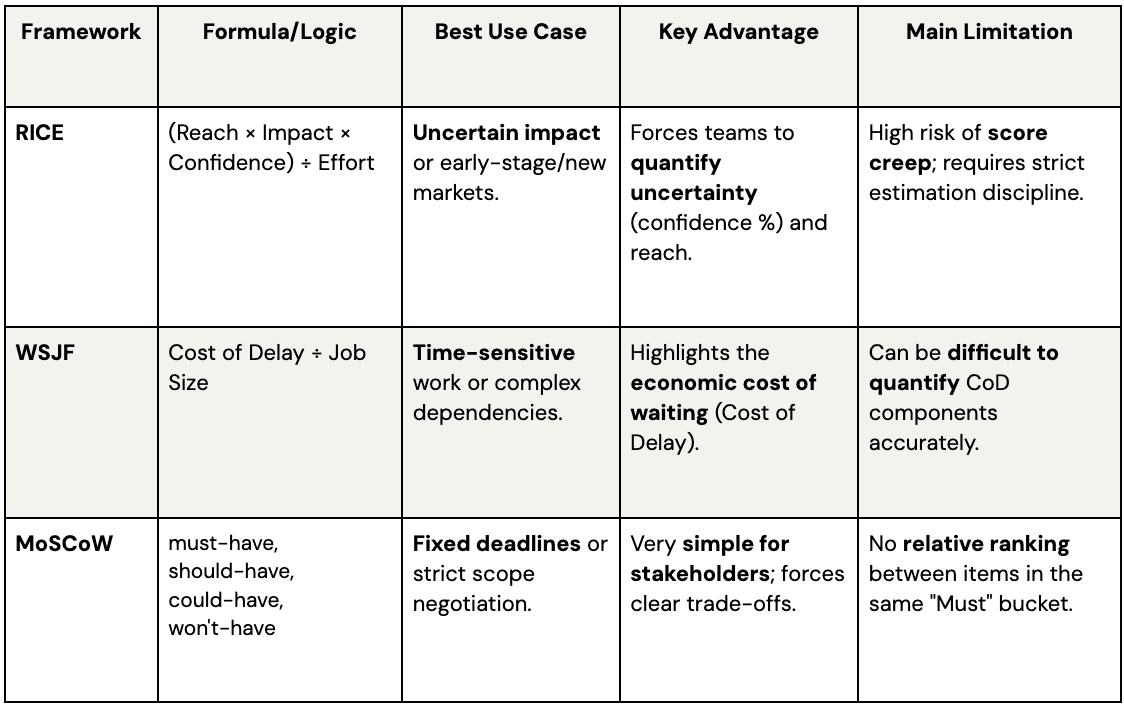
RICE: To prioritize roadmaps with uncertain reach
The RICE (Reach, Impact, Confidence, Effort) prioritization method is useful when you're working with limited or noisy data—new products, speculative bets, or early-stage markets where you can't be sure how many users will care.
Each initiative is scored on four components:
Reach: How many customers or accounts you expect to touch within a set time frame.
Impact: How much you expect the change to affect each customer according to a simple scale, such as 0.25 for minimal to 3 for massive impact.
Confidence: How sure you are about your reach and impact estimates, expressed as a percentage.
Effort: How much work is required, often measured in person-weeks or person-months.
The RICE framework combines these into a single RICE score: (Reach × Impact × Confidence) ÷ Effort, which helps you compare very different types of functionality while forcing you to acknowledge uncertainty.
In Notion, you can add properties for each component to your product roadmap database and use a formula to calculate scores automatically. You can then use Notion AI to summarize what changed as new research comes in. The main gotcha is estimation discipline: if scores creep up to push pet projects, the model loses value. To keep the framework honest, document your rubric and review calibration regularly.
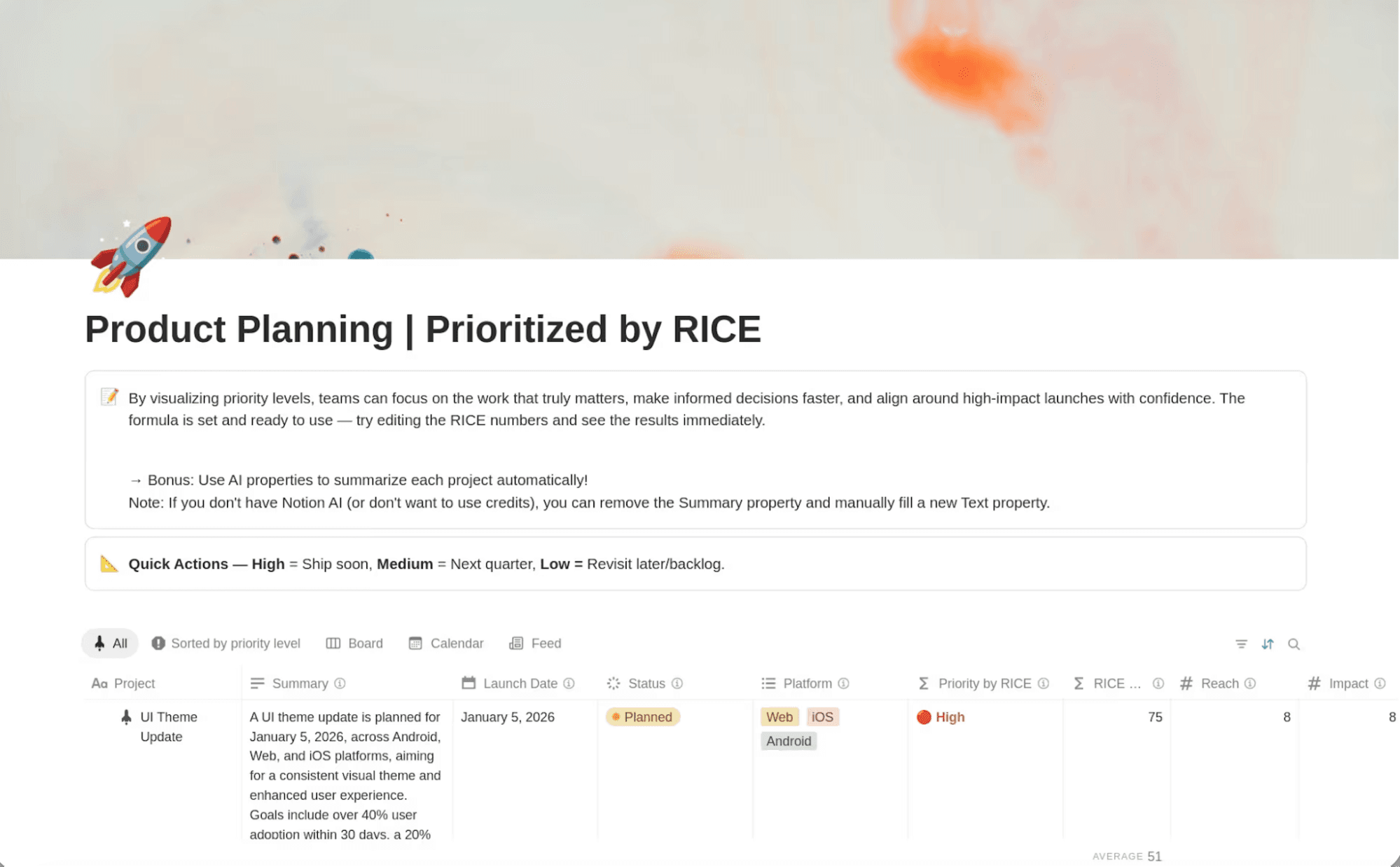
A Notion product planning template for using the RICE framework. (Source)
WSJF: For cost-of-delay clarity and sequencing
Popularized by the SAFe agile framework, WSJF (Weighted Shortest Job First), focuses product teams on the economic impact of sequencing decisions by asking what it costs to wait on each item. You estimate a Cost of Delay score based on three factors—user or business value, time criticality, and risk reduction or opportunity enablement—then divide that by Job Duration to surface the initiatives that deliver the most value per unit of time.
WSJF tends to work well when:
You coordinate dependencies across several teams and need a shared language for sequencing.
Some items are highly time sensitive (regulatory dates, peak season, competitive moves) and can't just sit in the product backlog.
You need to justify why a smaller item should jump ahead of a large, strategic project.
In Notion, you can model WSJF with number properties for each Cost of Delay component and duration, plus a formula to compute scores. Linked databases let you connect each initiative to the research, risk analysis, and stakeholder input behind the numbers.
MoSCoW: When negotiating scope in delivery-focused planning
The MoSCoW method is built for delivery realities like fixed launch dates, implementation windows with partners, or releases tied to marketing campaigns. Rather than producing a numeric score, you use this methodology to prioritize features by assigning them to specific buckets.
MoSCoW feature prioritization categories include:
Must have: Absolutely required for the release to succeed—core flows, critical bugs, legal or compliance items
Should have: Important enhancements that add clear value but aren't deal-breakers if they slip
Could have: Nice-to-have improvements you'll do if there's capacity—the first candidates to cut when timelines tighten
Won't have: Explicitly out of scope for this cycle, even if they're good product ideas
MoSCoW shines in scope discussions because it's easy to understand and forces real trade-offs. When a stakeholder insists a product feature is critical, you can ask which existing feature it should replace or whether to move the date. Notion lets you add a MoSCoW select property to your roadmap database, create views for each release that show Musts, Shoulds, and Coulds side by side, and use comments to capture why an item shifted category so the rationale is easy to revisit in the next planning cycle.
Whichever framework you choose, the system it lives in determines whether it sticks. Notion connects your scoring model, research, roadmap, and decision history in one place—so your framework becomes part of how your team actually works, not a separate exercise that gets abandoned between planning cycles.
Build a repeatable product prioritization framework with Notion AI
Picking a framework is the easy part. Making it part of your quarterly planning is harder. Success requires a simple, repeatable flow that ties scoring to real work and uses AI to keep your data and decisions in sync.
Step 1. Define decision scope, inputs, and scoring criteria
Before you score a single item, get clear on what you're actually deciding. Are you ranking themes for next quarter, sequencing a multi-year initiative, or triaging a backlog of ideas? The scope and time horizon determine which inputs matter most and how precise your estimates need to be.
Then follow these steps:
Gather your inputs: Centralize customer feedback, product metrics, sales and support escalations, competitive intel, technical dependencies, and team member capacity using one of Notion's product management templates. Then, ask Notion AI to summarize patterns—recurring pain points, frequently requested capabilities, or themes that map to your current product strategy.
Define your scoring criteria: Store these definitions in a Notion page and link them directly to your roadmap database so they're always visible during scoring.
Make it shared: Build alignment by ensuring everyone understands the decision scope, the inputs you care about, and how to apply each criterion. This turns the prioritization process into a shared exercise instead of a political negotiation.
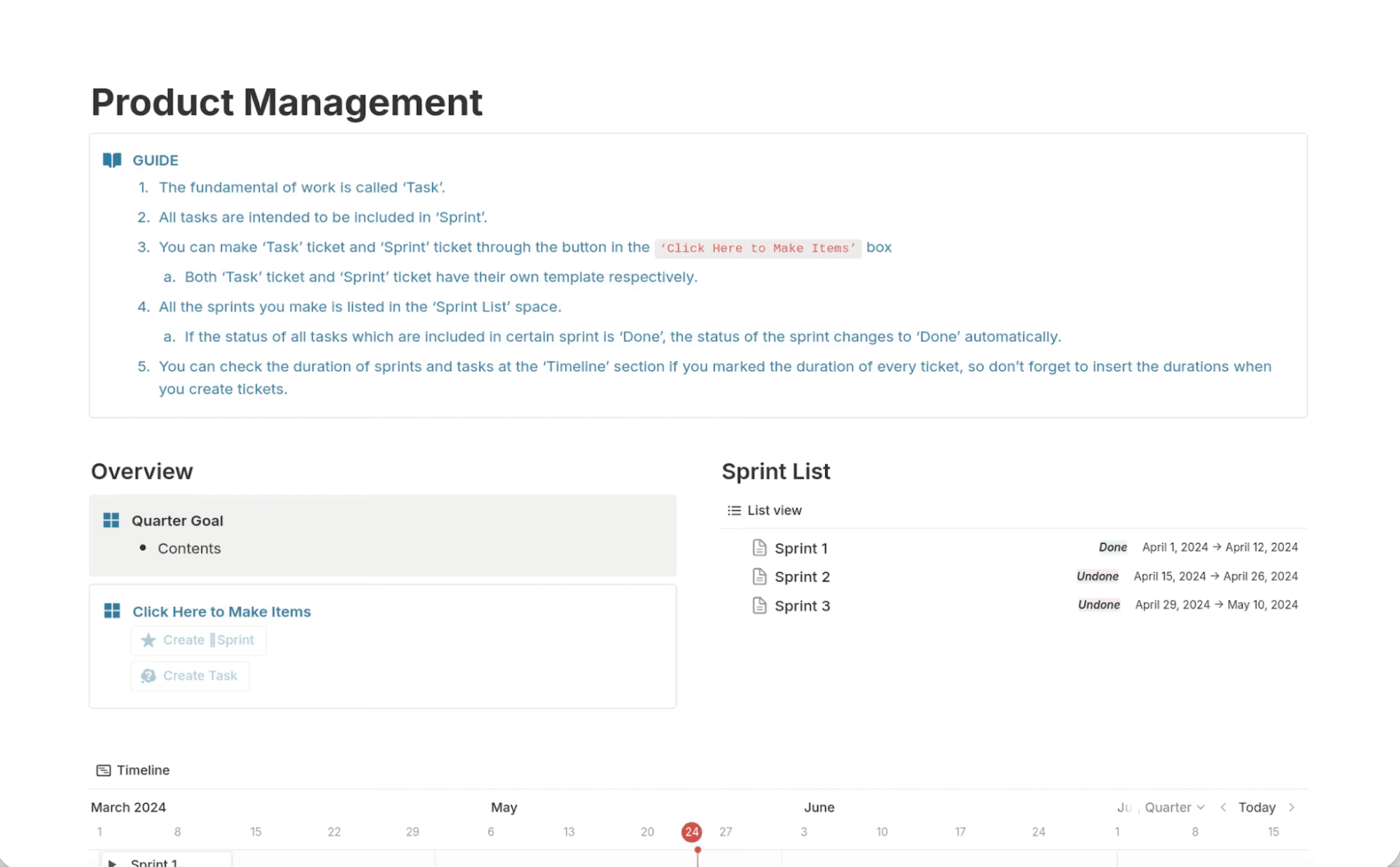
A product management template, available in Notion, showing project overview, sprint list, and timeline. (Source)
Step 2. Score, calibrate, and run sensitivity checks
With criteria in place, apply them to a set of candidates—but don't treat the first pass as final. The real value comes from comparing scores and adjusting where things don't feel right.
How to score and calibrate:
Initial scoring:
Have PMs or feature leads score their own initiatives against the chosen framework.Calibration session:
Review the most important items as a group. You'll quickly spot where "high impact" or "medium effort" mean different things to different people.Set up your Notion view:
Create a scorecard view that shows all candidates with scores side by side, along with links to supporting research or feedback. Use formulas to compute composite scores, then sort by priority.Run sensitivity checks:
Tweak weights, adjust effort estimates, or lower confidence where evidence is thin to see how much the top of the list changes.Use Custom Agents to spot inconsistencies
Instead of manually reviewing every scored initiative, you can configure a Notion Custom Agent—an AI assistant with instructions and workspace access—to audit your prioritization database.
For example, an agent could:
Flag features with high impact scores but little supporting research
Surface initiatives whose effort estimates differ from similar past projects
Highlight work that doesn't align with current strategic themes or OKRs
Because Custom Agents pull context from across your workspace—research docs, feedback databases, and past roadmap decisions—they can catch patterns that manual review often misses. Many teams run this check before calibration meetings so discussions start with the most questionable assumptions.
Your aim isn't perfect math. It's building a shared understanding of trade-offs—backed by artifacts you can revisit later—to ensure your workflow remains consistent.
Step 3. Decide, communicate trade-offs, and operationalize the cadence
Once you've calibrated scores, you still have to make the call—and make it stick. Many frameworks stall because the sheet gets updated, but the roadmap, sprint plans, and stakeholder expectations don't follow.
Capture the decision: Create a decision doc or roadmap entry with the final ranking, what made the cut, what was deferred, and why. Link to underlying research, score history, and related initiatives so the rationale is always available.
Communicate trade-offs: Share clear explanations with teams affected by postponed work. Have a Notion Custom Agent generate tailored summaries for leadership, GTM teams, or engineering. For example, an agent could:
Summarize why the top initiatives were prioritized
Generate roadmap updates for leadership
Draft engineering briefs outlining dependencies and expected impact
Establish a predictable rhythm: Decide how often you'll revisit scores—monthly, quarterly, or tied to major releases. Set up recurring pages and database views for each cycle.
Prepare each planning cycle: Schedule a Custom Agent to run at the start of each planning cycle. It can summarize new customer feedback, flag initiatives with outdated scores, and surface changes since the last review, giving your team a ready-made planning brief.
How do you make prioritization stick across teams?
Even a thoughtfully chosen product prioritization framework will fail if people don't trust it or don't know when it applies. Politics, side channels, and inconsistent use can quietly unwind your work.
To keep your framework credible across engineering, product, and design, you need clear decision rights, lightweight governance, and a trustworthy record of how and why priorities change.
Clarify decision rights and guardrails
Ambiguity about who decides what erodes confidence in frameworks fast—if priorities can be overridden in side conversations, teams stop investing in the process.
Write down who owns which types of decisions (PMs for feature trade-offs, product leadership for cross-team sequencing, execs for resource allocation) and capture it in a Notion doc linked to your roadmap database. Add properties like Decision Owner, Decision Status, or Exception Type, then let Notion AI flag items missing an owner or rationale so you can close gaps before they cause confusion.
Build lightweight governance
Governance doesn't have to mean heavy process. Set up a Notion form or request template where teammates propose ideas and log customer asks, then route entries into a central database tagged with filtered views for source, product area, and urgency.
Document your recurring rituals—weekly triage, monthly roadmap reviews, quarterly planning—in a shared Notion calendar or wiki. Linking these pages to your databases, scoring guidelines, and previous decisions allows new product managers and stakeholders to onboard themselves independently.
Keep the system trustworthy
Your framework only works if your scores and decisions reflect reality—credibility evaporates when priorities shift without explanation.
Notion preserves full context through version history, comments on trade-offs, and linked databases that connect each initiative to the feedback and research behind it. When you revisit old decisions, Notion AI can summarize discussions, highlight scoring patterns, and surface outliers so teams adjust based on what they've learned.
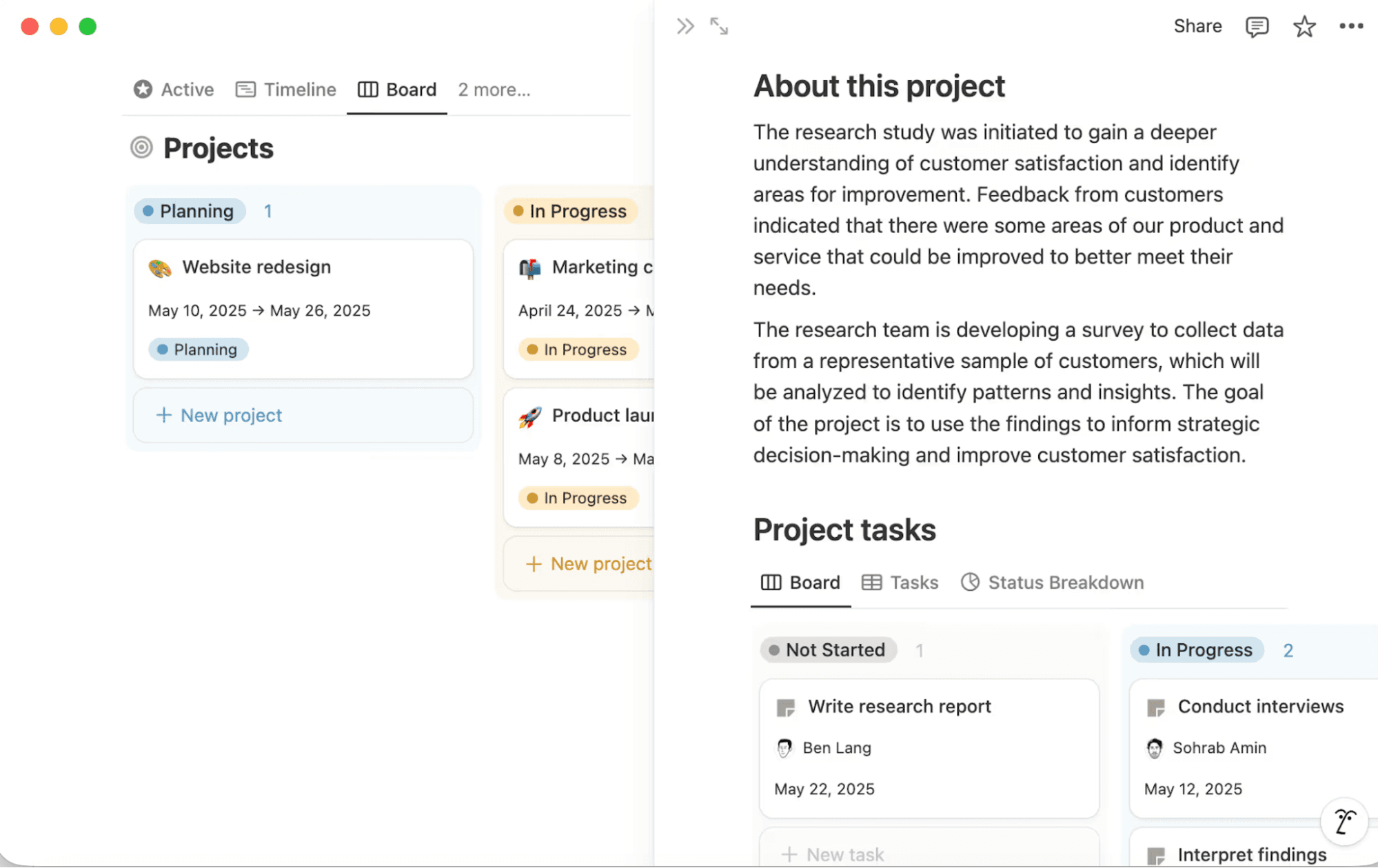
Project databases in Notion help teams document important project details. (Source)
Manage common failure modes
Even with clear ownership and good rituals, familiar failure modes still crop up. Here's how to catch them early:
Scoring drift: Different PMs stretch criteria or reinterpret scales over time. Create Notion views that surface items with unusually high or low scores compared with similar work, and hold periodic calibration sessions documented in shared pages.
Hidden dependencies: If you don't track how initiatives relate to one another, high-priority work can get blocked by lower-scoring items. Use relation properties to link dependencies alongside rollups and filtered views to show which important features are blocked and by what.
Stale scores: Items sit in the backlog while customer needs or effort estimates change. Set up a view for work that hasn't been reviewed lately, then ask Notion AI or a Custom Agent to summarize recent feedback or research linked to those items so you can re-score with fresh information.
Teams like Ramp and Qonto address these issues by centralizing their roadmaps, customer feedback, and prioritization decisions in Notion. When someone asks why an initiative moved up or down, the answer lives in connected docs instead of someone's memory.
Turn prioritization frameworks into living systems
A product prioritization framework only delivers value when it's embedded in how you plan, communicate, and execute. That means your scoring model, evidence, roadmap, and decisions must all live in a connected workplace that your team uses every day.
Notion turns frameworks from isolated spreadsheets into working systems. You can adapt templates for roadmaps, research repositories, and decision logs, then link them with properties and relations that match how your organization thinks.
Try Notion AI to build a connected product prioritization framework that helps your team compare initiatives side by side, document trade-offs, and summarize changes between planning cycles.