Understanding product management documentation: A product team guide
For many engineering, product, and design (EPD) teams, product management documentation is everywhere and nowhere at the same time.
Key decisions live in old documents, Slack threads, meeting notes, and half-updated product requirement documents. When someone needs to understand why a choice was made, they often have to dig through multiple tools or ask around. The result is wasted time, repeated conversations, and slower progress.
In contrast, strong product documentation connects strategy, decisions, and execution across the product lifecycle to provide the shared context that helps teams understand what they’re building, why it matters, and how the work moves forward.
This requires a practical framework for building documentation that supports execution rather than viewing it as a separate task. When teams treat documentation as part of a connected workspace, it becomes easier to track decisions, maintain clarity, and keep product development moving forward.
Why clear product management documentation matters for delivery
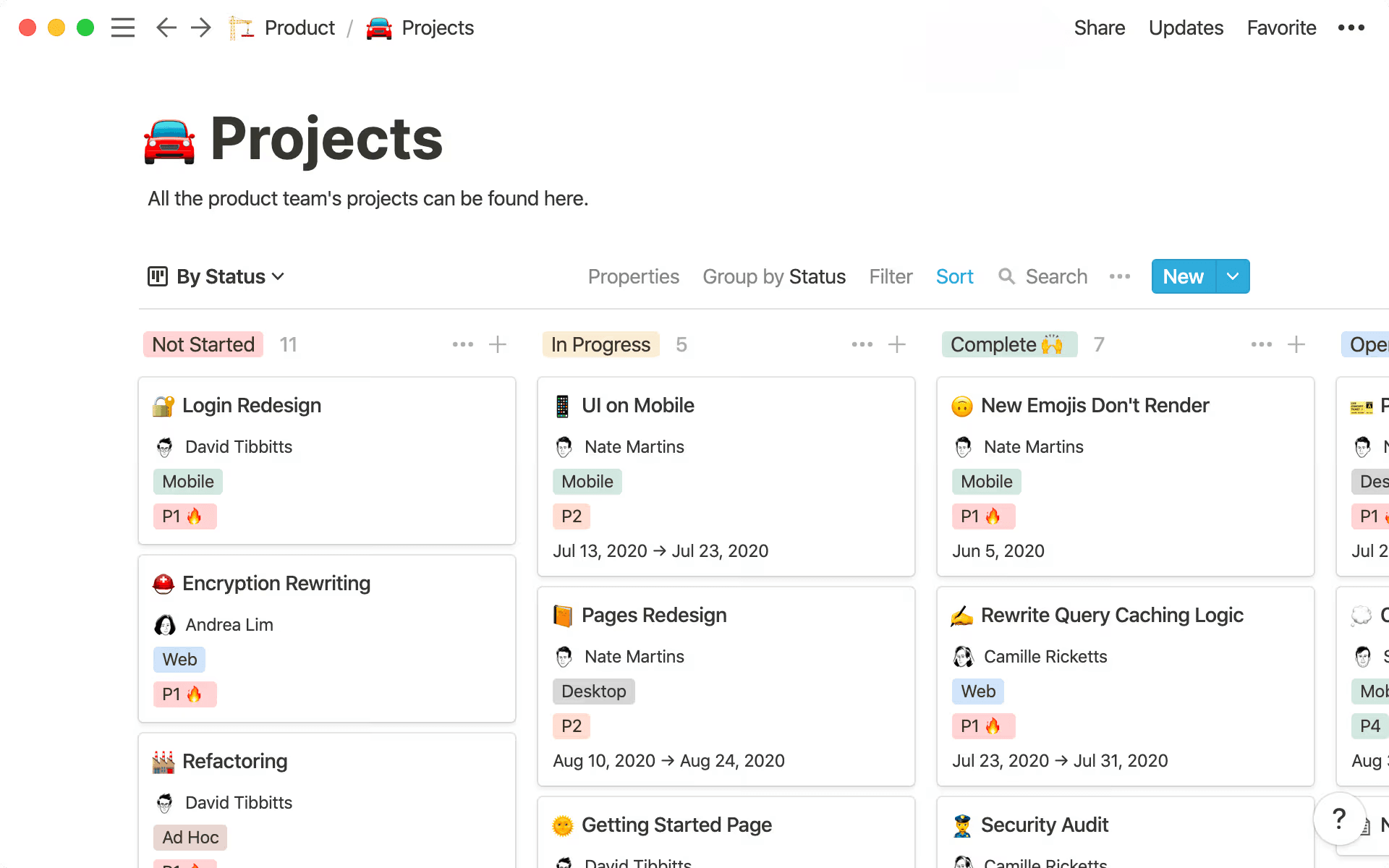
A project dashboard in Notion that shows all of a product’s teams projects and owners (Source)
Effective product documentation directly affects how quickly and confidently you ship. It reduces ambiguity, cuts down on back and forth, and gives everyone the same view of reality as work evolves. It also preserves valuable organizational knowledge, which can help new team members get up to speed faster and prevent the loss of information when an employee leaves.
According to the 2025 Value of Enterprise Intelligence Report by Bloomfire, organizations with strong knowledge practices reduce barriers to critical information by nearly 60 percent. In the same study, 46 percent of employees said they’d be more productive if this information was easier to access.
Other key benefits of a successful product management documentation process include:
Faster time to market: When your engineers, designers, and stakeholders can find the context they need without hunting across tools or booking a meeting, work starts sooner and flows with fewer interruptions.
Less rework: A clear scope, explicit tradeoffs, and documented decisions reduce confusion mid-sprint. Your teams avoid retracing their steps and focus on advancing the release.
Stronger cross-functional team alignment: When product documentation is linked to your roadmap, sprint board, and launch plans, you don't have competing sources of truth. Everyone sees the same goals, constraints, and progress.
Reliable decision traceability: Months later, you can easily understand why certain choices were made without relying on memory, which can aid in future decision-making. Decision logs and linked context make onboarding easier and help you refine your strategy over time.
Most documentation systems break because information is scattered, specs go stale, and teams create duplicate docs instead of updating what exists. The goal isn't to produce more documentation—it's to connect the documentation you already have with the work that depends on it.
Types of product documentation
Product managers rely on several types of documentation to align teams, clarify decisions, and guide product development from idea to launch. While the exact set varies by organization, most product teams regularly use the following core documents:
Product roadmap: A high-level visual plan that outlines the product’s direction and priorities over time to align stakeholders around strategic goals
Product requirements document (PRD): A detailed document describing the problem, goals, requirements, constraints, and success metrics for a specific product or feature
Product vision document: A concise statement that defines the long-term purpose and value proposition of the product, helping teams understand the “why”
User stories: Short descriptions of features written from the perspective of the user to translate product requirements into actionable development tasks
Technical specifications: Detailed documentation that explains how a feature will be built, including factors like architecture, dependencies, and system behavior
Decision logs: A running record of key product decisions, including the context, options considered, and rationale behind the final choice
Release notes: Summaries of new product features, improvements, functions, and fixes included in a product release
Together, these documents create a shared understanding across teams and provide a durable record of the product development process, including decisions, priorities, and product direction.
What should product management documentation include across the lifecycle?
The most useful product management documentation follows your product lifecycle. At each stage, documents should be flexible but structured enough to support decisions and handoffs. Each artifact should connect to your product roadmap and execution work.
Discovery documentation
Discovery documentation captures the "why" behind your roadmap so you're not rebuilding context every time a question surfaces mid-sprint. This documentation should include:
Problem framing: A concise statement of the end user problem, who's affected, and why it matters to the business.
Research insights: Key learnings from interviews, surveys, analytics, or competitive analyses that influenced your direction.
Assumptions and risks: What you're treating as true for now, what could block success, and what you plan to validate.
In Notion, you can use Custom Agents to continuously collect and synthesize discovery inputs. For example, a Notion Agent can review customer interview notes, support tickets, and product analytics each week and automatically highlight emerging patterns or risks before roadmap planning begins.
Definition documentation
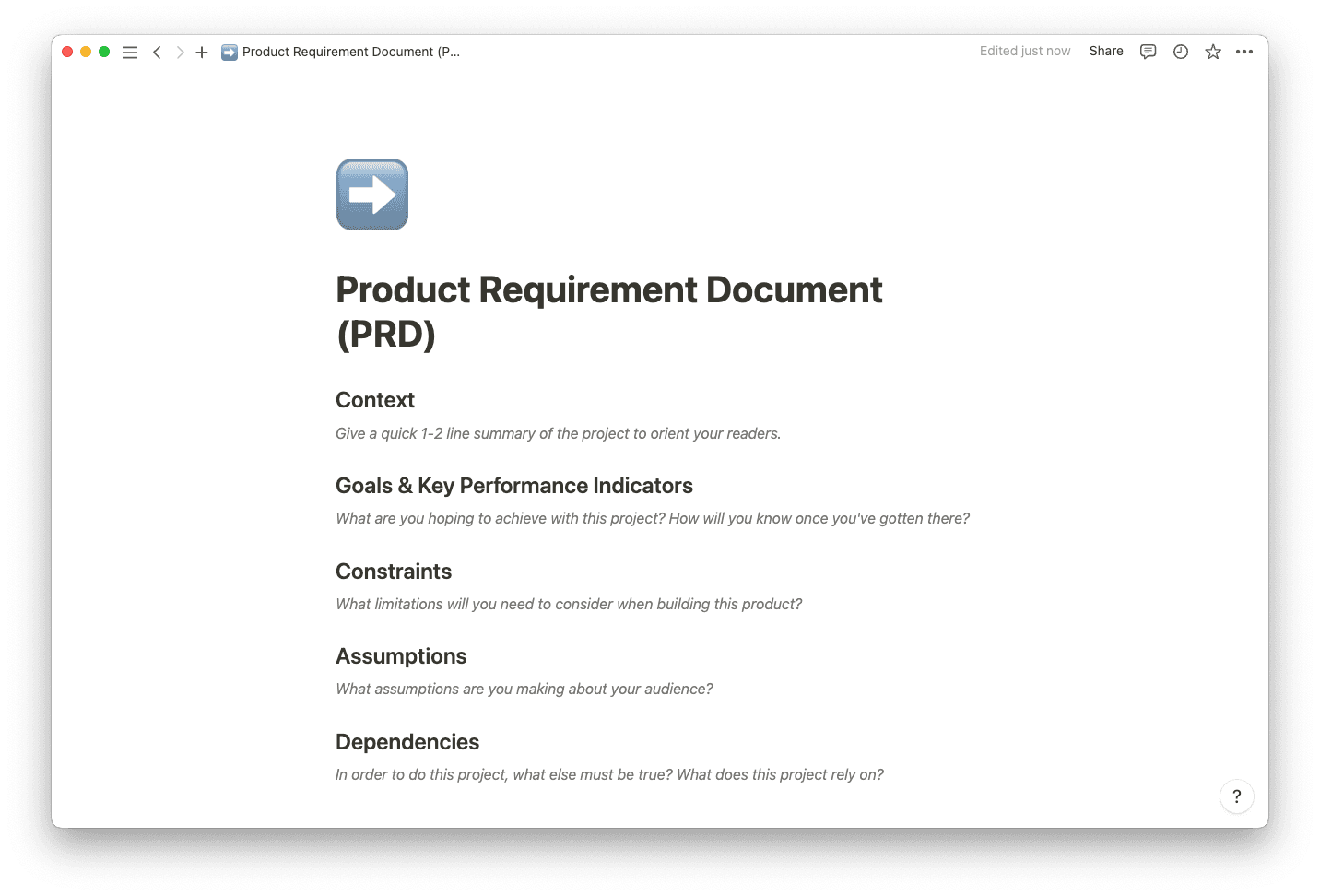
A product requirement document (PRD) template available in Notion (Source)
Definition documentation turns discovery insights into work your team can execute. Core artifacts at this stage include:
Product requirements: A focused description of the problem, user personas, user stories, and product specifications
Success metrics: The measurable outcomes or KPIs that will tell you if the work is doing its job
Scope boundaries: What's in this release, what's explicitly out, and any sequencing decisions
Decision logs: The key calls you made, who made them, and the reasoning behind them
You don’t need exhaustive detail—just enough clarity that the development team can move forward without constant questions. When these docs are tied directly to roadmap items, no one has to guess what done really means.
Delivery documentation
During delivery, documentation shifts from "what and why" to "how exactly." Good delivery documentation lets your engineers and designers build with confidence and reduces interruptions during the sprint. Consider including:
Execution specs: Detailed behavior for flows, states, and system interactions so implementation questions are answered up front where possible
Acceptance criteria: Clear, testable conditions that determine when work is ready to ship
Dependencies: Upstream and downstream work that’s dependent on other steps in the product management process
Technical constraints: Performance requirements, platform limitations, and existing architectural choices that shape implementation
Linking these specs back to the originating PRD and roadmap item keeps delivery aligned with intent so teams can make day-to-day implementation decisions with the broader context in view.
Launch and iteration documentation
After new features ship, documentation should help you understand what happened and guide what comes next. In launch documentation, include:
Release plans: Scope, rollout strategy and messaging, and operational readiness plans for before you go live
Performance reviews: Post-launch metrics, qualitative feedback, and early signals about adoption or friction
Experiment tracking: Hypotheses, test design, outcomes, and follow-up decisions
Backlog refinement notes: How and why you prioritize based on what you learned
When you connect these artifacts back to the original documentation, you build a living history: what you believed, what you shipped, how it performed, and how that shaped your roadmap.
How to write product management documentation your team can execute against
Clear product management documentation turns strategy into work that engineers, designers, and partners can act on without constant clarification. You don't need perfect writing skills—just unambiguous answers to the questions your team asks during delivery. Adding a dedicated FAQs section may be helpful in some cases for quick readability.
In Notion, you can capture this information using pre-built templates that can be connected to your project databases and adapted to your team’s rituals. A few you can use to get organized include:
Whether or not you choose to use a template, here’s a step-by-step guide to help you get started with stronger project management documentation.
Step 1: Define the problem and success criteria clearly
Every doc should start by anchoring on the user needs or problem and the outcome you expect, aligning with the overall product vision. Spell out:
Who you're designing for: The specific segment or persona and their current behavior or pain point
The problem or opportunity: What's broken or missing today and why it matters
Success criteria: A small set of measurable outcomes that define success (for example, activation rate, time-to-value, conversion rate, retention, etc.)
When these are explicit at the top of your PRD or strategy doc, every design review, technical decision, and tradeoff discussion can reference the same goals.
Step 2: Clarify scope and constraints
Make it clear what's inside this product development project and what isn't. Vague scope is one of the fastest ways to create rework and frustration across EPD teams. Capture:
In-scope work: The flows, platforms, segments, or use cases you'll address in this iteration
Out-of-scope items: Related ideas you're intentionally deferring with links to backlog or follow-up projects
Constraints: Technical dependencies, architecture limits, compliance considerations, and user experience guidelines that shape what's feasible
You can then link each constraint to the relevant design system documentation, technical decision record, or dependency ticket so your engineers don't have to track those down separately.
Step 3: Capture decisions and tradeoffs explicitly
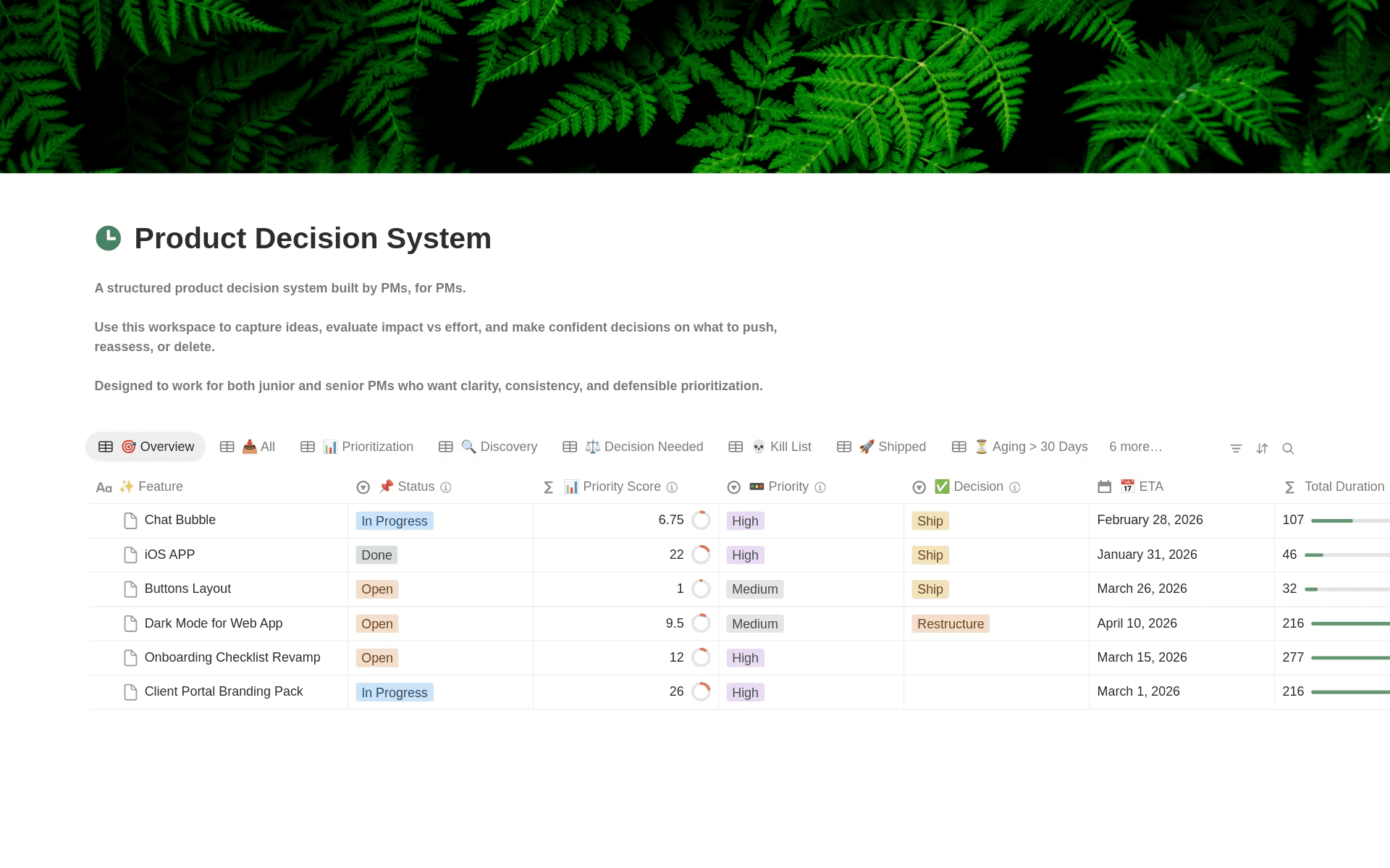
A decision log system template in Notion (Source)
Good product documentation records the reasoning behind your path. Otherwise, you'll end up re-debating the same topics every few weeks. A lightweight decision log attached to each PRD or spec can include:
The decision: A statement covering what you chose
Context: The data, constraints, and assumptions that led you there
Alternatives: Options you considered and why they didn't win
Owner and date: Who made the call and when
Maintaining decision logs manually can be difficult during fast-moving sprints. Notion Custom Agents can help you monitor meeting notes, Slack threads, or project updates and automatically record decisions in a shared log—capturing the context, participants, and rationale without any manual intervention.
Step 4: Link documentation to execution
Even a great PRD loses value if it's disconnected from the work. In Notion, that might look like:
Relating each PRD to the initiative in your roadmap database
Rolling up all sprint tasks, bugs, and subprojects under that same initiative
Linking to design files, runbooks, and analytics dashboards from the doc
This linking reduces drift between planning and implementation, makes status visible without extra reporting, and lets anyone trace a shipped change back to the original problem statement.
How to manage documentation so it stays current and trusted
Creating documentation is often the easy part. Keeping it current and reliable as work changes is where most systems fall apart. Treat documentation as a living system that moves with your delivery cadence, not a one-time artifact you publish and forget.
To help keep your documentation up to date, follow these tips:
Keep a single source of truth: Choose one workspace for product management documentation, roadmap, and specs instead of splitting them across multiple tools to keep teams productive. According to a 2024 developer survey, 30 percent of dev pros say their productivity is impacted 10 or more times per week due to knowledge silos, which are often caused by tool sprawl.
Use standard templates: Use shared structures for PRDs, decision logs, and specs so your engineers always know where to look for key details.
Add links to active work: Connect docs to roadmap items, sprints, and launch plans so updates happen in one place.
Regularly check assumptions: Revisit the riskiest assumptions and confidence levels during planning or weekly reviews.
Reduce manual status reporting: Let your project boards and linked docs reflect progress, rather than re-entering the same updates in multiple channels.
Teams can ask a Custom Agent to help maintain their documentation health. For example, an Agent can monitor project updates and automatically flag outdated specs, suggest updates to PRDs when scope changes, or notify owners when key documentation hasn’t been updated recently.
How Notion AI supports documentation maintenance
Once your docs and projects live together in Notion, AI can help you maintain that system without adding new processes. You can use Notion AI to:
Summarize long docs: Turn multi-page PRDs, research summaries, or product launch reviews into short overviews tailored to engineers, leadership, or partners.
Create stakeholder updates from live work: Draft weekly status reports based on linked roadmap items, tasks, and recent decisions instead of writing them from scratch.
Surface related context: Pull in relevant decision logs, past experiments, or historical specs when you're planning a new initiative.
Improve search: Ask natural-language questions to find the right doc or decision, even if you don't know the exact title or where it lives.
Product teams at companies like OpenAI and Ramp centralize their planning and execution in Notion so this context is available in one place. With docs, projects, and AI working together, you spend less time hunting for information and more time making the next decision.
Build product management documentation in a connected workspace
Product management documentation works best when it’s linked directly to the work it supports. In a connected workspace like Notion, docs, roadmaps, and execution decisions live together, allowing context to flow naturally from discovery through delivery.
Teams that centralize documentation this way can ship faster, onboard new teammates more easily, and make clearer decisions across engineering, product, and design workflows because everyone works from the same information.