Monitora l'utilizzo nella dashboard dei crediti Notion
Scopri come utilizzare la dashboard dei crediti Notion per monitorare l'utilizzo, pianificare le future esigenze di crediti e gestire la spesa corrente.
Vai alle Domande frequentiLa dashboard dei crediti Notion offre una vista chiara di come gli agenti personalizzati, la compilazione automatica, i Workers e i modelli IA premium utilizzino i crediti Notion all'interno dello spazio di lavoro. Utilizzala per monitorare l'utilizzo dei crediti, pianificare le future esigenze di crediti e gestire la spesa corrente. Per accedervi, vai su Impostazioni → Accesso e fatturazione → Crediti Notion.
Gli amministratori dei piani Business ed Enterprise possono monitorare l'utilizzo nella dashboard. Anche i creatori di agenti personalizzati e di worker possono vedere il ritmo dell'utilizzo dei crediti a livello dello spazio di lavoro. La tabella mostrerà solo gli agenti personalizzati o i worker che hanno creato.
Nella dashboard, puoi visualizzare:
Utilizzo dei crediti in tempo reale.
Utilizzo stimato fino alla data mensile di rinnovo del servizio.
Esecuzioni a livello di agente e utilizzo dei crediti, in modo da poter individuare gli agenti che gravano sui costi e modificarli all'occorrenza.
Membri dello spazio di lavoro che stanno utilizzando crediti oltre la soglia di utilizzo.
Crediti spesi da ciascun membro per i modelli premium.
Crediti di prova dal tuo account team. Questi appaiono come una categoria a sé stante, così puoi monitorarli separatamente dai crediti che hai acquistato.
Se gestisci diversi spazi di lavoro, avrai a disposizione anche una dashboard dei crediti Notion nella tua console di amministrazione, tramite la quale poter monitorare l'andamento dei crediti e l'utilizzo a tutti i livelli della tua azienda.
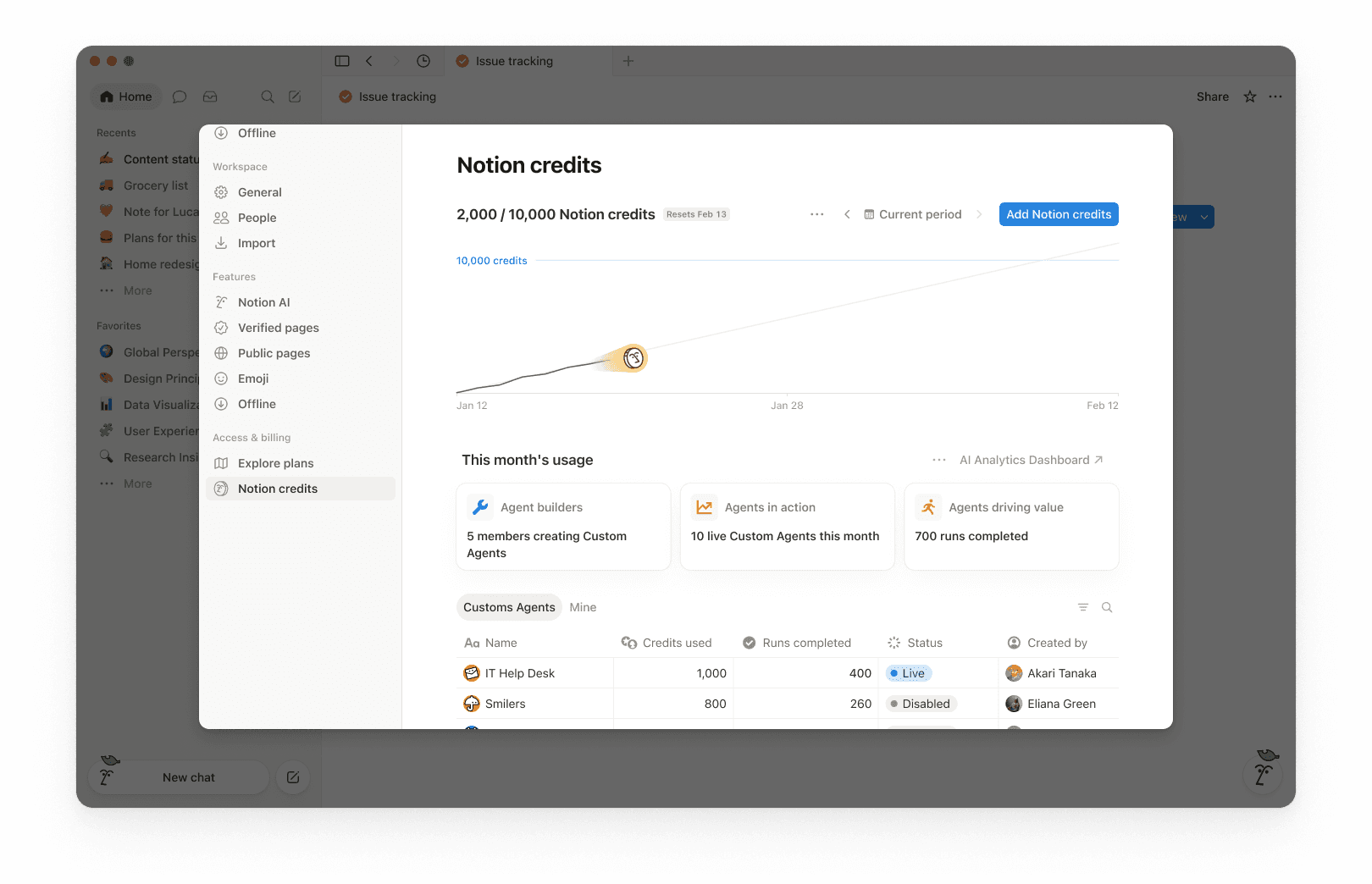
Nella parte superiore della dashboard, vedrai il totale dei crediti Notion utilizzati per il periodo selezionato e la data di azzeramento dei crediti. Il periodo selezionato si basa sul ciclo di fatturazione del tuo spazio di lavoro.
Questo ti consente di avere una panoramica rapida dell'utilizzo finora e di sapere quando termina il tuo ciclo di fatturazione mensile.
Nell'angolo in alto a destra, utilizza il selettore del periodo (ad esempio, Periodo corrente) e le frecce di navigazione per esaminare i periodi passati.
Il grafico dei consumi mostra l'utilizzo dei crediti nel corso del tempo:
La voce "Attuali" mostra i crediti utilizzati finora.
Proiezioni stimate dell'utilizzo entro la data di ripristino se i modelli attuali dovessero continuare. La stima è fornita solo a scopo informativo e l'utilizzo effettivo futuro potrebbe differire.
Utilizza questa funzione per capire se rischi di esaurire i crediti prima della data di rinnovo.
Alla voce Utilizzo di questo mese, vedrai metriche di adozione e attività come:
Creatori di agenti: quanti membri stanno creando agenti personalizzati.
Agenti in azione: il numero di agenti personalizzati attivi nel periodo considerato.
Esecuzioni completate: il numero delle attività completate dagli agenti nel tuo spazio di lavoro.
La tabella di utilizzo è organizzata in schede in modo da poter filtrare per tipo.
Tutto: Ogni agente personalizzato, compilazione automatica e worker nel tuo spazio di lavoro.
Agenti personalizzati: Solo spesa per agenti personalizzati.
Compilazione automatica: Solo spesa per compilazione automatica.
Worker: Solo spesa per worker. I worker mostrano un badge Gratuito durante il periodo beta.
Miei: Solo gli agenti personalizzati e i worker che hai creato
Per ogni elemento, la tabella mostra:
Crediti Notion usati
Esecuzioni completate
Stato
Creato da
La spesa dei membri ha una riga dedicata. Essa copre i crediti che le Persone spendono oltre la franchigia di utilizzo dell'IA e i crediti spesi per i modelli premium, così puoi vedere chi li sta utilizzando e quanto costano.
Per impostazione predefinita, la spesa dei worker viene monitorata separatamente da quella degli agenti personalizzati e non è inclusa nel grafico di utilizzo principale o nel numero totale di crediti. Per includere la spesa dei worker nel grafico e nel totale, seleziona il menu con i tre puntini ••• nella parte superiore della dashboard e attiva Includi la spesa dei worker.
Se il tuo team di account management ha assegnato alla tua organizzazione dei crediti di prova, ecco come funzionano:
I crediti di prova appaiono nella dashboard dei crediti Notion come una categoria a sé stante, separata dai crediti acquistati. Se la tua organizzazione ha un contratto multi-spazio di lavoro, puoi visualizzarli anche nella console dell'organizzazione.
Gli amministratori ricevono un avviso quando l'organizzazione ha utilizzato l'80% dei crediti di prova e un altro quando i crediti di prova sono esauriti.
I crediti di prova inutilizzati non vengono trasferiti al termine del periodo di prova.
Gli amministratori possono monitorare l'utilizzo dei crediti affinché la spesa rimanga prevedibile. Gli amministratori hanno diversi modi per gestire il ritmo di consumo dei crediti:
Visibilità: monitora l'utilizzo e le tendenze nella dashboard dei crediti Notion.
Linee guida: Decidi chi può creare agenti (e imposta dei limiti). Imposta un limite di crediti per ogni membro.
Controllo: Metti in pausa o disattiva gli agenti in qualsiasi momento per interrompere l'utilizzo mentre effettui verifiche o apporti modifiche. Disattiva i modelli premium per lo spazio di lavoro.
Ottimizza: perfeziona gli agenti in modo da ridurre i passaggi aggiuntivi e migliorare l'efficienza.
Usa la dashboard dei crediti Notion per monitorare l'utilizzo nel tempo e vedere quali funzionalità consumano più crediti. Notion avvisa inoltre gli amministratori quando lo spazio di lavoro si sta avvicinando o ha raggiunto il limite di crediti, in modo che abbiano il tempo di intervenire.
Quando un membro utilizza crediti Notion oltre la soglia di utilizzo consentita, il suo utilizzo appare come una riga individuale nella dashboard dei crediti. Gli amministratori possono vedere quali utenti stanno spendendo crediti oltre il limite e quanto ne hanno utilizzato.
I modelli premium che consumano crediti vengono visualizzati allo stesso modo. Quando un membro ne utilizza uno, il suo utilizzo avrà una riga qui.
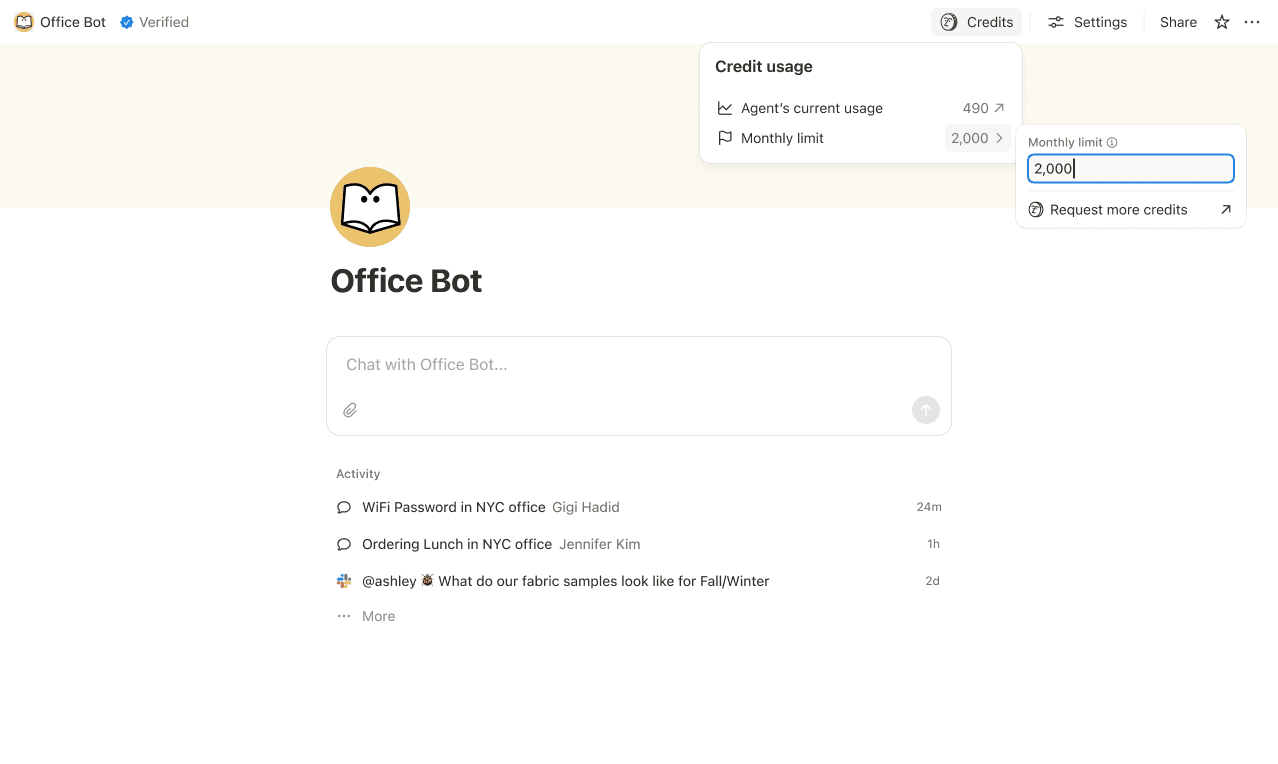
Imposta limiti di credito per i singoli agenti personalizzati in modo che si mettano in pausa quando raggiungono una soglia. In alcuni casi, un agente potrebbe superare il limite per completare un'attività in corso. Se un'attività è già in esecuzione quando raggiunge il limite, la lasciamo terminare prima di bloccare il nuovo utilizzo.
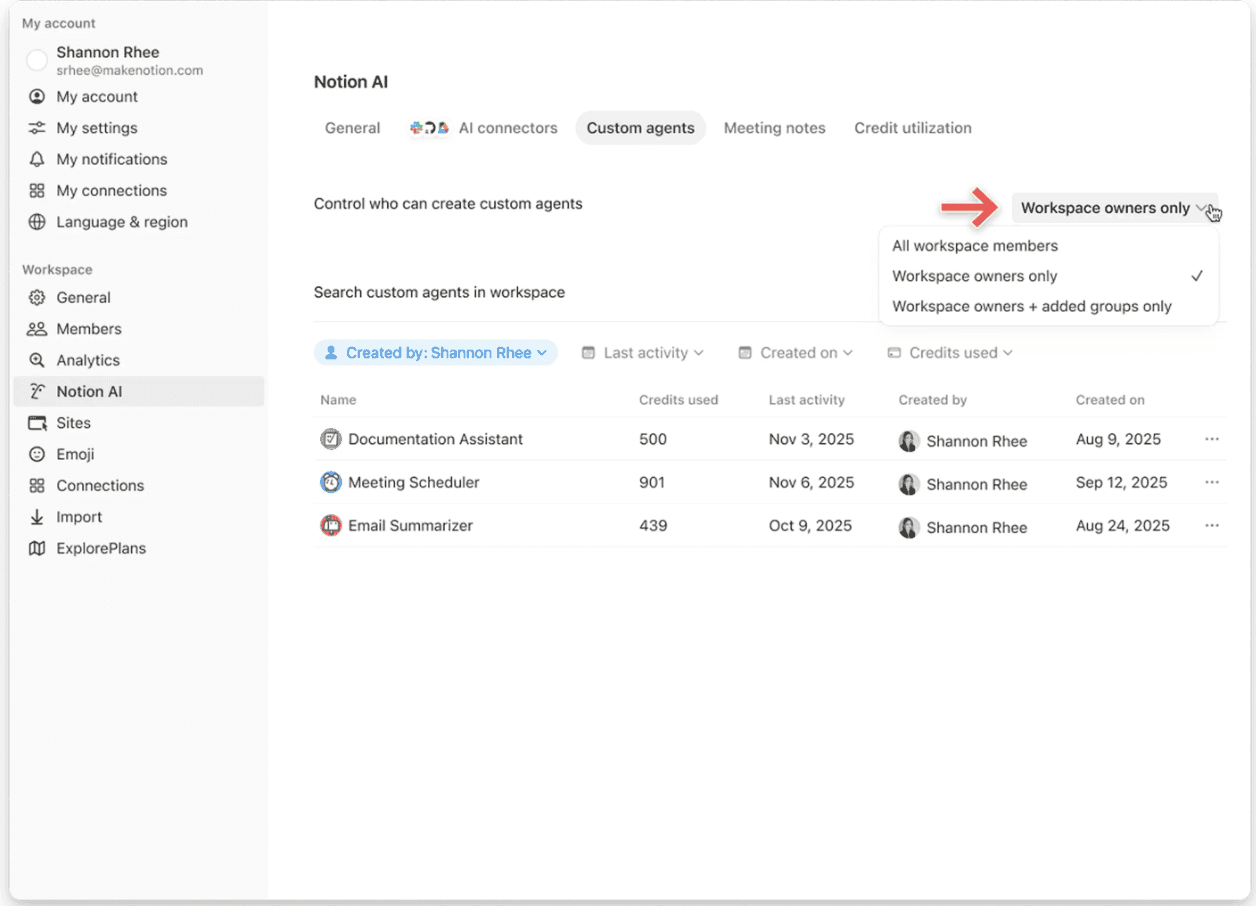
Controlla chi può creare agenti personalizzati (tutti, solo i proprietari dello spazio di lavoro o membri selezionati).
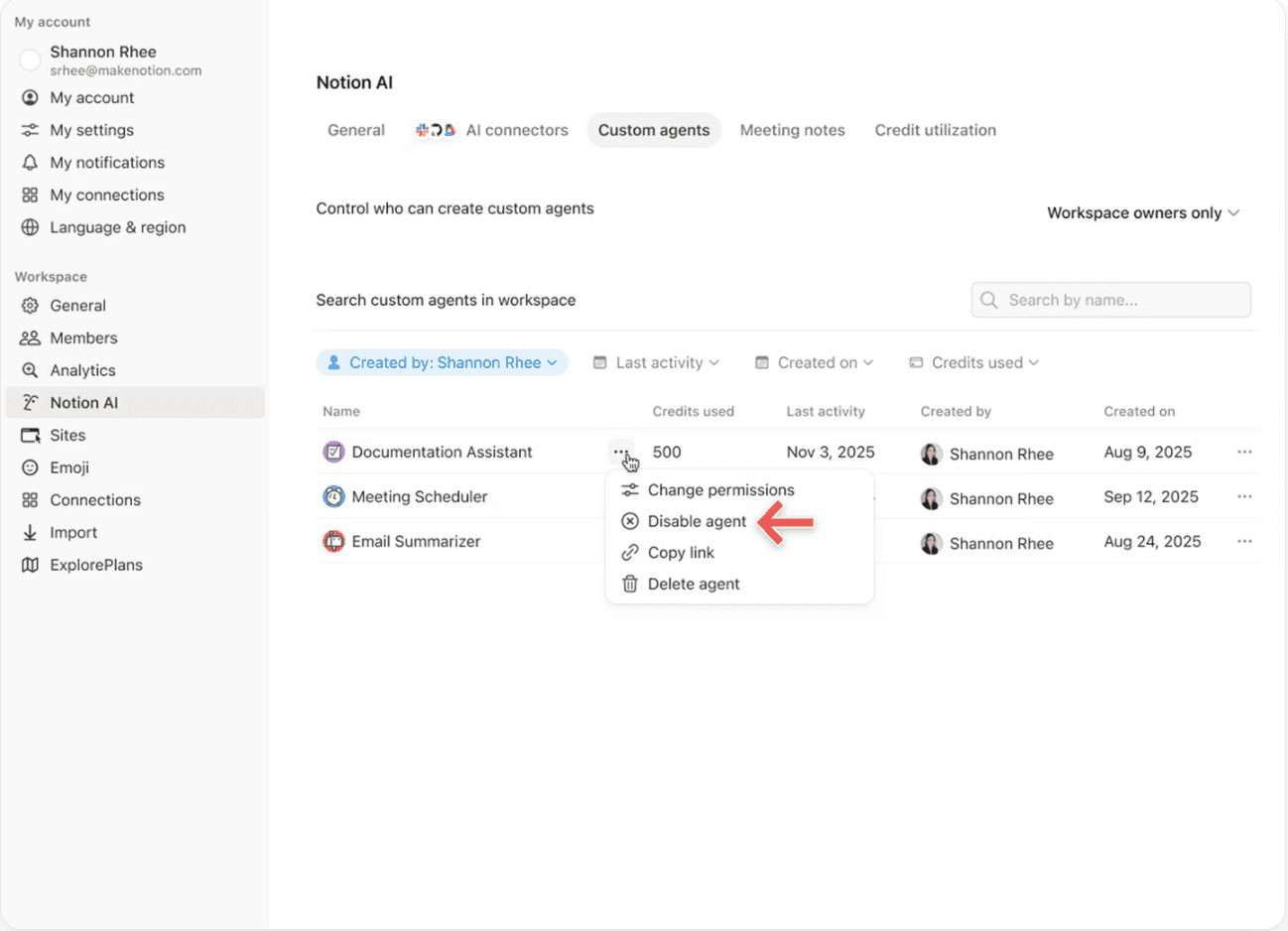
Metti in pausa o disattiva un agente personalizzato in qualsiasi momento per interrompere immediatamente l'utilizzo dei crediti mentre esegui verifiche sull'attività o apporti modifiche all'agente.
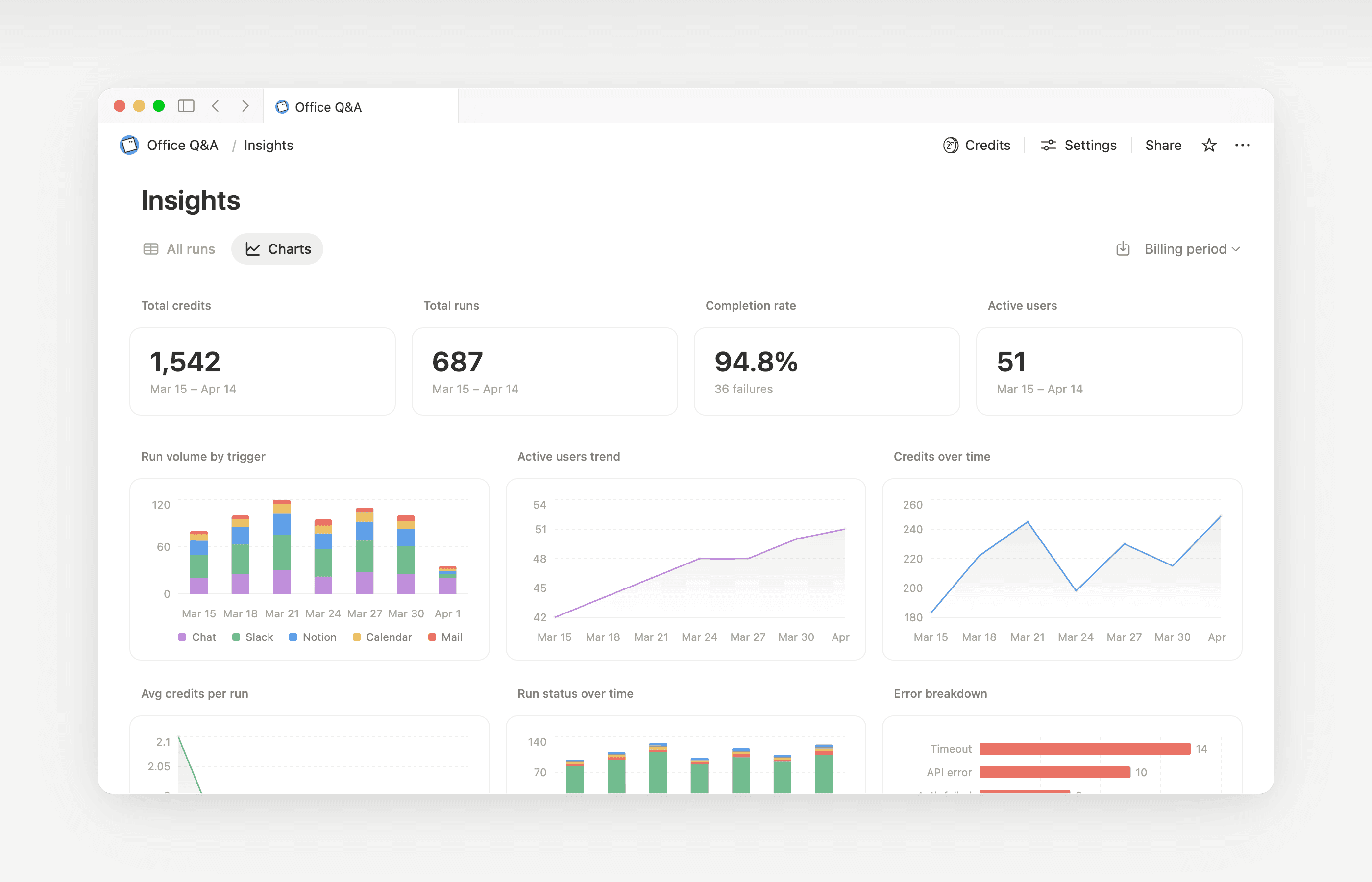
Gli Insight aiutano i creatori di agenti personalizzati e gli amministratori dello spazio di lavoro a comprendere l'attività, in modo da poter apportare aggiornamenti mirati che migliorino le prestazioni. Usa gli Insight per individuare le esecuzioni che richiedono passaggi aggiuntivi, che falliscono e riprovano, o che utilizzano un modello più costoso di quanto richiesto dal lavoro. Quindi, aggiorna le istruzioni o le impostazioni dell'agente affinché venga eseguito in modo più efficiente.
Apri gli Insight direttamente all'interno di un agente per:
Monitora l'attività e l'utilizzo dei crediti del tuo agente personalizzato.
Identifica le esecuzioni più costose del previsto.
Esamina quali modelli, strumenti e trigger sono stati utilizzati.
Trova e correggi le esecuzioni non riuscite affinché il tuo agente funzioni in modo più affidabile.
Scopri di più su come utilizzare Insights per ridurre i costi e migliorare un agente personalizzato→
I proprietari dello spazio di lavoro possono decidere se i membri possono utilizzare i crediti Notion dopo aver raggiunto la soglia di utilizzo consentita. Quando questa opzione è disattivata, i membri che esauriscono la loro soglia devono attendere il rinnovo del periodo mensile o a rotazione. Scopri come gestire questa impostazione →

Scopri cosa sono gli agenti personalizzati e come funzionano.
Scopri in che modo gli agenti personalizzati accedono alle informazioni, come funziona la condivisione e cosa possono controllare gli amministratori: Condivisione e permessi degli agenti personalizzati →
Scopri altre buone pratiche sull'ottimizzazione dei crediti Notion e sull'efficienza degli agenti personalizzati in una guida per amministratori per iniziare a utilizzare gli agenti personalizzati →
Domande frequenti
Cosa succede se esauriamo i crediti Notion?
Cosa succede se esauriamo i crediti Notion?
Se il tuo spazio di lavoro non ha abbastanza crediti Notion, gli agenti personalizzati verranno messi in pausa automaticamente fino a quando non avverrà l'azzeramento dei crediti o un amministratore non ne aggiungerà altri. Anche i modelli premium verranno messi in pausa.
Come vengono informati gli amministratori prima che i crediti Notion si esauriscano?
Come vengono informati gli amministratori prima che i crediti Notion si esauriscano?
Gli amministratori ricevono notifiche nell'app (e via email) quando lo spazio di lavoro raggiunge l'80% e il 100% del consumo dei crediti Notion, in modo da avere il tempo di intervenire prima che gli agenti vengano messi in pausa.
Come posso acquistare altri crediti Notion?
Come posso acquistare altri crediti Notion?
Gli amministratori possono acquistare crediti Notion direttamente nel prodotto o tramite il proprio team di account management. Scopri di più su come acquistare crediti Notion.
Come funzionano le modifiche ai crediti Notion a metà mese?
Come funzionano le modifiche ai crediti Notion a metà mese?
Se aumenti i tuoi crediti a metà del periodo di servizio mensile, i crediti aggiuntivi saranno disponibili immediatamente per il periodo di servizio corrente. Ti verrà addebitato l'importo ricorrente più elevato dei crediti all'inizio della tua prossima data di servizio mensile.
Se riduci i tuoi crediti a metà del periodo di servizio mensile, l'importo inferiore avrà effetto all'inizio del periodo di servizio successivo. Da quel momento in poi, ti verrà addebitato ogni mese l'importo inferiore dei crediti ricorrenti.
Collaboro con un team di account management per acquistare crediti Notion. Cosa succede se effettuo l’upgrade, espando o rinnovo il mio piano Business o Enterprise, che comprende crediti Notion annuali, a metà dell'intervallo di fatturazione?
Collaboro con un team di account management per acquistare crediti Notion. Cosa succede se effettuo l’upgrade, espando o rinnovo il mio piano Business o Enterprise, che comprende crediti Notion annuali, a metà dell'intervallo di fatturazione?
Per i crediti Notion annuali prepagati che non sono stati utilizzati, riceverai un credito proporzionale pari alla quantità inferiore tra le seguenti:
L'importo in dollari corrispondente ai crediti Notion annuali rimasti inutilizzati
La quota di crediti Notion annuali proporzionale al tempo rimanente del periodo di abbonamento
Questo credito si applica quando un nuovo modulo d'ordine Business o Enterprise sostituisce quello attuale prima della fine del relativo periodo di abbonamento. I crediti Notion non hanno valore in contanti. Eventuali crediti vengono applicati al nuovo piano.
La compilazione automatica utilizza crediti Notion?
La compilazione automatica utilizza crediti Notion?
La compilazione automatica prevede due opzioni: Basic e agente personalizzato.
La compilazione automatica di base è inclusa nei piani Business ed Enterprise e non utilizza i crediti Notion.
La compilazione automatica per l'agente personalizzato utilizza i crediti Notion perché sfrutta funzionalità avanzate dell'agente personalizzato (come l'utilizzo di un contesto più dettagliato e ragionamenti più avanzati).
Cosa succede agli agenti personalizzati se passo a un piano inferiore?
Cosa succede agli agenti personalizzati se passo a un piano inferiore?
Se passi a un piano Notion inferiore come Free o Plus, tutti gli agenti personalizzati esistenti verranno disattivati, ma non eliminati. Potrai visualizzare (ma non modificare) la pagina della chat e le impostazioni degli agenti personalizzati. Gli agenti personalizzati continueranno a funzionare se torni a un piano Business o Enterprise.
Posso acquistare crediti Notion se gestisco il mio abbonamento tramite l'App Store o Google Play?
Posso acquistare crediti Notion se gestisco il mio abbonamento tramite l'App Store o Google Play?
Non direttamente. Se il tuo abbonamento Notion è gestito tramite un app store per dispositivi mobili (Apple App Store o Google Play), non potrai acquistare crediti Notion dall'interno di Notion.
Per acquistare crediti, dovrai:
Annullare il tuo abbonamento all’app mobile su App Store o Google Play.
Effettuare l’upgrade a un piano Notion direttamente su notion.com (Business o Enterprise, con AI inclusa).
Una volta che il nuovo abbonamento sarà attivo, un amministratore potrà acquistare crediti Notion da
Impostazioni→Accesso e fatturazione→Crediti Notion.
Assicurati che il tuo nuovo piano includa l’AI prima di acquistare i crediti Notion. I crediti Notion sono disponibili solo sui piani Business e Enterprise.
C'è un limite al numero di crediti che posso acquistare?
C'è un limite al numero di crediti che posso acquistare?
No. Puoi acquistare la quantità di crediti necessaria per il tuo spazio di lavoro, anche in grandi quantità. Se il tuo metodo di pagamento richiede alcuni giorni per essere accreditato, il tuo team potrà continuare a utilizzare i crediti fino all'importo che hai deciso di acquistare, in attesa che il pagamento venga elaborato.
Cosa succede ai miei crediti Notion se un pagamento non va a buon fine?
Cosa succede ai miei crediti Notion se un pagamento non va a buon fine?
Il tuo team conserva i crediti Notion che hai già pagato. I crediti che superano tale importo vengono messi in attesa finché un amministratore non corregge il pagamento, dopodiché vengono sbloccati automaticamente. Un pagamento fallito dei crediti Notion non influisce sul tuo piano Notion principale. Scopri di più su come funzionano i pagamenti dei crediti Notion →