Track Notion credits usage
Learn how to use the Notion credits dashboard to track usage, plan future credit needs, and manage ongoing spend.
Jump to FAQsWhen changes start
New Business and Enterprise workspaces move to the new credit system starting October 19, 2026. For existing workspaces, it takes effect on November 2, 2026.
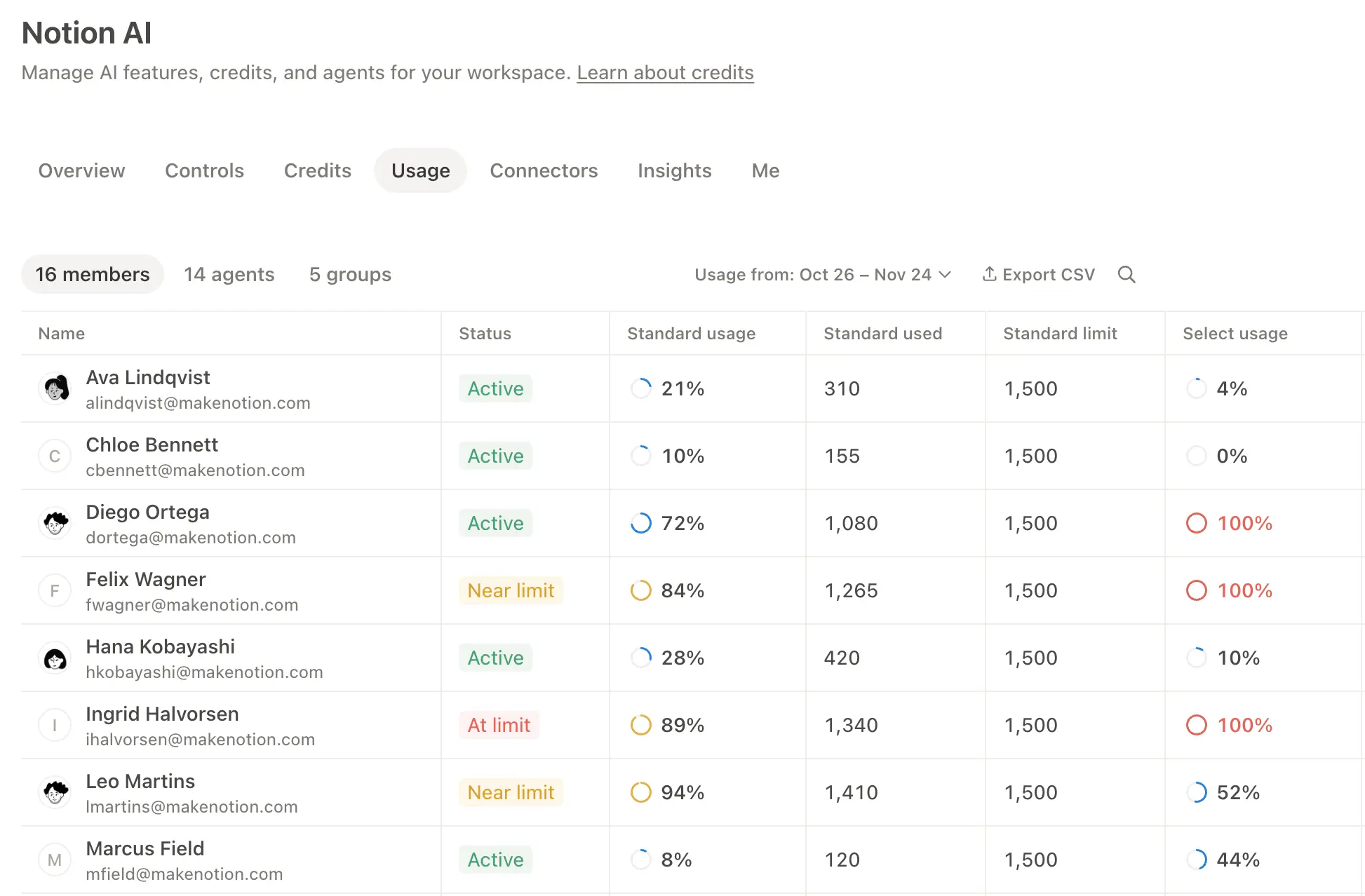
The Notion AI usage page gives you a clear view of how Custom Agents, Autofill, Workers, and high credit consumption models use Notion credits across the workspace. Use it to track usage, plan future credit needs, and manage ongoing spend. To access it, go to Settings → Notion AI → Usage.
Only owners on Business and Enterprise plans can access the Notion AI page. For a tour of each tab, see Notion AI settings overview →
This page breaks usage down by credit type (Standard, Select, and Notion) and shows usage by member, group, and agent. A member or agent that's close to its limit has a Near limit flag. You'll see a Credit requested flag when someone has asked for more.
Workspace owners can review and approve credit requests from Settings → Requests. Learn more in Review requests for Notion credits →
You can export this data as a CSV or pull it with the Admin API to bring it into your own reporting.
If you manage multiple workspaces, you’ll also have a Notion credits dashboard in your admin console where you can track credit pacing and usage across your organization.
Admins can monitor credit usage so spend stays predictable. Admins have several ways to manage credit pacing:
Visibility: Track usage and trends in the Notion usage page.
Guardrails: Decide who can create agents (and set limits). Set a credit limit for each member.
Control: Pause or switch off agents anytime to stop usage while you investigate or make changes. Turn high credit consumption models off for the workspace.
Optimize: Fine-tune agents to reduce extra steps and improve efficiency.
Use the Notion usage page to track usage over time and see which features are using the most credits. Notion also notifies admins when the workspace is approaching or has reached the credit limit, so admins have time to act.
When a member uses Notion credits beyond the allowance, their usage appears as an individual row on the usage page. Admins can see which users are spending credits past the limit and how much they've used.
High credit consumption models which spend credits show up the same way. When a member uses one of these, their usage will have a row here.
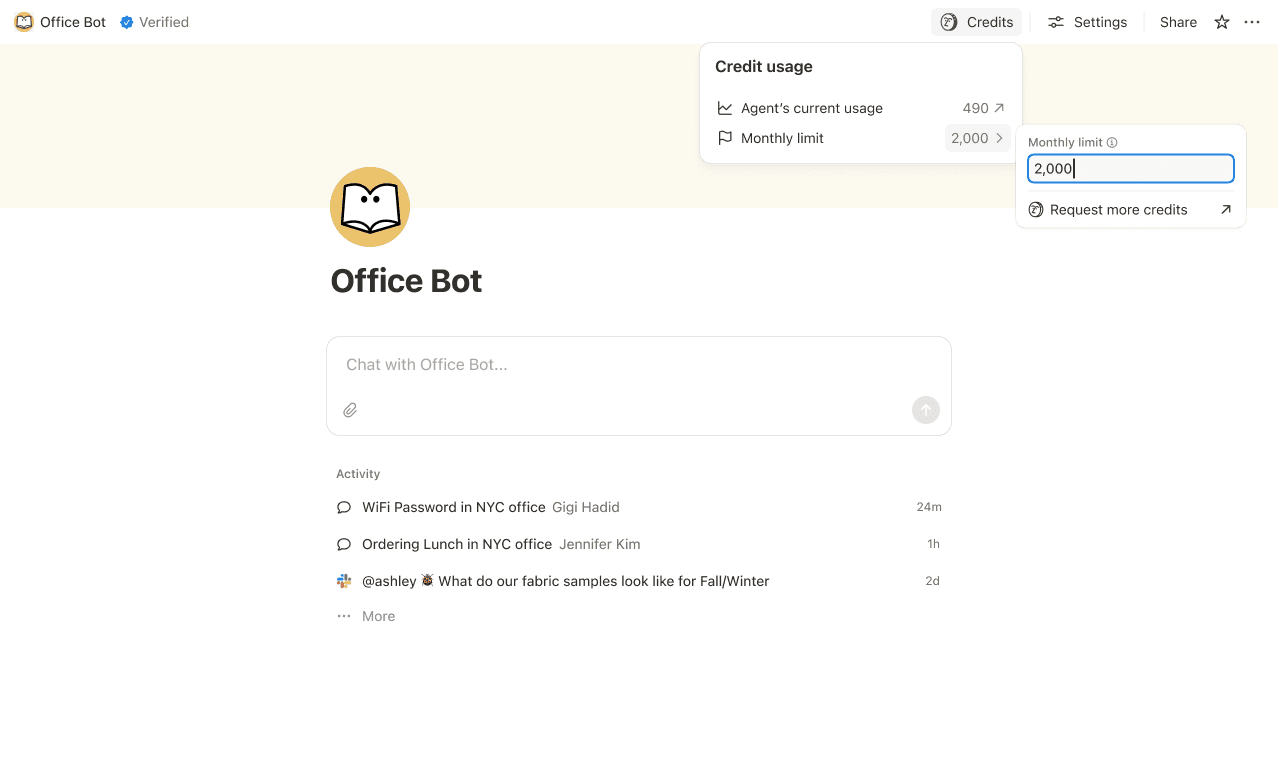
Set credit limits for individual Custom Agents so they pause when they hit a threshold. In some cases, an agent may go over the limit in order to complete an ongoing task. If a task is already running when it hits the cap, we let it finish before stopping new usage.
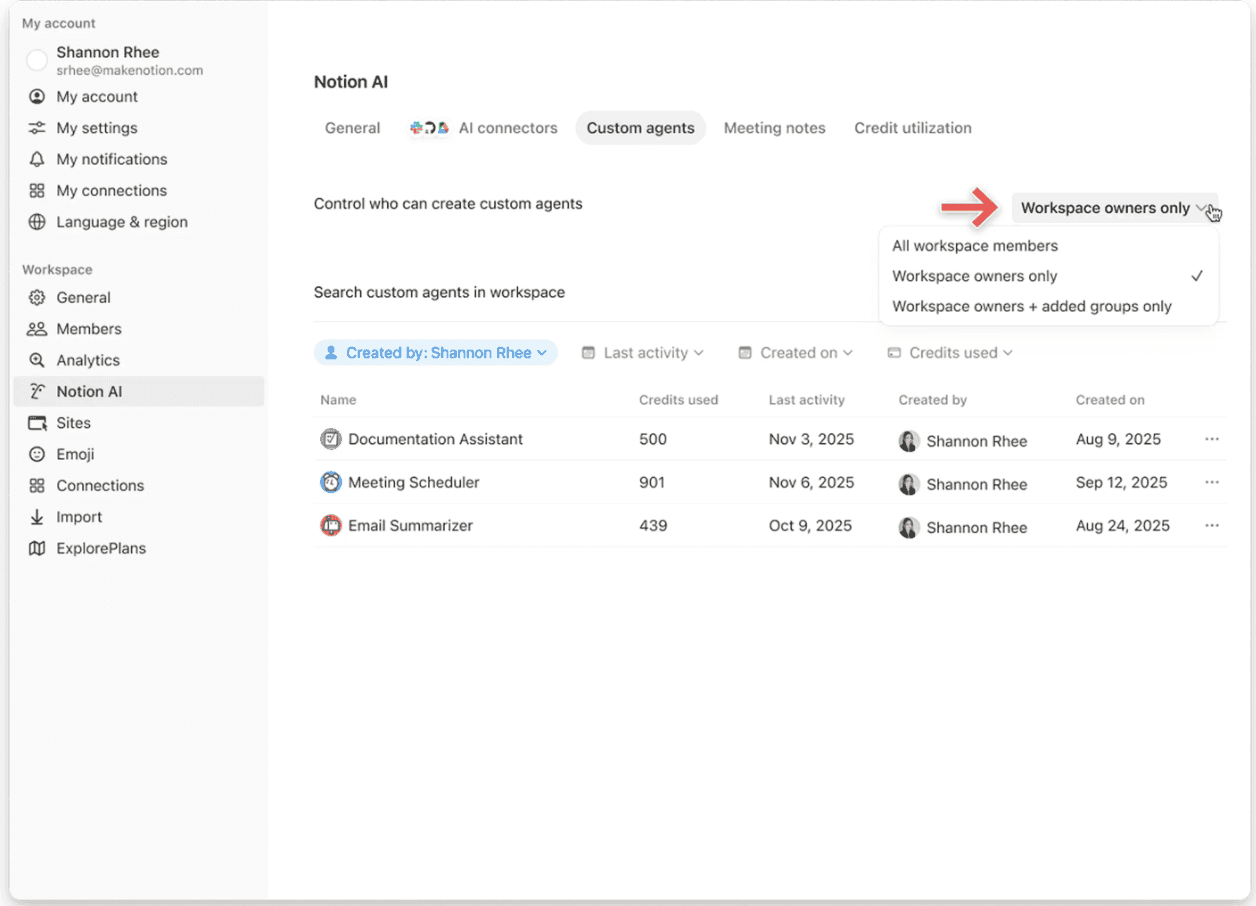
Control who can create Custom Agents (everyone, workspace owners only, selected members, or groups).
Pause or switch off a Custom Agent anytime to immediately stop credit usage while you review activity or adjust the agent. You can also switch the agent to a model that uses fewer credits. Learn more about workspace admin controls for Custom Agents →
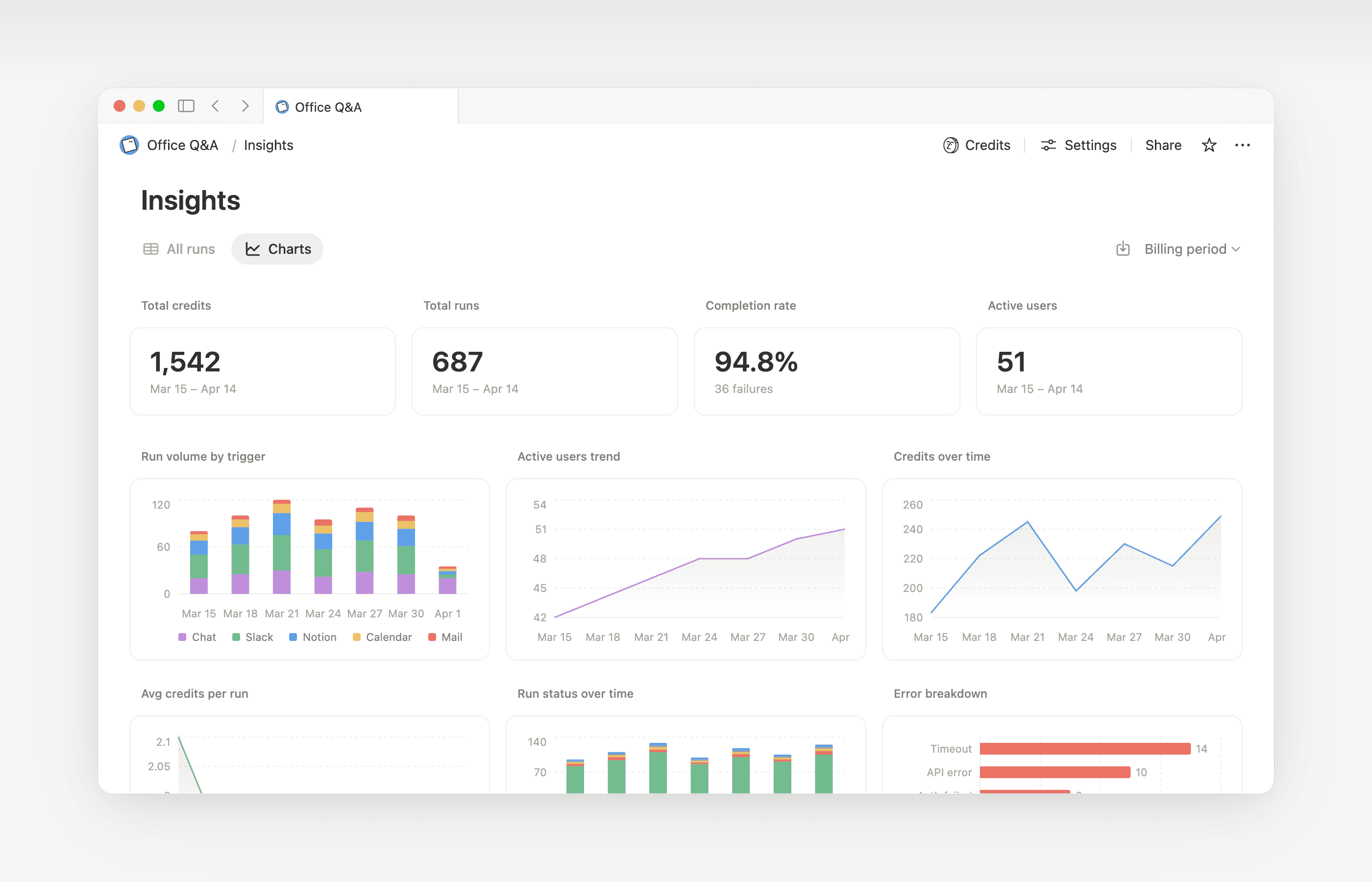
Insights helps Custom Agent creators and workspace admins understand activity so they can make targeted updates that improve performance. Use Insights to spot runs that take extra steps, fail and retry, or use a more expensive model than the job requires. Then, update the agent’s instructions or settings so it runs more efficiently.
Open Insights directly within an agent to:
Monitor your Custom Agent’s activity and credit usage.
Identify runs that are more expensive than expected.
Review what models, tools, and triggers were used.
Find and fix failed runs so your agent works more reliably.
Learn more about how to use Insights to reduce costs and improve a Custom Agent →
Workspace owners can decide whether members can use Notion credits after hitting the allowance. When this is turned off, members who use up their allowance must wait for the rolling or monthly window to refresh. Learn how to manage this setting →

Learn what Custom Agents are and how they work.
Learn how Custom Agents access information, how sharing works, and what admins can control: Custom Agents sharing and permissions →
See more best practices on optimizing Notion credits and efficiency for Custom Agents in an admin’s guide to getting started with Custom Agents →
FAQs
What happens if we run out of Notion credits?
What happens if we run out of Notion credits?
If your workspace doesn't have enough Notion credits, Custom Agents that run on shared workspace credits will pause automatically until credits reset or a workspace owner adds more credits. High credit consumption models pause too. A Custom Agent you set up for your own use keeps working until your Select credits are used up, then follows the same credit rules.
How do owners get notified before running out of Notion credits?
How do owners get notified before running out of Notion credits?
Owners receive in-app (and email) notifications when your workspace reaches 80% and 100% of its Notion credit usage, so you have time to adjust before agents pause.
How do I buy more Notion credits?
How do I buy more Notion credits?
Workspace owners can purchase Notion credits either in-product or through their account team. Learn more about Notion credits.
How do mid-month Notion credit changes work?
How do mid-month Notion credit changes work?
If you increase your credits in the middle of your monthly service period, the additional credits are available immediately for the current service period. You’ll be billed for the higher recurring credit amount at the start of your next monthly service date.
If you decrease your credits in the middle of your monthly service period, the lower amount takes effect at the start of the next service period. From then on, you’ll be billed for the lower recurring credit amount each month.
I work with an account team to purchase Notion credits. What happens if I upgrade, expand, or renew my Business or Enterprise plan, which includes Annual Notion Credits, in the middle of my billing interval?
I work with an account team to purchase Notion credits. What happens if I upgrade, expand, or renew my Business or Enterprise plan, which includes Annual Notion Credits, in the middle of my billing interval?
You'll get a prorated credit for the unused prepaid Annual Notion Credits equal to the lesser of:
The dollar amount of Annual Notion Credits remaining unused, or
The Annual Notion Credit fees prorated for the time remaining in the subscription term
This credit applies when a new Business or Enterprise order form replaces your current one before the end of its subscription term. Notion Credits have no cash value. Any credit applies toward the new plan.
Does Autofill use Notion credits?
Does Autofill use Notion credits?
Autofill has two options: Basic and Custom Agent.
Basic Autofill is included on Business and Enterprise plans, and does not use Notion credits.
Custom Agent Autofill uses Notion credits because it runs with Custom Agent capabilities (like using richer context and more advanced reasoning).
What happens to Custom Agents if I downgrade my plan?
What happens to Custom Agents if I downgrade my plan?
If you downgrade your Notion plan to Free or Plus, all existing Custom Agents are switched off, but not deleted. You can view (but not edit) the Custom Agent chat page and settings. Custom Agents can continue if you upgrade back to Business or Enterprise.
Can I purchase Notion credits if I manage my subscription through the App Store or Google Play?
Can I purchase Notion credits if I manage my subscription through the App Store or Google Play?
Not directly. If your Notion subscription is managed through a mobile app store (Apple App Store or Google Play), you won't be able to purchase Notion credits from within Notion.
To buy credits, you'll need to:
Cancel your mobile app store subscription.
Upgrade to a Notion plan directly on notion.com (Business or Enterprise, with AI included).
Once your new subscription is active, a workspace owner can purchase Notion credits from
Settings→Access & billing→Notion credits.
Make sure your new plan includes AI before purchasing credits. Notion credits are only available on Business and Enterprise plans.
Is there a limit to how many credits we can buy?
Is there a limit to how many credits we can buy?
No. Workspace owners can buy the amount of credits the workspace needs, including large amounts. If your payment method takes a few days to clear, your team can keep using credits up to the amount you set out to buy while the payment settles.
What happens to our Notion credits if a payment fails?
What happens to our Notion credits if a payment fails?
Your team keeps the Notion credits you've already paid for. Credits above that amount are put on hold until a workspace owner fixes the payment, and then they unlock automatically. A failed Notion credit payment doesn't affect your main Notion plan. Learn more about how Notion credit payments work →
How are Notion credits different from Standard and Select credits?
How are Notion credits different from Standard and Select credits?
Standard and Select credits are included with each Business or Enterprise seat. They’re separate per-member amounts that reset monthly and don’t roll over.
Notion credits are purchased by a workspace owner for the workspace. They cover eligible usage beyond Standard or Select credits when an owner allows it, plus high credit consumption models and Custom Agents funded by the workspace. Monthly Notion credits are a purchase option, not the Standard or Select credits included with your seat.