Notionクレジットダッシュボードでクレジット使用量を追跡する
Notionクレジットダッシュボードを使用して、利用状況の追跡、将来のクレジット必要量の計画、継続的な支出の管理を行う方法を学びます。
よくあるご質問(FAQ)に移動Notionクレジットダッシュボードでは、カスタムエージェント、自動入力、Workers、およびプレミアムAIモデルがワークスペース全体でどのようにNotionクレジットを使用しているかを明確に把握できます。これを使ってクレジット使用量を追跡し、今後のクレジット需要を計画し、継続的な支出を管理できます。アクセスするには、設定 → アクセスと請求 → Notionクレジットに移動します。
BusinessプランおよびEnterpriseプランの管理者は、ダッシュボードで利用状況を監視できます。カスタムエージェント作成者やWorker作成者も、ワークスペースレベルのNotionクレジット使用量を確認できます。テーブルには、そのユーザーが作成したカスタムエージェントまたはWorkerのみが表示されます。
ダッシュボードでは、次のことを確認できます。
リアルタイムのクレジット使用量。
毎月のサービス日までの予測使用量。
エージェントレベルの実行数とクレジット使用量が表示され、これにより支出の多いエージェントを特定して、必要に応じて調整できます。
利用許容量を超えてクレジットを使用しているワークスペースメンバー。
各メンバーがプレミアムモデルに消費するNotionクレジット。
アカウントチームから提供された体験版クレジット。これらは独自のカテゴリとして表示されるため、購入したクレジットとは別に追跡できます。
複数のワークスペースを管理している場合は、管理者コンソールからNotionクレジットダッシュボードにアクセスし、組織全体のNotionクレジット使用量と使用状況を追跡できます。
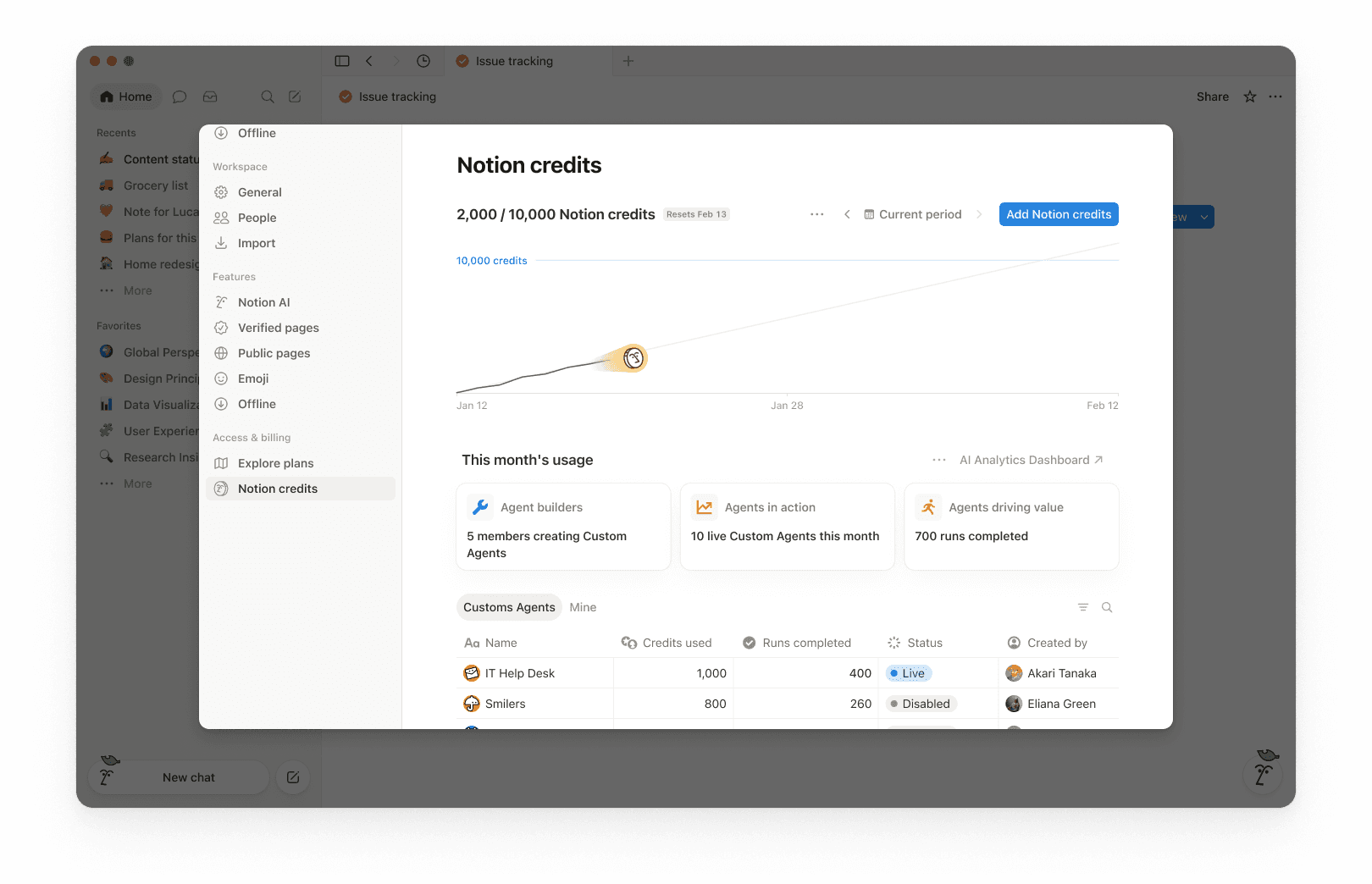
ダッシュボードの上部には、選択した期間に使用されたNotionクレジットの合計と、クレジットのリセット日が表示されます。選択した期間は、ワークスペースの請求サイクルに基づいています。
これにより、これまでの利用状況と、毎月の請求サイクルが終了するタイミングを簡単に把握できます。
右上にある期間セレクター(たとえば現在の期間)とナビゲーション矢印を使用して、過去の期間を確認します。
利用状況チャートには、時間の経過に伴うクレジットの利用状況が表示されます。
現在のクレジットは、これまでに実際に使用したクレジットを示します。
現在の利用パターンが続いた場合に、リセット日までにどの程度の利用量になるかを予測したプロジェクトです。この予測は情報提供のみを目的としており、実際の将来の利用状況とは異なる場合があります。
リセット前にクレジットが不足する可能性を確認するために使用します。
今月のクレジットポイント使用量には、次のような導入とアクティビティの指標が表示されます:
エージェントビルダー:カスタムエージェントを作成しているメンバーの数。
稼働中のエージェント:期間中に稼働しているカスタムエージェントの数。
完了した実行:ワークスペース全体でエージェントが完了したタスクの数。
利用状況テーブルはタブで構成されており、タイプ別にフィルターできます。
すべて: ワークスペース内のすべてのカスタムエージェント、自動入力、およびWorker。
カスタムエージェント: カスタムエージェントの支出のみ。
自動入力: 自動入力の支出のみ。
Workers: Workerの支出のみ。Workerには、ベータ期間中「Free」バッジが表示されます。
Mine: 作成したカスタムエージェントとWorkerのみ
各項目について、表には以下が表示されます。
利用済みNotionクレジットポイント
完了実行数
ステータス
作成者
メンバーの支出は個別の行に表示されます。これには、AI使用枠を超えて消費されたNotionクレジットや、プレミアムモデルに消費されたNotionクレジットが含まれるため、誰が使用しているかとその費用を確認できます。
デフォルトでは、Workerの支出はカスタムエージェントの支出とは別に追跡され、メインの利用状況チャートやNotionクレジットの合計には含まれません。Workerの支出をチャートと合計に含めるには、ダッシュボード上部の3点メニュー ••• を選択し、Workerの支出を含める をオンにします。
アカウントチームから組織に体験版クレジットが付与されている場合、その仕組みは以下の通りです。
体験版クレジットは、購入したクレジットとは別の独自のカテゴリとしてNotionクレジットダッシュボードに表示されます。組織がマルチワークスペース契約を結んでいる場合は、組織コンソールでも確認できます。
組織が体験版クレジットの80%を消費した時点と、体験版クレジットをすべて使い切った時点で、管理者にアラートが送信されます。
未使用の体験版クレジットは、体験版終了後に繰り越されません。
管理者はクレジット使用量を監視し、支出を予測可能な状態に保つことができます。管理者には、クレジットのペースを管理するためのいくつかの方法が用意されています。
可視性:Notionクレジットダッシュボードでクレジット使用量と使用傾向を追跡できます。
ガードレール: エージェントを作成できるユーザーを決定し(制限を設定)、各メンバーにNotionクレジットの制限を設定します。
コントロール: いつでもエージェントを一時停止またはオフにして、調査や変更を行っている間の利用を停止できます。ワークスペースのプレミアムモデルをオフにすることも可能です。
最適化:エージェントを微調整して、不要な手順を削減し、効率を向上させます。
Notionクレジットダッシュボードを使用して、時間の経過に伴う使用状況を追跡し、どの機能が最も多くのNotionクレジットを消費しているかを確認します。また、ワークスペースがクレジット制限に近づいた場合や制限に達した場合にNotionから管理者へ通知されるため、管理者はすぐに対処できます。
メンバーが使用許容量を超えてNotionクレジットを使用した場合、その使用状況はNotionクレジットダッシュボードに個別の行として表示されます。管理者は、どのユーザーが制限を超えてNotionクレジットを消費しているか、その消費量を確認できます。
Notionクレジットを消費するプレミアムモデルも同様に表示されます。メンバーがこれらのいずれかを使用すると、その利用状況がここに1行として表示されます。
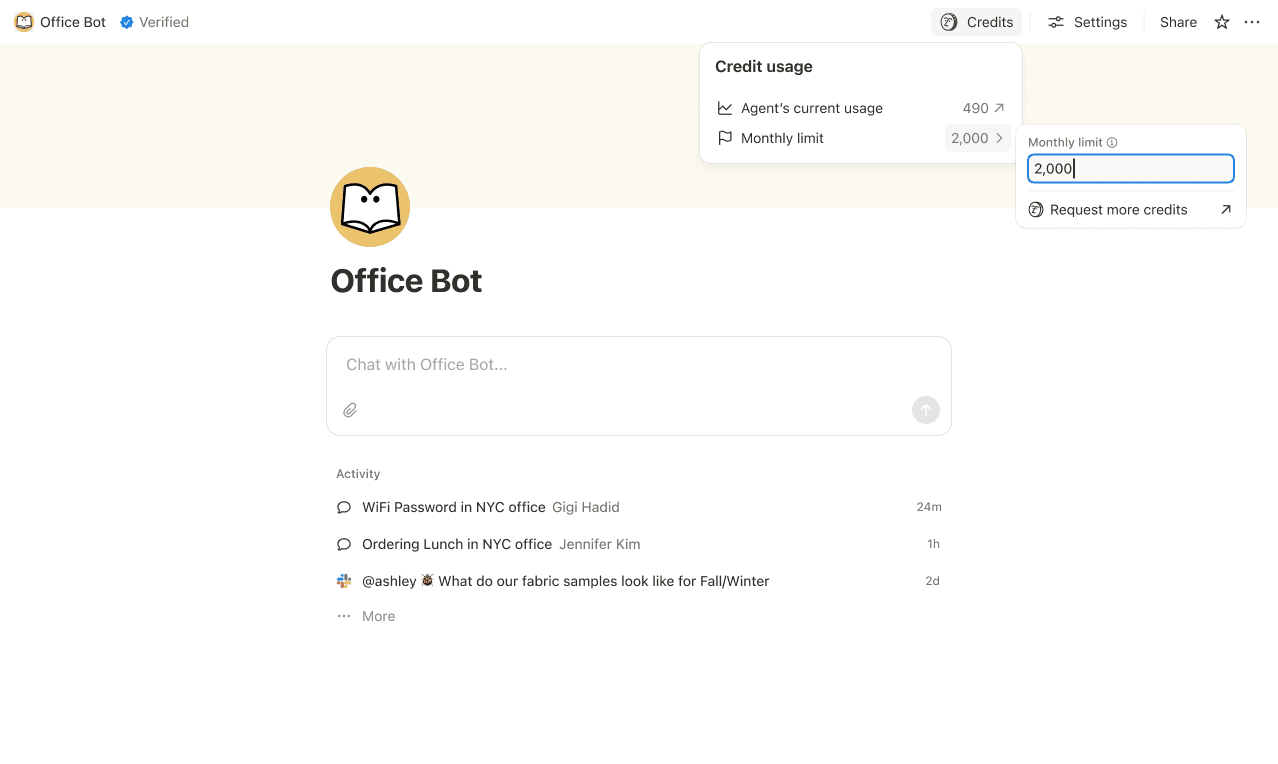
カスタムエージェントごとにNotionクレジットの制限を設定し、しきい値に達したときには自動的に一時停止するようにします。場合によっては、進行中のタスクを完了するためにエージェントが制限を超えることもありますが、タスクが実行中の場合は、新たな使用を停止する前にその完了を許可します。
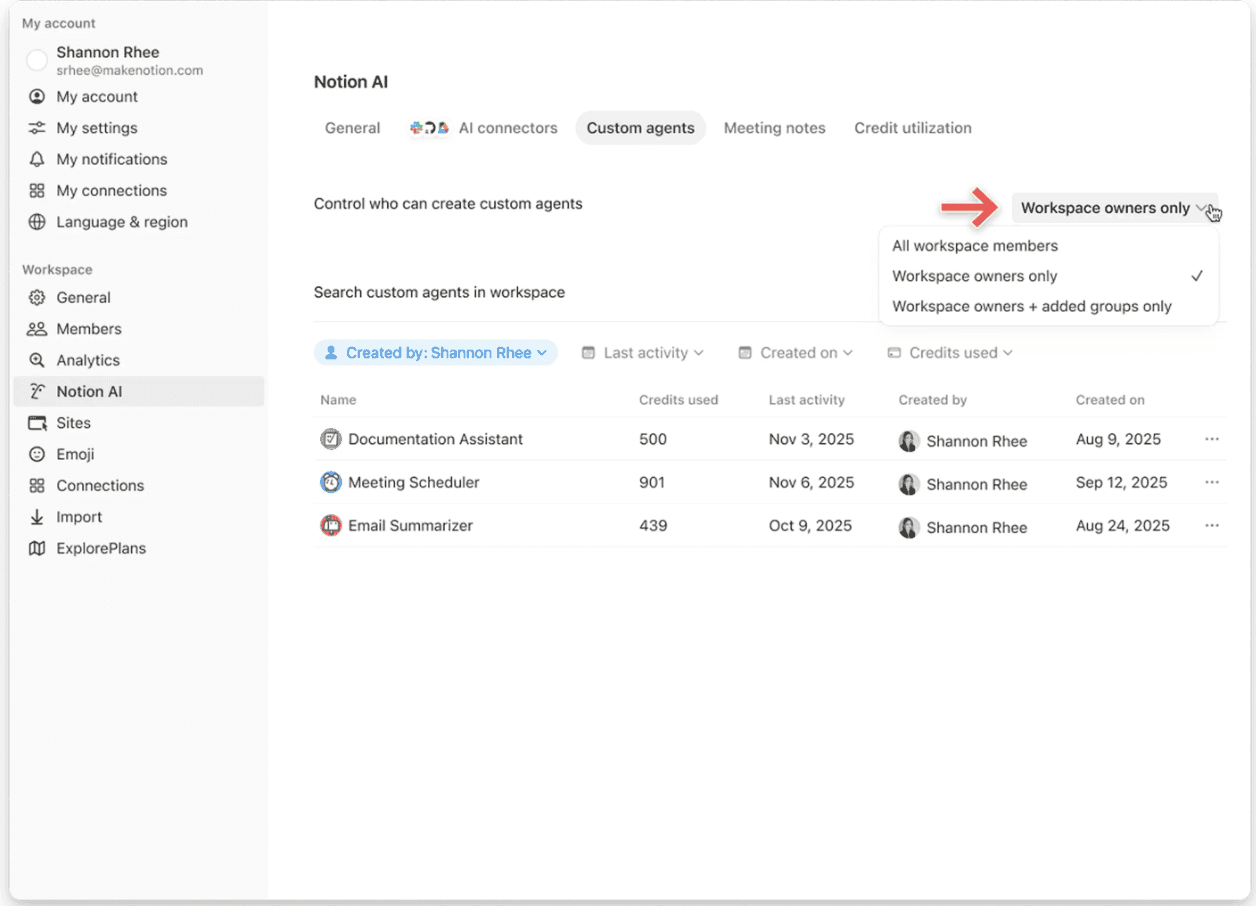
カスタムエージェントを作成できるユーザーを、「全員」「ワークスペースオーナーのみ」「特定のメンバー」のいずれかに限定して設定します。
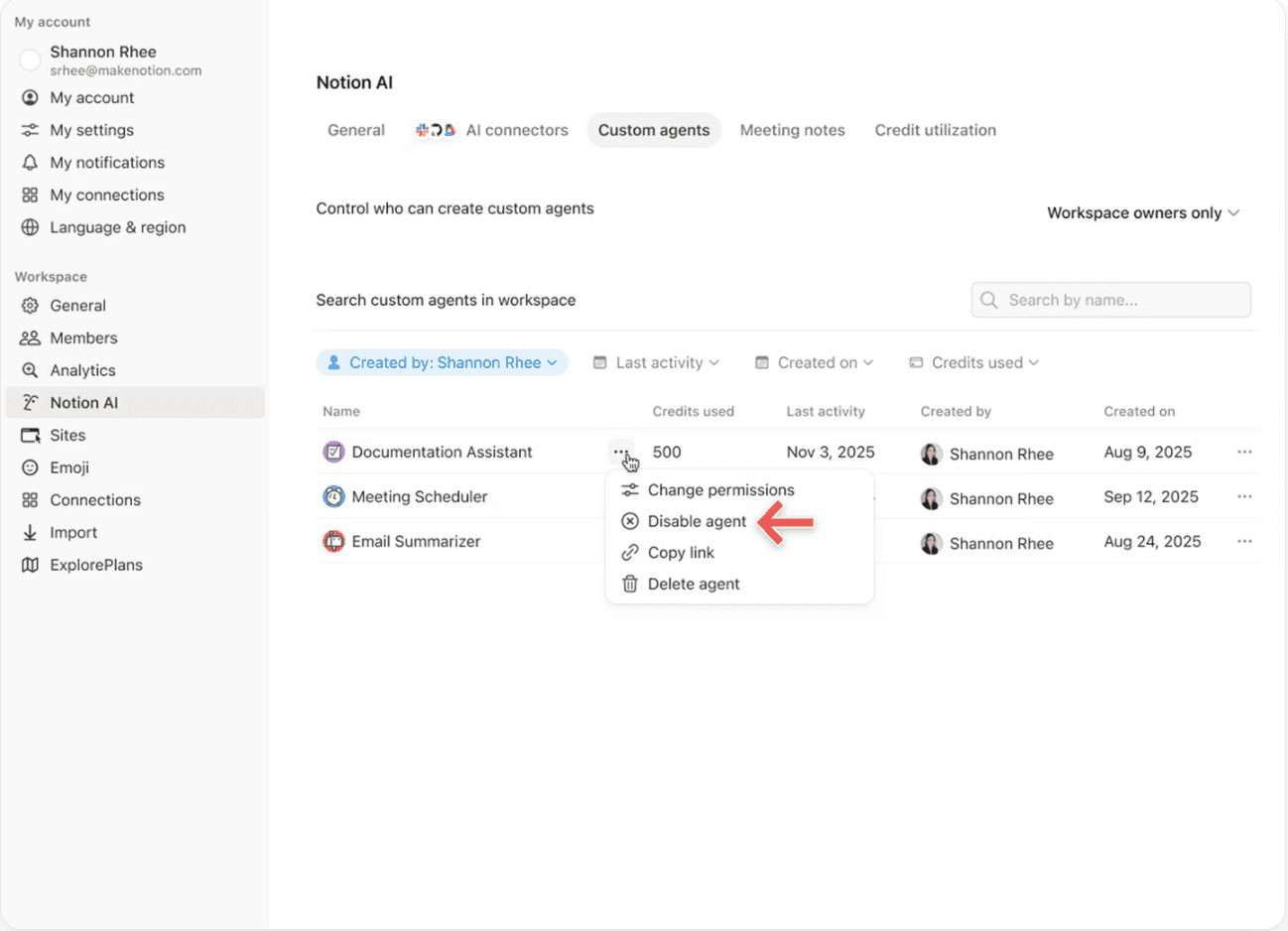
アクティビティの確認中またはエージェントの調整中は、いつでもカスタムエージェントを一時停止またはオフにして、その場でクレジットの使用を停止できます。
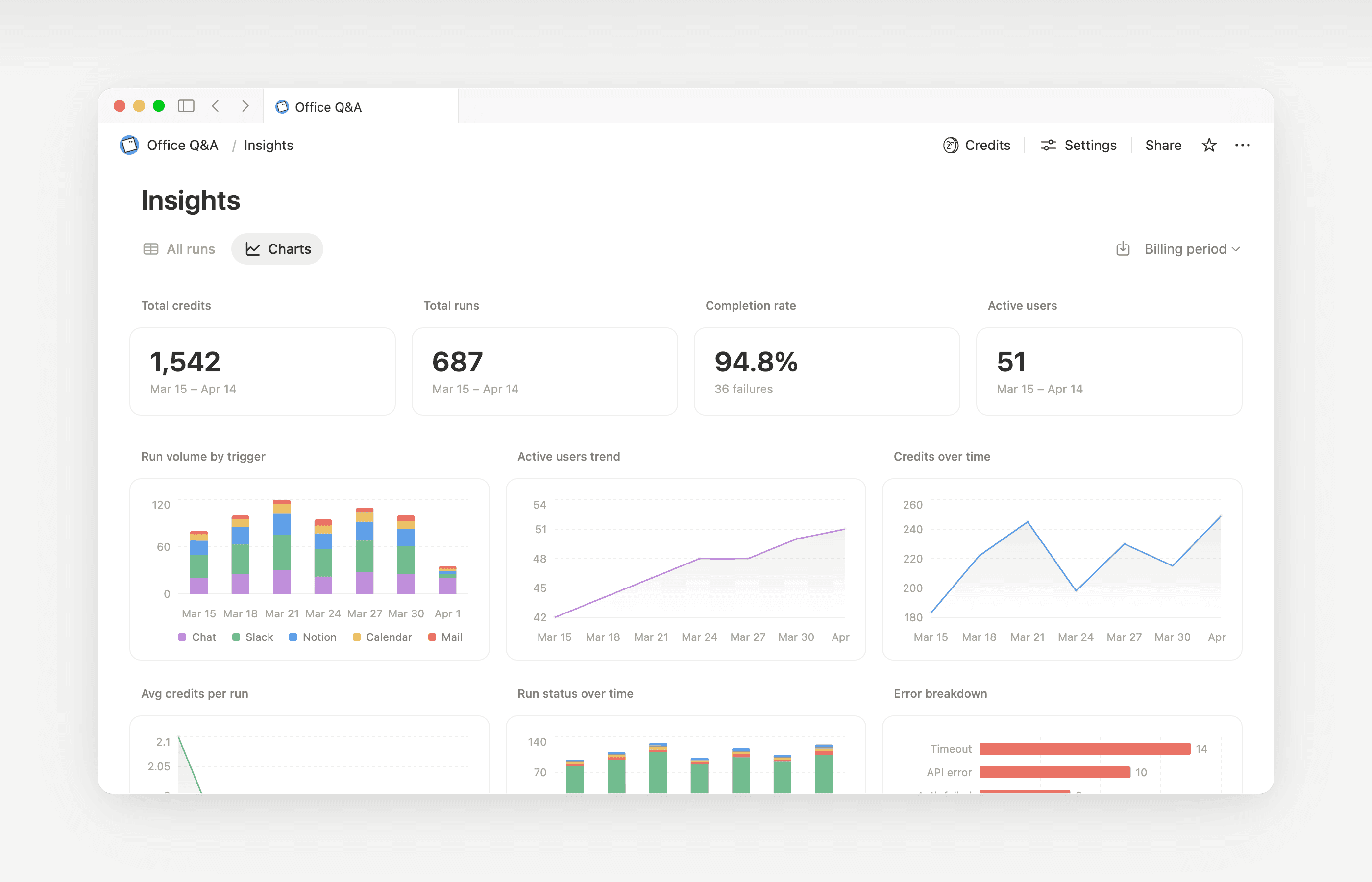
インサイトは、カスタムエージェントのクリエイターやワークスペース管理者がアクティビティを把握し、パフォーマンスを向上させるための的を絞った更新を行うのに役立ちます。インサイトを使用して、余分なステップを要する実行、失敗して再試行する実行、またはジョブが必要とするよりも高価なモデルを使用している実行を特定します。その後、エージェントの指示や設定を更新して、より効率的に実行されるようにします。
エージェントの設定メニューからインサイトを開くと、次のことを行えます。
カスタムエージェントのアクティビティとNotionクレジット使用量を監視する。
予想以上にコストが嵩んでいる実行を特定する。
どのモデル、ツール、トリガーが使用されたかを確認する。
エラーが発生した実行を特定、修正することで、エージェントの働きを安定させる。
インサイトを使用してコストを削減し、カスタムエージェントのパフォーマンスを改善する方法について詳しくはこちら。→
ワークスペースのオーナーは、メンバーが使用許容量に達した後もNotionクレジットを使用できるかどうかを決定できます。この設定がオフの場合、許容量を使い切ったメンバーは、ローリング期間または月次の更新期間がリセットされるまで待つ必要があります。この設定の管理方法について詳しくはこちら →

カスタムエージェントの概要と仕組みを学びます。
カスタムエージェントによる情報へのアクセス方法、共有の仕組み、管理者が操作できる項目について、詳しくはこちら:カスタムエージェントの共有と権限 →
カスタムエージェントにおけるNotionクレジットの最適化と効率向上のためのベストプラクティスについては、管理者向けカスタムエージェント入門ガイド →をご確認ください。
よくあるご質問(FAQ)
Notionクレジットポイントを使い切った後はどうなりますか?
Notionクレジットポイントを使い切った後はどうなりますか?
ワークスペース内のNotionクレジットが不足すると、カスタムエージェントは自動的に一時停止します。クレジットがリセットされるか、管理者がクレジットを追加するまで、再開されません。プレミアムモデルも同様に一時停止します。
Notionクレジットを使い切る前に、管理者にはどのような通知が届きますか?
Notionクレジットを使い切る前に、管理者にはどのような通知が届きますか?
ワークスペースのNotionクレジット使用量が80%および100%に達した時点で、管理者にアプリ内通知(およびメール)が届きます。これにより、エージェントが自動停止してしまう前に、使用量を調整することが可能です。
Notionクレジットを追加購入する方法は?
Notionクレジットを追加購入する方法は?
管理者は、Notionクレジットを製品内またはアカウントチームを通じて購入できます。詳しくはNotionクレジットの購入方法をご覧ください。
月途中のNotionクレジットの変更はどのように処理されますか?
月途中のNotionクレジットの変更はどのように処理されますか?
月額サービス期間の途中でクレジットを増やした場合、追加分は現在のサービス期間ですぐに利用可能になります。次回の月額サービス開始日に、増額された定期クレジット料金が請求されます。
月額サービス期間の途中でクレジットを減らした場合、減額分は次回のサービス期間開始時に適用されます。それ以降は、毎月、減額された定期クレジット料金が請求されます。
アカウントチームと連携してNotionクレジットを購入しています。年間Notionクレジットが含まれるビジネスプランまたはエンタープライズプランのアップグレード、拡張、または更新を、請求期間の途中で行った場合はどうなりますか?
アカウントチームと連携してNotionクレジットを購入しています。年間Notionクレジットが含まれるビジネスプランまたはエンタープライズプランのアップグレード、拡張、または更新を、請求期間の途中で行った場合はどうなりますか?
未使用の前払い年間Notionクレジットに対して、次のいずれか少ない金額に相当する日割り計算されたクレジットが付与されます。
未使用の年間Notionクレジットの金額(米ドル)、または
サブスクリプション期間の残りの期間に対して日割り計算された年間Notionクレジットの料金
このクレジットは、現在のサブスクリプション期間が終了する前に、新しいビジネスプランまたはエンタープライズプランの注文書が現在の注文書に取って代わる場合に適用されます。Notionクレジットに現金価値はありません。すべてのクレジットは新しいプランに適用されます。
自動入力はNotionクレジットを消費しますか?
自動入力はNotionクレジットを消費しますか?
自動入力には、ベーシックとカスタムエージェントの2つのオプションがあります。
ベーシック自動入力はビジネスプランとエンタープライズプランに含まれており、Notionクレジットは消費されません。
カスタムエージェント自動入力では、カスタムエージェントの機能(より豊富なコンテキストの活用やより高度な推論など)を使用して実行されるため、Notionクレジットが消費されます。
プランをダウングレードすると、カスタムエージェントはどうなりますか?
プランをダウングレードすると、カスタムエージェントはどうなりますか?
Notionプランをフリープランまたはプラスプランにダウングレードした場合、既存のカスタムエージェントはすべてオフになりますが、削除はされません。カスタムエージェントのチャットページと設定を表示することはできますが、編集はできません。ビジネスプランまたはエンタープライズプランに再度アップグレードすれば、カスタムエージェントを継続して利用できます。
App StoreまたはGoogle Playでサブスクリプションを管理している場合、Notionクレジットを購入できますか?
App StoreまたはGoogle Playでサブスクリプションを管理している場合、Notionクレジットを購入できますか?
直接はできません。Notionサブスクリプションがモバイルアプリストア(Apple App StoreまたはGoogle Play)を通じて管理されている場合、Notion内からNotionクレジットを購入することはできません。
クレジットを購入するには、次の手順に従ってください。
モバイルアプリストアのサブスクリプションをキャンセルします。
notion.comで直接、Notionプラン(AIが含まれるビジネスプランまたはエンタープライズプラン)にアップグレードします。
新しいサブスクリプションが有効になると、管理者は
設定→アクセスと請求→NotionクレジットからNotionクレジットを購入できます。
クレジットを購入する前に、新しいプランにAIが含まれていることを確認してください。Notionクレジットは、ビジネスプランおよびエンタープライズプランでのみ利用可能です。
購入できるクレジット数に上限はありますか?
購入できるクレジット数に上限はありますか?
いいえ。ワークスペースが必要とする量のクレジットを購入できます(大量購入も可能です)。支払い方法によって決済に数日かかる場合でも、チームは購入予定の金額分までクレジットを引き続き使用できるようになります。
支払いに失敗した場合、Notionクレジットはどうなりますか?
支払いに失敗した場合、Notionクレジットはどうなりますか?
チームはすでに支払い済みのNotionクレジットを保持します。支払い金額を超えるクレジットは、管理者が支払いを修正するまで確保され、修正完了後は自動的に利用可能となります。Notionクレジットの支払いに失敗しても、メインのNotionプランには影響しません。詳しくはNotionクレジットの支払いの仕組み →をご覧ください。