• Notion-KIKI-Tools für die Arbeit
  • AgentenAutomatisiere Routineaufgaben
  • Smart NotesPerfekt geschrieben von der KI
  • Enterprise SucheFinde Antworten in Sekundenschnelle
  • WissensdatenbankBündle dein Wissen
  • DokumenteEinfach und leistungsstark
  • ProjekteVerwalte jede Art von Projekt
  • VerbindungenVerbinde deine Apps
  • SicherheitSicher und skalierbar
  • Notion CalendarEs wird Zeit
. Das ist neu→
Lade die Notion-App herunter→
  • KI-Funktionen
  • Notion-KIKI-Tools für die Arbeit
  • AgentenAutomatisiere Routineaufgaben
  • Smart NotesPerfekt geschrieben von der KI
  • Enterprise SucheFinde Antworten in Sekundenschnelle
  • KI-Anwendungsfälle entdecken
  • Für die Arbeit
  • Für das Leben
  • Notion für
  • Konzerne
  • Kleine Unternehmen
  • Start-ups
  • Entwickler/-innen
  • Entdecken
  • Neue Funktionen
  • Erfahrungsberichte von Kund/-innen
  • Webinare
  • Vorlagen
  • Beratung
  • Lernen
  • Academy
  • Produkt-Touren
  • Hilfe-Center
TarifeDemo anfordern
AnmeldenNutze Notion kostenlos
  • Hilfe-Center
      • Notion-Grundlagen
      • Navigation in der Seitenleiste
      • Workspace-Einstellungen
      • Einstellungen und Präferenzen
      • Seiten und Blöcke
      • Datenbanken
      • Datenbankansichten
      • Freigabe und Berechtigungen
      • Notion Sites
      • Import und Export deiner Daten
      • Verbindungen
      • Automatisierungen
      • Notion-KI
      • Notion-KI Connect
      • Personalisierte Agenten
      • Externe Agenten
      • Verwalte deinen Workspace
      • Datenschutz und Sicherheit
      • Notion-KI-Sicherheit
      • Notion auf dem Desktop, im Web und auf Mobilgeräten
      • Notion Calendar
      • Marketplace und Vorlagen
      • Notion-Guthaben
      • Pläne und Abrechnung
      • Problem beheben
      • Entwicklertools erkunden
  • Lass dich zertifizieren
  • Notion Academy
  • Support
  • Werde Teil unserer Community
  • Die passende Beratung finden
  1. Hilfe-Center
  2. Unternehmensweite Nutzung
  1. ← Unternehmensweite Nutzung

Unternehmensweite Nutzung

Anleitung

Building a comprehensive team notes & docs database

Building a comprehensive team notes & docs database
Anleitung

Reminders & @mentions

Reminders & @mentions
Anleitung

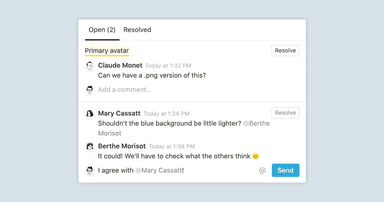
Comments & discussions

Comments & discussions
Anleitung

Creating a knowledge hub by organizing docs for large teams

Creating a knowledge hub by organizing docs for large teams
Anleitung

Mit Aufgaben-Datenbank finden deine To-dos ihr Zuhause

Mit Aufgaben-Datenbank finden deine To-dos ihr Zuhause
Anleitung

How workspace owners can set up teamspaces for their organization

How workspace owners can set up teamspaces for their organization
Anleitung

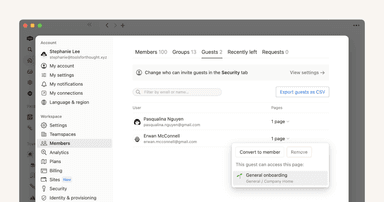
Wer sollte ein Workspace-Mitglied sein und wer sollte ein Gast sein?

Wer sollte ein Workspace-Mitglied sein und wer sollte ein Gast sein?
Anleitung

Creating links & backlinks

Creating links & backlinks
Anleitung

Creating a page

Creating a page
Anleitung

Block basics: build the foundation for your team’s pages

Block basics: build the foundation for your team’s pages
Anleitung

Organize, connect, and scale your Notion knowledge management system

Organize, connect, and scale your Notion knowledge management system
Anleitung

When to use each type of database view

When to use each type of database view
Anleitung

Getting started with templates for your team

Getting started with templates for your team
Anleitung

Nutze die API, um deine Tools mit Notion zu verbinden

Nutze die API, um deine Tools mit Notion zu verbinden
Anleitung

Best practices for internal communications on Notion

Best practices for internal communications on Notion
Anleitung

Use Asana link previews to keep your teams on the same page

Use Asana link previews to keep your teams on the same page
Anleitung

Writing & editing basics

Writing & editing basics
Anleitung

How teams can use comments for better collaboration

How teams can use comments for better collaboration
Anleitung

The best way to set up your team’s sidebar for clear organization

The best way to set up your team’s sidebar for clear organization
Anleitung

What is Notion?

What is Notion?
Anleitung

How to set up your Notion workspace for your team

How to set up your Notion workspace for your team
Anleitung

Assign custom database permissions to make your life easier

Assign custom database permissions to make your life easier
Anleitung

Grant the right level of access with teamspaces and groups

Grant the right level of access with teamspaces and groups
Anleitung

Navigating with the sidebar

Navigating with the sidebar
Anleitung

Create and use an upvote formula for team decisions

Create and use an upvote formula for team decisions
Anleitung

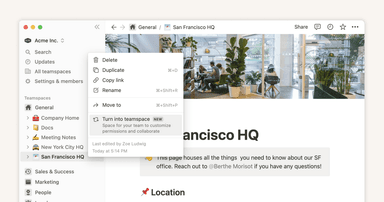
How to use and customize the sidebar with teamspaces

How to use and customize the sidebar with teamspaces
Wir formen unsere Werkzeuge,
und danach formen unsere Werkzeuge uns.
Marshall McLuhan
  • Produkt
  • Funktionen
  • Neue Funktionen
  • Notion-KI
  • Tarife
  • Demo anfordern
  • Download
  • Mehr entdecken→
  • Ressourcen
  • Erfahrungsberichte von Kund/-innen
  • Verbindungen
  • Marketplace
  • Hilfe-Center
  • Academy
  • Community
  • Unternehmen
  • Über uns
  • Karriere
  • Sicherheit
  • Status
  • Nutzungsbedingungen und Datenschutz
  • Deine Datenschutzrechte
  • Notion für
  • Unternehmen
  • Kleine Unternehmen
  • Start-ups
  • Entwickler/-innen
  • Mehr entdecken→
  • English (US)
  • Bahasa Indonesia
  • Dansk
  • Deutsch
  • English (UK)
  • Español (España)
  • Español (Latinoamérica)
  • Français (France)
  • Italiano
  • Nederlands
  • Norsk
  • Português (Brasil)
  • Suomi
  • Svenska
  • Tiếng Việt
  • עברית
  • العربية
  • ภาษาไทย
  • 한국어
  • 日本語
  • 简体中文
  • 繁體中文

© 2026 Notion Labs, Inc.