Paramètres et préférences du compte
Il y a une multitude de paramètres et de préférences de compte à ajuster dans Notion.
Aller directement aux questions fréquentesPour modifier votre photo de profil, vous devez utiliser accéder à Notion via l’application de bureau ou le Web et suivre les étapes suivantes :
Dans la barre latérale, sélectionnez la flèche vers le bas à côté du nom de l’espace de travail pour accéder à
Paramètres. Sélectionnez ensuite{your name}.Sélectionnez votre photo actuelle ou vos initiales au-dessus de l’option
Ajouter une photo.Choisissez le fichier que vous souhaitez utiliser à partir de votre appareil et cliquez sur
Ouvrir.
Pour modifier votre nom dans dans Notion :
Dans la barre latérale, sélectionnez la flèche vers le bas à côté du nom de l’espace de travail pour accéder à
Paramètres→{your name}.Sous
Nom, saisissez le nom que vous souhaitez utiliser.
Votre adresse e-mail principale est celle à laquelle les notifications de compte sont envoyées par défaut. Vous pouvez associer jusqu’à 5 adresses e-mail à un seul compte Notion.
Pour modifier votre adresse e-mail principale :
Dans la barre latérale, sélectionnez la flèche vers le bas à côté du nom de l’espace de travail pour accéder à
Paramètres→{your name}.Sous
Sécurité du compte, cliquez surGérer les adresses e-mails.Cliquez sur
Ajouter une adresse e-mailet saisissez la nouvelle adresse que vous souhaitez utiliser.Un code de vérification sera envoyé à la nouvelle adresse. Saisissez-le dans Notion pour la vérifier.
Après la vérification, cliquez sur le menu
•••à côté de la nouvelle adresse e-mail et sélectionnezDéfinir comme adresse principale.Si vous le souhaitez, vous pouvez supprimer votre ancienne adresse e-mail en cliquant sur le menu
•••à côté de celle-ci et en sélectionnantSupprimer.
Grâce aux adresses e-mail secondaires, vous pouvez désormais associer plusieurs adresses e-mail à votre compte Notion. Toute adresse secondaire vérifiée peut être utilisée pour se connecter, recevoir des partages et être mentionné(e) — le tout pointant vers la même identité de compte.
Si l’adresse e-mail de votre choix est déjà associée à un autre compte Notion :
Vous devrez d’abord supprimer ce compte avant d’ajouter l’adresse e-mail en tant qu’adresse secondaire. Connectez-vous à l’autre compte, accédez à Paramètres → {your name} → Supprimer mon compte, puis revenez à votre compte principal et ajoutez l’adresse e-mail en tant qu’adresse secondaire.
Pour les utilisateur·rices Enterprise :
La possibilité de gérer vos propres adresses e-mail secondaires dépend de la politique de votre organisation. Votre administrateur peut avoir défini les adresses secondaires sur : Désactivé (non autorisé), Domaines vérifiés uniquement (seules les adresses e-mail correspondant aux domaines vérifiés de votre entreprise) ou Activé (n’importe quelle adresse e-mail). Contactez l’administrateur de votre espace de travail si vous ne parvenez pas à ajouter une adresse secondaire.
J’aimerais modifier mon adresse e‑mail, mais j’ai eu un message d’erreur « Cette adresse e‑mail est déjà utilisée ».
Si vous souhaitez remplacer l’adresse e-mail de votre compte par une adresse déjà associée à un autre compte Notion, vous devrez d’abord supprimer ce compte avant de pouvoir ajouter l’adresse e-mail en tant qu’adresse secondaire. Pour ce faire :
Connectez-vous au compte associé à l’adresse e-mail souhaitée, puis accédez aux
Paramètres→{your name}→Supprimer mon compte.Ensuite, revenez à votre compte principal et ajoutez l’adresse e-mail en tant qu’adresse secondaire.
Est-ce que je peux avoir plusieurs adresses e‑mail sur mon compte Notion ?
Oui, c’est possible. Consultez la section Adresses e‑mail secondaires pour en savoir plus sur l’utilisation de plusieurs adresses e-mail pour votre compte Notion.

Si un message d’erreur indique que votre nouvelle adresse e‑mail est déjà utilisée avec un autre compte, vous devez d’abord supprimer le compte associé à cette adresse, puis réessayer.
Si vous souhaitez vous connecter à Notion en utilisant un mot de passe permanent au lieu de codes de connexion temporaires :
Dans la barre latérale, sélectionnez la flèche vers le bas à côté du nom de l’espace de travail pour accéder à
Paramètres→{your name}.Sélectionnez
Définir un mot de passe.Saisissez un mot de passe qui répond aux exigences de sécurité et confirmez-le :
Doit comporter au moins 8 caractères.
Doit inclure au moins 4 caractères uniques.
Si le mot de passe comporte entre 8 et 14 caractères, il doit inclure au moins une lettre et un chiffre. Si le mot de passe comporte 15 caractères ou plus, cette exigence est supprimée.
Les caractères spéciaux sont autorisés, mais pas obligatoires.
Si vous souhaitez modifier ou supprimer votre mot de passe :
Dans la barre latérale, sélectionnez la flèche vers le bas à côté du nom de l’espace de travail pour accéder à
Paramètres→{your name}.Sélectionnez
Modifier le mot de passe.Saisissez un nouveau mot de passe et sélectionnez
Modifier le mot de passe, ou cliquez surSupprimer le mot de passe.

Remarque : ne divulguez votre mot de passe à personne, pas même au service client de Notion ! Si une personne prétendant représenter « le service client de Notion » vous demande votre mot de passe, il ne s’agit pas nous.
Tous les mots de passe sont chiffrés sur nos serveurs, nous n’avons accès à aucun d’entre eux.
Réinitialiser votre mot de passe
Si vous avez oublié votre mot de passe, suivez les instructions pour le réinitialiser ici →
En savoir plus sur la vérification en deux étapes ici →
En savoir plus sur les clés d’accès ici →

Pour en savoir plus sur les méthodes de connexion et de déconnexion de Notion, consultez cet article →
En savoir plus sur la suppression de votre compte ici →
En savoir plus sur la déconnexion de tous vos appareils ici →
Pour personnaliser l’apparence de Notion sur le bureau :
Dans la barre latérale, sélectionnez la flèche vers le bas à côté du nom de l’espace de travail pour accéder à
Paramètres→Préférences.Ouvrez la liste déroulante à côté d’
Apparenceet sélectionnez l’une des options suivantes :Utiliser les paramètres du systèmepour utiliser le réglage défini au niveau de votre système.Clairpour utiliser le mode clair.Sombrepour utiliser le mode sombre.
Vous pouvez également activer ou désactiver le mode sombre à tout moment avec le raccourci
Cmd/Ctrl+Maj+L.
Pour personnaliser l’apparence de Notion sur mobile :
Appuyez sur l’icône
•••en haut à droite pour ouvrir la barre latérale.Appuyez sur
Paramètreset faites défiler la page jusqu’à la sectionApparence.Ouvrez la liste déroulante et sélectionnez l’une des options suivantes :
Utiliser les paramètres du systèmepour utiliser le réglage défini au niveau de votre système.Clairpour utiliser le mode clair.Sombrepour utiliser le mode sombre.
Remarque : lorsque vous passez en mode sombre, cela s’applique à tous les espaces de travail auxquels vous êtes connecté·e sur votre compte. Si vous passez de l’un à l’autre, ils seront tous en mode sombre.
Remarque: le mode contraste élevé est actuellement en bêta et est soumis aux conditions bêta de votre contrat.
Le mode contraste élevé augmente le contraste du texte, des icônes et des bordures pour une meilleure visibilité. Il fonctionne indépendamment de votre paramètre d’apparence.
Le mode contraste élevé est actuellement disponible uniquement sur les versions bureau et web de Notion.
Dans la barre latérale, sélectionnez la flèche vers le bas à côté du nom de l’espace de travail pour accéder à
Paramètres→Préférences.Ouvrez la liste déroulante à côté de
Contraste élevéet sélectionnez l’une des options suivantes :Utiliser les paramètres systèmepour suivre le réglage de contraste de votre appareil.Contraste
Standardpour l’apparence par défaut de Notion.Contraste élevépour un contraste accru sur le texte, les icônes et les bordures.
Remarque : Ce paramètre est enregistré par appareil. Le choisir sur un appareil ne mettra pas à jour ce paramètre sur vos autres appareils.
Si vous êtes sur le Web et vous souhaitez que les liens vers les pages Notion s’ouvrent dans votre application de bureau :
Dans la barre latérale, sélectionnez la flèche vers le bas à côté du nom de l’espace de travail pour accéder à
Paramètres→Préférences.Activer
Ouvrir les liens dans l’application de bureau.
Il vous faudra avoir déjà installé l’application desktop. Vous devrez également accéder à Notion dans votre application desktop et vous assurer que l’option Ouvrir les liens dans le navigateur est désactivée dans vos paramètres.
Si les liens Notion ne s’ouvrent pas automatiquement dans l’application de bureau
Si les liens vers les pages Notion ne s’ouvrent pas automatiquement dans l’application de bureau, essayez de suivre ces étapes :
Ouvrez le lien dans votre navigateur.
Cliquez sur
•••en haut à droite de la page. Faites défiler le menu qui s’affiche jusqu’en bas et cliquez sur
Ouvrir dans l’application macOS
Pour changer la langue d’affichage :
Cliquez sur
Paramètresdans la barre latérale →Préférences.Sous
Langue et heure, ouvrez la liste déroulante à côté deLangue.Sélectionnez votre langue.
Remarque : sur mobile, la langue de votre application Notion correspond à celle de votre appareil (que vous pouvez modifier dans ses préférences système).
En fonction de votre région, les calendriers dans Notion seront configurés par défaut pour commencer le dimanche ou le lundi. Cela s’applique également aux sélecteurs de dates dans les rappels et aux bases de données. Si vous préférez, vous pouvez modifier ce paramètre manuellement. Pour ce faire :
Dans la barre latérale, sélectionnez la flèche vers le bas à côté du nom de l’espace de travail pour accéder à
Paramètres→Préférences.Sous
Langue et heure, activez ou désactivez l’optionCommencer la semaine le lundi.
Pour changer de fuseau horaire :
Dans la barre latérale, sélectionnez la flèche vers le bas à côté du nom de l’espace de travail pour accéder à
Paramètres→Préférences.Sous
Langue et heure, définissez votre fuseau horaire manuellement ou activez l’optionMettre à jour automatiquement le fuseau horaire.
Si vous utilisez l’application de bureau de Notion, vous pouvez gérer les paramètres de l’application en accédant à Paramètres dans la barre latérale → Préférences.
Ouvrez le menu déroulant à côté de
Au démarragepour choisirReprendre là où vous vous étiez arrêté, ce qui rouvrira les onglets que vous aviez ouverts juste avant de fermer l’application. Vous pouvez également choisirVotre page par défautsi vous souhaitez démarrer avec la même page à chaque fois.Si vous souhaitez utiliser la recherche rapide, qui vous permet d’effectuer rapidement des recherches dans Notion tout en utilisant une autre application, activez l’option
Utiliser la recherche rapide. Une fois ce paramètre activé, vous pouvez également activer l’optionAfficher Notion dans la barre des menuspour accéder à Notion depuis le haut de votre écran, ainsi qu’ajuster leRaccourci clavier pour la recherche rapideet leRaccourci d’IA de Notion.Si vous souhaitez ouvrir une page de recherche à chaque fois que vous créez un nouvel onglet, activez l’option
Nouvel onglet de recherche. Cela vous permet de rechercher et d’accéder directement à la page qui vous intéresse chaque fois que vous ouvrez un onglet. Si ce paramètre est désactivé, de nouveaux onglets afficheront la page par défaut définie dans le paramètrePage par défaut.Si vous souhaitez que les liens vers les pages Notion s’ouvrent dans votre navigateur plutôt que dans l’application desktop, activez l’option
Ouvrir les liens Notion dans le navigateur. Vous devrez accéder à Notion dans votre navigateur et vous assurer que l’optionOuvrir les liens dans l’application desktopest désactivée dans vos paramètres.
Si vous ne souhaitez pas que votre compte soit inclus dans les données analytiques des pages, vous pouvez désactiver cette option entièrement, ou la limiter à certaines pages seulement.
Pour désactiver complètement votre participation aux données analytiques :
Dans la barre latérale, sélectionnez la flèche vers le bas à côté du nom de l’espace de travail pour accéder à
Paramètres→Préférences.Sous
Confidentialité, ouvrez la liste déroulante à côté d’Afficher l’historique de mes vueset sélectionnezNe pas enregistrer.
En savoir plus sur les données analytiques de page ici →
Vous pouvez décider si les utilisateurs qui connaissent votre adresse e‑mail peuvent voir votre nom et votre photo de profil lorsqu’ils vous invitent dans un nouvel espace de travail :
Dans la barre latérale, sélectionnez la flèche vers le bas à côté du nom de l’espace de travail pour accéder à
Paramètres→Préférences.Dans la section
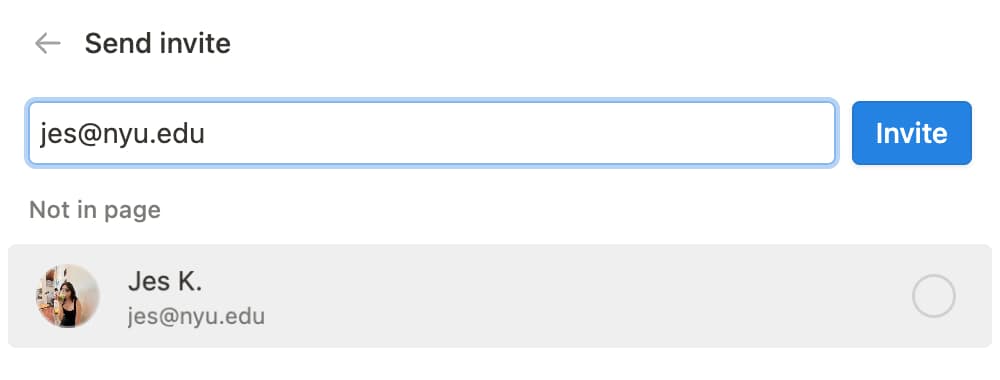
Confidentialité, activez l’optionVisibilité du profilpour que votre profil soit visible pour les personnes qui connaissent votre adresse e‑mail. Désactivez-la pour masquer votre profil.
Si vous activez la visibilité du profil, l’utilisateur le verra lorsqu’il vous invitera à rejoindre un espace de travail ou une page :
Si vous désactivez la visibilité du profil, voici ce que l’utilisateur verra lorsqu’il vous invitera à rejoindre un espace de travail ou une page :
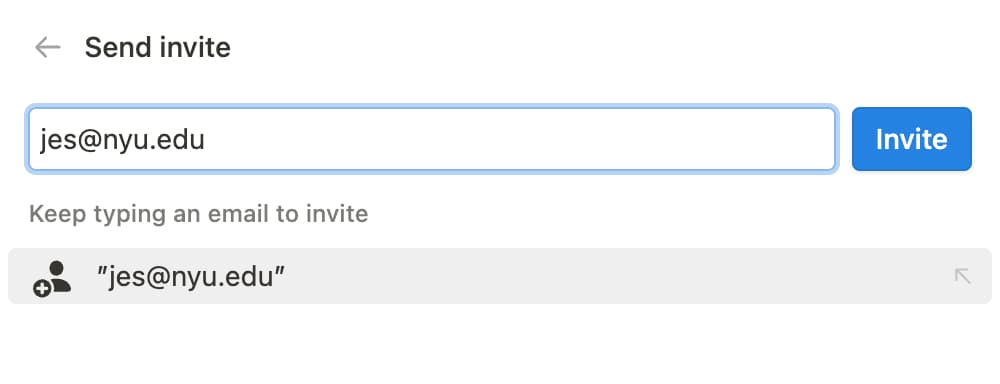
Note : Si vous faites déjà partie du même espace de travail que l’utilisateur qui vous invite, ou si vous avez déjà rejoint l’espace de travail, il pourra voir votre profil.
Questions fréquentes
J’ai oublié mon mot de passe. Que dois-je faire ?
J’ai oublié mon mot de passe. Que dois-je faire ?
Si vous avez oublié votre mot de passe, suivez les instructions pour le réinitialiser ici →
J’ai reçu un e-mail me disant que j’ai changé mon adresse e-mail ou mon mot de passe alors que ce n’est pas le cas !
J’ai reçu un e-mail me disant que j’ai changé mon adresse e-mail ou mon mot de passe alors que ce n’est pas le cas !
Si vous recevez un e-mail à propos d’un changement de mot de passe, réinitialisez votre mot de passe dès que possible. Procédez comme suit :
Rendez-vous sur notion.so/login depuis votre navigateur.
Cliquez sur le bouton
Continuer avec une adresse e-mail.Saisissez l’adresse e-mail associée à votre compte Notion.
En dessous du champ, cliquez sur
Mot de passe oublié ?, puis surEnvoyer le lien de réinitialisation.Nous enverrons un lien à votre adresse e-mail. Cliquer sur le lien ouvrira les
Settingsde votre espace de travail Notion, où vous pourrez définir un nouveau mot de passe.Signalez toute activité suspecte de ce type à notre service client : [email protected].
J’aimerais modifier mon adresse e‑mail, mais j’ai eu un message d’erreur « Cette adresse e‑mail est déjà utilisée ».
J’aimerais modifier mon adresse e‑mail, mais j’ai eu un message d’erreur « Cette adresse e‑mail est déjà utilisée ».
Si vous souhaitez remplacer l’adresse e-mail de votre compte par une adresse déjà associée à un autre compte Notion, connectez-vous au compte actuellement associé à l’adresse e-mail de votre choix et supprimez-le pour libérer cette adresse e-mail. Pour ce faire :
Connectez-vous au compte associé à l’adresse e-mail souhaitée, puis accédez aux
Paramètres→{your name}→Supprimer mon compte.Connectez-vous au compte dont vous souhaitez modifier l’adresse e-mail, puis accédez aux
Paramètres→{your name}→Modifier l’adresse e-mail.
Que puis-je faire si j’ai, par erreur, définitivement supprimé du contenu ? Y a-t-il moyen de le récupérer ?
Que puis-je faire si j’ai, par erreur, définitivement supprimé du contenu ? Y a-t-il moyen de le récupérer ?
Si vous avez supprimé par erreur une page, un espace de travail, ou même l’intégralité de votre compte, nous pouvons vous aider ! Envoyez-nous un message dans l’application en effectuant un clic sur ? en bas de votre barre latérale, ou envoyez-nous un e-mail à [email protected].
Nous conservons des sauvegardes de nos bases de données, ce qui nous permet de restaurer une version de votre contenu dans les 30 jours suivant sa suppression, si vous en avez besoin.