Allocate credits to each workspace
Set a credit limit for each workspace in your organization, so every team gets a predictable share and no workspace uses more than its budget.
Ir a las preguntas frecuentesIf your organization has multiple workspaces under one contract, all of your Notion credits are shared in a single pool by default.
Workspace credit allocation lets organization admins allocate how many credits each workspace can use in a monthly cycle. This gives every team a predictable budget and prevents one workspace from using up credits another team needed.
Setting credit limits is for multi-workspace contracts on Enterprise plans.
Admins and owners can set and manage limits from within their organization settings.
Limits are set per monthly cycle. Each workspace's usage counts against its limit within a monthly cycle and resets when the next monthly cycle begins.
A workspace's limit applies to its total credit usage, regardless of credit type (monthly, annual, or on-demand).
When a workspace reaches its limit, Custom Agents and other features that use credits pause in that workspace.
Organization admins can change or remove a limit for the current monthly cycle at any time.
Only organization owners and admins with access to their organization settings can set or manage workspace credit limits. Workspace members and workspace-level admins don't have access to these controls.
Open your organization settings. Go to the workspace switcher →
Manage organization.Go to
Notion Credits.Find the workspace breakdown table. It lists every workspace under your contract.
Select the workspace you want to limit.
Enter a credit limit for that workspace.
Repeat for any other workspaces you want to cap. Workspaces without a limit continue to draw from the shared contract pool.
A workspace limit caps how many credits a workspace can use in total, no matter where those credits come from. It works alongside on-demand credits. It doesn't replace them. A workspace can have on-demand spend turned on and a workspace limit at the same time.
A workspace can keep using credits when both of these are true:
The contract still has unused purchased credits, or the workspace is allowed to spend on-demand credits.
The workspace hasn't hit its workspace limit.
If a workspace reaches its limit, it's paused even if the contract still has credits or on-demand is turned on. This lets organizations keep the flexibility of on-demand spend while still capping how much any single workspace can use.

Example: two workspaces, each capped at 6,000 credits
Your contract has 10,000 purchased credits with on-demand spend turned on, and you cap both Workspace A and Workspace B at 6,000 credits each.
Workspace A reaches 6,000 credits → It's capped and paused, even though the contract still has credits left.
Workspace B is at 4,000 credits. Contract combined usage is now 10,000, so the purchased pool is used up → Workspace B starts drawing on-demand credits.
Workspace B keeps spending up to its own 6,000 limit, using another 2,000 on-demand credits before it's paused too.
Total credits used: 12,000 (6,000 per workspace). The workspace cap holds no matter whether credits come from the purchased pool or on-demand.
The workspace's credit usage reaches 100% of its allocated limit.
Custom Agents and other AI features that use credits pause in that workspace.
Workspace admins see a banner indicating that the workspace has reached its credit limit.
In your organization settings, that workspace shows a status pill indicating the limit was reached.
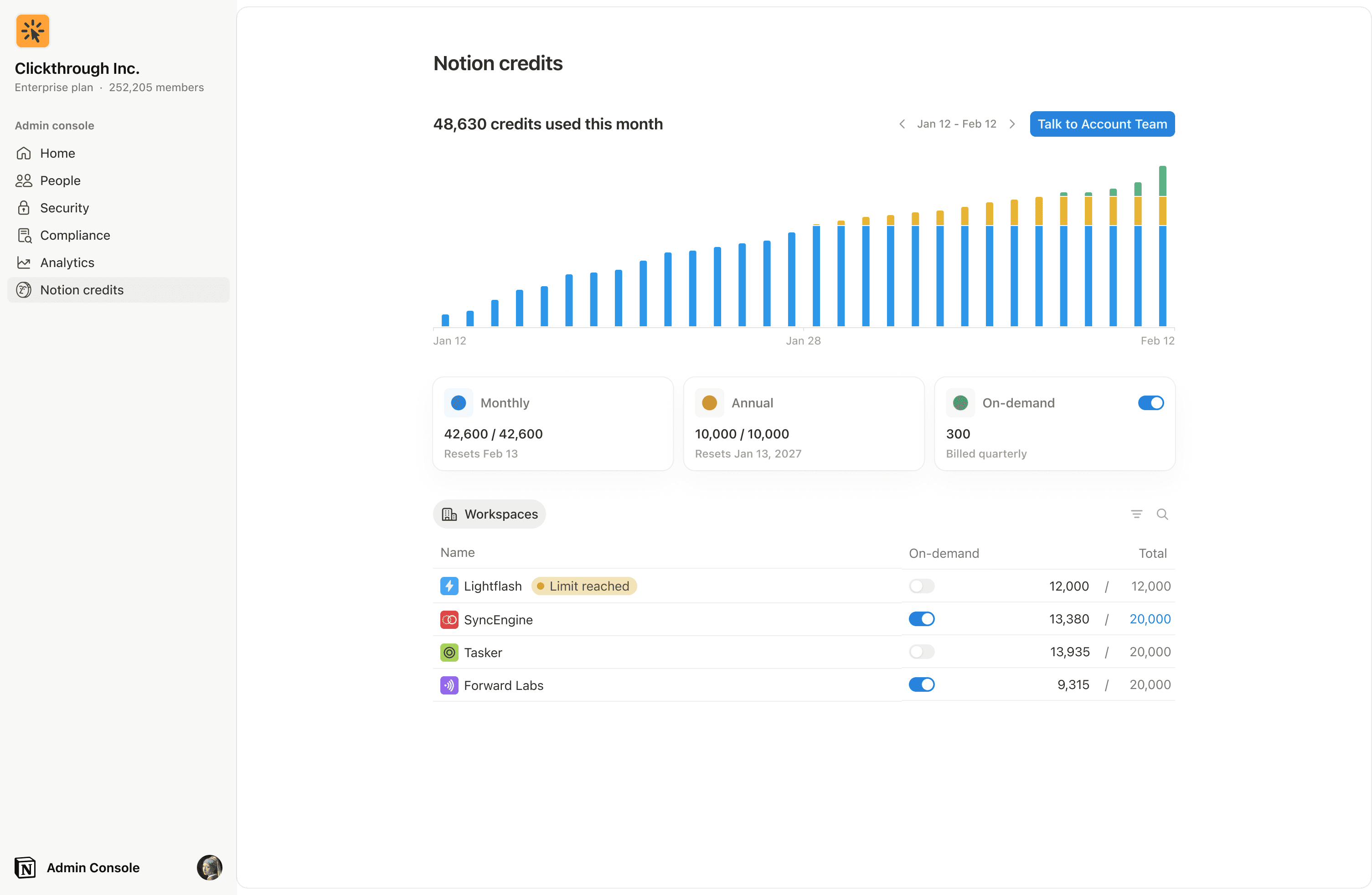
In some instances, a workspace may go over the limit you set in order to complete an ongoing task. If a task is already running when it hits the cap, we let it finish before stopping new usage. If a workspace is over its allocated limit, no new tasks will begin.
Other workspaces under the contract are unaffected and keep using credits as usual. Because limits are set per monthly cycle, a paused workspace automatically regains access when the next monthly cycle begins (or sooner, if an org admin raises that workspace's credit allocation).
Workspace admins get an inbox notification when their workspace reaches 100% of its allocated limit.
There is no 80% notification for workspace limits.
Members don't receive inbox notifications for workspace limits.
You can change a workspace's allocation anytime from the Notion Credits section of your organization settings:
Raise or lower the limit: Takes effect right away.
Remove the limit: The workspace goes back to drawing from the shared contract pool.
You can only edit limits for the current monthly cycle. Limits for past cycles can't be changed. Once a cycle ends, those records are locked so your usage history stays accurate.
Preguntas frecuentes
Can I allocate credits by type (monthly, annual, or on-demand)?
Can I allocate credits by type (monthly, annual, or on-demand)?
Not yet. Limits apply to a workspace's total credit usage, not a specific credit type. We don't support credit-type filtering yet.
What happens to my other workspaces when one hits its limit?
What happens to my other workspaces when one hits its limit?
Nothing. Only the workspace that reached its limit is paused. All other workspaces under the contract keep working.
Can workspace members or workspace admins set these limits?
Can workspace members or workspace admins set these limits?
No. Workspace credit allocation is managed in the org console, which is only available to organization owners and admins.
A workspace is paused. How do I get it running again?
A workspace is paused. How do I get it running again?
An organization admin can increase that workspace's credit allocation in the org console. Members should contact their organization admin to request more credits.
Is this available for single-workspace contracts?
Is this available for single-workspace contracts?
No. This feature is only available for multi-workspace contracts managed from the org console.