
TL;DR
Today we’re announcing a faster, more efficient Notion AI—and a new credit system.
A smarter model router. We’ve upgraded
Auto, which sends each task to the model that best balances quality, speed, and cost—delivering similar results to frontier models at about 90% lower cost.Agents, rebuilt for efficiency. Notion Agent and Custom Agents now run on new infrastructure that unlocks longer-running tasks. It keeps complex tasks focused and credit-efficient with smarter context management and a harness tuned for fewer wasted steps.
Bring your own AI. Connect your ChatGPT plans to Notion Agent (available now), bring your own model key on Enterprise (private alpha), or connect your AI tools through the improved Notion MCP.
More visibility and controls. A new AI Command Center gives admins usage dashboards, spending limits, and agent governance in one place. Members also get a clear view of their own usage.
An evolved credit system. Business and Enterprise seats now include monthly Standard credits, for work where Notion picks the best model for the job, and Select credits, for when you pick the model or run your own Custom Agents. The vast majority of users are unlikely to run out of monthly credits. You also no longer need to buy credits to start building custom agents. Admins can purchase additional Notion credits. Learn more →
AI is moving faster than ever. We added seven new models with our partners at Anthropic, OpenAI, and open-weight providers in the past month alone. Notion Agents can now work on a single task for more than 24 hours, up from five minutes. And your agents can connect to hundreds of different tools via MCPs and connectors, up from a few dozen earlier this summer.
You’ve also made it clear that you’re increasingly using Notion as the infrastructure for your own agents. Our job is to offer you the best model-agnostic context layer to use with any model from any model provider.
So today we’re announcing a set of improvements that make Notion AI more powerful, more reliable, and more efficient—and a new credit system built around them.
Uh-oh! It looks like your ad blocker is preventing the video from playing.
Please watch it on YouTube
Credits go 10× further with Auto
With so many models, knowing which one to pick is overwhelming. Often, people just default to high-cost models for most requests. Auto is the model router that does that work for you. It reads each task and sends it to the model that best balances quality, speed, and cost.
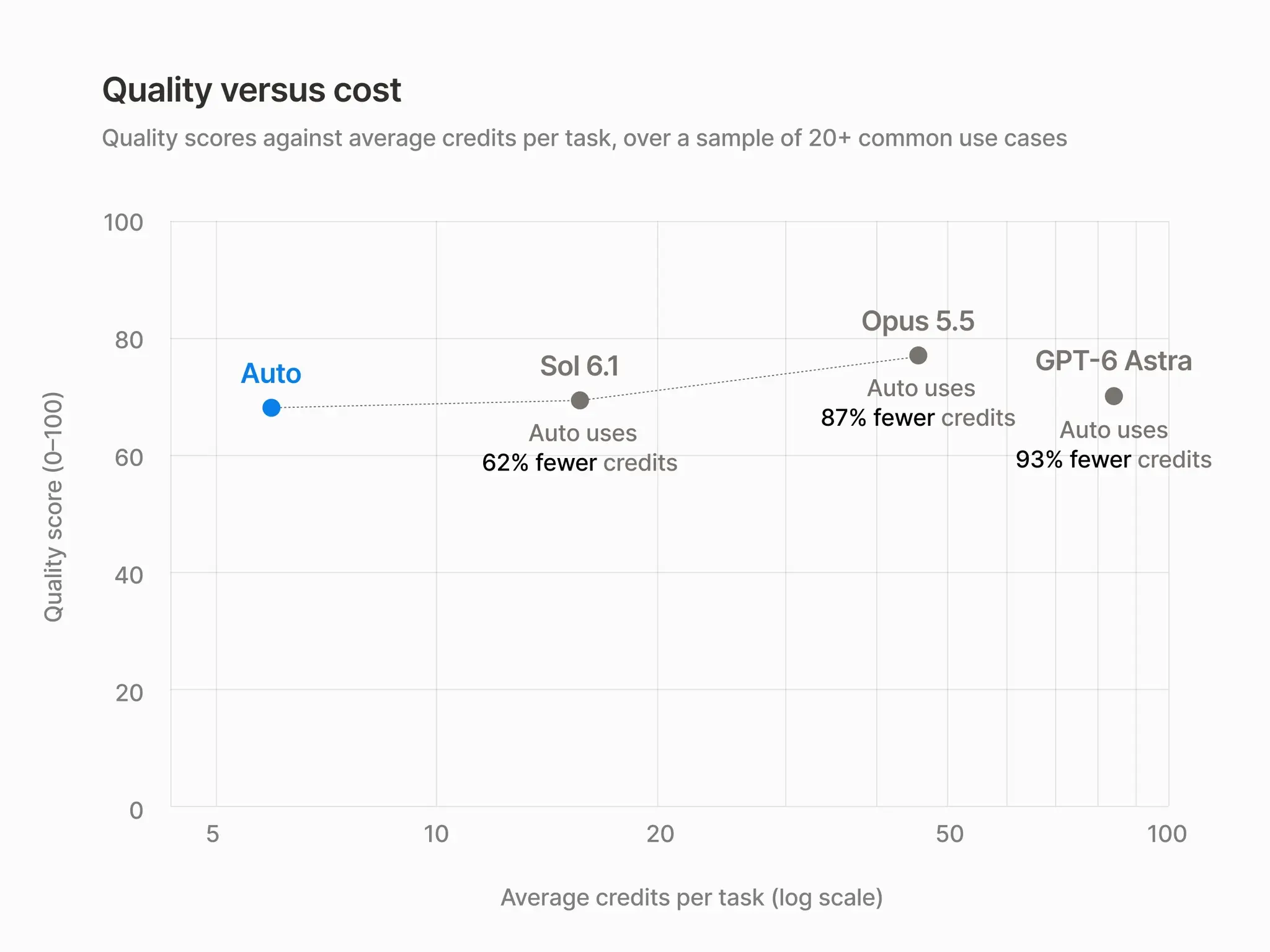
Across 20+ common use cases, Auto delivered similar results to Opus 5.5 and Astra at about 90% lower average cost. That means credits go about 10× further.
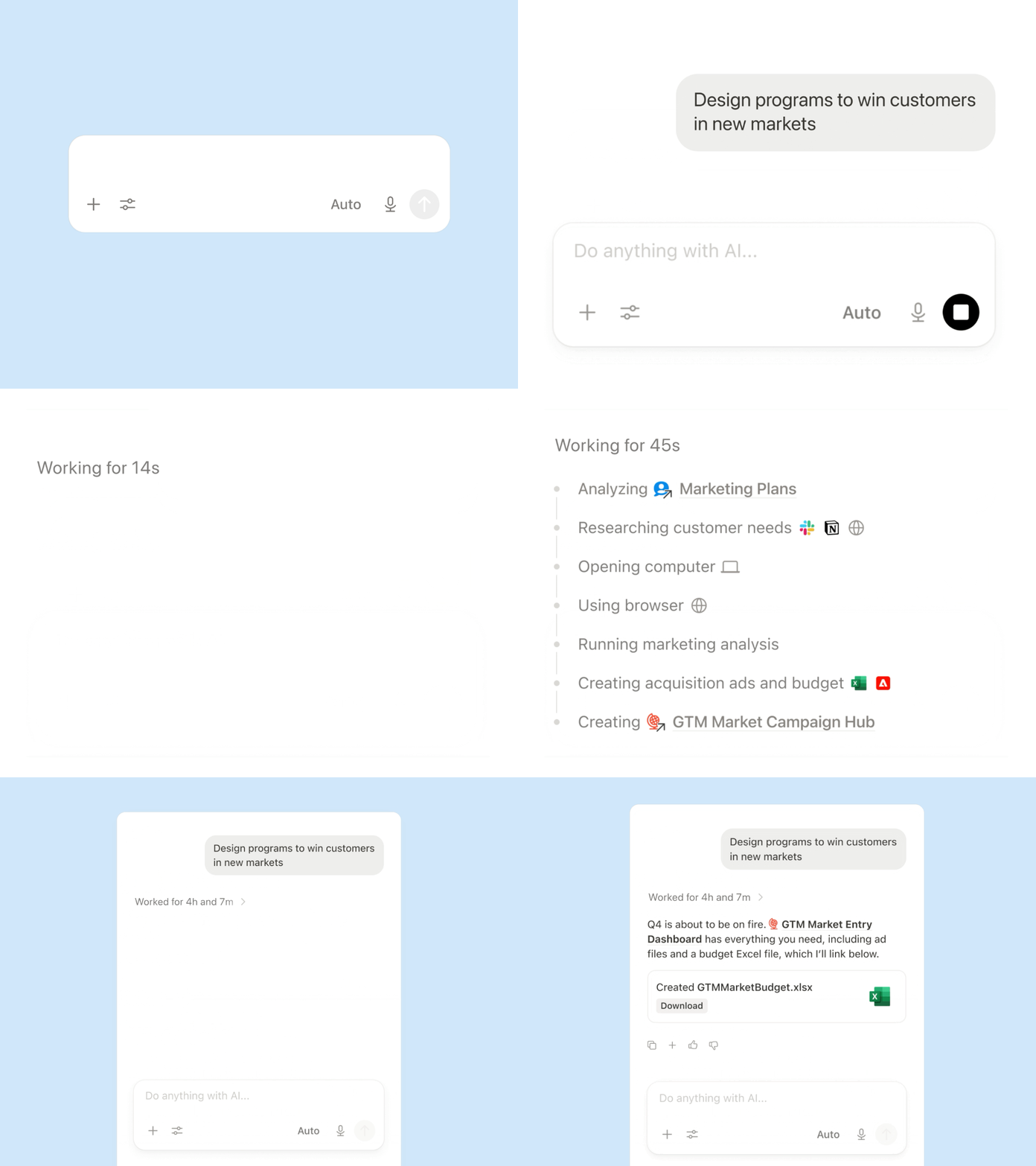
Auto delegates simple requests to fast, efficient models. Longer, more difficult work, such as analysis or multi-step agent runs, is sent to more capable ones. And if a model is not making meaningful progress on your task, Auto re-routes to a different model to work through the problem.
When better models are released (which happens almost every week), we evaluate them, and Auto can start using providers you have approved right away without you ever having to track the latest release. We constantly tune Auto on real knowledge work, with one goal: the best, fastest result for the least credit consumption.
You can see how models compare on everyday knowledge work on the Notion Knowledge Board, and read more about how .
More capable, more efficient Notion Agents
We rebuilt Notion Agent harness, again. This is the sixth generation—no rest for teams building AI!
Shir, our brilliant Head of AI and Core Product, summarized this new version nicely in a team meeting last week: “To support long-running threads in a way that wouldn’t blow through credits, we knew we needed to pair them with significant efficiency gains.”
So, what’s actually changed under the hood? Warning: Shir also said, “It may get a little technical.”
Durable execution for long tasks. Every session runs on a dedicated service with a queue-backed worker loop, so work keeps going through restarts and hiccups. That's how a task can now run for 24 hours.
Computer and browser use. With its own computer, your agents can write short scripts that are faster, cheaper and higher quality to run as code versus with language model tokens.
Smarter context management. Agents compact long conversations, using each model provider's native compaction where possible. Large tool results get offloaded instead of flooding the context window. Less to reread on every step means less compute per task.
Safer by default. A new “Review for me” mode uses a separate model to check whether an action is safe before the agent takes it.
Faster apps. Agents run up to 50% faster on both web and mobile apps.
The result is agents that finish more of what they start (our infra uptime is now >99.9%) and Custom Agent runs that cost about 30% less in testing.
Use AI you already pay for
You shouldn’t have to pay for AI twice. So there are a few ways to use the AI you already have with Notion.
First, you can now use your ChatGPT subscription. In close partnership with OpenAI, we built a connection that allows you to use your ChatGPT Plus, Pro, or Go accounts inside Notion. It works in your personal Notion Agent to start, not Custom Agents, with more plans and surfaces to follow.
We are also very excited to announce Bring Your Own Key (BYOK) is in alpha for Enterprise plan customers. Using your own model-provider key has been a top request recently. You can read about the alpha here and talk to your account team about access.
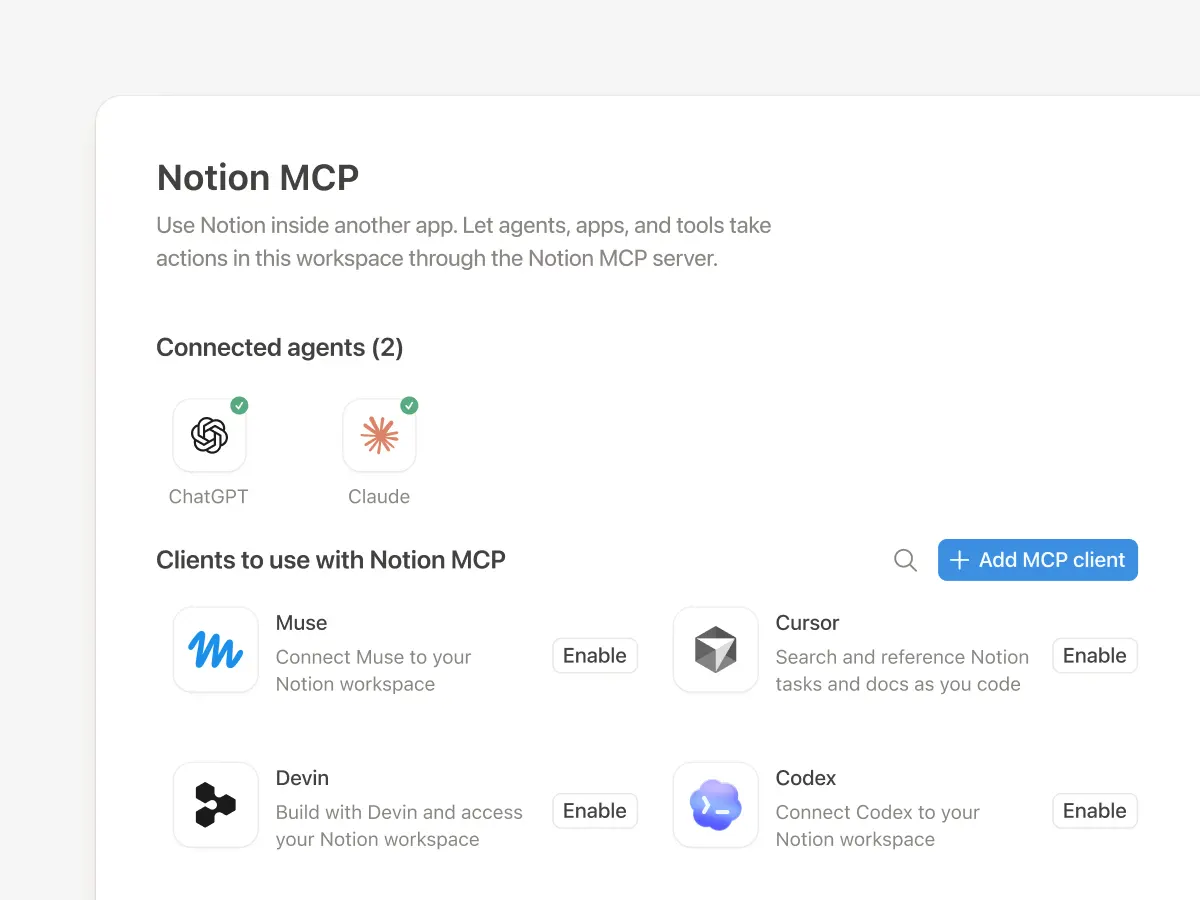
And finally, we overhauled Notion MCP. It connects your favorite agents, like ChatGPT, Claude, Grokbot, and Muse, to Notion as a shared brain where they can find context, remember what matters, and build shareable artifacts. Clearly customers love the MCP since it’s the fastest-growing product in Notion history, so we invested more. You can now sync memories to Notion, with Skills via MCP coming soon. Whether you are using the MCP already or just getting started, share this prompt with agent to really see it rip.
See and control where your credits go
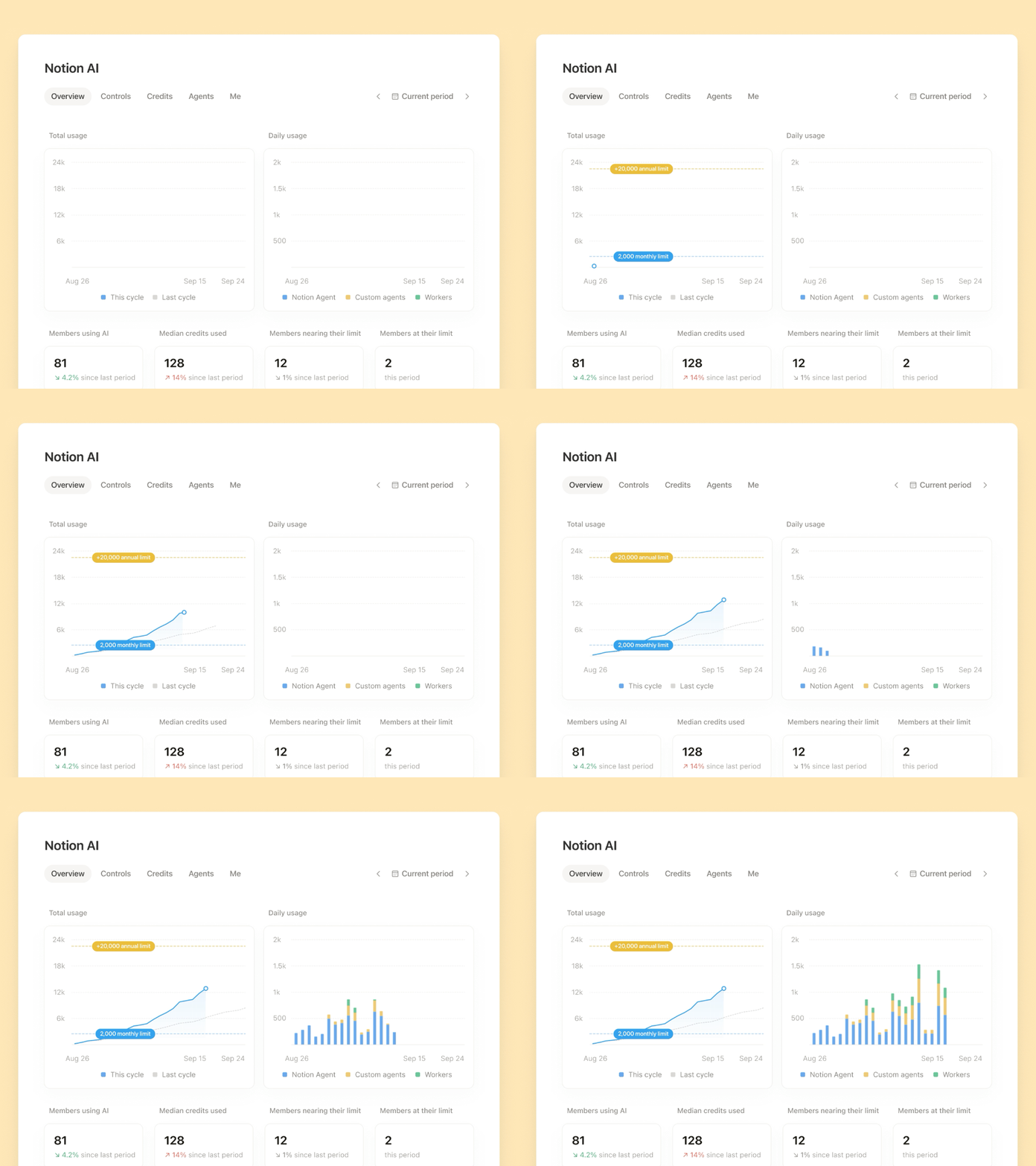
Admins need to know what’s running, who owns what, and what everything costs. Soon, you’ll have a new AI Command Center that brings it all into one place. This unifies what was previously in multiple places (sorry about that!) and gives you more visibility and control.
Admins get one place to see credit usage by member, feature, and agent, with alerts as the workspace nears its limit. They can set spending limits for members and agents, choose which models members can use, and control who can create, pause, or archive Custom Agents. Members can see how many of their included credits they’ve used and what each of their agents spends.
A new credit system for Notion AI
Your agents can do more now, and increasingly Notion Agent, Custom Agents, and many outside AI tools can all work in one place. So we’re bringing it all together. Here’s how it works:
Two types of monthly credits are included with your seat. Business and Enterprise seats come with 1,500 Standard credits per month, for work where Notion picks the model, and 500 Select credits per month, for work where you pick the model or to run your Custom Agents.
Admins can purchase additional credits for their workspace with full control over how they’re allocated. Additional credits can cover Custom Agents shared with the workspace, high-credit consumption models (e.g., Fable, Astra), and anything beyond your included credits.
Try Custom Agents without paying first using your included monthly Select credits.
Thanks to our upgraded model router, credits will go a lot farther than before. Based on our estimates, the vast majority of users are unlikely to run out of credits.
So, why did we keep Standard and Select separate? It’s because AI tasks consume credits at very different rates. A few complex tasks or frequently running Custom Agents could quickly exhaust a shared allowance. Separate allowances protect everyday AI usage on Auto while giving users the flexibility to choose models and run agents.
The new system is live today for new customers. Existing customers move over on November 2, and admins will get an email with the details. Learn more about the new credit system →
We’re building this together
Nobody has the AI era fully figured out, including us. What we can do is keep making AI more efficient to run, keep giving you a choice of models, and keep being straight with you about what’s changing and why.
Many of the improvements in this post started as your feedback. Thank you for building with us.
FAQs
What should I use for everyday work in Notion?
What should I use for everyday work in Notion?
Use Auto for writing, summarizing, and asking questions. Your Standard credits should cover this everyday work for the month.
What happens when I choose a model myself?
What happens when I choose a model myself?
Choosing a model uses your Select credits. If you need more, your admin can buy Notion credits for the workspace—or you can switch back to Auto.
Which credits do my Custom Agents use?
Which credits do my Custom Agents use?
Your own Custom Agents use your Select credits. How quickly they use credits depends on the complexity of the work and the model they use.
What if my team runs a lot of Custom Agents?
What if my team runs a lot of Custom Agents?
Team Custom Agents use Select credits by default, even when other people use them. To fund them with Notion credits instead, ask your admin. If they need more later, you can ask for a larger budget.
Can I use my ChatGPT subscription in Notion?
Can I use my ChatGPT subscription in Notion?
Yes. Connect your ChatGPT Pro or Plus account and use it in your personal Notion Agent instead of using your Standard and Select credits.
What happens if our contract hasn’t renewed yet?
What happens if our contract hasn’t renewed yet?
You’ll move to the new system on November 2, with the same Standard and Select credits as everyone else. At renewal, your credits will be set based on your plan, and your account team will walk you through the details.