Acompanhe o consumo no painel de créditos do Notion
Saiba como usar o painel de créditos do Notion para monitorar o uso, planejar futuras necessidades de créditos e gerenciar os gastos contínuos.
Acessar as perguntas frequentesO painel de créditos do Notion oferece uma visão clara de como Agentes personalizados, Preenchimento Automático, Workers e modelos de IA premium usam créditos do Notion em todo o espaço de trabalho. Use-o para monitorar o uso, planejar futuras necessidades de créditos e gerenciar os gastos contínuos. Para acessá-lo, vá para Configurações → Acesso e faturamento → créditos do Notion.
Administradores dos planos Business e Plano Enterprise podem monitorar o uso no painel. Criadores de Agentes personalizados e criadores de Workers também podem ver o ritmo de créditos em nível de espaço de trabalho. A tabela mostrará apenas os Agentes personalizados ou Workers que eles criaram.
No painel, você pode visualizar:
O uso de créditos em tempo real.
O uso estimado até a data do serviço mensal.
Execuções e uso de créditos no âmbito do agente, para que você possa identificar os agentes que impulsionam os gastos e ajustá-los conforme necessário.
Membros do espaço de trabalho que estão usando créditos além da cota de uso.
Créditos que cada membro gasta em modelos premium.
Créditos de avaliação da sua equipe de gestão de contas. Eles aparecem como sua própria categoria, para que você possa monitorá-los separadamente dos créditos que comprou.
Se você gerencia vários espaços de trabalho, também terá um painel de créditos do Notion no seu painel de administrador, onde poderá monitorar o ritmo de créditos e o uso em toda a sua organização.
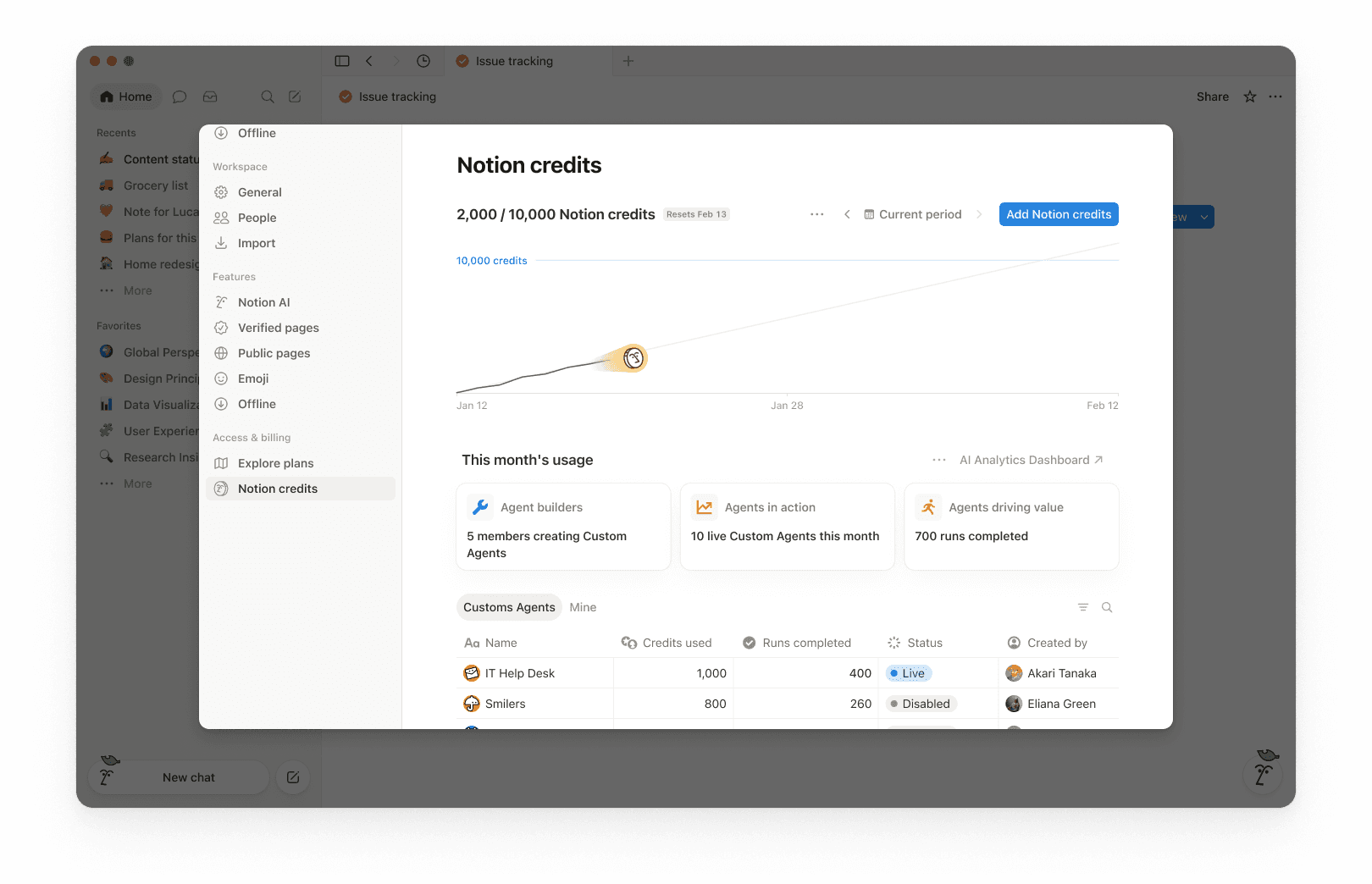
Na parte superior do painel, você verá o total de créditos do Notion usados no período selecionado e a data de redefinição dos seus créditos. O período selecionado baseia-se no ciclo de faturamento do seu espaço de trabalho.
Isso oferece uma visão geral rápida do seu uso até o momento e até o fim do ciclo de faturamento mensal.
No canto superior direito, use o seletor de período (por exemplo, Período atual) e as setas de navegação para revisar os períodos anteriores.
O gráfico de uso mostra o uso de créditos ao longo do tempo:
“Atual” mostra os créditos reais usados até o momento.
Projeções estimadas de onde seu uso provavelmente chegará na data de renovação, caso os padrões atuais continuem. A estimativa é fornecida apenas para fins informativos, e o uso futuro real pode diferir.
Use isso para identificar se você está prestes a ficar sem créditos antes da redefinição.
Em “Uso deste mês”, você verá métricas de adoção e atividade, por exemplo:
Construtores de agentes: quantos membros estão criando agentes personalizados.
Agentes em ação: quantos agentes personalizados estão em execução durante o período.
Execuções concluídas: quantas tarefas os agentes concluíram no seu espaço de trabalho.
A tabela de uso é organizada em guias para que você possa filtrar por tipo.
Todos: Todos os agentes personalizados, preenchimento automático e workers no seu espaço de trabalho.
Agente personalizado: Apenas gastos com Agente personalizado.
Preenchimento automático: Apenas gastos com preenchimento automático.
Workers: Apenas gastos com Workers. Os Workers exibem um selo de Free durante o período beta.
Meus: Apenas os Agentes personalizados e Workers que você criou.
Para cada item, a tabela mostra:
Créditos do Notion usados
Execuções concluídas
Status
Criado por
O gasto dos membros tem sua própria linha. Isso cobre os créditos que as pessoas gastam além da franquia de uso de IA e os créditos que gastam em modelos premium, para que você possa ver quem os está usando e quanto custam.
Por padrão, os gastos com Workers são rastreados separadamente dos gastos com Agentes Personalizados e não são incluídos no gráfico de uso principal ou no número total de créditos. Para incluir os gastos com Workers no gráfico e no total, selecione o menu de três pontos ••• na parte superior do painel e ative Incluir gastos com Workers.
Se sua equipe de gestão de contas concedeu créditos de avaliação à sua organização, veja como eles funcionam:
Os créditos de avaliação aparecem no painel de créditos do Notion como sua própria categoria, separada dos créditos que você comprou. Se sua organização tiver um contrato para vários espaços de trabalho, você também poderá vê-los no console da organização.
Os administradores recebem um alerta quando sua organização utiliza 80% de seus créditos de avaliação, e outro quando os créditos de avaliação são totalmente utilizados.
Créditos de avaliação não utilizados não são transferidos após o término do período de avaliação.
Os administradores podem monitorar o uso de créditos para manter os gastos previsíveis. Eles dispõem de diversas maneiras de gerenciar o ritmo do uso de créditos:
Visibilidade: acompanhe o consumo e as tendências no painel de créditos do Notion.
Diretrizes: Decida quem pode criar agentes (e defina limites). Defina um limite de crédito para cada membro.
Controle: Pausar ou desligar agentes a qualquer momento para interromper o uso enquanto você investiga ou faz alterações. Pausar modelos premium para o espaço de trabalho.
Otimização: ajuste os agentes para reduzir etapas extras e aumentar a eficiência.
Use o painel de créditos do Notion para acompanhar o uso ao longo do tempo e ver quais recursos estão consumindo mais créditos. O Notion também notifica os administradores quando o espaço de trabalho está se aproximando ou atingiu o limite de crédito, para que os administradores tenham tempo de agir.
Quando um membro usa créditos do Notion além da cota de uso, seu uso aparece como uma linha individual no painel de créditos. Os administradores podem ver quais usuários estão gastando créditos além do limite e quanto eles usaram.
Modelos premium que gastam créditos aparecem da mesma forma. Quando um membro usa um deles, seu uso terá uma linha aqui.
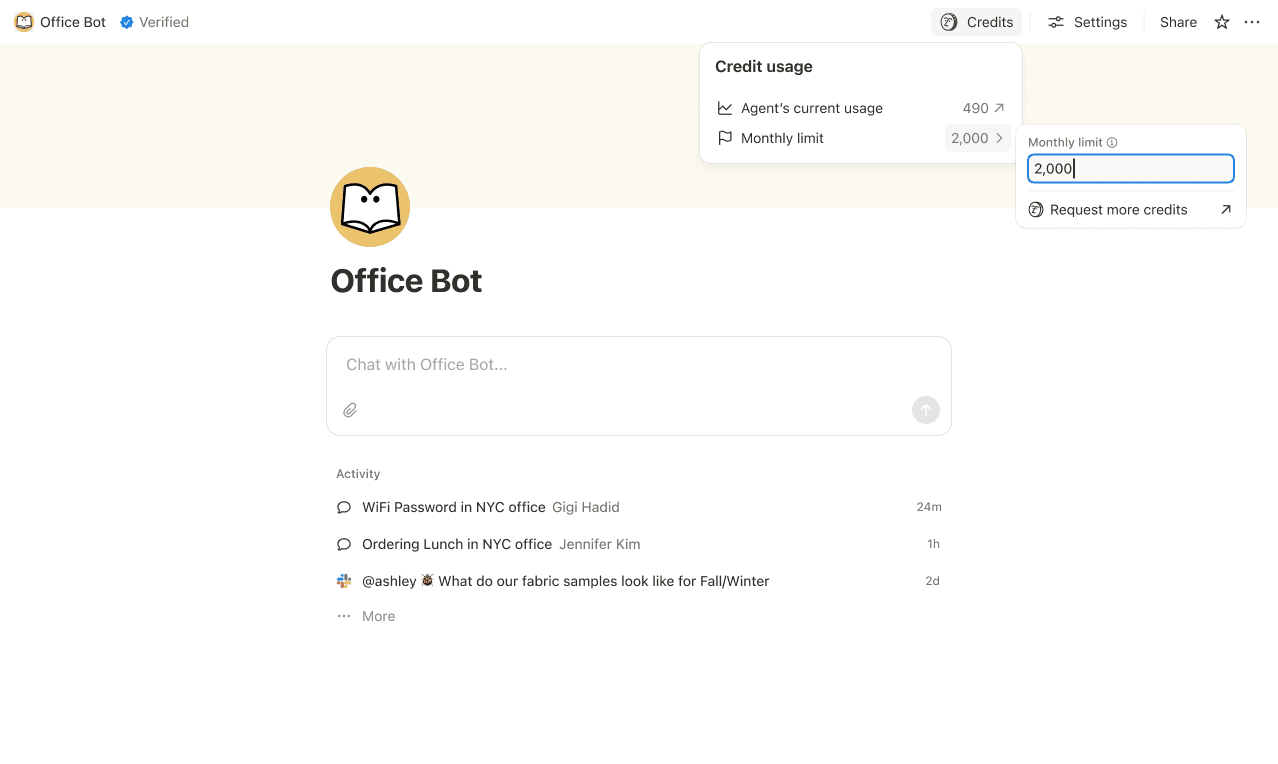
Defina limites de crédito para Agentes Personalizados individuais para que eles sejam pausados quando atingirem um limite. Em alguns casos, um agente pode exceder o limite para concluir uma tarefa em andamento. Se uma tarefa já estiver em execução quando atingir o limite, permitimos que ela termine antes de interromper o novo uso.
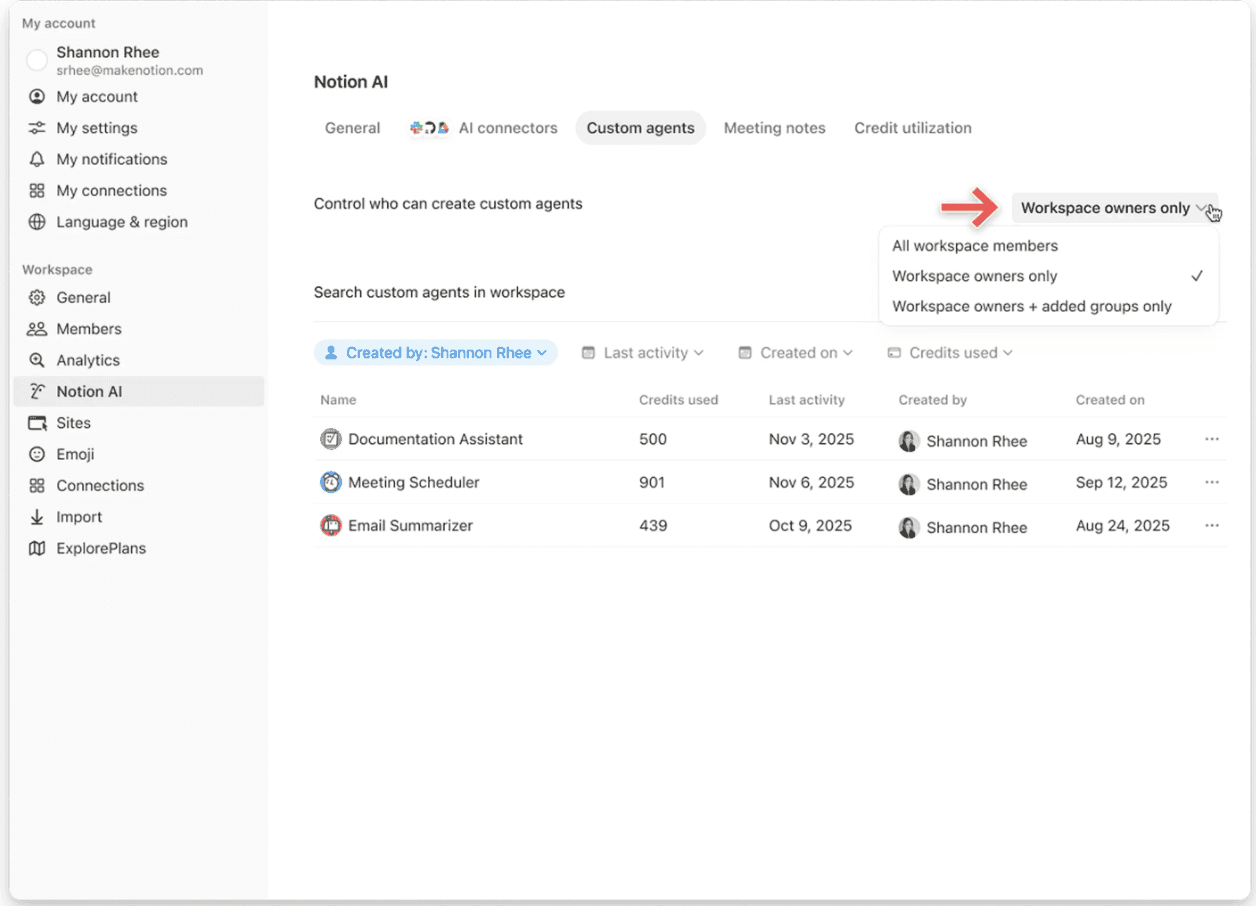
Controle quem pode criar Agentes Personalizados (todos, apenas os proprietários do espaço de trabalho ou membros selecionados).
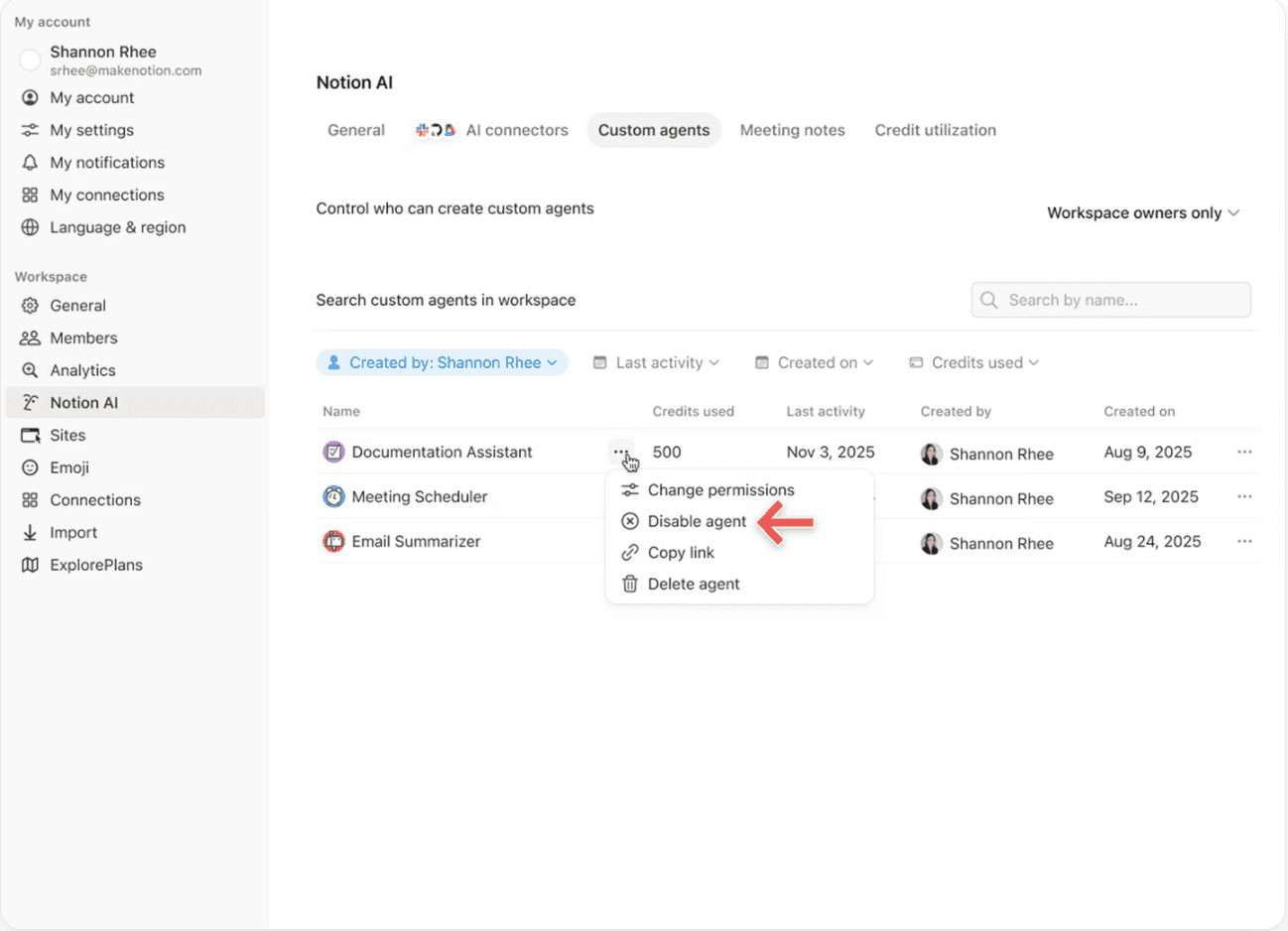
Pause ou desative um agente personalizado a qualquer momento para interromper imediatamente o uso de créditos enquanto você analisa a atividade ou ajusta o agente.
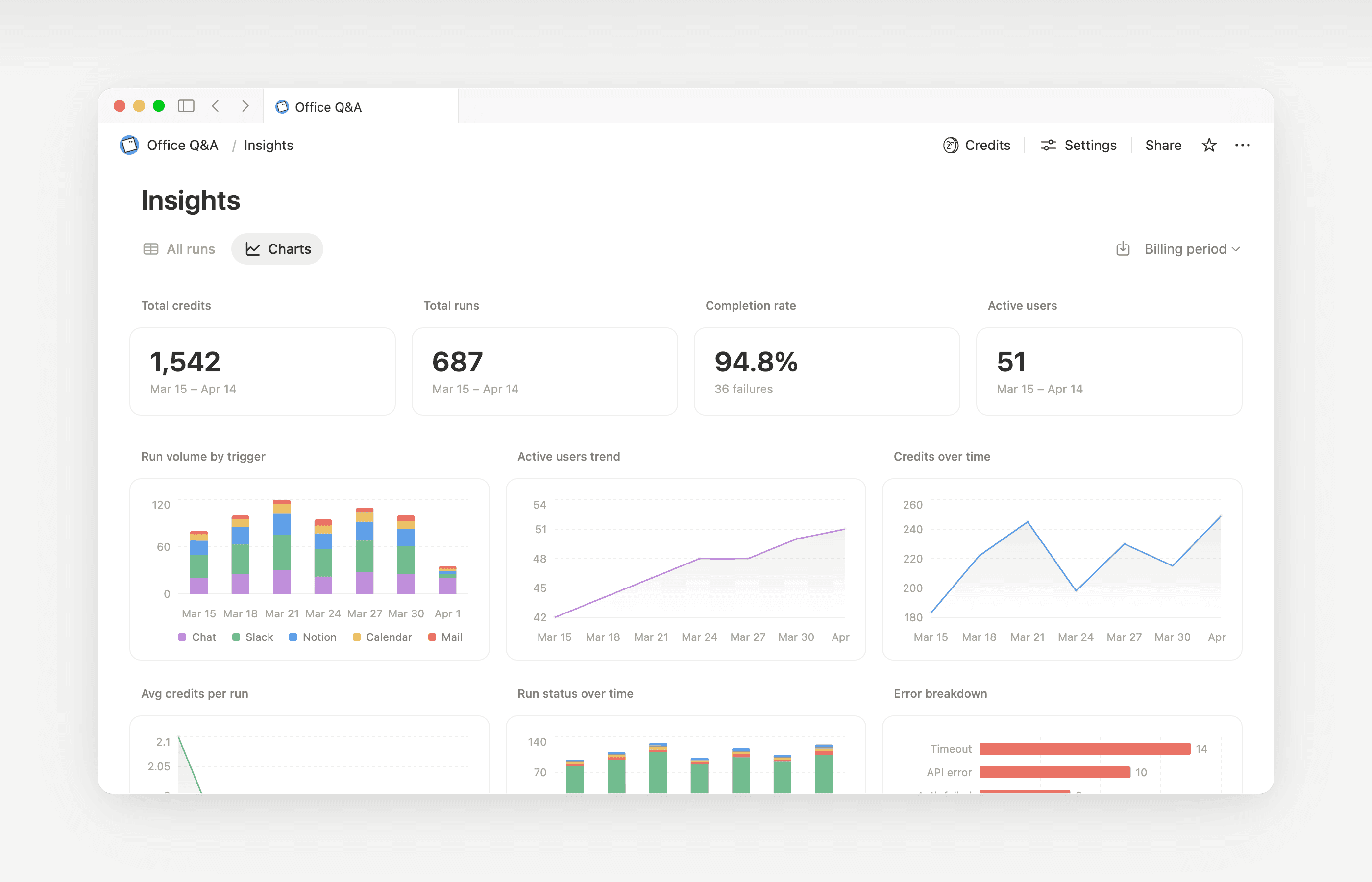
O Insights ajuda os criadores de Agentes Personalizados e os administradores do espaço de trabalho a entender a atividade para que possam fazer atualizações direcionadas que melhorem o desempenho. Use o Insights para identificar execuções que exigem etapas extras, falham e tentam novamente, ou usam um modelo mais caro do que o trabalho exige. Em seguida, atualize as instruções ou configurações do agente para que ele seja executado com mais eficiência.
Abra o Insights diretamente dentro de um agente para:
Monitore a atividade e o uso de créditos do seu Agente personalizado.
Identificar execuções mais caras do que o esperado.
Verificar quais modelos, ferramentas e gatilhos foram usados.
Localizar e corrigir execuções com erro, para que seu agente funcione de forma mais confiável.
Saiba mais sobre como usar o Insights para reduzir custos e melhorar um Agente personalizado→
Os proprietários do espaço de trabalho podem decidir se os membros podem usar créditos do Notion após atingirem a cota de uso. Quando isso estiver desativado, os membros que esgotarem sua cota devem aguardar a renovação do período mensal ou contínuo. Saiba como gerenciar essa configuração →

Saiba o que são Agentes personalizados e como eles funcionam.
Saiba como os Agentes personalizados acessam informações, como o compartilhamento funciona e o que os administradores podem controlar: Compartilhamento e permissões de Agentes personalizados →
Veja mais práticas recomendadas sobre como otimizar créditos do Notion e a eficiência para Agentes personalizados em um guia do administrador para começar a usar Agentes personalizados →
Perguntas frequentes
O que acontece se ficarmos sem créditos do Notion?
O que acontece se ficarmos sem créditos do Notion?
Se o seu espaço de trabalho não tiver créditos do Notion suficientes, o Agente personalizado será pausado automaticamente até que os créditos sejam redefinidos ou um administrador adicione mais créditos. Modelos premium também serão pausados.
Como os administradores são notificados antes de ficarem sem créditos do Notion?
Como os administradores são notificados antes de ficarem sem créditos do Notion?
Os administradores recebem notificações no aplicativo (e por e-mail) quando o espaço de trabalho atinge 80% e 100% do uso de créditos do Notion. Isso acontece para que você tenha tempo de se planejar antes que os agentes parem de funcionar.
Como faço para comprar mais créditos do Notion?
Como faço para comprar mais créditos do Notion?
Os administradores podem comprar créditos do Notion no produto ou por meio da equipe de gestão de contas. Saiba mais sobre como comprar créditos do Notion.
Como funcionam as alterações de créditos do Notion no meio do mês?
Como funcionam as alterações de créditos do Notion no meio do mês?
Se você aumentar seus créditos no meio do seu período de serviço mensal, os créditos adicionais estarão disponíveis imediatamente para o período de serviço atual. A cobrança será feita pelo valor mais alto de crédito recorrente no início da próxima data de serviço mensal.
Se você diminuir seus créditos no meio do seu período de serviço mensal, o menor valor entrará em vigor no início do próximo período de serviço. A partir daí, a cobrança será feita pelo valor mais baixo de crédito recorrente a cada mês.
Trabalho com uma equipe de gestão de contas para comprar créditos do Notion. O que acontece se eu fizer upgrade, expandir ou renovar meu Plano Business ou Enterprise, que inclui Créditos Anuais do Notion, no meio do meu intervalo de faturamento?
Trabalho com uma equipe de gestão de contas para comprar créditos do Notion. O que acontece se eu fizer upgrade, expandir ou renovar meu Plano Business ou Enterprise, que inclui Créditos Anuais do Notion, no meio do meu intervalo de faturamento?
Você receberá um crédito proporcional pelos Créditos Anuais do Notion pré-pagos não utilizados, equivalente ao menor valor entre:
O valor em dólares dos Créditos Anuais do Notion restantes não utilizados, ou
As taxas dos Créditos Anuais do Notion proporcionais ao tempo restante no período de assinatura
Esse crédito se aplica quando um novo formulário de pedido do plano Business ou Enterprise substitui o atual antes do final do período de assinatura. Os Créditos do Notion não têm valor monetário. Qualquer crédito se aplica ao novo plano.
O Preenchimento Automático usa créditos do Notion?
O Preenchimento Automático usa créditos do Notion?
O Preenchimento Automático tem duas opções: Básico e Agente Personalizado.
O Preenchimento Automático Básico está incluído nos Planos Business e Enterprise e não usa créditos do Notion.
O Preenchimento Automático com Agente Personalizado usa créditos do Notion porque é executado com recursos do Agente Personalizado (como o uso de um contexto mais detalhado e um raciocínio mais avançado).
O que acontece com os Agentes personalizados se eu fizer o downgrade do meu plano?
O que acontece com os Agentes personalizados se eu fizer o downgrade do meu plano?
Se você fizer downgrade do seu plano do Notion para Free ou Plus, todos os Agentes personalizados existentes serão desativados, mas não excluídos. Você pode visualizar (mas não editar) as configurações e a página de chat do Agente personalizado. Os Agentes personalizados podem continuar lá se você fizer upgrade novamente para o plano Business ou Enterprise.
Posso comprar créditos do Notion se gerenciar minha assinatura na App Store ou no Google Play?
Posso comprar créditos do Notion se gerenciar minha assinatura na App Store ou no Google Play?
Não diretamente. Se a sua assinatura do Notion for gerenciada por meio de uma loja de aplicativos móveis (App Store da Apple ou Google Play), você não poderá comprar créditos dentro do Notion.
Para comprar créditos, você precisará:
Cancelar sua assinatura na loja de aplicativos móveis.
Fazer upgrade para um plano do Notion diretamente em notion.com (Plano Business ou Enterprise, com IA inclusa).
Quando a nova assinatura estiver ativa, um administrador poderá adquirir créditos do Notion em
Configurações→Acesso e faturamento→Créditos do Notion.
Certifique-se de que seu novo plano inclua IA antes de comprar créditos. Créditos do Notion estão disponíveis apenas nos planos Business e Enterprise.
Existe um limite de quantos créditos podemos comprar?
Existe um limite de quantos créditos podemos comprar?
Não. Você pode comprar a quantidade de créditos que seu espaço de trabalho precisa, incluindo grandes quantidades. Se o seu método de pagamento levar alguns dias para ser processado, sua equipe poderá continuar usando créditos até a quantidade que você decidiu comprar até o pagamento ser compensado.
O que acontece com nossos créditos do Notion se um pagamento falhar?
O que acontece com nossos créditos do Notion se um pagamento falhar?
Sua equipe mantém os créditos do Notion pelos quais você já pagou. Créditos acima desse valor são colocados em espera até que um administrador resolva o pagamento. Então, eles são desbloqueados automaticamente. Uma falha no pagamento dos créditos do Notion não afeta seu plano principal do Notion. Saiba mais sobre como funcionam os pagamentos de créditos do Notion →