Notion Enterprise security provisions
Discover how Notion's security and compliance features for Enterprise plans work together to protect your company's most valuable property — your data.
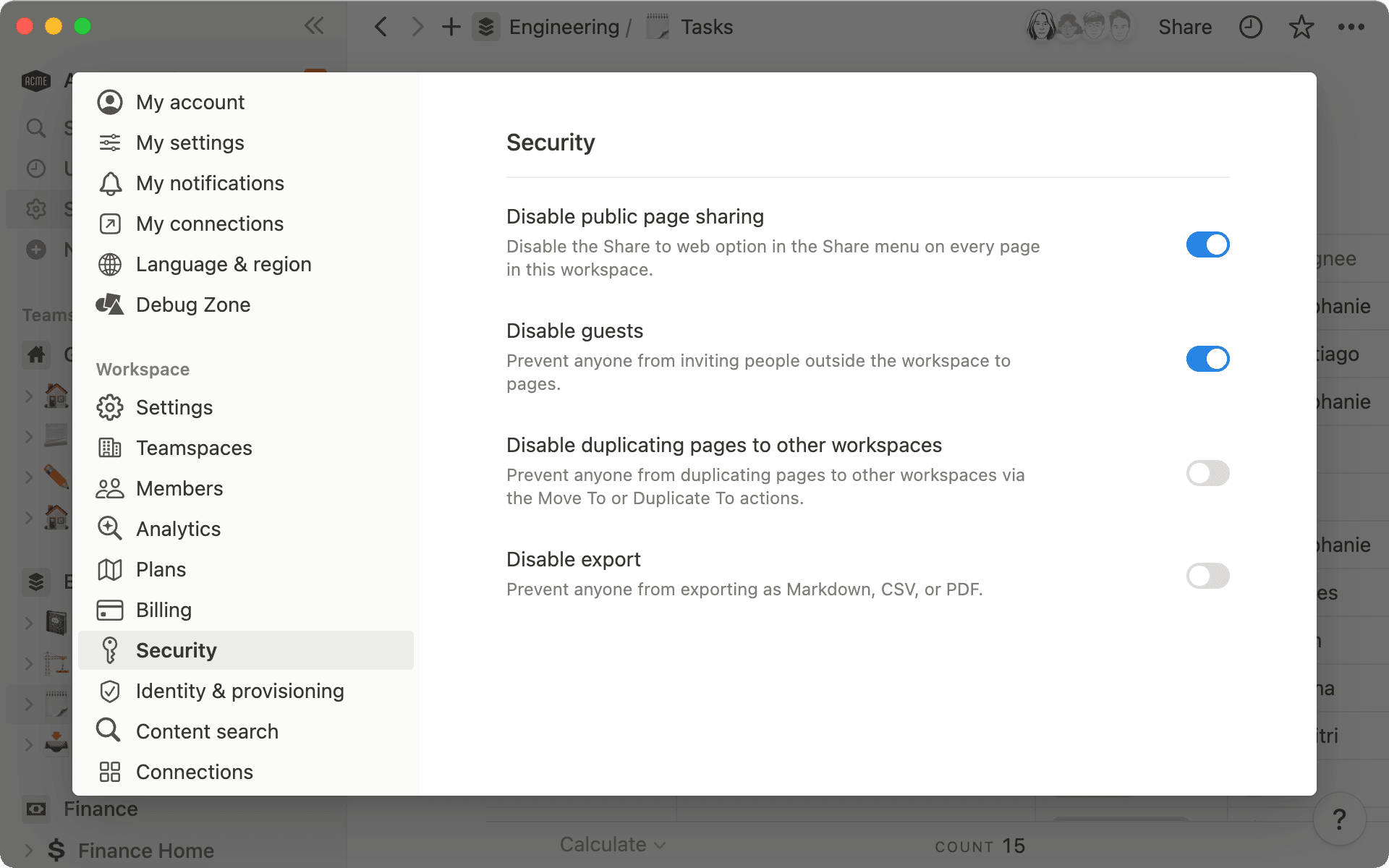
Workspace owners on enterprise plans have access to various security settings and connections that keep your data protected.
Your wikis, docs, and projects live side by side in Notion, a connected workspace where all teams can collaborate and track work.
Since Notion is the hub for your most valuable intellectual property, you need to know that your data is secure and all the necessary protections are in place to make sure you operate in compliance.
In this guide, you’ll learn how Notion’s security and compliance features for Enterprise plans allow you to have complete enterprise-grade experience and keep your company data safe.
Workspace owners have full control over the Notion workspace security settings to restrict external access to your data, which you can find in the Security tab in your workspace settings.
To secure your workspace, you can make use of the following settings:
Disable public page sharing: this will disable the Share to web option in the Share menu on every page in this workspace.
Disable guests: this prevents anyone from inviting people outside the workspace to any page. However, even with “Disable guests” turned on for the workspace, workspace owners can enable members to send guest invite requests to provide more granular access for external collaborators or guests.
Disable moving or duplicating pages to other workspaces: this prevents data from leaving the workspace via the Move to or Duplicate actions.
Disable export: this prevents anyone from exporting page and database content as PDF, HTML, Markdown & CSV.
Disabling all these options will put the tightest lockdown on your content and prevent your content from being shared, downloaded or moved out of the workspace.

Teamspace vs. Workspace security
Manage your settings at an organization level
On Notion’s Enterprise plan, Workspace owners can access additional data and reporting to get deeper insights into how team members interact with content and use the workspace overall.
Here are some of the most impactful data and reporting features currently in Notion Enterprise:
SIEM connections
SIEM (Security Information and Event Management) connections collect event log data from various sources, identify unusual activity in real time, and allow configurable, off-the-shelf alerts, reports, and dashboards. By integrating a SIEM solution with Notion, you can bring Notion audit log information into a shared platform where you monitor the rest of your SaaS apps for better analysis, searches, and correlations.
Integrating with a SIEM solution allows you to configure alerts on unusual activity, provide reports, and build dashboards to support incident investigation. These tools enable automated alerts, but do not trigger automated actions in Notion.
Partner integrations: Multiple pre-built connections.
Custom SIEM integration: A self-serve webhook that sends all audit log events in real-time to any SIEM endpoint you configure. Useful if your SIEM platform isn't one of our named partners.
Learn more about adding security and compliance connections →
DLP connections
Data Loss Protection (DLP) tools prevent users from storing sensitive data in unauthorized platforms or with unauthorized external or internal audiences. These tools use libraries of patterns to identify different types of sensitive data and personally identifiable information (PII).
You can create alerts to notify workspace owners about sensitive content and trigger automated actions to redact sensitive content from the workspace immediately to help reduce the time of overexposure with manual intervention.
Learn more about Notion DLP partner connections →
Enterprise Workspace owners can export a list of all members under Settings > Members > Export Members as CSV. This CSV export will contain a list of all members in the workspace, including their name, email address, role, what groups they belong to, and their unique Notion user ID.
To help with legal and compliance backups, Enterprise workspace owners can export the workspace in multiple file formats, including CSV, Markdown & PDF. See our help center article on exporting your content for more details.
Learn more about exporting your content →
Enterprise workspace owners have access to an Audit Log (under Settings) which gives an overview of a large range of events that have occurred in the workspace.
Audit log allows workspace owners to see all events taking place across their workspace.
Learn more about audit log →
Content search provides Enterprise workspace owners with visibility into workspace content to improve governance of the workspace and resolve page access issues:
View who has access to a page
Modify the permissions of a page
Discover and re-assign abandoned pages from former employees (including private pages)
Learn more about content search →
All content on a Notion Enterprise workspace is owned by your company. You can share this article with your employees if they have questions about what data is accessible to Enterprise workspace owners when using a verified domain on Notion.
Enterprise Key Management (EKM) gives Enterprise customers control over the encryption keys protecting their workspace data. Customers can provision and grant Notion access to an AWS Key Management Service (KMS) encryption key, denoted as the Customer Managed Key (CMK), and Notion uses it to encrypt workspace data.
Notion uses industry-standard envelope encryption: the customer's CMK is used to encrypt a set of Notion-managed Workspace Encryption Keys (WEKs), which in turn are used to encrypt Data Encryption Keys (DEKs) protecting each piece of content.
With EKM, customers can:
Unilaterally revoke CMK access: revoking Notion's access to the CMK makes EKM-protected data completely inaccessible until CMK access is restored.
Control key rotation: new CMKs can be provided to replace previously used keys.
Audit key usage: monitor key use in their own KMS account via AWS CloudTrail.
EKM is currently in Beta Early Access release and is available to select Enterprise customers, with general availability coming soon. Contact your account team to learn more.
Notion AI honors your workspace's existing permissions and never uses Customer Data to train models. Enterprise workspaces enforce zero data retention with our default LLM providers, and Notion AI is in scope for our SOC 2 Type 2, Korea CSP Evaluation and ISO 27001 certification.
Workspace owners can control custom agent behavior, including web search settings, external request confirmation, and credit usage beyond the workspace allowance. Enterprise customers can also use DLP integrations to alert on sensitive content in AI prompts and outputs. Personal chat agents assume the permissions of the user executing the query.
Custom Agents have their own independent permissions and follow a build-from-nothing security model: they start with no access until it is explicitly granted. Governance features include:
Admin controls: an Agent Directory, creation controls, audit logs, AI analytics, and ownership transfer.
Sharing warnings: clear prompts when an agent can access private pages, email, calendar, or third-party integrations.
Automatic access checks: agents stop running if all editors lose access to a connected resource.
Runtime safeguards: agents pause for confirmation before accessing unexpected external URLs, with layered prompt injection protections.
Learn more: Notion AI security and privacy practices and Custom Agents security features.
AI Connectors bring content from tools like Slack, Microsoft Teams, and Jira into Notion AI's answers. Connections authenticate with OAuth 2.0 over TLS 1.2+, and connected content is represented as embeddings in an isolated, SOC 2-audited vector database. Source-system permissions are enforced at query time, so people only see connected content they already have access to, and permission changes propagate within about an hour. Guest users are excluded from connector access, and disconnecting a connector deletes its ingested data within 24 hours.
Notion maintains a comprehensive security and privacy program designed to protect your data in accordance with various regulatory and industry standards.
A full list of Notion’s compliance certifications is available on the Notion Trust Center.
Ada yang belum kami bahas?