• Notion AIכלי AI לעבודה
  • סוכניםאוטומציה של משימות שגרתיות
  • AI Meeting Notesנכתב בצורה מושלמת על ידי AI
  • חיפוש Enterpriseלמצוא תשובות באופן מיידי
  • בסיס ידעריכוז כל הידע שלכם במקום אחד
  • מסמכיםפשוט ועוצמתי
  • פרויקטיםלנהל פרויקט כלשהו
  • חיבוריםחיבור האפליקציות שלכם
  • אבטחהבטוח וניתן להרחבה
  • Notion Calendarהגיע הזמן
. כל מה שחדש→
הורדת אפליקציית Notion→
  • תכונות AI
  • Notion AIכלי AI לעבודה
  • סוכניםאוטומציה של משימות שגרתיות
  • AI Meeting Notesנכתב בצורה מושלמת על ידי AI
  • חיפוש Enterpriseלמצוא תשובות באופן מיידי
  • מקרי שימוש
  • לעבודה
  • לחיים
  • Notion עבור
  • ארגון
  • עסקים קטנים
  • חברות סטארט-אפ
  • מפתחים
  • לגלות
  • מה חדש
  • סיפורי לקוחות
  • וובינרים
  • תבניות
  • יועצים
  • למידה
  • Academy
  • סיורים במוצר
  • מרכז העזרה
תמחורבקשת הדגמה
התחברותקבלת Notion בחינם
  • מרכז העזרה
      • היסודות של Notion
      • ניווט בסרגל הצד
      • הגדרות סביבת עבודה
      • הגדרות והעדפות
      • דפים ובלוקים
      • מאגרי ידע
      • תצוגות של מאגר הידע
      • שיתוף והרשאות
      • Notion Sites
      • ייבוא וייצוא של הנתונים שלך
      • חיבורים
      • אוטומציות
      • Notion AI
      • חיבורי AI של Notion
      • סוכנים בהתאמה אישית
      • סוכנים חיצוניים
      • ניהול סביבת עבודה שלכם
      • פרטיות ואבטחה
      • Notion בשולחן העבודה, באינטרנט ובנייד
      • Notion Calendar
      • Marketplace ותבניות
      • קרדיטים של Notion
      • תוכניות וחיוב
      • פתרון בעיות
      • גילוי כלי הפיתוח
  • לקבל הסמכה
  • Notion Academy
  • תמיכה
  • הצטרפות לקהילה שלנו
  • חיפוש יועץ או יועצת
  1. מרכז העזרה
  2. שימוש כלל ארגוני
  1. ← שימוש כלל ארגוני

שימוש כלל ארגוני

מדריך

How workspace owners can set up teamspaces for their organization

How workspace owners can set up teamspaces for their organization
מדריך

Who should be a workspace member, and who should be a guest?

Who should be a workspace member, and who should be a guest?
מדריך

Building a comprehensive team notes & docs database

Building a comprehensive team notes & docs database
מדריך

Reminders & @mentions

Reminders & @mentions
מדריך

Comments & discussions

Comments & discussions
מדריך

Creating links & backlinks

Creating links & backlinks
מדריך

Creating a page

Creating a page
מדריך

Block basics: build the foundation for your team’s pages

Block basics: build the foundation for your team’s pages
מדריך

Organize, connect, and scale your Notion knowledge management system

Organize, connect, and scale your Notion knowledge management system
מדריך

When to use each type of database view

When to use each type of database view
מדריך

Getting started with templates for your team

Getting started with templates for your team
מדריך

Creating a knowledge hub by organizing docs for large teams

Creating a knowledge hub by organizing docs for large teams
מדריך

Give your to-dos a home with Task databases

Give your to-dos a home with Task databases
מדריך

Connect your tools to Notion with the API

Connect your tools to Notion with the API
מדריך

Best practices for internal communications on Notion

Best practices for internal communications on Notion
מדריך

Use Asana link previews to keep your teams on the same page

Use Asana link previews to keep your teams on the same page
מדריך

Writing & editing basics

Writing & editing basics
מדריך

How teams can use comments for better collaboration

How teams can use comments for better collaboration
מדריך

The best way to set up your team’s sidebar for clear organization

The best way to set up your team’s sidebar for clear organization
מדריך

What is Notion?

What is Notion?
מדריך

How to set up your Notion workspace for your team

How to set up your Notion workspace for your team
מדריך

Assign custom database permissions to make your life easier

Assign custom database permissions to make your life easier
מדריך

Grant the right level of access with teamspaces and groups

Grant the right level of access with teamspaces and groups
מדריך

Navigating with the sidebar

Navigating with the sidebar
מדריך

Create and use an upvote formula for team decisions

Create and use an upvote formula for team decisions
מדריך

How to use and customize the sidebar with teamspaces
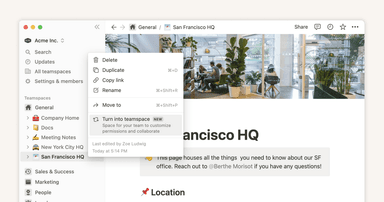
How to use and customize the sidebar with teamspaces
קודם אנחנו מעצבים את הכלים שלנו,
ואז הכלים שלנו מעצבים אותנו.
מרשל מקלוהן
  • מוצר
  • תכונות
  • מה חדש
  • Notion AI
  • תמחור
  • בקשת הדגמה
  • הורדה
  • למידע נוסף→
  • משאבים
  • סיפורי לקוחות
  • חיבורים
  • Marketplace
  • מרכז העזרה
  • Academy
  • קהילה
  • החברה
  • אודותינו
  • משרות
  • אבטחה
  • סטטוס
  • תנאים ופרטיות
  • זכויות הפרטיות שלכם
  • Notion עבור
  • ארגונים
  • עסקים קטנים
  • חברות סטארט-אפ
  • מפתחים
  • למידע נוסף→
  • English (US)
  • Bahasa Indonesia
  • Dansk
  • Deutsch
  • English (UK)
  • Español (España)
  • Español (Latinoamérica)
  • Français (France)
  • Italiano
  • Nederlands
  • Norsk
  • Português (Brasil)
  • Suomi
  • Svenska
  • Tiếng Việt
  • עברית
  • العربية
  • ภาษาไทย
  • 한국어
  • 日本語
  • 简体中文
  • 繁體中文

© 2026 Notion Labs, Inc.