A newshapefor work
v1.0
A field guide for building a shared context system that you, your team, and your agents can work in together.

Introduction
What is the New Shape for Work?
You’re about to learn a better way to work.
It’s a way to move faster, have more fun, be more creative, and win as a team. It eliminates drag and busywork, so you can focus on the things that only you can do.
Our goal is to make Notion the perfect tool for this way of working, but this idea is bigger than Notion itself. It’s a strategy any team can use to accelerate progress, because it solves the central challenge we’ve helped thousands of teams face and overcome.
For many teams, AI is helpful, but it hasn’t transformed the way they operate. The difference feels marginal. This is a guidebook for anyone who wants to change that for their team.
The root of the problem is clear: When AI is used without an effective strategy, it gives you surprisingly little leverage. It’s like adding a power boost to a bicycle with only one gear — the pedals move frenetically, but nothing has fundamentally changed. Increased leverage allows you to move up to a higher level, and work on the system rather than in the system.
So, how can we do that?

Information scattered everywhere
Everyone reinventing their own wheel
Agents confused by outdated docs
One-off chats
Isolated achievements

Everything automatically organized
Rationalized, shared systems
Clean context for agents
Automated processes
Compounding flywheel
This is the core philosophy of A New Shape for Work:
Humans thrive when we do the creative work that we love, and that only we can do. Everything else can, should, and eventually will be automated. The question is: how?
AI gives individuals incredible power, but the bigger promise is for teams to have that power. The path to achieving this has two parts.
First, create a shared context system that your whole team and their agents can work in together. Then, second, create shared AI systemsThis unlocks the magic...This unlocks the magic...(sometimes called “factories”) that a handful of people can be responsible for, and that everyone else can benefit from.
It might sound complicated, but the simplest version is nothing more than a shared to-do list with an agent and your teamThe simplest agent...The simplest agent... . This only takes a few minutes to set up, but it can be extended to handle tasks of near-infinite complexity.
A New Shape for Work works because it’s built on simple, logical truths that feel obvious in retrospect.
When one part of a team adopts A New Shape for Work, the rest quickly follow, without need for persuasion or “change management.” It assumes the widespread adoption of AI, but does not mandate any specific model provider, tools, or applications.
The beauty of this method is you don’t need to change everything overnight. Start with one workflow, or one team. See if it works for you. Then go from there.
Let’s get started, shall we?
What happens without a context system
Just chatting
Does this sound familiar?
You’ve heard about (or maybe experienced) the incredible things AI can do with code, but you’ve seen nowhere near the same level of impact on most other types of work.
Some teammates spike far ahead with AI, but their way of working doesn’t catch on with the rest of the team as you had hoped it would.
Your AI has so much trouble finding things that you find yourself hesitating to ask it questions that it should (at least in theory) be able to answer. You have the feeling that information is too disorganized, spread across too many systems, or locked up in legacy tools that don’t work well with agents.
You constantly have to catch up your agent and give it background information because it’s missing key context; it can’t just “keep up” the way a teammate would.
There is a lot of one-off use of chatbots on your team, and the occasional flashy demo, but not nearly as much reliable, systematic automation of business processes and functions as you’d like. You see a lot of motion, but not as much durable progress.
You’re nervous about letting your agent make edits, except in the digital equivalent of a sheet of scratch paper, because the real systems your team uses have no good way to preview or audit changes.
You think there are hundreds (maybe thousands?) of agents individuals have built inside your company. You don’t know what they have access to, what risks they pose, or whether the cost is worth it.
These may seem like separate problems, but in reality, they all point toward a single cause: the lack of a context system. A context system is what allows your team’s agents to learn together over time.
Out of context
Many teams still use AI chat in a siloed, shallow way. Individual employees may choose to connect email, calendar, and docs to their AI, but only for personal use.
Using AI in this way is like using a computer without a hard drive, or a web application without a database: You give it inputs, it returns some output, but nothing is saved in a durable, organized way — and so value can’t accumulate or compound over time. The AI is essentially stateless and single-player.
When you connect your agents to a central shared space to save and find information (again, what we call a context system) then knowledge accumulates, collaboration flourishes, and the system’s usefulness begins to compound:
Everyone’s agent reads from and writes to the same place. All memory and context is captured and routed to the correct location in the context system.
Agents can accomplish more ambitious goals, because they have an organized place to store practical knowledge.
Collaboration becomes more fluid; one user’s agent can benefit from the knowledge their teammate’s agent helped capture, and pick up where it left off.
Repeated work can become a reliable workflow instead of a one-off conversation.
The system is bigger than any individual teammate or agent.
When used this way, the system and the agents that use it become something like a central nervous system for an organization’s information. Some people call it a “company brain.” We call it a “context system.” It works great with personal agentsA personal agent just means...A personal agent just means..., and it becomes even more valuable when you build factories on top of it.
This structure is among the most valuable IP any modern organization can have, because it defines the limit of what is possible for agents to do within that company. It doesn’t matter if an LLM is capable of solving hundred-year-old math problems — if it doesn’t have the right context about your company, it’s not much more useful than a calculator. Steam, Steel, and Infinite MindsSteam, Steel, and Infinite Minds
Off script
The way most people start out using AI is by starting a new chat, asking the agent to do something, and then keep working in that same chat until either the task is done, or they give up. For some types of work — especially when you want to be involved every step of the way — this is great.
But what can you do if you want the agent to produce complex, valuable work on its own, without your constant involvement? And how can you get it to perform the same type of tasks consistently across hundreds, thousands, maybe millions of runs?
For this, you will likely need a new mental model. Don’t think of the agent as an assistant: think of it as a computer program that just so happens to execute instructions written in natural language, rather than in code. These instructions are called “skills” in the AI world.
When you give an agent a detailed set of instructions, and the right tools to do a particular job, it’s capable of a thousand times more than when it’s given vague directives and left to figure out the rest on its own.
When you start thinking like this, you’re setting up your agent to succeed much more reliably at complex tasks. The systems you build are much more valuable than an ephemeral chat thread — for two reasons. First, skills enable agents to handle more ambitious tasks at higher volumes. And second, skills can compound; they accumulate learning and become more effective over time.
Works on my machine
The great thing about skills is that they’re simple — they’re just a markdown file with written instructions (and possibly some associated resources). For example, you might have a “create slide deck” skill that comes with a template file, or a helper script to convert your slide deck into different formats.
Skills do have limitations, though. Imagine, for example, that you put a lot of effort into creating a great “slide deck creator” skill. You share it with your team and everyone loves it. It starts to become infrastructure for your business. But some people report that it doesn’t always work the way it’s supposed to. What can you do to diagnose the problem?
The problem is, they are using the skill in their own personal AI agent, which you do not have access to. They may have other skills that are interfering with your skill. Maybe there is a problem with their computer. Maybe they are using an old or under-powered model or harnessThe harness is the program...The harness is the program.... You don’t know, and you don’t have a great way of finding out either (without them handing over their laptop).
Most teams are using skills today, but we believe work will increasingly move to shared agents — what some people are beginning to call “factories” — which can be continuously improved much more easily than skills.
If the slide deck skill was a factory, then the actual slide deck creation agent would be shared infrastructure. Teammates can still use their personal agents to request slide decks to be created, it’s just that the creation happens by the factory agent. That way, whomever manages the factory can debug, optimize, and update things on a continual basis. You can even have an agent help do this for you, to create an automatic self-improving system!
Why is this so important? You want your most advanced, enthusiastic AI builders to create the best systems possible, and you want everyone else to be able to benefit from them.
From chats to systems
One-off chats with AI are great, but if the only time you have agents working on your behalf is when you decide to send them a chat message, you’re missing out.
A company is what it does, and most things a company does are caused by one of two triggers:
Trigger type | Explanation | Examples |
|---|---|---|
Scheduled | Happens at recurring times | Monthly accounting close, daily standup, quarterly board meeting, weekly metrics report, biweekly manager 1:1, annual performance review |
Event-driven | When X happens, we do Y | Support email received, lead form filled out, account created, Slack message sent, idea sparked in meeting, breaking news |
When a person at your company decides to chat with an agent, it’s a form of event-driven task. Something made the person think, “I should ask AI about this.” That’s great, but it relies on a human noticing something.
To move up a level, to creating systems rather than just having chats, think about the scheduled and event-driven triggers that you can have automatically wake agents up and do work for you. For example, you might already have an agent hooked up to take a first pass at support emails. Do you have a daily news scan? What about agents that route product feedback to the right teams? Monitor social media chatter? You can get creative.
But the trigger is just the start of the work. How do you make sure the agent does the right thing, reliably, every time?
Don’t pay the “configuration tax”
When someone new joins your team, is it better for them to have to set up everything from scratch, or should they be able to plug into preconfigured workflows on day one?
Obviously you want things to be preconfigured for them, for two reasons:
First, you want them to be productive as quickly as possible. Having them set everything up themselves would be a waste of time.
Second, you want to benefit from specialization and gains from trade. Some employees in your company will be more naturally suited to setting up agents and factories. Others will simply use those agents. You want to create space for each type of person to do what they do best.
The problem is most AI chat platforms today don’t give teams much, if any, ability to preconfigure an agent for employees. Right now, it’s up to each employee to connect all their own systems, ensure they have the right skills, and then figure out how to use them.
This makes no sense.
With factories, people can just ask for a slide deck, a data report, a bug fix, and so on — and then get it back, often within minutes, at the highest level of quality achievable by anyone at the company. And if something goes sideways, it can be easily noticed and improved for the next run. No setup required.
Don’t tie yourself to one model provider
Basic probability theory states that P(A and B) is necessarily less than or equal to P(A or B). This is why bets with multiple wagers — what gamblers call “parlays” — pay out at increased odds.
At work, though, we get no extra reward for bank shots.
“Who will make the best LLM next year” and “who will have the best workspace for using AI” are two separate questions. Why tie them together if you don’t have to? You can choose a workspace that is purely focused on being the best, and that supports any AI model. Rent the intelligence. Own the context. That’s A New Shape for Work.
And in fact, the whole concept of “the best LLM” is suspect. There is no best LLM, generally speaking; there is only the best LLM for a particular job.
Right now, we tend to think of AI models along a single spectrum of differentiation:
cheaper, faster, less intelligent ↔ costlier, slower, more intelligent
But over time, as markets mature, the axes of differentiation tend to proliferate. Today, we already have “fast mode” models that you can pay more for. Tomorrow, we may also have models that specialize in design, writing, finance, and more.
Over time, it will only become more costly to tie your team’s workspace to a single developer of AI models, for the same reason you wouldn’t want to read books by only one author.
A jagged frontier (in more ways than one)
In Silicon Valley, there is an idea called “the jagged frontier,” which basically means that modern LLMs have very uneven (jagged) levels of competence. They are superhuman in some domains (code, math), but surprisingly weak in others (writing, design, and counting the number of “r”s in the word “strawberry”).
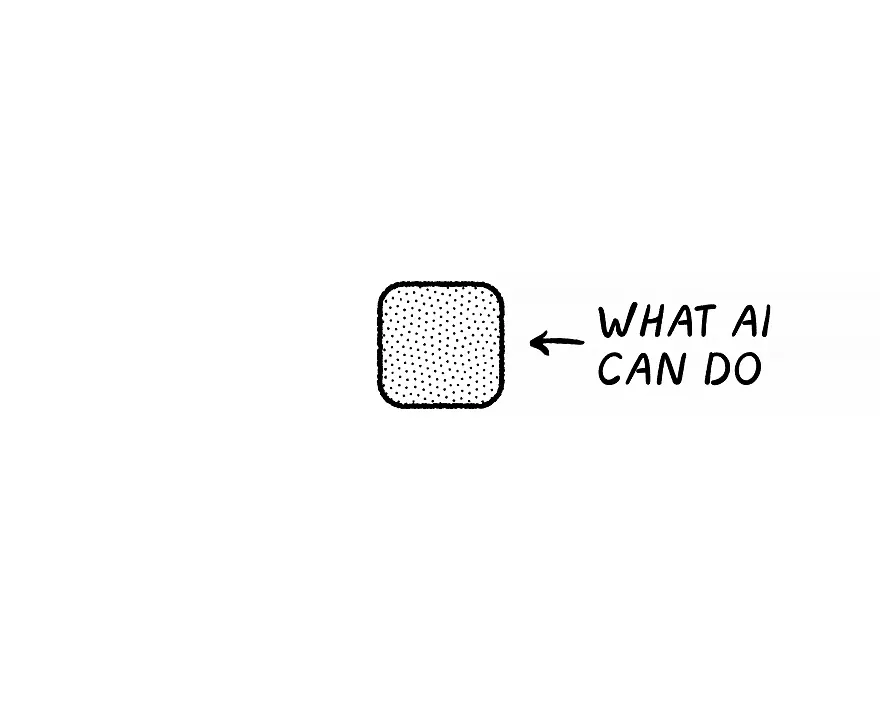
AI is a fun toy.

AI is helping on some tasks.

Sometimes AI is amazing, sometimes it's dumb.
There is another jagged AI frontier, though, which is probably more relevant to you: Some organizations, perhaps your competitors, are a thousand times more proficient than others at using AI. And within an organization, we see the same power law: Some team members are a thousand times more proficient at using AI. These team members go down rabbit holes learning about AI, they experiment constantly, and they do their best to share what works, but only to limited success.
To be clear, it is fine — and in fact inevitable! — for some people to have greater interest and aptitude for certain kinds of work. The crucial thing is whether you can harness their energy toward repeatable, shared systems that everyone else can use and benefit from. And this is impossible without shared context, skills, agents, and governance layers.
If that sounds good to you, let’s turn our attention toward the most fundamental layer of them all. If you add only one component to your system, let it be this: the context system.
Introducing the context system
What is a context system?
If you asked an LLM a question in 2022, it would respond by using the information it was trained on — and that information only. It could, in a way, only look inward. In 2022, LLMs could not look anything up online or within your internal company systems. All it could do was choose which tokenA token is the atomic unit...A token is the atomic unit...was likely to come next.
Then, in the summer of 2023, researchers developed something wonderful: tool use. Finally, LLMs gained the ability to connect to other systems. You could, for example, give an LLM a web search tool, so it can access obscure or recent information not in its training. You could give it a database query tool, so it could run a report for you. Or you could potentially even give it risky tools, like the ability to run any command it wants on your computer. This is when the term “agent” became popular. LLMs were no longer just for chatting — suddenly they were using tools to accomplish actual, tangible work in the world.
The question is: How can you set your agents up to accomplish the goals you give them? What tools should they be able to use?
For most agents, the most important tool is access to the place where your team communicates and stores knowledge. This is what separates the “new, but genius and tireless employee” from the “smart outsider.” The better this system is structured, the better chance your agents have at accomplishing the goals you give them. That’s what a context system is for.
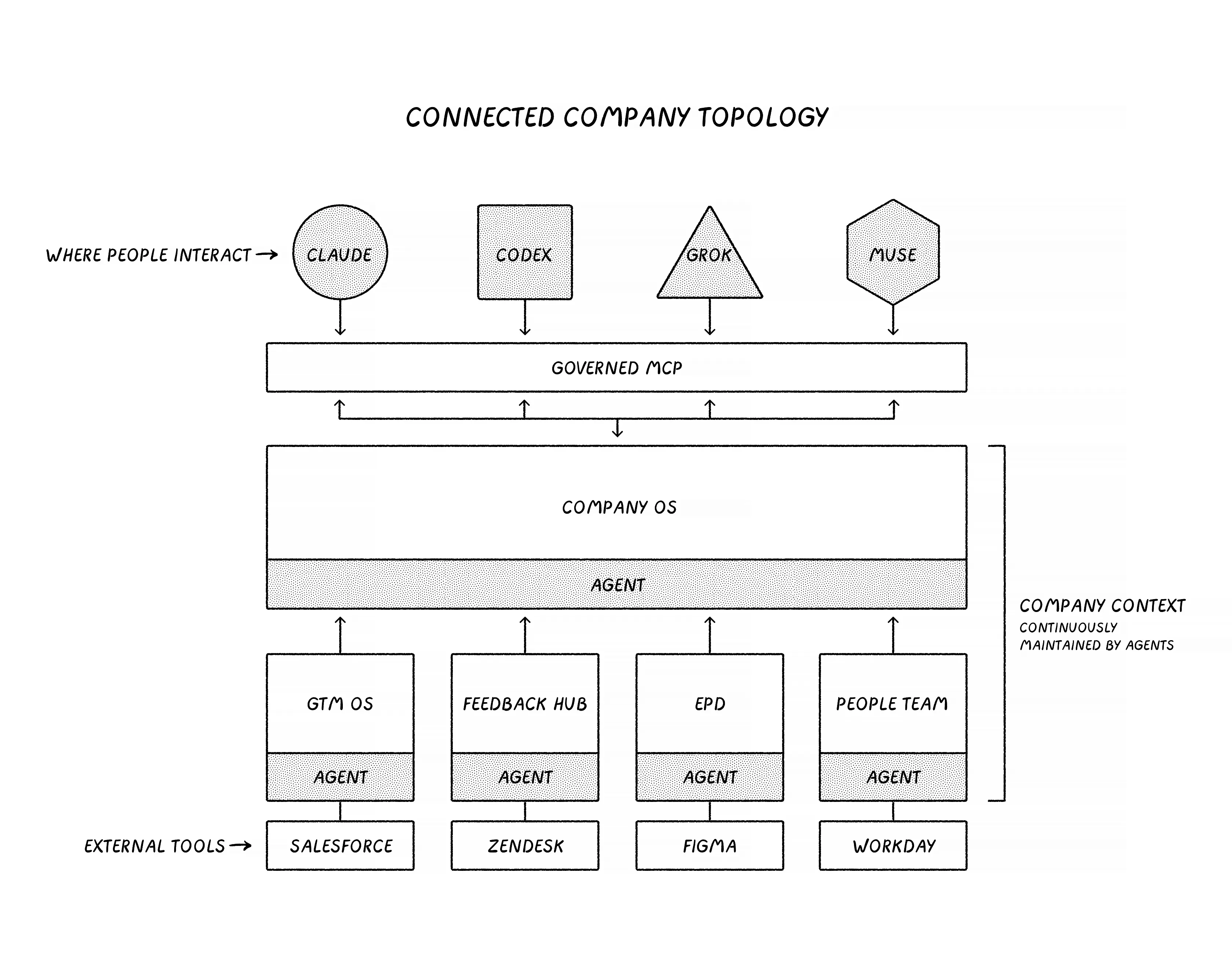
But what actually is a context system? Broadly defined, context systems do six jobs:
Store all essential company information and knowledge
Ensure everything is well-organized and has a logical place to go
Govern everything with granular permissions and version controls
Display the information any way you want
Provide a great collaboration experience for your team (commenting, mobile, desktop, etc)
Work flawlessly with any agent
Let’s unpack each of these.
Why not roll your own?
By any metric, the amount of new software created every day is growing exponentially.
But what is all this new code doing? Are new startups behind it? Personal software? A bit. But mostly, it’s people within existing companies making things to solve their own problems. For example: internal tools, prototypes, workflow experiments, dashboards, and more. (And often the people making them are not traditional engineers.)
The reason this code is created in the first place is evidence that people want more flexibility than existing tools are giving them. Flexibility is important, but “raw code deployed on the internet” is usually not the best container — for a few reasons.
Security. In the era of LLM-powered cyberattacks, companies need a more secure and reliable foundation for your apps and artifacts to be shared, discovered, built upon, and secured.
Agent integration. If company data is scattered among a constellation of homegrown apps, how will agents find it and work with it? Is it searchable? Not unless you invest in indexing, embedding, etc. This is a massive fixed cost you don’t want to pay for each homegrown project.
Governance. Who can access the data? What happens if an agent deletes it? Is there version control?
Collaboration. How can people view the data? Does the data work on mobile? Is there a notification system that tells people when something they care about changes?
The good news is that a well-designed context system gives you all the flexibility you crave, and provides all the boring foundational stuff you probably don’t want to vibe code. Spend your tokens on something more fun.
Structured object storage
Before agents, storage was relatively simple. Most companies had just a few systems that served their needs fairly well. The main one was basically a digital filing cabinet for unstructured data, storing team documents, presentations, and spreadsheets. And then they’d have a couple of “systems of record” for structured data, usually known by a three-letter initialism, (such as CRM, ERP, CMS, ATS, HRIS, and so on).
Notion’s original innovation was to combine the power of structure with the freedom of flexibility. You could start with a document outlining the goals for a project, then create a database to track milestones and to-dos. These could be displayed as a calendar, or as a kanban board. It was like Legos for building your own software. Notion became popular because, for many companies, the way they work did not map naturally to off-the-shelf software.
Now, with agents, many companies can discover the benefits of this type of flexibility in a new way. But they are struggling with it. Agents are creating bespoke software, where the data lives in low-level databases or markdown files. But this creates as many problems as it solves. Most organizations do not want their data scattered across hundreds of stray PostgresPostgres is one of the more popular...Postgres is one of the more popular... databases.
But the solution is not to go back to the world of folders full of scattered documents, where there is no structure and no ability to use the power of code that LLMs have made widely accessible.
What you want from a good storage system looks something like this:
Structured data can be structured
Unstructured documents can freely coexist, but can be organized in a rational way so they are discoverable by humans and agents
Code can power anything you want it to
This is the future of information storage for teams.
Ontology
The last section, “Structured object storage,” was about the importance of the ability to structure your business data however you want. This raises the question: what structure should it have? How should you model your domain?
You can’t have these kinds of discussions in Silicon Valley for too long without running into the word ontology. It sounds very ancient and Greek, but the term actually emerged in the 17th and 18th centuries from a group of German Enlightenment philosophers who were interested in the power of rational thought. They needed a word to describe the most general philosophical study of what exists — what kinds of things are out there, and how they relate to each other. So they mashed together two Greek roots, onto- (“being,” or “what exists”) and -logia (“study” or “account of”), to form ontology. Several hundred years later, this word has found a new life as a way to describe enterprise data modeling. Fun!
So, to return to our question, what types of things exist in your world? How do they relate to each other? And why does this even matter?
Agents thrive when information is properly modeled and organized. Instead of having to read hundreds of scattered documents, they can navigate a well-organized context system quickly and efficiently. Because of the data’s structure, they get the right answers more often, faster, and using fewer tokens. This structure also unlocks smaller models’ ability to perform more ambitious tasks for you. And agents can much more easily maintain the system for you when it is clear what the organizing principles of the system are. For any team that wants to move fast, a context system with a clear ontology is nonnegotiable.
So how do you get started?
An ambitious person may be tempted to go wild and create an intricate ontology, but we recommend starting with a small set of core databases. For instance, Notion has a spaceA space or “Teamspace” ...A space or “Teamspace” ... in our own team Notion called CompanyOS that has a small number of primary databases:
Projects
Tasks
Documents
People
Teams
Customers
The cool part is the relationships you can create between different types of objects. For example, in the People database there is a “Manager” attributeAttributes, sometimes referred...Attributes, sometimes referred..., which allows us to very easily create an org chart. People can belong to one or more teams. Projects have an attribute called DRI (Directly Responsible Individual) that can be assigned to a person in the People database.
This sort of data modeling exercise will be familiar to anyone with a background in programming. But with Notion there is no need to learn to code. You just need to think in systems.
Without systems thinking, each page is treated as a standalone document. Basically a sheet of scrap paper. With a connected system, it’s easy for people and agents to find the right documents for the right task.
For example, instead of just searching, “Q4 roadmap” (which may semantically match hundreds of irrelevant documents), you can have a Quarterly Plans database, with one row per quarterly plan. And in your Meetings and Documents databases, there can be a link to a quarterly plan. Now, all agents (or people) need to do is navigate to the Q4 2026 entry under Quarterly Plans, and they can get all related meetings, documents, tasks, and more with a single command.
Fractal structure
Aside from the core databases that your company relies on, one-off databases benefit from having a bit of structure.
For instance, this guidebook used to live as a project in our main Projects database at Notion. But inside that database, we used another database to organize various drafts and keep track of versions. Each had a version number and a timestamp of when it was created. If someone wanted to know what changed between any two versions, they could just ask their agent. And when they did, their agent could easily navigate from the Projects database, to the draft tracker database, to comparing two versions. No wasted tokens. And of course this makes life easier for people as well. A little structure goes a long way.
You want it to be easy to create order. A good context system makes that the default for everyone on your team, whether they're working on core foundational databases or a quick, temporary page.
Syncs
Once you have an ontology that creates a proper place for everything, how do you fill it with information? And should you try to fill it up with everything? Or is some data better kept separate?
Generally speaking, we recommend syncing everything into your chosen context system. A good context system should efficiently surface the right information to your agents, while governing access with granular permissions, and giving you version control. It turns out that this is a complex job that is hard to do well. Many of your existing systems (your CRM, for example) may or may not be as optimized to work well with agents. Better to pick one world-class provider, slurp everything into it, and offer it up to your agents as a simple, governed, consistently great access point.
You can and should still use those external systems! It’s just that directly granting agents access to dozens of sources adds complexity, multiplies possible points of failure, and is exponentially harder to govern. Better to sync it in.
To illustrate this point, let’s take a seemingly simple example. Imagine you have an agent responsible for writing weekly status updates about all your key customer accounts. Without a context system, this agent may need to connect separately to Slack or Microsoft Teams (a lot of key context lives in Slack or Teams channels shared with customers), your CRM, calendar, email, perhaps some product analytics sources, your meeting recording app, and more. Each one of these systems has its own way of governing and organizing data, and navigating these discrepancies costs valuable tokens and increases the likelihood of errors. Plus, some systems are much more searchable and navigable than others.
At Notion we have a large team that is constantly measuring, experimenting, and improving our search technology. Any good context system you choose should dedicate substantial resources to this sort of thing. But for most companies, it isn’t core to their product offerings.
Again, the context system is not going to replace all your other software. But your agents need a good, central place to access that context. This is sort of like a “data warehouse”A data warehouse is...A data warehouse is..., but instead of all customer data, you want all internal operating data in one place. — Call it a “context warehouse,” if you like. It makes it easier for agents to get you the right answer faster.
How do you sync in data? There are two ways.
The first is what we call “managed syncs,” which are officially managed by the context system. For example, a big focus of ours has been making our Salesforce sync amazing; there are a lot of details to get right, and to stay on top of.
But what if you use a system we don’t already have a managed sync for? Or what if you don’t love the specific way our managed sync works for some reason? You can have AI create one just for you! In Notion, they’re called worker syncs, but any good context system should have an easy way to pull context in from other sources.
Meetings
Perhaps the richest sources of context for teams and companies are meeting transcripts. Good context systems make meetings a first-class type of object in the workspace.
Ideally, you have a main Meetings database that all public meetings can go into. Since meetings typically relate to specific projects, you can create an association for each meeting that references one or more projects in your Projects database. And meetings are held by people, which means you’ll want to set up another relation to your People table.
This structure makes it incredibly efficient for an agent to answer questions about any project. Instead of searching for arbitrary terms across vast quantities of messy data, across dozens of systems, an agent can just find the correct project, and read recent updates and meeting notes.
Of course, as we all know, not every meeting is meant to be shared with the entire company. Which leads us to our next topic!
Permissions
Different people (and agents) inside your organization need different levels of access to context.
Your context system needs to match whatever level of granularity you want, without creating a giant mess of permissions. Because most companies don’t use a good organization system for their knowledge, documents are private by default and are only shared with a few people ad hoc.
This creates two problems.
First, it’s a pain to manually share each of your documents with a group of people. You’re likely to forget about a few people who may need access and it takes up precious time that could be spent on more productive tasks.
Second, and perhaps more important, the groups that need access to things change over time. New people join teams or get promoted. How do you automatically share everything with them as needed?
The solution is to use a groups-based permission system. Define groups of people, and share access with a group, rather than a specific person.
But beyond groups, there is much more that a context system should do to keep your information structure clean. For example, row- and column-based permissions turn out to be incredibly useful.
Imagine you want to store salary information in a People database. You may decide this would be too sensitive to share broadly, so you want to allow only certain people access. Should you create a new private database? Or does it make more sense to just have a private column on the same database that only certain people can access? In many cases, the latter is the much better decision; you don’t want to have to create an entirely new and redundant database just to manage the privacy of one specific piece of information.
Row-based permissions are useful too. For example, let’s say you have a Performance Reviews database, but you want people only to be able to see reviews they have personally written. A good context system should allow for this.
Editing and collaboration experience
So far we’ve been talking about AI agents as the primary user of your context system. But, of course, a context system needs to be great for humans, too.
That’s why you need a context system that has a well-crafted interface for reading, writing, and collaboration. It needs to have fast desktop and mobile apps. Notifications are a must. You need suggested changes, comments, @mentions, and all the little things that help people work together.
For databases, you want different views depending on your job. Tasks cry out for a kanban board.Kanban boards are...Kanban boards are... Product roadmaps benefit from a timeline view. Editorial schedules need a calendar view. And sometimes you just need a good, old-fashioned table view. If you want a totally custom view, or a completely new form of visualization, or even a custom application, you should be able to make that too.
These all need to be fast. They need to be accessible to all users, regardless of ability. Ideally they’re even beautiful. These details are hard to get right. It’s not for us to determine how good a job we’ve done at Notion of living up to our aspirations for quality. Only you can judge that. All we can say is that we work tirelessly to be worthy of your trust. You should expect nothing less from the maker of the software that holds your company’s most essential information.
Validation
If the job of a context system is to hold accurate information that’s important to your team, then it should be impossible to input certain types of “bad” information into the system. For example, when you fill out a form on a website to register a guest for a dinner party, it may show an error message if you forget to enter something crucial, like dietary restrictions. Your context system should be able to do the same.
With AI, more intriguing types of validation become possible. You run product memos through checks to make sure they answer key questions you want your product memos to answer. You can make sure loose sheets of paper get filed in the right place. You can even make sure that new decisions and information are fully reflected in all pages of your workspace.
The goal of a good context system isn’t just to store information. It’s to ensure the information is accurate, well organized, and up to standard.
Curing context rot
If a context system is for storing accurate, up-to-date information and making it easily accessible to agents and people, then Enemy No. 1 is bad context. Stale, substandard, incomplete, improperly organized, misplaced, and out-of-date context is everywhere. In the past, we did our best to clean it up manually, or we lived with it.
But now, agents make it possible for us to maintain our context systems in ways that nobody ever had the energy to do before.
In the next section, we’ll learn how that can work and, perhaps more importantly, introduce a more general idea that we believe will reshape how most modern workflows function.
Factories
What is a factory?
Factories are shared AI systems that are designed to handle specific organizational tasks. For example, a team could set up an agent factory to automatically write weekly project-status updates for every team. This is a great way to keep your context system up to date, but the thing that makes it a factory is that a small number of people can set them up and make them good. Everyone else benefits from them without having to know much about how they work. This unlocks the magic of “specialization and gains from trade.” You can build your own factories, or buy one from a vendor.
Here are a few examples you’re probably already familiar with (even if you haven’t been calling them factories):
Customer experience factory:
Customers email or chat with support, and an agent handles it autonomously, or may decide in some circumstances to escalate to a human.
Slide deck factory:
Many teams need to create the same type of slide deck over and over again — and waste time iterating with a personal AI agent that does not have sufficient instructions. A factory can provide a shared system that is easy to use and produces standardized results.
Bug fix factory:
Software crashes are detected in production and trigger an agent to investigate, fix, raise a pull request (a software engineering term for “propose a change to the source code”), and sometimes even autonomously merge it if adversarial review agents deem it safe enough to do so.
Data factory:
Teammates ask data questions (“How many people ordered the chicken sandwich last week? Is it becoming more popular?”), and an agent asks clarifying questions, accesses the data warehouse, and constructs a visual, interactive data explainer that can be shared with teammates. Later, human experts review samples to ensure accuracy and tweak the agents’ behavior.
Customer intake factory:
When you sign a new customer, many teams kick off a process that triggers multiple different actions. It requires intelligence, but you need it to happen pretty much exactly the same way every time. A factory is great for this too!
Every factory shares a few essential attributes that differentiate it from a regular AI chat or personal agent.
They are...
Specific: designed to handle certain types of tasks, and not others
Shared: multiple people on your team can use it
Scrutinized: some members of the team monitor the agent to make sure it performs as it should
For example, you might ask an agent to perform many different types of tasks — everything from inbox triage to brainstorming strategy. But that wouldn't count as a factory, because it's not specific.
Or you may give a personal agent memory or custom instructions to improve performance, but no one else can benefit from that except for you.
And if you have a personal agent connected to a data warehouse and you could ask it to answer a data question, that still wouldn’t be a factory. Because no one on the team is monitoring that agent to make sure it’s performing well.
Why factories matter
The “AI factory” architecture enables specialization and gains from trade. This is, as the economist Adam Smith argued hundreds of years ago, the primary basis for all economic prosperity.
Imagine if everyone on your customer experience team had to train and operate their own agents to answer customer support emails. There are many disadvantages compared to the standard factory that most companies adopt. Here are a few:
There is a lot of wasted, duplicated work when everyone sets up their own agent. These fixed costs should only be incurred once.
Quality will vary dramatically, since not everyone will set up their own agents the same way, or with an equal level of effort and sophistication.
Even the best agent set up by the best member of the team for themselves would likely be much worse than a factory that multiple people pour energy and focus into.
Improvements don’t compound. When one person figures out an improvement, others have to manually discover it and adopt it for themselves.
Employee turnover is especially harmful with this setup.
It’s harder to make good judgments about training an agent when you have a limited set of data to pull from. One central team monitoring one thousand runs per day (with more sophisticated AI monitoring tools) is going to have better judgment than twenty-five people observing forty runs each, manually.
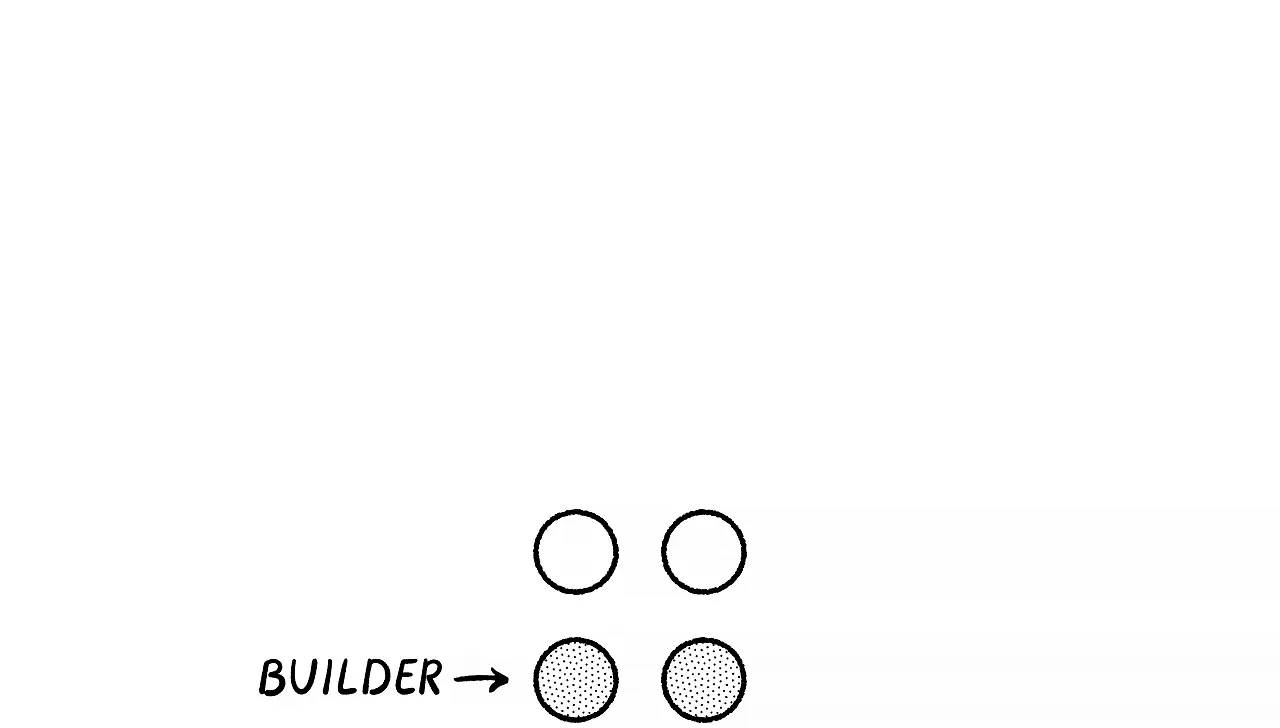
Team of 4: Builders = 50% of the team’s time

Team of 36: Builders = 5.6% of the team’s time
Let’s make the abstract idea of “quality” a bit more concrete. Specifically, let’s consider security and privacy risks. If every person on the team is responsible for making their own decisions about what their agent should be able to access (or what actions the agent can perform without approval), it doesn’t matter if the average level of quality is within an acceptable range. All that matters are tail events — one bad security vulnerability in one agent is all it takes to cause significant harm.
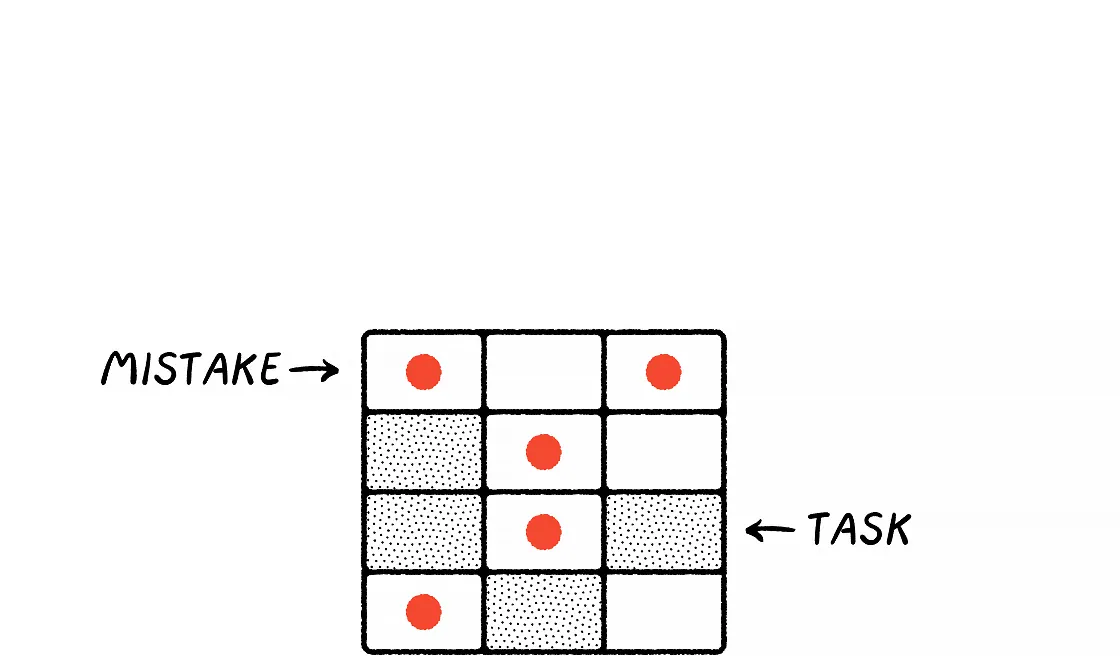
Personal Agents
Shared Factory
People will still use personal agents to help them do things (including help building, monitoring, and extending factories), but for the reasons listed above, we believe the most economically valuable AI work of the future will largely happen in factories, rather than through and by personal agents.
What about skills?
What’s the difference between a factory and a skill? If one person makes a great skill, and everyone else can benefit from it, isn’t that enough? Not quite.
Skills are a sort of proto-factory. They allow different agents to share some instructions in common, which enables some degree of specialization and gains from trade. But skills are missing a few of the key ingredients we listed earlier:
Skills aren’t scrutinized. If everyone uses their own personal agents, there probably won’t be a great way for a specific set of people to observe each agent in order to optimize performance and address issues.
They aren’t really shared. The only things that are shared are some snippets of text. But because the agent and its computer are not shared, all sorts of things can go wrong. Context is not shared, which means that learnings may or may not accumulate. Users must manage their own connectors and software dependencies. The agent might not run if their laptop is shut, and conflicting skills and instructions may make the agent’s behavior less reliable.
Shared skills are much better than nothing being shared at all, but over time more work will migrate to factory-like settings.
What a factory is not
You’ll sometimes hear people talk about “software factories,” sometimes even called “dark factories,” meaning: software that is written, reviewed, and possibly even deployed entirely by AI with no human oversight at any point. This is not what we mean when we talk about factories, for two reasons.
First, factories aren’t just for making software. They can be used for all sorts of knowledge work.
Second, humans can participate in factories however they want. There are many parts of a factory workflow that require human creativity and judgment. It’s up to you to decide where and how you want to participate.
“Software factory” is a popular term because agents are great at writing code, and that’s what some of the earliest factories were built to do. But the “factory” pattern is by no means limited to software. All we mean when we talk about a “factory” is an agent (or a collection of agents) set up to handle specific types of tasks. Multiple people can use it, and it can be scrutinized and continuously improved by the factory manager.
Economies of scale
In the original Industrial Revolution, it wasn’t enough to invent the steam engine or the power loom. For those inventions to matter economically, someone had to put them into production — which meant acquiring land, skilled labor, machines, tools, financing, and all the other things necessary to create a physical factory. The fixed costs of creating and running such a factory dominated variable costs like raw materials. Therefore, to make a profit, one had to produce above a certain threshold.
AI agents and factories are like a miniature version of this. For example, let’s say you want an agent to create a slide deck in your company’s style. It might take you half a day of tinkering to make an okay version. For just one slide deck, that probably isn’t worth it. You could have made the deck yourself in an hour.
Because the fixed costs of AI factories are so small, the economic incentive to centralize and scale is subtle, rather than glaring like it is with physical factories.
But what if you make decks every day? Or an entire team of twenty people is making decks every day? And what if a few days of focused effort on the AI system yields significantly better decks? Wouldn't it feel more obviously worth it to spend a few days focusing on the AI system to yield significantly better decks? As the value of the output scales up, higher and higher levels of investment into the system become rational. This is the essence of fixed costs.
With both AI and physical factories, fixed costs dominate. The big difference is that physical factories are many orders of magnitude harder to create than AI factories — think a minimum of “years and millions of dollars” vs. “hours and hundreds of dollars.”
Because the fixed costs of AI factories are so small, the economic incentive to centralize and scale is subtle, rather than glaring, like it would be with physical factories. It seems so easy for everyone to create their own personal agentic workflows that we ignore the fact that it’s wildly inefficient when compared to what’s possible with shared systems.
We believe this is a temporary phenomenon, and the world will increasingly wake up to the value of AI factories.
Instead of one hundred people each spending an hour hand-rolling their own slide deck skill, imagine how much better off your team would be if two people spent twenty-five hours each and everyone else spent no time thinking about it at all. Half the total time was spent, yet the factory is fifty hours deep into the learning curve, whereas each personal agent is just one hour deep.
How many of the one hour-deep personal agents are abandoned because they were deemed not good enough? A minimum threshold of time that must be spent setting up a workflow before it becomes truly useful. Without factories, many initiatives that would have been successful may have failed because they never got out of the “hobby/side project” zone.
There is a learning curve, and most tasks you want an AI to do for you are possible. But you need to travel further up the learning curve than is rational for a single individual to do for any given task, let alone all the tasks we want to use AI for. If the AI was good enough at creating slide decks after simply asking it “make a slide deck for me,” then none of this would matter. But the fact is we’ve all tried that and we know those decks aren’t good enough. The same is true for most other types of tasks we want AI to perform for us. This is why factories are inevitable.
The simplest possible factory
Economic theory is nice, but you may be wondering, “How can I actually set up a factory?”
Remember, our definition of a factory is that it is shared, meaning multiple people can use it. It is specific, meaning it’s only for certain tasks and not others. And it is scrutinized, meaning some people on the team can ensure quality — and maintain and extend the factory over time by looking at how it runs, and fixing it where it fails.
Let’s stick with the slide-deck example. You don’t have to use Notion, but a simple factory in Notion looks something like this:
Create a database in Notion called “Slide Decks”
Create a “status” column with values: to-do, doing, and done.
Create an agent that runs any time a new task is created with the “to-do” status. (You can set this up inside Notion using Custom Agents, or you can have Notion trigger an external agent running wherever you want, using a webhook.)
When the agent is triggered, it should first mark the card as “doing,” then get to work making the deck. When it’s done, it should update the card with a link to the deck and drag it into the “done” column.
Once you’ve tried it and it works, share access to the Notion database with other folks on your team. You can also create a skill or change your team-wide system prompt (sometimes called “custom instructions”) to tell their agents to add a row in the Slide-Decks database and mark it as “to-do” if the user asks for a slide deck.
Watch the agent work! If it makes mistakes, update the prompt in such a way that it’s less likely to make that mistake again.
It’s that simple. This takes five minutes or less to set up and yet it fulfills all the key criteria of a factory: It’s built to handle specific tasks; it’s shared; and you can scrutinize the work to make sure the work is done correctly.
Ready to get more sophisticated?
Four steps to build a factory
Notice
The first step to building a factory is noticing a pattern of work that you suspect could be handled better by a factory than how it is currently handled by your team.
Good candidates for factories typically share at least some of the following traits:
Recurring.
Verifiable.
Stable over time, relatively static process/requirements.
It is more about an average, standard level of quality — not exceptional outlier creativity.
Purely digital knowledge work (robotics are outside the scope of this book).
Requires access to a known universe of information.
Mistakes are not overly costly, and/or are easy to detect.
The goal is not to remove humans from these processes. It is to elevate them to positions of responsibility and authority over the assembly line of routine work. They should be consulted when it matters most, and empowered to exercise creativity and judgment within the system.
When you do this, you can handle ten or maybe a hundred times more work with the same number of people. Each person on your team will have a much more important and satisfying job.
For inspiration, here are some factories we’ve set up or seen customers set up successfully:
Customer support email answering
Email newsletter quality assurance
Keeping software dependencies updated
Fixing minor bugs
Answering data questions
Creating simple demo videos
Weekly project updates
Sales follow-up
Product feedback processing and triage
Employee onboarding
Invoice and expense processing
Plan
Once you have a good idea for a factory, the next step is to create a simple plan as a starting point. A little effort and thinking will save a lot of time later.
The best way to plan is to work on it alongside a personal agent. Send it a link to this book, and talk to it about the workflow you’d like to automate. Ask it to help set up your factory on your behalf. If you use Notion, it’s very easy to connect the Notion MCP to your agent.
One important pointer: It’s important not to add complexity too quickly. This is a common mistake that both humans and LLMs are eager to make. (LLMs are probably a bit worse, to be fair.) It’s much better to start with a simple factory, run it, watch it fail, and implement solutions to the real failures you observe than to start with a complex factory that contains a lot of preemptive fixes to things you imagined could go wrong. The truth is all of us are bad at predicting how factories will fail. Why guess when you can know for sure?
The most important decisions you’ll need to make when forming your plan are the most basic ones. What should the factory do? Where will it live? What are the inputs, the stages of the process, and the final outputs? What tools and systems access will the factory agent (or agents) need to do their job?
There are many ways to set up a factory, but the biggest decision is whether to do it purely in raw code and databases, or use a hosted platform, or something in between.
The great thing about code is you have unlimited flexibility. The problem is you have to build almost everything from scratch. The consequences of this can range from “somewhat of a hassle” to “massive security vulnerability.”
That’s why many people turn to hosted platforms to run factories and agents. The problem with that is you often end up sacrificing too much flexibility, and so the hosted solution either A) doesn’t stick, or B) limits your vision. This is especially true with vertical platforms designed around one, hyper-specific use case for an agent or factory.
Running a factory doesn’t mean you need to take any scary steps. Each step can and should be incremental, an experiment with an appropriate level of risk.
The best solution is to use a hybrid approach: work with a malleable platform like Notion as your context system for the factory (for example, to store the tasks and their statuses, artifacts, run history, prompts, evals, etc). This can conform to whatever shape you need it to take. And then, you can run the agents themselves wherever you want. You can use Notion custom agents, Claude Managed Agents, OpenAI Agents API, or your own totally custom thing.
The important thing is to get started, try it, and see if it works for you. You’ll soon discover a pattern that fits your needs. And at that point, you’ll be off to the races, building factories all the time. You can even create a “factory factory” that makes it easy to set up factories just how you like them!
Run
It feels scary to give a factory responsibility over something important when you’ve never seen any proof that the factory can do the job properly. This is rational! It makes sense to run your factory incrementally — to start small and low risk, and gradually you can give it bigger responsibilities as it becomes more trustworthy.
Running a factory doesn’t mean you need to take any scary steps. Each step can and should be incremental, an experiment with an appropriate level of risk.
Here are a few ways to do that: Start with a shadow run. Don’t ask the factory to do anything that makes an impact in the real world. For example, instead of sending emails, just have it draft them. Instead of changing a deal description in the CRM, have the factory tell you what it would have written. Shadow runs tell you what the AI would do, instead of having the AI actually do it. They are indispensable when you want AI to make actions that could have costly consequences for mistakes.
Another way to manage risk is to carefully control volume. For example, if you are building a factory to respond to customer emails, and you get 1 million customer emails per day, consider not immediately having your factory draft a reply to every single one. Instead, start with a tiny sample. Or, if you want to make it even simpler, just copy-paste the email into a new task card and trigger the agent manually. Or create an eval suite of a couple dozen test emails! No need to scale to one hundred percent on day one.
As the factory gets better, you can gradually increase volume and allow it to take consequential actions.
Improve
When you observe your factory running, you’ll notice things you want to improve. At this point, you can update your agent’s prompt. For example, maybe your slide deck factory is making titles that are too long.
For simple changes, it’s fine to just edit the prompt directly, but at some point you’ll want a way to keep old versions of the prompt in case you’d prefer to switch back. You’ll also probably want a way to do a test run of the new prompt to make sure it works before switching everyone over to the factory.
If you want to be fancy, you can use a formal version control system like Git, define your agent in code, and set up a development or staging environment where you can test changes before you roll them out. In our experience, this would be overkill for most factories; you can also solve prompt versioning with something as simple as a Prompt Versions database.
As it grows more complex, our slide deck factory might have three stages: research, writing, and design. You could make a database for prompts with a column for “status,” which can be testing, production, or retired. Add another column for “process step,” which can be research, writing, or design. Then just tell your agent that when it’s triggered by a new task to either use the prompt specified by that task (if there is one) or use the prompt where “status” is set to “production.”
This is a simple way to test different versions of prompts. But how do you know if your new prompt is actually better than the old one?
You could manually try giving it different tasks. But that requires you to remember what tasks you think the agent should be good at. This is hard to remember, which means most people just test the new behavior they were looking for. For example, if you wanted to ensure the slide deck’s headlines were not too long, you’d give it the most recent task where it failed and look at the headlines to see if the change fixed it.
The problem with this is that sometimes prompt changes have unintended consequences on other parts of the system. While you’re paying attention to headline length, the AI may also start shortening all sorts of other text that you actually don’t want shortened.
The easiest and most robust way to handle these issues is to simply write down the tasks you want your AI to excel at — and the criteria you'll use to judge its performance on them. For example, you might have a list of different types of slide decks you want the AI to make and a list of all the things you want to be true about each one (headline length, tone, etc.). Sometimes AI, or even static code, can be a good judge. Other times you’ll want a human on your team to take a look.
In AI, we call this list of tasks and judgement criteria “evals.” The big AI labs do this in order to judge their newest models, and you can do it too. It’s a lot easier than you’d expect.
Conclusion
The shape that never changes
William Gibson once said, “The future is already here. It’s just not very evenly distributed.” You’ve just read some ten thousand words about how the nature of work is changing. Perhaps it is a peek into the future. But, paradoxically, the most important thing to remember when thinking about what comes next is that so much will never change. People are people. We want to be useful. We want to solve problems. We want to develop mastery, each in our own way. We want to move fast, have fun, and be creative. We usually want our team to win. Sometimes, that means we’ll do tedious grunt work. Generally, it means we’ll do whatever it takes.
None of this changes because of AI.