Review requests for Notion credits
Learn how workspace owners can review and approve requests for more Notion credits from the AI Command Center, so members and agents can keep working without raising limits for everyone.
Chuyển đến Câu hỏi thường gặpWhen a member or an agent needs more Notion credits, they can send a workspace owner a request, and they can approve or decline it. Approving gives access without changing anyone else's limits. Owners can also manage workspace AI usage from Notion AI settings.
This article is for workspace owners. Learn more about how members can manage AI credits →
You need to be a workspace owner on the Business or Enterprise plan.
You can add members to an approval group, so that requests don’t pile up on one person.
You can route requests to a chosen group, like a few admins or team leads, so they don't pile up on one person.
Access to the workspace's Notion credits, for use with Notion Agent and Custom Agents.
Funding for a shared Custom Agent. See ask an admin to fund your Custom Agent →
A higher credit limit for your Notion Agent and Custom Agents.
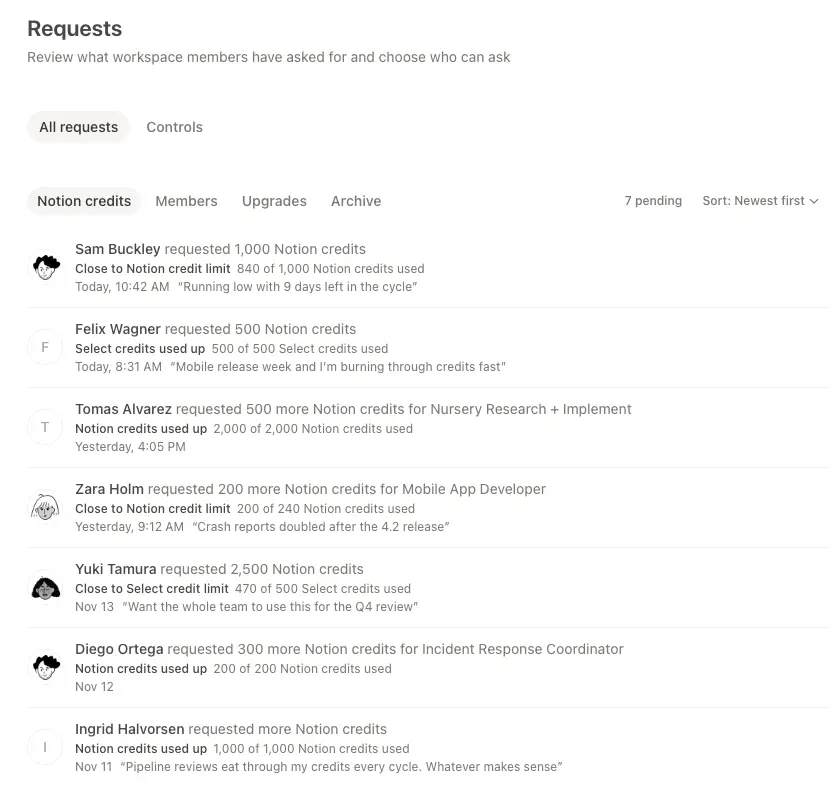
Go to Settings → Requests. Each request shows who's asking, what they want, and why, plus what will change if you approve.
Go to
Settings→Notion AI, then selectCredits.Under
Approval group, select theGroupdropdown.Select the group you want to allow to approve credit limit increase requests.
You can create a new group to add as approvers from Settings > Members > Groups. Learn more about how to create and manage groups →
Go to
Settings→Requests.Open a request to see who sent it, what they're asking for, and the reason.
To approve, assign the member to a credit limit that fits, or make a new one. This gives just that member more room without raising the default for everyone.
You can also decline the request if it isn't needed.
Approving a request gives access under the limit you set.
It doesn't buy more credits. Access still depends on the credits your workspace has available.
If the workspace is out of credits, approved members still can't spend until you add more. Learn how to purchase Notion credits.
After someone sends a request, it stays pending until you approve or decline it.
While members wait, they can keep using the credits included in their plan.
Câu hỏi thường gặp
Can I set one limit for a whole team?
Can I set one limit for a whole team?
Yes. You can set a credit limit for one member or a group, or for your entire workspace. Each member in a group or workspace gets the same limit, so you don't have to set it person by person.
Where do members send requests from?
Where do members send requests from?
When a member reaches a limit, they can send a request for more directly from their own Notion AI settings in Settings > Notion AI > Me. Learn more in Manage your usage allowance for Notion AI and How AI credits work for Custom Agents.