Kairo
Kairo
Kairo
关于
Kairo is a personal productivity app that brings your tasks, notes, meetings, emails, and calendar into a single workspace.
With the Notion connection, you can:
• Securely connect your Notion workspace using OAuth 2.0.
• Browse the Notion pages you've shared with Kairo.
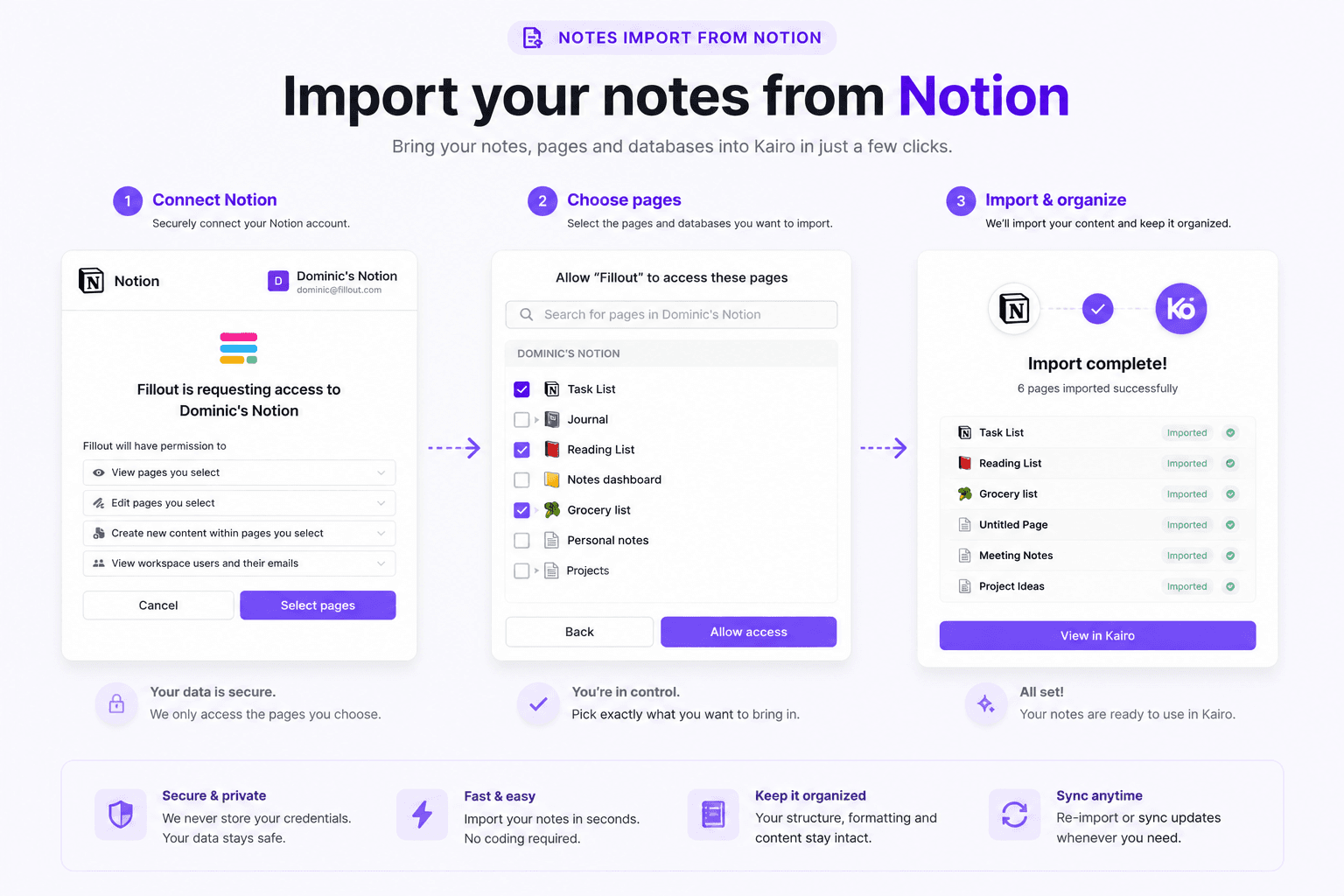
• Import any page into Kairo as a note — its content is converted to rich text so you can read, search, and reference it alongside everything else.
Kairo only accesses the pages you explicitly grant during the Notion authorization step. Your access token is stored encrypted, and imported content is used solely to display your notes inside Kairo. We never modify or delete your Notion content.
Get started by connecting Notion from Settings → Integrations in Kairo, then pick the pages you want to import.
功能
- 读取、插入和更新内容可以读取、插入和更新与此连接共享的页面、数据库和区块。
- 查看工作空间用户读取有关工作空间成员和访客的基本档案详细信息,包括其电子邮件地址。
如何使用
1. Sign in to Kairo at https://www.kairoos.co.
2. Go to Settings → Integrations (or open Notes) and click "Connect Notion".
3. Authorize Kairo and select the Notion pages you want to share.
4. Choose pages to import — they'll appear in Kairo as notes, fully searchable.