 Consulting IQ
Consulting IQ
À propos
Consulting IQ connects your Notion workspace to secure, AI-assisted workflows.
Use Consulting IQ to search and summarize authorized Notion pages, databases, and workspace content directly from chat. When you explicitly request an action, Consulting IQ can create or update supported Notion content based on your access level.
You remain in control:
• Consulting IQ can only access content permitted by your Notion account and the workspace you authorize.
• Read access is used to find, understand, and summarize relevant workspace content.
• Write actions occur only when you explicitly request them.
• Notion remains the source of truth.
• You can disconnect your Notion workspace at any time.
Consulting IQ helps teams turn existing workspace knowledge into faster answers, clearer documentation, and more efficient day-to-day workflows.
Fonctionnalités
- Lire, insérer et mettre à jour contenuPeut lire, insérer et mettre à jour les pages, les bases de données et les blocs partagés avec cette connexion.
- Afficher les utilisateur·rices de l’espace de travailLit les détails de base du profil des membres et des invité·es de l’espace de travail, y compris leurs adresses e-mail.
Comment utiliser l’intégration
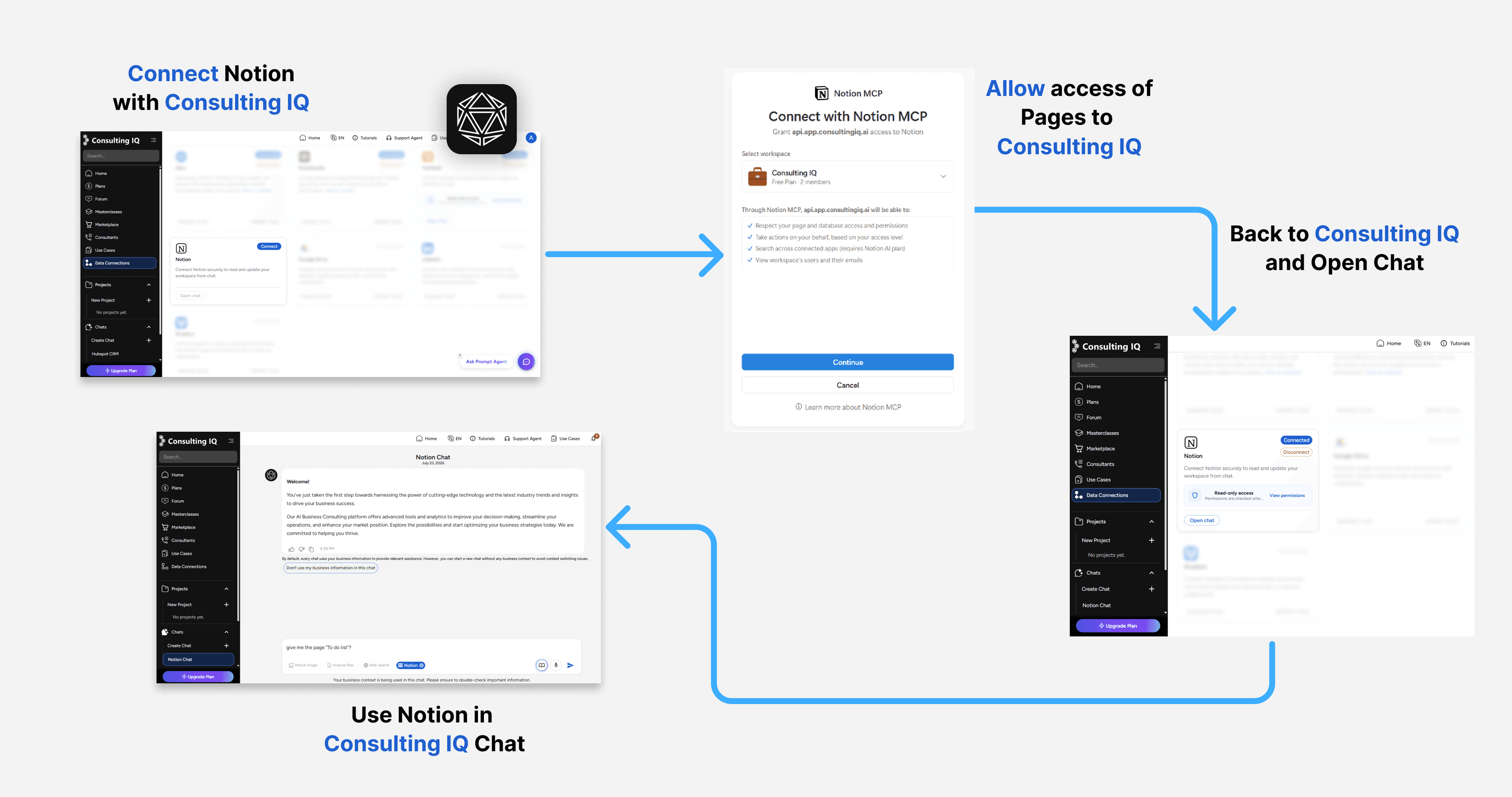
1. Sign in to your Consulting IQ account.
2. Open Data Connections from the main navigation.
3. Find Notion and select Connect.
4. Review the requested read and write capabilities, then select Continue to Notion.
5. In Notion, choose the workspace you want to connect and complete the authorization process.
6. After authorization, you will return to Consulting IQ. The Notion card will show that your workspace is connected.
7. Open a chat and ask Consulting IQ to search, summarize, create, or update authorized Notion content.
Example requests:
• Find our latest product requirements document in Notion.
• Summarize the project updates from this week.
• Create a project status page from this conversation.
• Update the approved project page with this summary.
Consulting IQ can only access content permitted by your Notion account and authorized workspace. Write actions are performed only when you explicitly request them.
You can review the connection or disconnect Notion at any time from Data Connections.
Détails
- Automatisations
- Productivité
- Données analytiques