موصل الذكاء الاصطناعي لـ Slack Enterprise Grid
Set up Slack Enterprise Grid so Notion AI can search your Slack, and let Custom Agents read and post in the channels you choose.
الانتقال إلى الأسئلة الشائعةمن يمكنه ربط Slack Enterprise Grid بـ Notion AI؟
لربط Slack Enterprise Grid بـ Notion AI، يجب عليك:
أن تكون ضمن الخطة المؤسسية لـ Notion، مع أكثر من عضو في مساحة عمل Notion.
أن تمتلك نطاق بريد إلكتروني تم التحقق منه في Notion.
أن تكون مالك مؤسسة في Notion، ومالك مساحة العمل لمساحة عمل Notion التي تم تثبيت موصل الذكاء الاصطناعي فيها.
أن تكون مسؤولاً في Slack Enterprise Grid.
إذا كنت قد قمت بالفعل بربط Slack بأي من مساحات العمل في مؤسستك، فإننا نوصي بقطع الربط قبل إعداد ربط Slack Enterprise Grid.
كيف يمكنني ربط Slack Enterprise Grid؟
لربط Slack Enterprise Grid بـ Notion AI:
انتقل إلى
الإعدادات←Notion AI.حدد
ربط Slack.إذا كنت قد قمت بالفعل بإعداد موصل Slack AI، فستحتاج إلى قطع الربط ثم إعادة الربط بـ Slack Enterprise Grid.
أثناء قيامك بالإعداد باستخدام Slack Enterprise Grid، لن تتمكن من استخدام Slack في Enterprise Search.
اتبع مطالبات المصادقة الخاصة بـ Slack Enterprise Grid. تأكد من اختيار مؤسسة Slack Grid الخاصة بك ضمن
مؤسساتك؛ لا تختر من مساحات العمل الخاصة بك.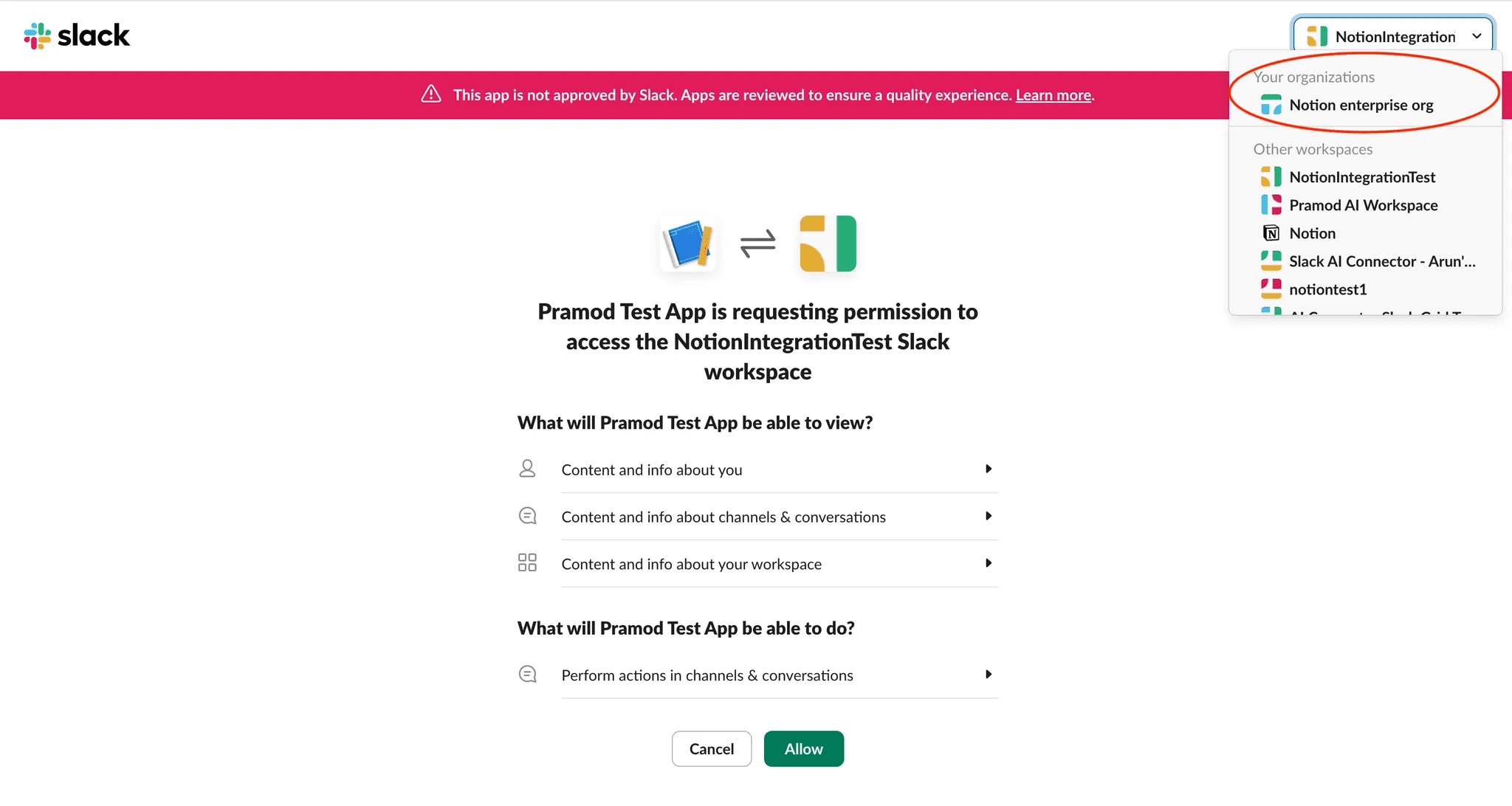
ستتم إعادة توجيهك إلى Notion. انقر فوق
تحديد مساحات عمل Slackلاختيار مساحات العمل الخاصة بك عبر لوحة تحكم مسؤول Slack.في Slack، انقر فوق
إضافة إلى المزيد من مساحات العمل.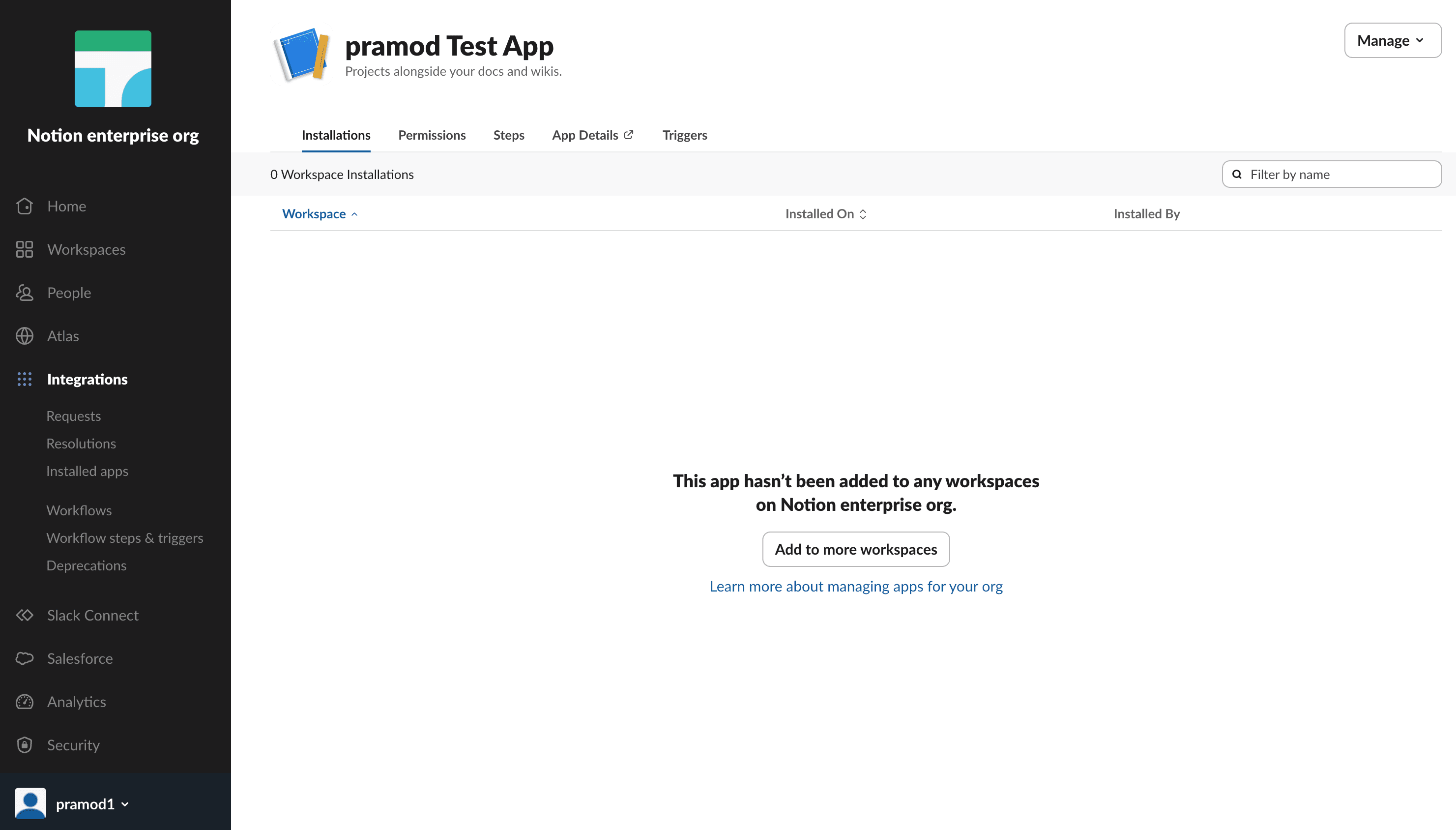
حدد مساحات عمل Slack التي تريد أن تنعكس في Slack Enterprise Grid الخاص بك. نوصي بإضافة جميع مساحات عمل Slack الحالية والمستقبلية.
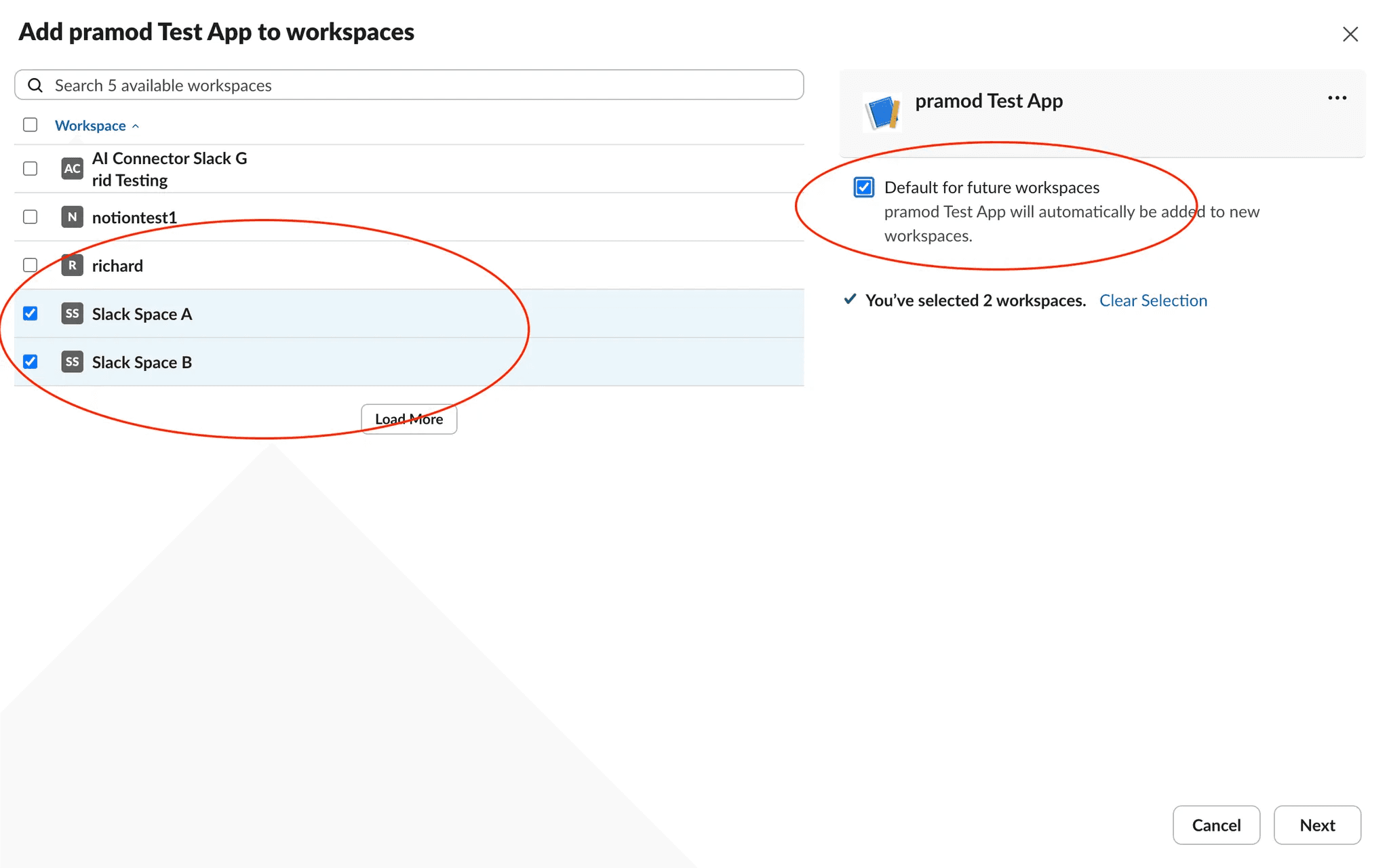
امنح حق الوصول إلى Notion AI وحدد
إضافة تطبيق.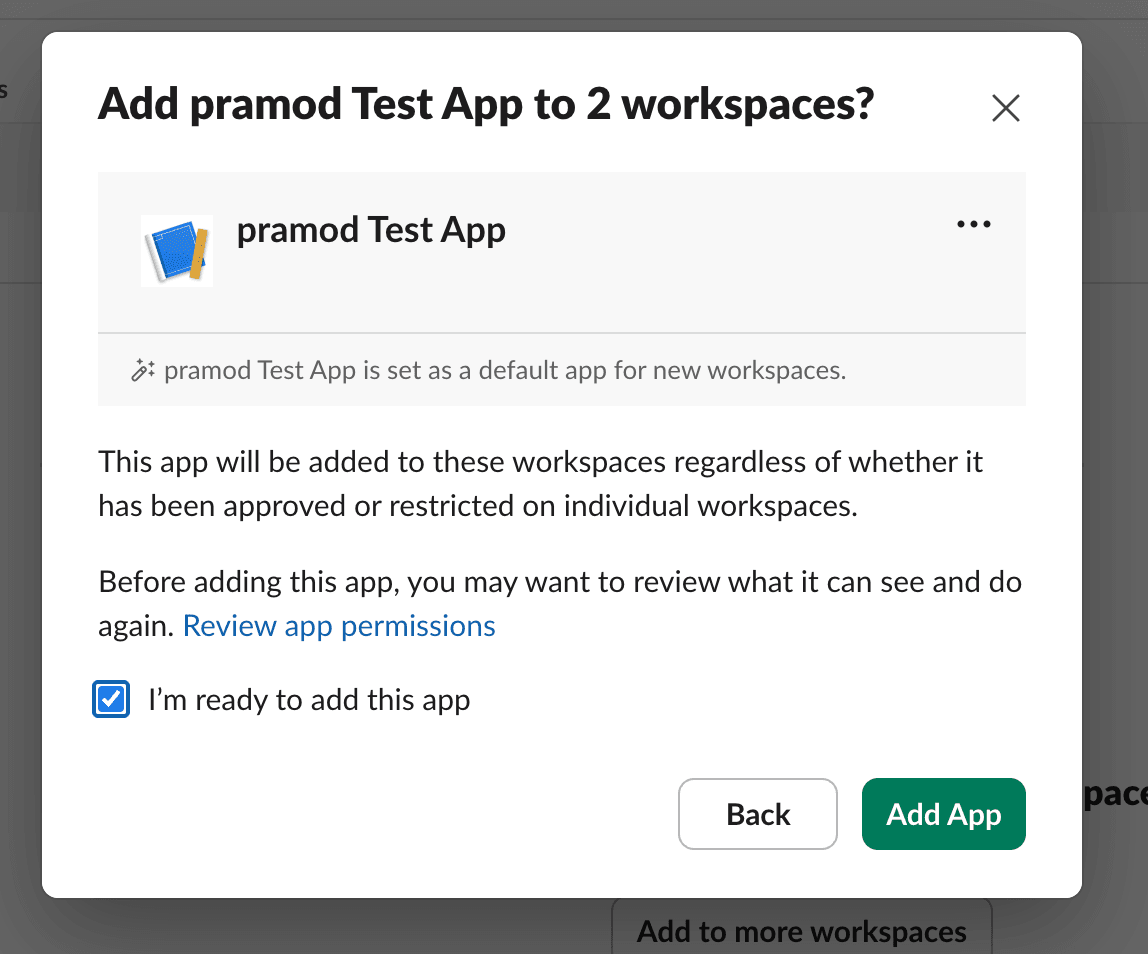
قد يستغرق الربط ما يصل إلى 36 ساعة اعتماداً على حجم بيانات Slack الخاصة بك.
بالنسبة لأي مساحات عمل Notion إضافية، يجب على كل مسؤول مساحة عمل ربط Slack في إعدادات Notion AI الخاصة بتلك المساحة. وستحدد مساحة عمل Notion التي تم استخدامها أولاً لإعداد الربط في مؤسسة Notion مساحات عمل Slack التي سيبحث فيها بقية مساحات عمل Notion عبر Enterprise Search. لن تكون هناك حاجة إلى مصادقة إضافية.
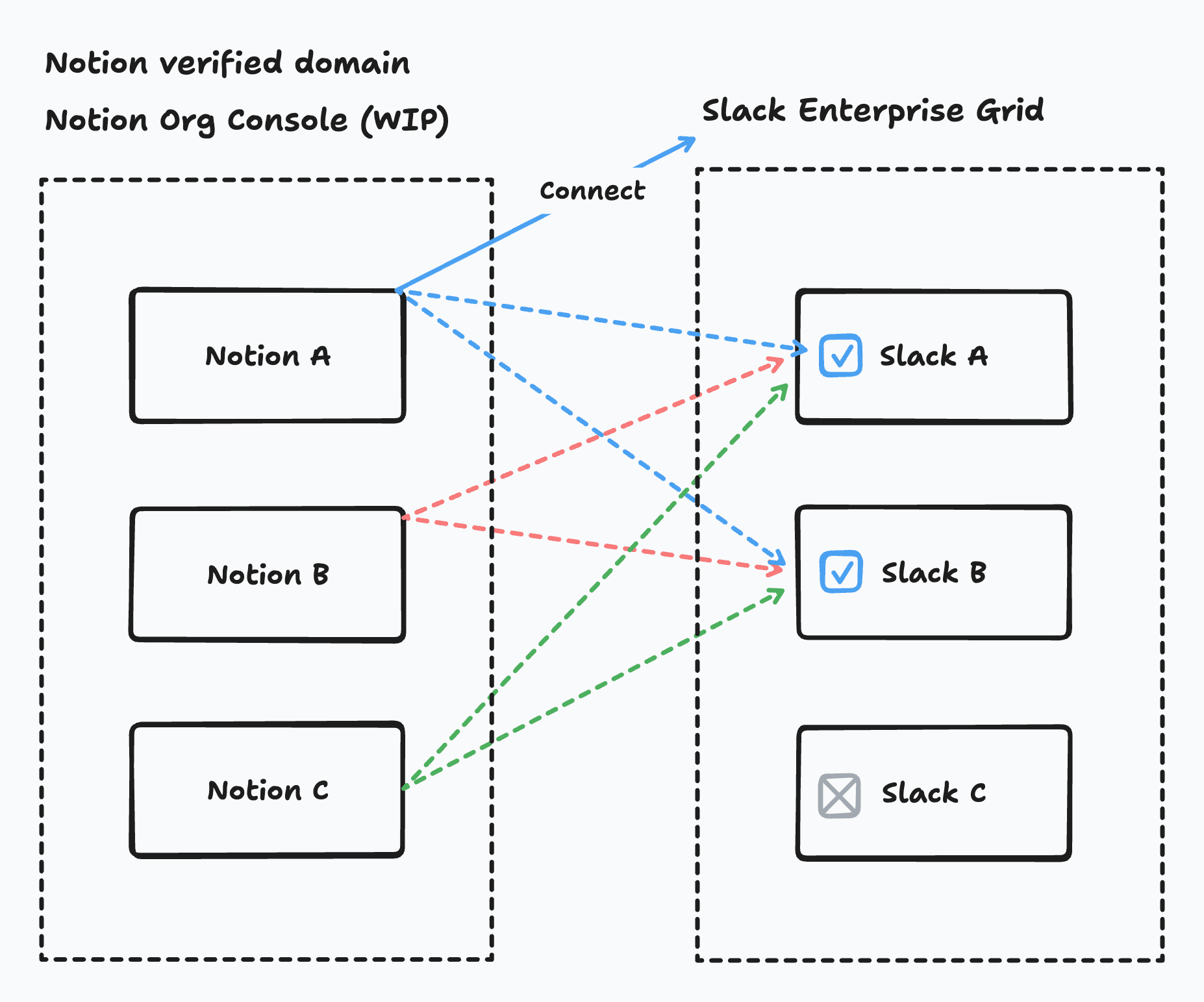
إذا كان عضو في مساحة عمل Notion غير موجود في مساحة عمل Slack التي ربطتها مساحة العمل من خلال Grid، فلن يتمكن من الاستعلام أو طرح أسئلة حول مساحة عمل Slack تلك.
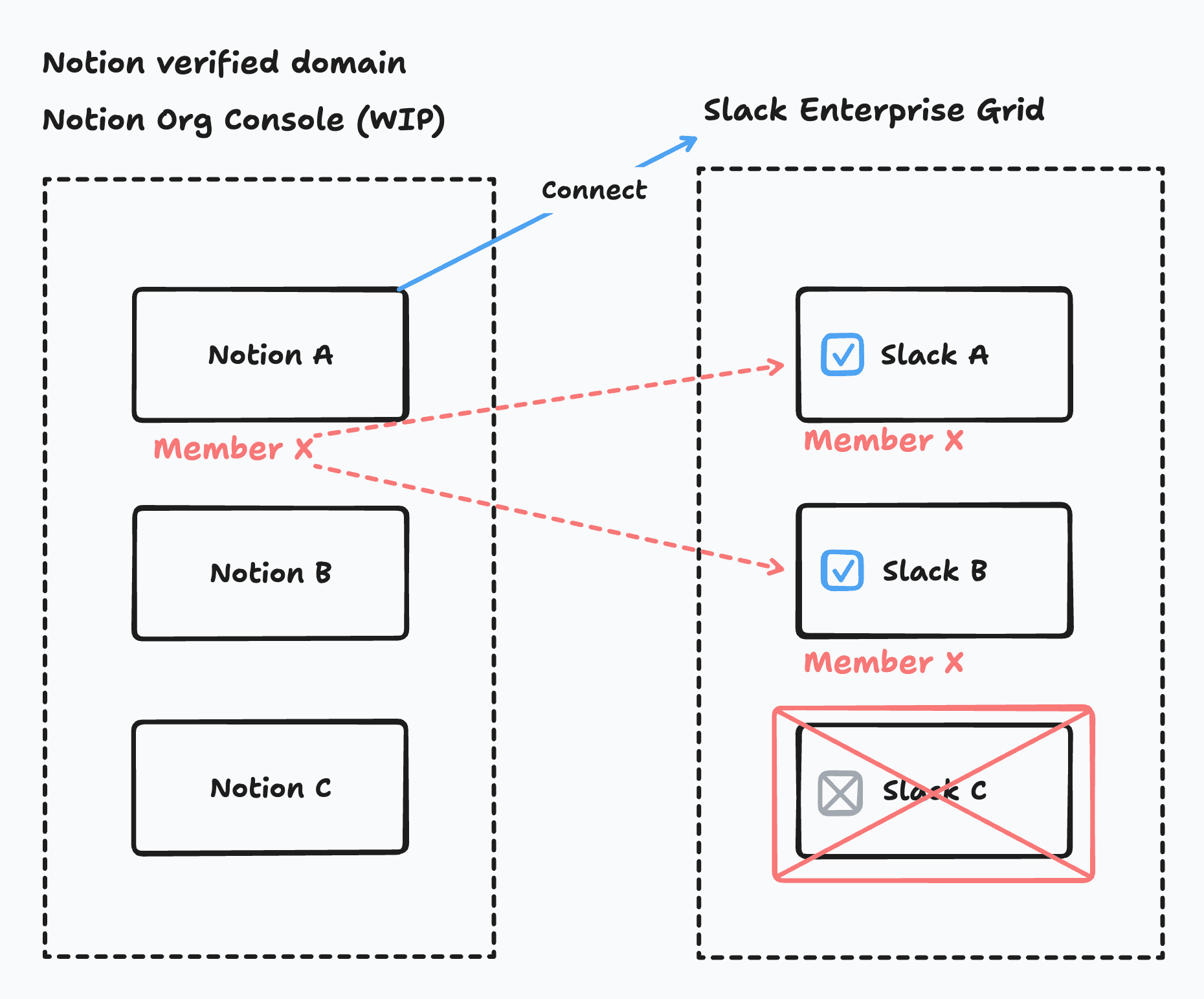

ملاحظة:
توخَّ الحذر عند اتباع مسار تثبيت Slack، فقد تؤدي إلى إطلاق طلبات تثبيت/إلغاء تثبيت متعددة لمساحة عمل Slack نفسها. يبدأ كل إجراء تثبيت/إلغاء تثبيت مسار استيعاب/تنظيف، وهو أمر يستغرق وقتاً طويلاً. وإذا حدثت هذه العمليات في تتابع سريع، فقد يؤدي ذلك إلى حالة غير مستقرة.
بالنسبة لـ Grid، نحن لا ندعم اختيار أي قناة. يمكن للمسؤولين اختيار الفرق التي يرغبون في استيعابها.
الأسئلة الشائعة
Why don't I see Slack as an option when setting up a Custom Agent?
Why don't I see Slack as an option when setting up a Custom Agent?
Make sure an admin has connected the Slack AI connector first. Then ask a Notion workspace owner to confirm Custom Agents are allowed to view and post messages in the Slack connector settings. Finally, confirm you're on a plan that supports Slack with Custom Agents.
Who can install Custom Agents?
Who can install Custom Agents?
Only Slack Org Admins (or Organization owners) can approve the installation for your whole Slack org, and select which Slack workspaces are included. Individual workspace admins can still manage which channels the agent participates in within their workspace.
Will the agent have access to every channel in our Grid?
Will the agent have access to every channel in our Grid?
No. The agent only joins the public channels you invite it to. Each agent connects to one workspace in your Grid at a time, and can also use org-wide channels shared with that workspace.
Do members still need to connect their own Slack account?
Do members still need to connect their own Slack account?
Yes. The installation for your Slack org powers Custom Agents, but members may still need to connect their personal Slack account to confirm who they are.
Why can't the Custom Agent see a channel I expected?
Why can't the Custom Agent see a channel I expected?
Check whether the channel is included in the agent's allowed channel list. Confirm you're signed into the right Slack workspace. You can also manually add the Slack channel by URL if it doesn't populate in your channel list.
Why can the Custom Agent post in one channel, but not another?
Why can the Custom Agent post in one channel, but not another?
The Custom Agent can only work in channels you explicitly allow. Add the channel to the agent's Slack access, then try again.
How do I get more help or report a bug?
How do I get more help or report a bug?
Reach out to your Notion contact directly, or share feedback via the in-product feedback button. We're actively monitoring feedback to improve quickly.