

簡介
The future of software will be running AI agents, without a provider lock-in and using open-weight models. We are building the toolset to enable humans and enterprises to automate their business.
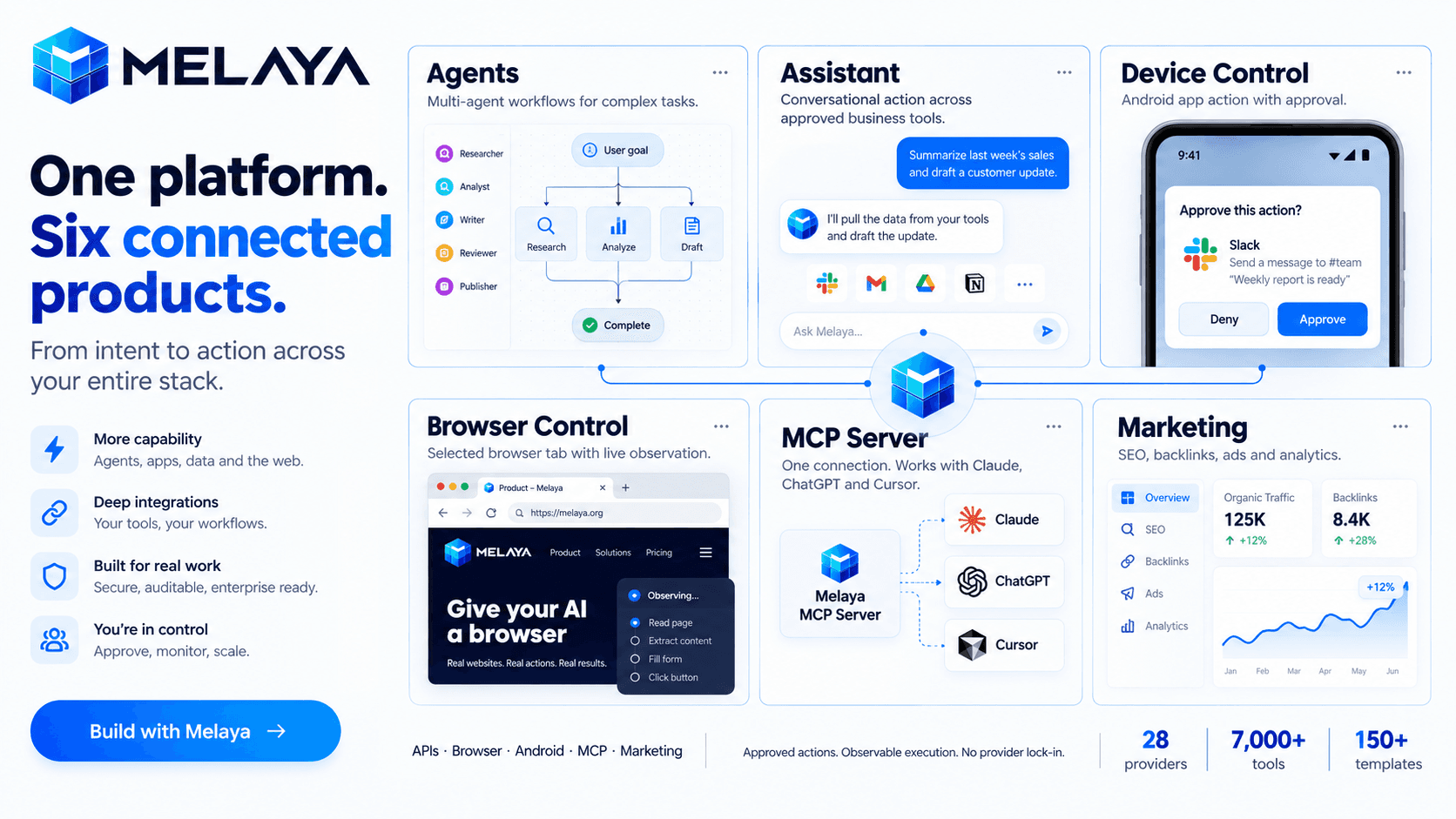
Melaya is a platform for building and running AI agents across business tools, browsers and Android apps.
Products
- Melaya Agents: A visual builder for workflows and multi-agent teams. Combines models, tools, memory, schedules and approval steps in replayable runs.
- Melaya Assistant: One conversational workspace for working across connected business systems, using approved tools and shared context.
- Melaya Device Control: AI agents that operate real Android apps through accessibility, without root or a dedicated API integration.
- Melaya Browser Control: Agents that navigate and act inside your browser, with selected tabs, site permissions, live observation and manual takeover.
- Melaya MCP Server: Gives existing AI assistants—including Claude, ChatGPT and Cursor—access to Melaya’s tools, browser control, mobile agents and workflows through one connection.
- Melaya Marketing: A unified suite for AI SEO audits, backlink building, advertising, analytics and a marketing copilot that works with your connected accounts.
Shared USPs
Bring your own cloud or local AI through 28 providers; combine 7,000+ tools and 150+ templates; automate across APIs, browsers and phones; control consequential actions through configurable approvals; inspect execution history through compliant tool call audits and evaluation systems;
Use cases
- Automating multi-step web workflows with a governed browser extension
- Running multi-agent crews with human-in-the-loop approval before consequential actions
- AI SEO audits, agentic backlink building and cross-platform ads from one marketing copilot
- Give your CLI access to your browser or phone for QA testing
- Automating repetitive mobile apps workflows through mobile agents
功能
- 讀取、插入和更新內容可以讀取、插入和更新此連接共享的頁面、資料庫和區塊。
- 讀取和加入 個留言可以在有權存取的頁面和區塊上讀取和加入留言。
- 查看工作空間使用者讀取工作空間成員與訪客的基本個人檔案詳細資料,包括其電子郵件地址。
使用方式
- Create your account
at
melaya.org
/register. - Bring your preferred AI.
Connect a supported cloud provider or local model. Choose the AI that fits your workflow. - Connect your tools.
Link the business accounts your agents need. For browser workflows, install the Melaya extension; for mobile workflows, pair your Android device and enable the required permissions. - Choose where to start:
- Assistant:
Describe a task and work across your connected tools. - Agents:
Start from a template or build a workflow visually. - Browser Control:
Automate tasks inside your browser. - Device Control:
Automate workflows in real Android apps. - MCP Server:
Give your existing AI assistant access to Melaya’s tools and controls. - Marketing:
Explore SEO audits, backlink building, advertising and analytics.
- Assistant:
- Run one useful task.
Start small: research a prospect, prepare a report or test a web workflow. Review permissions, configure approval steps and inspect the results. - Make it repeatable.
Refine your workflow, then use schedules, webhooks or API triggers where appropriate.
Explore the melaya.org/documentation and melaya.org/use cases for guidance and inspiration.
