Ajeris
Ajeris
簡介
Most Notion integrations require you to open a browser, navigate to a page, and type. Ajeris works the other way around: you text your phone, and your personal AI agent handles Notion for you.
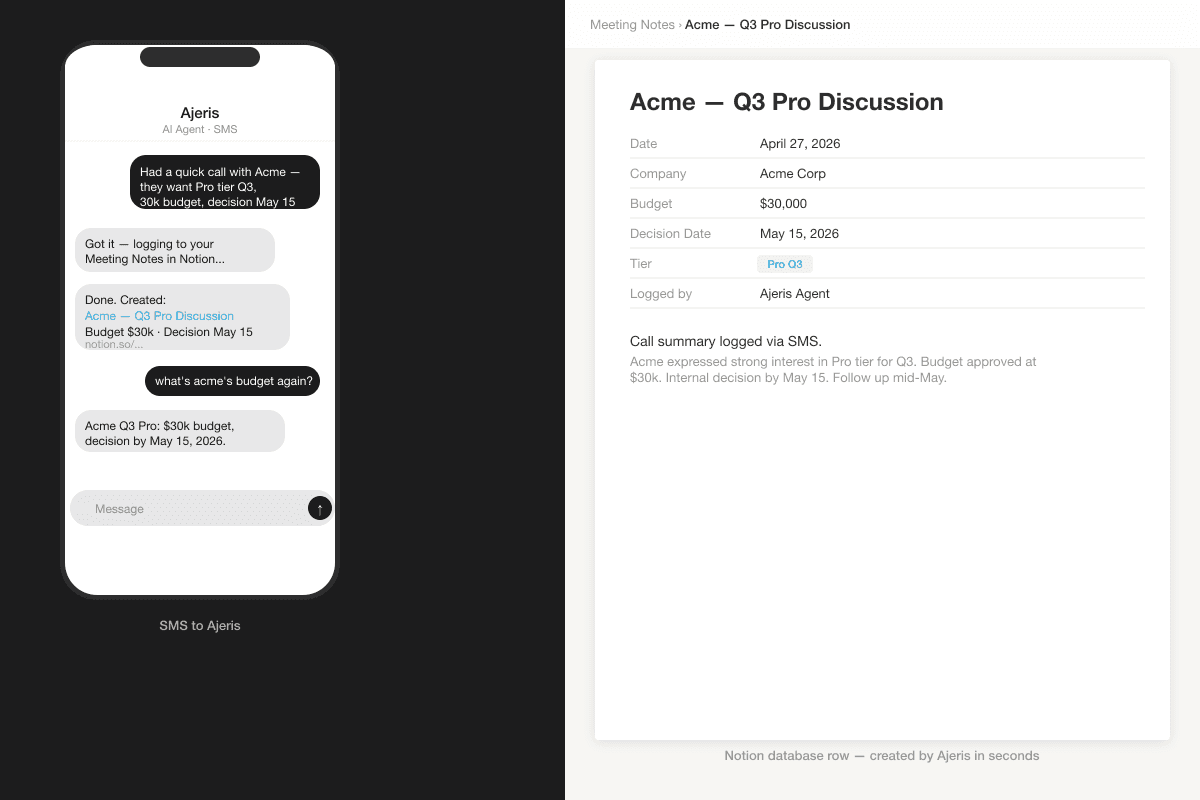
Ajeris is built for founders, consultants, and operators who live on their phones. After a client call you send one SMS — "Acme wants Pro tier, $30k budget, decision May 15" — and the entry lands in your Meeting Notes database, structured and timestamped. No app switch. No copy-paste. No "I'll log it later."
What you can do with Ajeris + Notion:
- Log a client meeting as a Notion CRM entry — by text, from your car
- Ask "what's the status of project X?" and get the database answer in plain language
- Append an idea to your Notion brain dump page in 5 seconds, at 2am
- Update a deal stage or task property hands-free, no swipe required
- Query across your Notion workspace alongside other tools in the same SMS thread
Unlike Claude.ai or ChatGPT's Notion connectors, Ajeris is phone-first and cross-tool. Your Notion data sits in the same conversation as your HubSpot CRM, Slack, Google Calendar, and QuickBooks — one thread, one agent, one context window that carries all of it.
Ajeris connects to multiple Notion workspaces and respects the per-page sharing model. Access is limited exactly to what you grant during setup, nothing more. All tokens are encrypted at rest with industry-standard encryption.
Setup takes under two minutes. Connect your Notion workspace once, choose which databases your agent can access, and you're done. No API keys. No configuration files. Just text.
Your Notion, from your phone.
功能
- 讀取、插入和更新內容可以讀取、插入和更新此連接共享的頁面、資料庫和區塊。
- 讀取和加入 個留言可以在有權存取的頁面和區塊上讀取和加入留言。
- 查看工作空間使用者讀取工作空間成員與訪客的基本個人檔案詳細資料,包括其電子郵件地址。
使用方式
- Visit ajeris.com and create your account by texting our number
- From your manage page, click "Connect" on the Notion tile
- Authorize Ajeris in the Notion consent screen, make sure to select the pages and databases you want your agent to access (or pick "All pages")
- After connecting, configure which Notion database is your Meeting Notes, your CRM, and your Brain Dump page
- Text your Ajeris number anything you'd normally type into Notion: "log a meeting with Acme, they want Pro tier, $30k budget, May decision", and your agent files it in the right database with structured properties