

About
You already track habits in Notion or want to start but feel overwhelmed? Connect Habit Heroes to your workspace via official OAuth and enjoy automatic streaks with scores and live leaderboards.
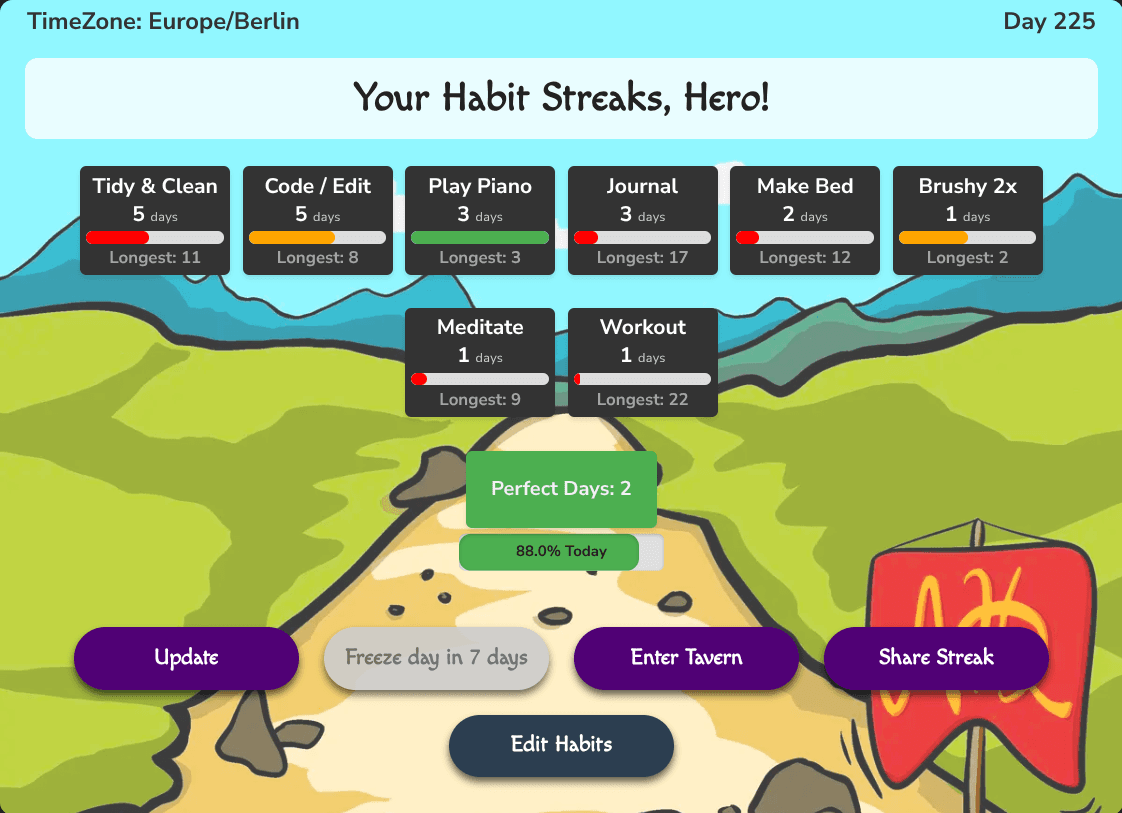
- Automatic per-habit streak tracking - no formulas, no manual counting. Advanced statistics and progress over time.
- Compete with anyone. Create a 30-day challenge, invite friends, and race on consistency, with live leaderboards.
- Insights: completion rates, trends and all-time records across every habit.
- An interactive widget embedded in your Notion page. Add, edit and schedule habits there (daily, every N days, or a weekly quota) instead of editing database properties.
- Your data stays in your Notion. We only read the one database you connect. Your streaks update whenever you open the widget, and a nightly sync at your local midnight covers the days you don't; the day's journal page is created for you. Disconnect any time, everything you tracked stays in Notion.
Get started in 2 minutes: duplicate the free habit template, connect your workspace. Completely free for individual users, for the love of habit tracking.
Tính năng
- Đọc, chèn và cập nhật nội dungCó thể đọc, chèn và cập nhật các trang, cơ sở dữ liệu và thành phần nội dung được chia sẻ với kết nối này.
- Xem người dùng trong không gian làm việcĐọc thông tin hồ sơ cơ bản của thành viên và khách trong không gian làm việc, bao gồm cả địa chỉ email của họ.
How to use
1) Create a free account at https://notionhabitheroes.com/register
2) On https://notionhabitheroes.com/start click "Integrate with your Notion". The OAuth step connects your workspace, duplicates the free habit tracker template and grants access to that one page. Already tracking in your own database? See https://notionhabitheroes.com/works-with
3) The widget is embedded automatically in the prepared frame on your template page. Want it on another Notion page too? Your personal embed link is shown right after connecting.
4) Keep checking boxes in Notion. Streaks, points and leaderboards update whenever you open the widget or click Update, and a nightly sync at your local midnight covers the days you don't.
Details
- Năng suất
- Tự động hóa
- Hợp tác