Project Management Frameworks For Every Team in One Workspace
You probably didn’t set out to be a process-keeper—you want to build something. But turning ideas into outcomes can be challenging when scaffolding starts getting in the way of development.
Yet here you are, surrounded by boards, sprints, tasks, tools. You want to choose a project management framework, hoping that it helps. It might. But for all you know, it might just become another layer of complexity.
What if, rather than bending your team to the framework, the framework bent to your team? What if your workspace didn’t just record work—instead, it connected it so design specs, engineering tasks, and product goals all lived and moved together?
The point is to build project management frameworks that evolve. Recognizing when to use standard frameworks, where they fall short, and how AI can help you fill in the gaps can keep your workloads moving without stifling the creativity that makes great products possible.
What is a project management framework—and why do they matter?
At its heart, a project management framework is the structure you use to turn work into results—in other words, it helps you plan, execute, review, and iterate. It also lays out the rules of the road for your team’s work: how you map tasks, move from idea to launch, and know when work is done.
That’s because the best framework isn’t a rigid rulebook. Instead, it grows with your team and evolves as your needs change.
This is especially helpful for EPD project teams—here’s why:
Engineering needs clarity, dependencies, and predictable deliverables.
Product teams need vision, alignment, and cross-team visibility.
Design teams need flexibility, iteration, and experimentation.
A one-size-fits-all structure rarely serves all three of these goals. The project management methodology that does work, though, is one that acknowledges these different rhythms and ties them together.
In Notion, this happens naturally. Documents, tasks, goals, and meetings live in the same workspace, regardless of the type of project. Because of that, you don’t have to bolt on a separate tool for project management—you can instead build a framework right where your team already operates. After all, when everything lives in one place, it’s easier to adapt and scale for future growth.
What are the most common project management frameworks, and how do I use them?
Choosing a framework is like choosing hiking gear: you need to think about terrain, weather, the size of your group, and how far you plan to go.
To pick the best framework for your team, you should ask yourself these three questions:
Are we building exploratory features or launching a regulatory compliance overhaul?
Is our team small or scaling quickly?
Is the next milestone one month or one year out?
Keep those questions in mind as we take a look at how five familiar project management methodologies stack up—and how Notion AI can help make them more than “just another board”:
1. Agile: Flexible, iterative, and ideal for innovation-driven teams
Agile project management emphasizes small, incremental releases, constant feedback, and early value delivery. It starts with a broad direction and evolves toward the target rather than laser-focusing on a specific goal.
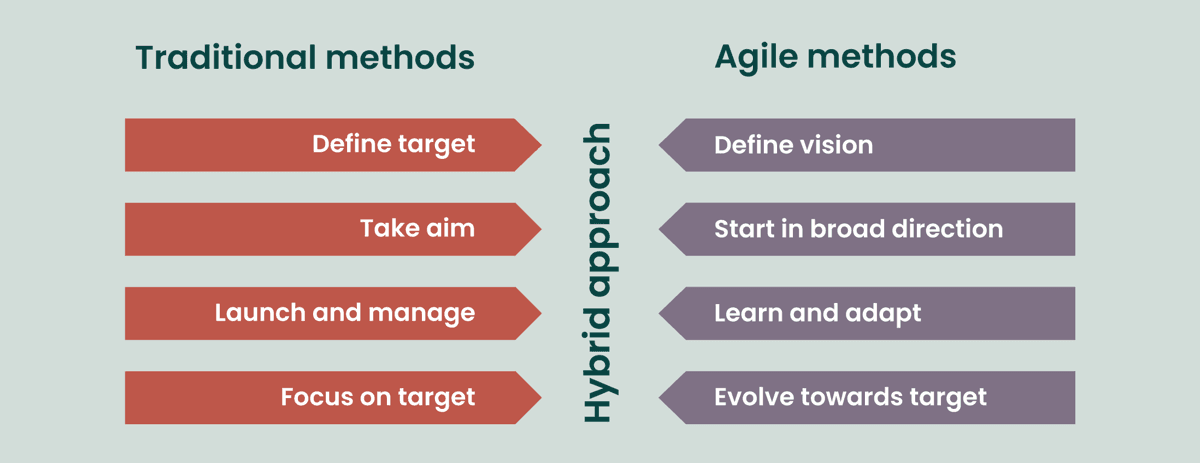
A chart that compares agile project management to traditional frameworks (Source)
When to use it: Use agile project management when your product roadmap is fluid, you’re exploring markets, or you’re adapting to user feedback.
How Notion helps: Notion can turn your agile board into a living hub that helps you connect customer feedback, roadmaps, and development tasks in one place. That way, everything stays in sync automatically when priorities change or feedback comes in.
2. Scrum: Sprint-based work with defined roles and rituals
The scrum framework divides work into fixed-length sprints based on defined roles like product owner, scrum master, and development team member. Each sprint includes ceremonies like planning and daily stand-ups to deliver products in short project lifecycles.
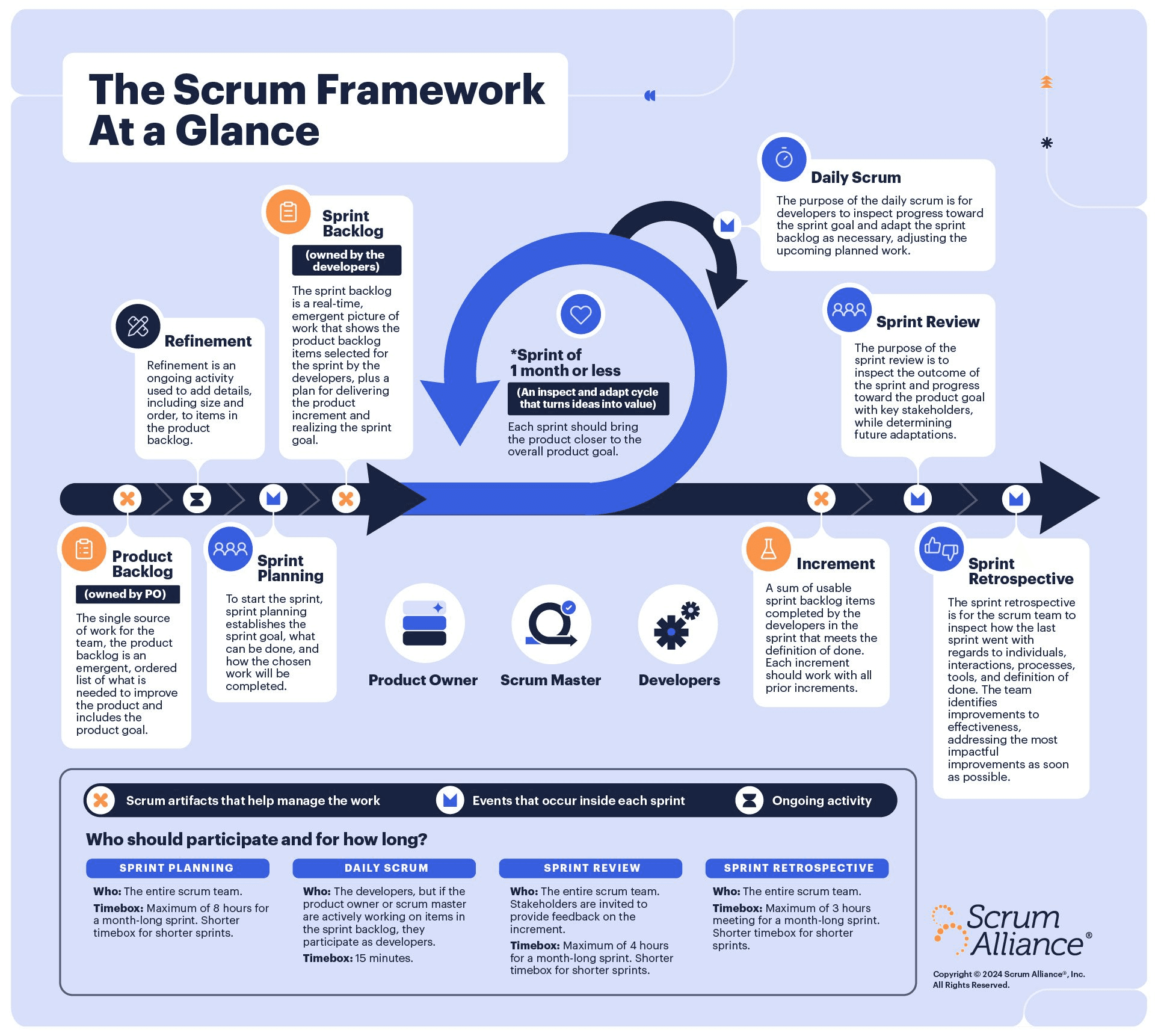
A graphic that shows the basic steps of the scrum framework (Source)
When to use it: Consider the scrum framework when you value cadence, predictability, and a structured approach—like if you’re part of a mid-sized engineering team that ships every two weeks.
How Notion helps: Our platform provides templates for project planning and backlog grooming, while AI can generate sprint summaries and analyze blockers.
3. Kanban: Continuous flow and visual task management
Kanban boards visualize work as cards on a board, with categories that range from “To do” to “In progress” to “Done.” They’re simple, visual, and great for optimizing flow and reducing bottlenecks.
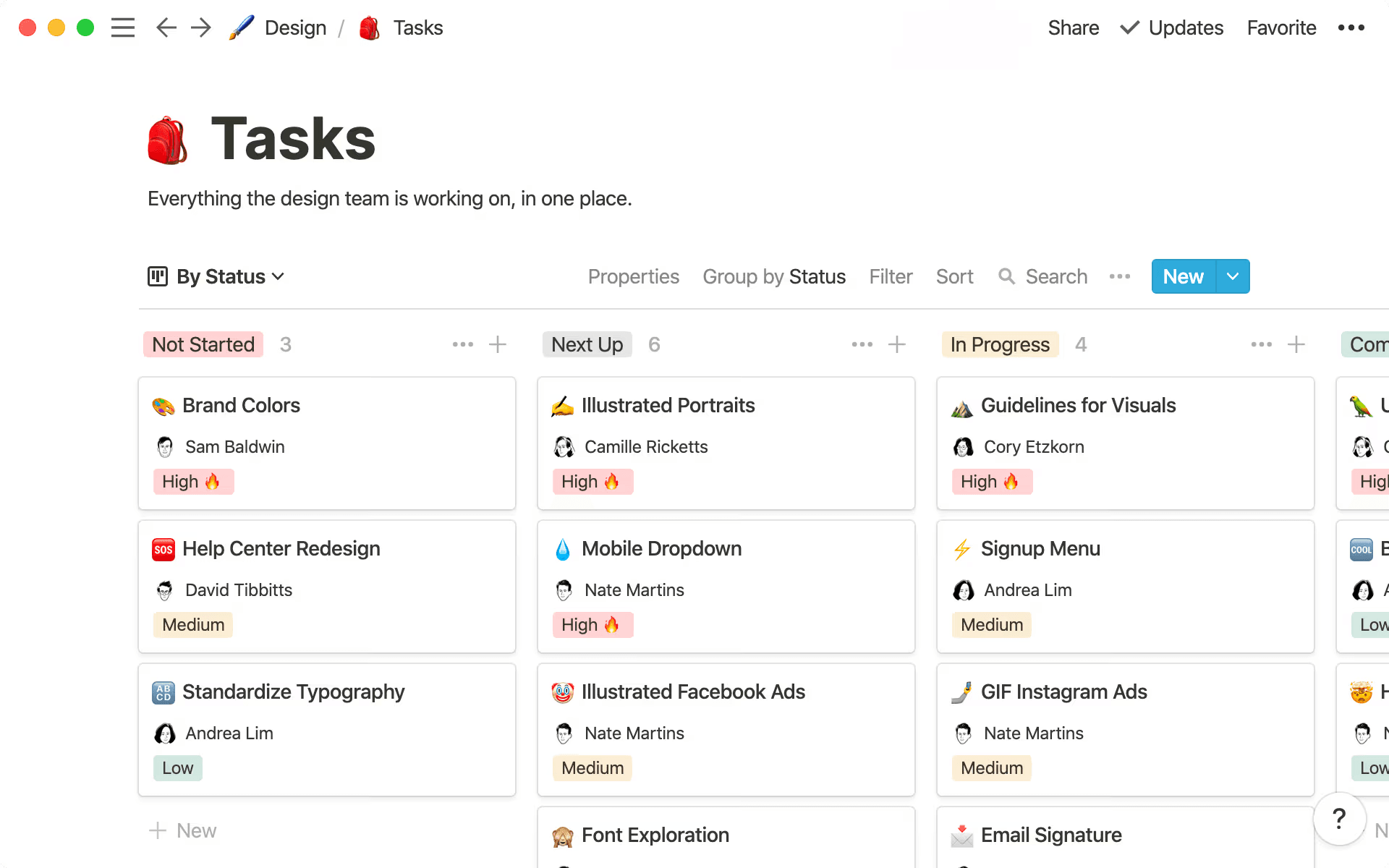
A screenshot of Notion’s task management tool shows a Kanban board. (Source)
When to use it: Use the Kanban method when handling ongoing workstreams—like design systems, QA testing, or software development—where work involves continuous improvement or frequent shifts.
How Notion helps: Notion makes it easy to visualize work in board view while preserving context in linked documents. For example, Toyota—which invented the Kanban system—uses Notion to centralize and track its projects, tasks, and research schedules, which boosts its teams’ efficiency and collaboration.
4. Waterfall: Sequential planning for fixed-scope projects
Waterfall project management works in linear stages, like project requirements → design → system testing → implementation → verification → deployment and maintenance. You have to complete each stage before the next one begins.
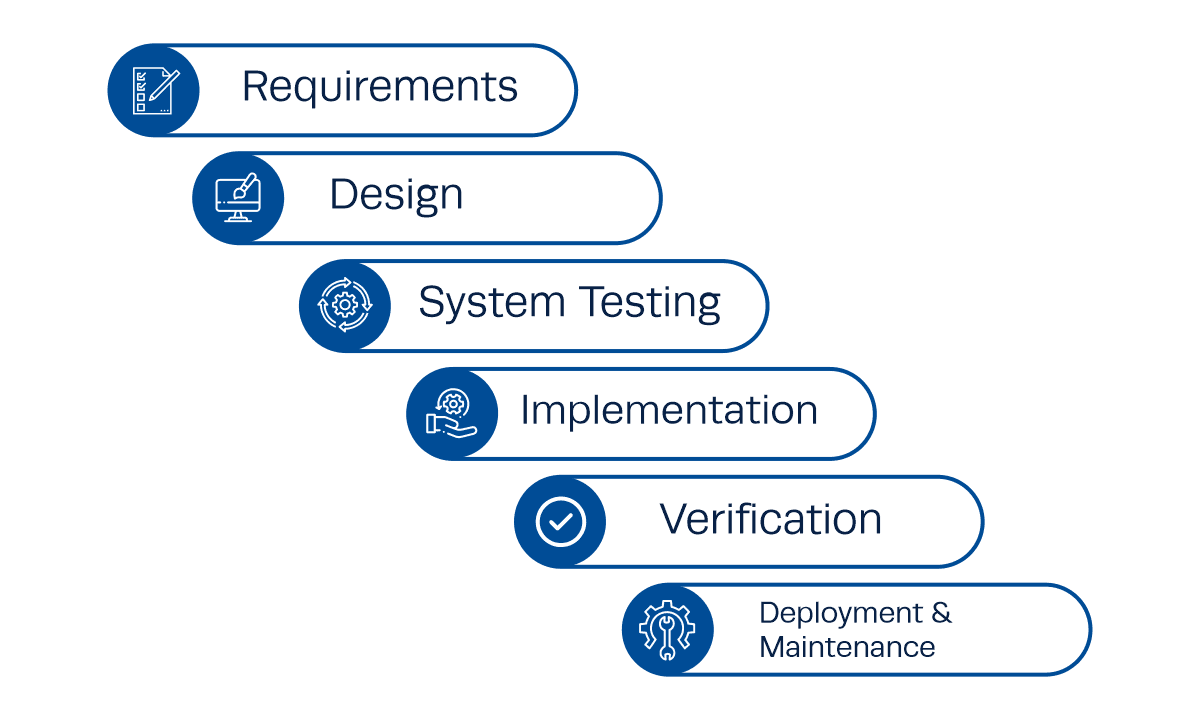
The six stages of waterfall project management (Source)
When to use it: Use waterfall methodology for projects with well-defined scopes and dependencies. Think infrastructure migrations, compliance work, or detailed UI overhauls.
How Notion helps: Our platform lets you create timeline views with dependencies, milestones, and linked documentation. Additionally, AI can summarize phase progress, flag overdue tasks, and consolidate project updates.
5. Hybrid: Blending structure and agility for large-scale projects
Hybrid project management combines elements from other common frameworks (mostly waterfall and agile) to take advantage of the strengths of each. For example, teams might plan high-level milestones (waterfall-style) but use iterative sprints (Agile-style) for project execution.
Some companies may also use the critical path method, which prioritizes the tasks that a project depends on most, which are usually those that take the longest.
When to use it: Consider this approach if you’re in an enterprise environment where teams work across functions or if you’re managing complex projects that don’t fit a “mold.”
How Notion helps: Notion allows you to build custom processes that work for you and your team. That way, you don’t need to mold yourself to a rigid, out-of-the-box solution.
Where do traditional project management frameworks fall short?
Most frameworks look great on paper. But in practice, they often create the opposite of what teams need: silos, visibility gaps, and endless status meetings. When this happens, data lives in too many tools, updates fall out of sync, and context switching causes teams to lose key info.
According to a study that Notion commissioned, roughly three-quarters of US companies already use project management software, but more than 60 percent are interested in adopting a new platform within the next year. In fact, project management ranked just behind AI implementation as tool decision-makers’ biggest challenge in the past 12 months.¹
That’s why Notion reimagines the project management framework as a connected workspace—one where documents, tasks, and project scopes live together. And with AI, the system itself helps you manage the work, not the other way around.
Here are a few different ways that traditional frameworks fall short—and how Notion AI addresses these issues:
Tool fragmentation creates silos and slows visibility
In many enterprise stacks, each team uses its own system: Jira for engineers, Figma for designers, and Google Docs for product specs. Visibility across these tools requires manual updates or meetings that rehash the same information.
But in Notion, everything is connected—product specs link directly to sprint tasks, design decisions live alongside build documentation, and AI can summarize this cross-linked context instantly. The platform also supports each business function using its preferred tools and consolidates its data in one place. All this, and you don’t have to switch a single tab.
Manual reporting and updates waste valuable time
Every project manager knows the pain of pulling together weekly updates: gathering notes, rewriting summaries, and updating status dashboards.
In Notion, AI does this automatically. For instance, it can summarize project progress based on metrics, generate status reports, and flag trends. This frees you to focus on solving problems rather than simply reporting on them.
Rigid processes limit creativity and cross-functional flow
Frameworks are supposed to help teams focus, but rigid systems often do just the opposite. When this happens, engineers spend more time conforming to processes than shipping, designers lose the flexibility they need to iterate, and product managers chase alignment instead of driving project outcomes.
Notion solves this problem by letting each team build frameworks around their workflows—not someone else’s template. And as your teams evolve, AI ensures that your workspace evolves with them.
Scaling introduces friction between teams and systems
As teams scale, systems multiply. When this happens, a framework that worked for 10 people might break when 100 people use it.
In Notion, scaling doesn’t require reinventing your workflows. Instead, you can link workspaces, automate updates, and keep everyone aligned from sprint to strategy. AI is the connective tissue here, analyzing how your teams work and recommending structure as complexity grows.
How is AI transforming project management frameworks?
The frameworks we’ve described here aren’t new. But what is new is how AI makes them fluid, intelligent, and connected. Today, we’ve replaced static boards and manual updates with systems that learn, adapt, and surface what matters.
Think of AI as the operating layer for your framework. It doesn’t replace your process—it instead enhances your workflow and reduces friction. Here’s how:
Automating status reports, stand-ups, and retrospectives
Rather than drafting a status update, you can ask, “What changed this week?” AI then searches across your workspace and all connected apps, reviews completed tasks and surfaced blockers, and drafts a summary. Just like that, the time you normally would spend reporting becomes time for solving more important problems.
Surfacing insights across projects with AI-generated search and summaries
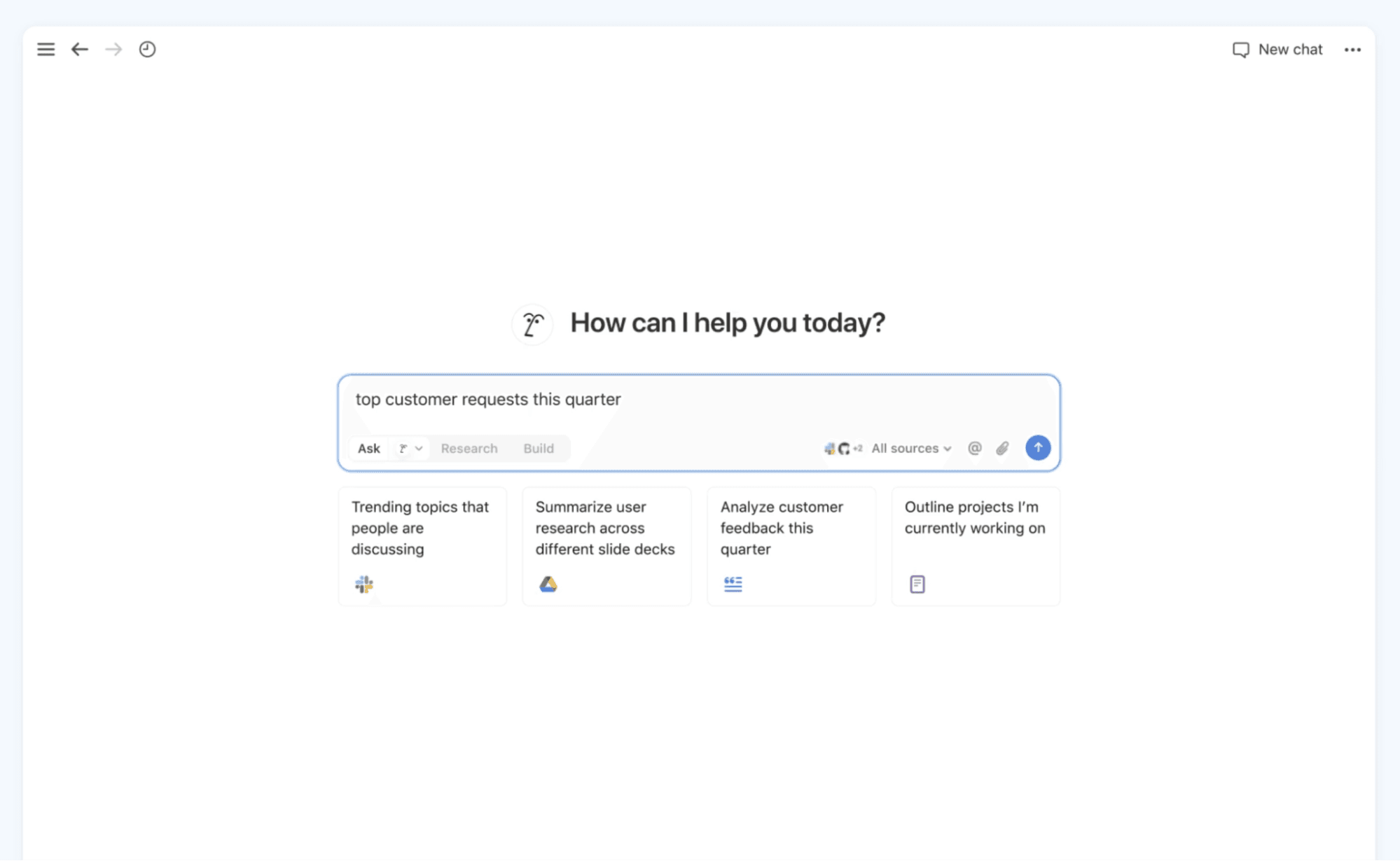
A sample query using Notion’s Enterprise Search feature (Source)
Need to know which features are at risk or where your bottlenecks are? AI helps here too. That’s because it doesn’t just search keywords—it also understands context, connecting text, documents, and project goals. For example, if you ask Notion’s Enterprise Search a question, you’ll get a meaningful answer with links back to the work that informed it. No more piecing together notes, chats, and slide decks.
Turning meeting notes into action items automatically
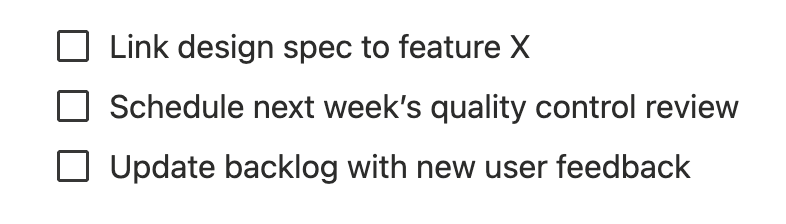
You walk out of a design-engineering sync with decisions and to-dos. They’re all in the meeting log, but AI can recognize them and turn them into tasks like these:
Link design spec to feature X
Schedule next week’s quality control review
Update backlog with new user feedback
When Notion AI creates project tasks and connects them to your documents, everything stays actionable.
Building adaptive frameworks that learn how your team works
Over time, your team builds a rhythm that works, and AI observes those patterns: tasks that your team always reopens, where handoffs stall, and which phases take longer than expected. It then surfaces those insights so you can adjust your framework.
The result? An evolving system that grows with your team—not a generic platform that you borrowed from somewhere else.
How to manage any project management framework in Notion
The nice thing about Notion is that you don’t need a six-month rollout or a massive tool swap to set up a new project management framework. Instead, you can quickly build a framework by following these four steps:
1. Use Notion templates to set up your chosen framework
Notion’s template gallery features over 30,000 templates to choose from. So regardless of the framework you choose, you won’t have to start your project from scratch.
For example, you can use a pre-built Kanban board like the one below:
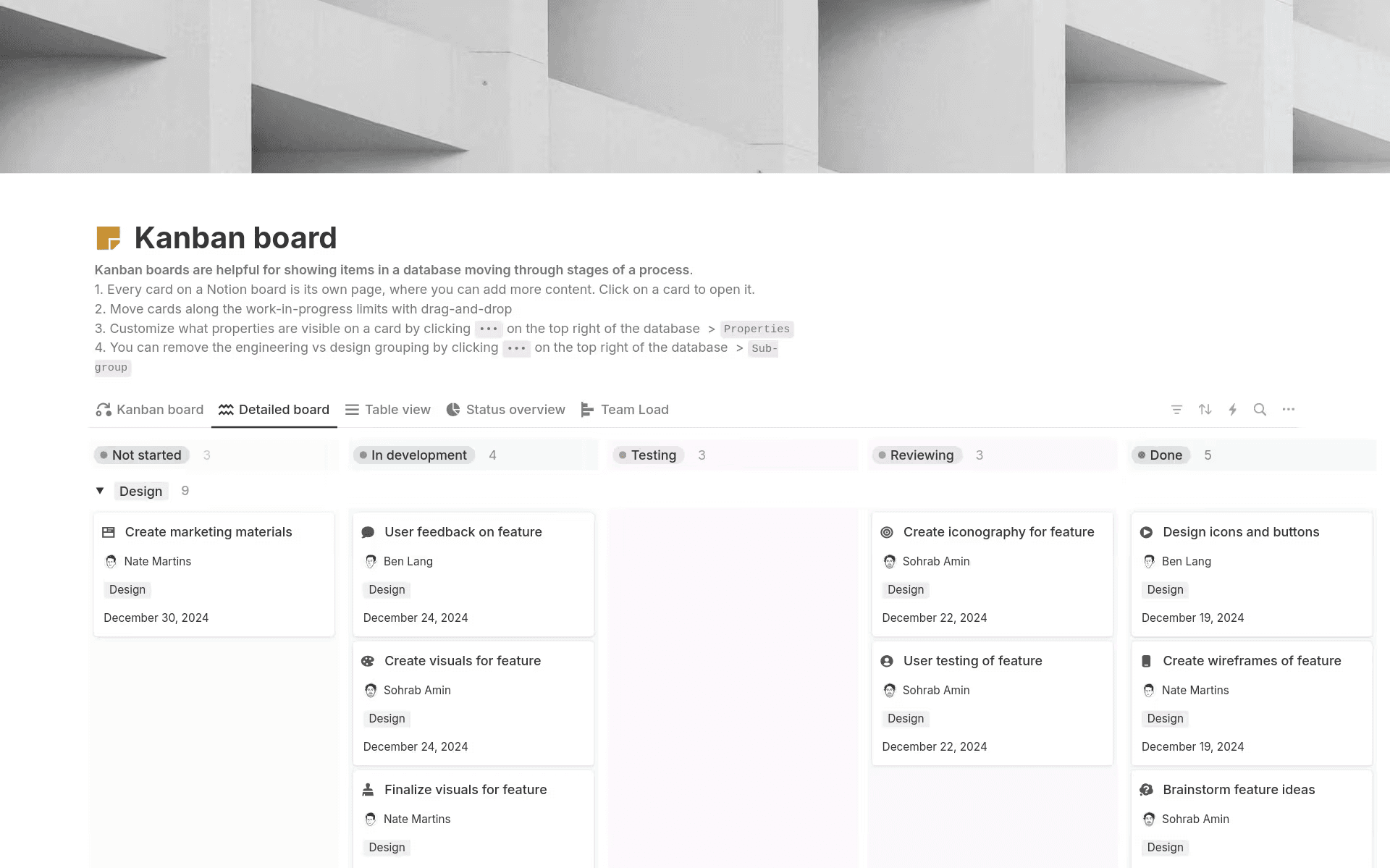
One of Notion’s Kanban board templates, with movable task blocks across project stages (Source)
Or you can try a project timeline template like this one:
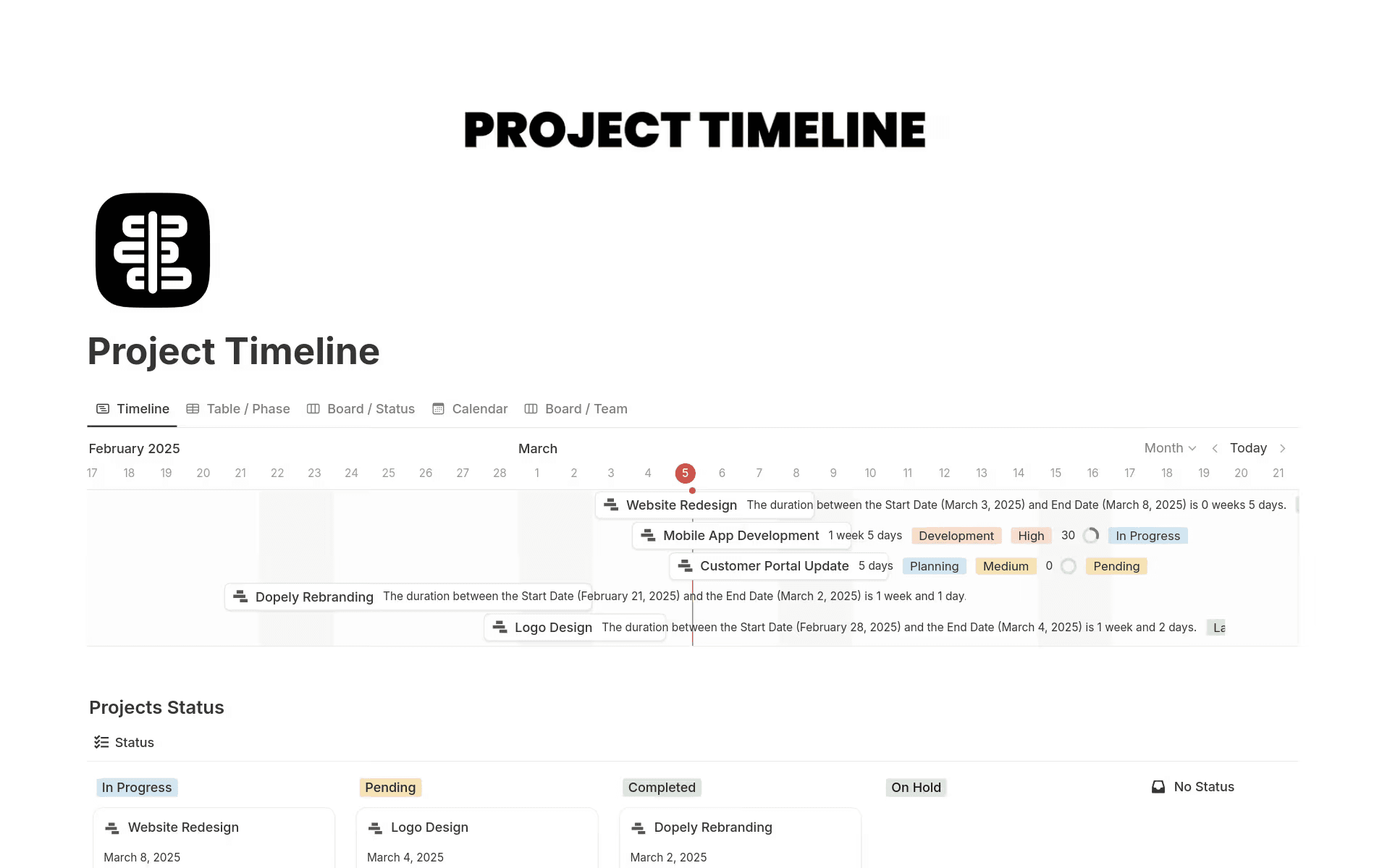
You can also modify as you go—pick the best template for your team, tweak the fields, and make changes as necessary to reflect the roles and stages that your team uses.
For step-by-step instructions on how to implement these templates, check out the video below:
¡Vaya! Parece que tu bloqueador de anuncios está impidiendo que se reproduzca el vídeo.
Míralo en YouTube

Link goals, docs, and sprints together in one place
Once you have your bare-bones framework, you can start filling in the details and gaps by linking it to your existing documents and goals.
Say you have the product goal of improving onboarding conversion by 10 percent this quarter. You can link that goal to your design research doc, the research to engineering tasks, and tasks back to your project brief. That way, you can trace “why” → “what” → “how” in one place to keep design, product, and engineering aligned.
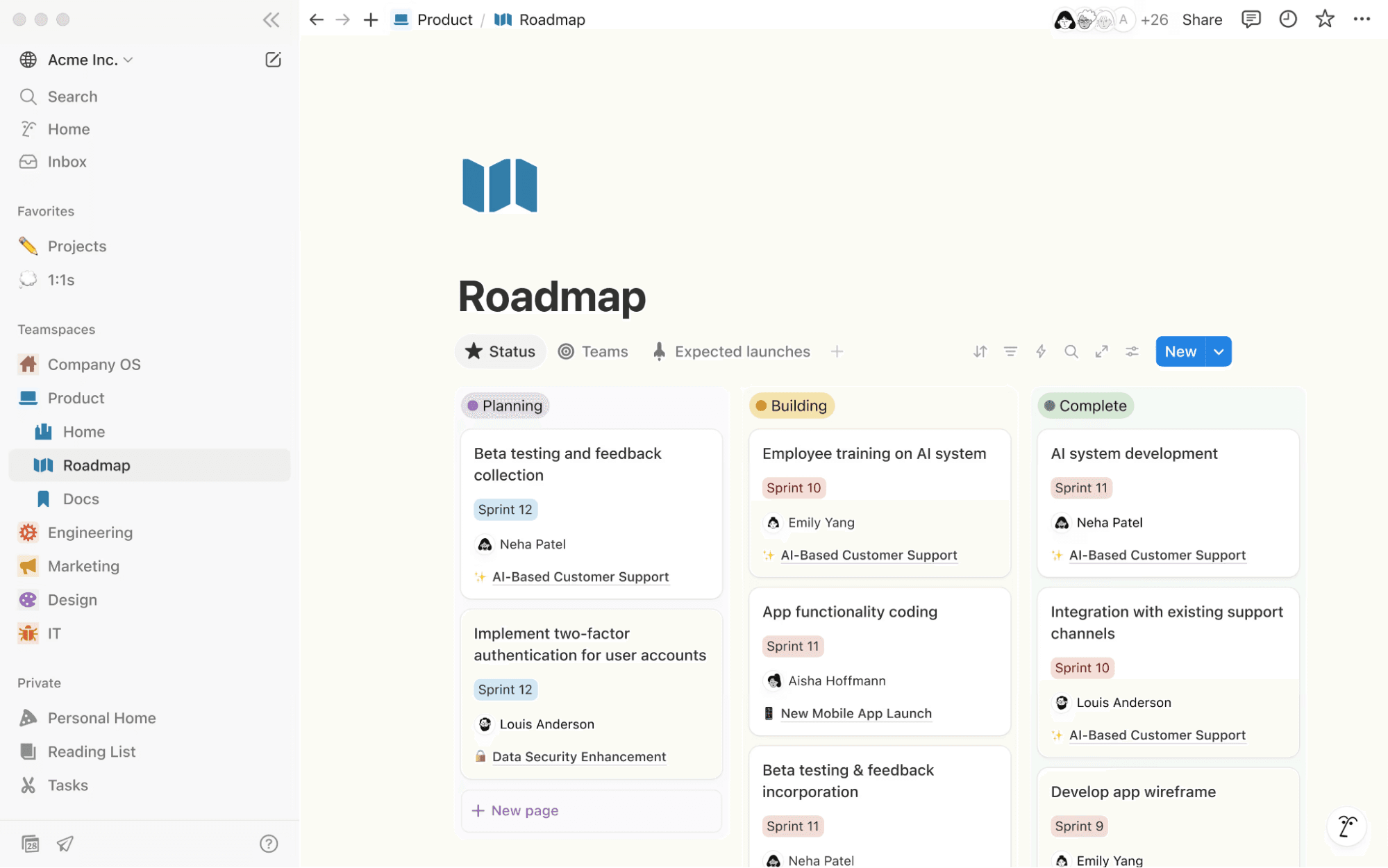
An example of a Notion Roadmap that links to specific sprints and teams (Source)
Automate reporting and updates with Notion AI
AI agents can help you do the heavy lifting. For example, Notion AI can turn a picture of sticky notes from your brainstorm into a prioritized roadmap and convert meeting notes into on-brand social posts to create a calendar of content. You can even use it to conduct research and generate detailed documents.
You could also ask an AI agent to build a bug tracking dashboard that populates with feedback from Notion and external apps like email and Slack. It can then assign appropriate engineers, write a summary for each bug, and update the dashboard based on notes from specific meetings that you’ve scheduled in Notion.
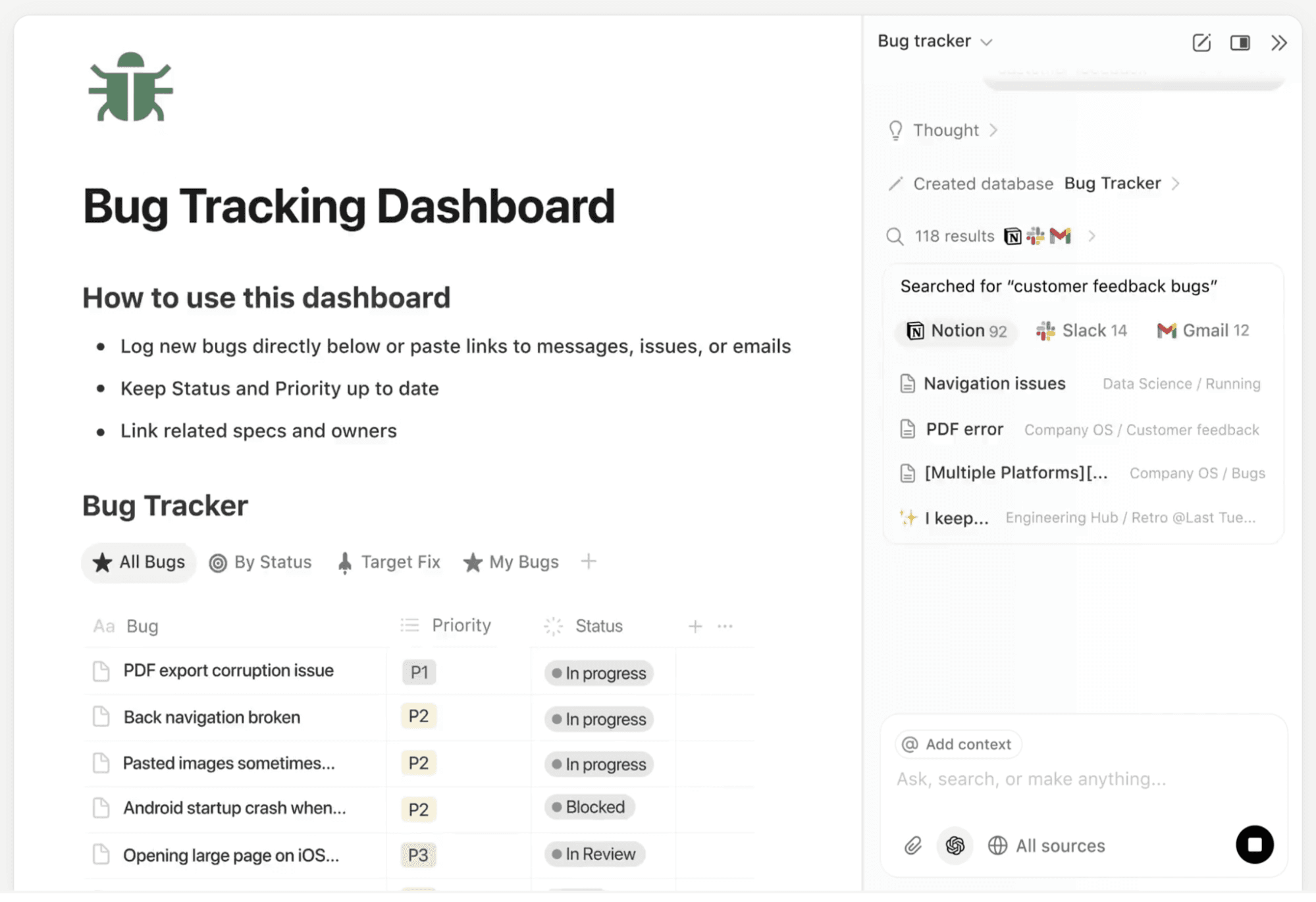
A screenshot that shows an example of a bug tracking dashboard that Notion AI created (Source)
Share dashboards and context across every team
Once your system is connected, you can build views for each role. That way, engineering sees sprint velocity, design sees the feedback cycle, and product sees roadmap progress. This means everyone has visibility without duplication and understands how their part ties into the whole.
In Notion, you can use teamspaces to create dedicated workspaces that fit how each team or department works. You can also set role-based access and permissions for stakeholders, which can help you scale.
For detailed instructions on how to set up and customize a teamspace, see the video below:
¡Vaya! Parece que tu bloqueador de anuncios está impidiendo que se reproduzca el vídeo.
Míralo en YouTube
Build flexible, AI-connected project management frameworks in Notion
The magic isn’t in picking the perfect framework—it’s choosing one that fits, adapts, and connects. This is why Notion allows you to build and optimize a system around how your team works and evolve it as you go. That way, you don’t have to force your team into a structure based on a generic, on-size-fits-all system.
When everything—docs, tasks, goals, and more—is in one place, context lives where work happens. That means you’ll see benefits like these:
New team members ride the lineage of goals to tasks and deliverables.
Teams move faster with fewer hand-offs and less friction.
Onboarding more people doesn’t result in software sprawl.
Visibility flows within the system, which means you’ll spend less time chasing updates.
Want an agile framework for your engineering squads but Kanban for design ops? Done. Want a hybrid for your enterprise roadmap? You’re set—now iterate.
Here’s the takeaway: The right framework is one that evolves. The right tool is one that connects. And together, they let your teams move from idea to outcome faster and smarter.
Try Notion AI for free today to begin building the adaptive project management framework you need to elevate your project success.
References:
¹Numerous Productivity Study commissioned by Notion (n=1,000). Questions: Which of the following tools or software does your organization use, if any? Select all that apply.; Please indicate which has been the most challenging and which has been the least challenging for your company or team over the past 12 months.