

Mais informações
Luma Agents are creative AI agents that take work from brief to finished asset — production-quality video, imagery, and motion design — in one continuous workflow.
Connect Notion, and your agents can work directly from the documents your team already writes. Instead of copy-pasting context into a prompt, point your agent at the source: the campaign brief, the brand guidelines, the product launch doc, the content calendar.
What you can do:
- Brief to video. Ask your agent to read a creative brief in Notion and produce finished video concepts from it — script, visuals, and edit grounded in what the brief actually says.
- Stay on brand. Keep brand guidelines, tone-of-voice docs, and messaging frameworks in Notion; your agent references them so every generation starts from brand truth, not a blank page.
- Campaign variants at scale. Turn a campaign planning doc into families of assets — formats, ratios, and messaging variants for every channel.
- Research-backed creative. Agents can pull product specs, positioning docs, and customer research into the creative process, so the output reflects what your team knows.
Access and control: You choose exactly which Notion pages to share when you connect — Luma can only read what you grant, and you can revoke access at any time from either Notion or Luma. Connections are managed by your team's workspace settings.
Luma Agents are built by Luma AI, the frontier lab behind the Ray family of video models and Dream Machine, used by creative and marketing teams to go from idea to production-ready content in minutes.
Recursos
- Ler e inserir conteúdoPode ler e inserir páginas, bases de dados e blocos compartilhados com esta conexão.
- Ler comentáriosPode ler comentários nas páginas e nos blocos que pode acessar.
- Veja os usuários do espaço de trabalhoLê detalhes básicos do perfil sobre membros e convidados do espaço de trabalho, incluindo seus endereços de e-mail.
Como usar
1. Create or sign in to your Luma account at lumalabs.ai.
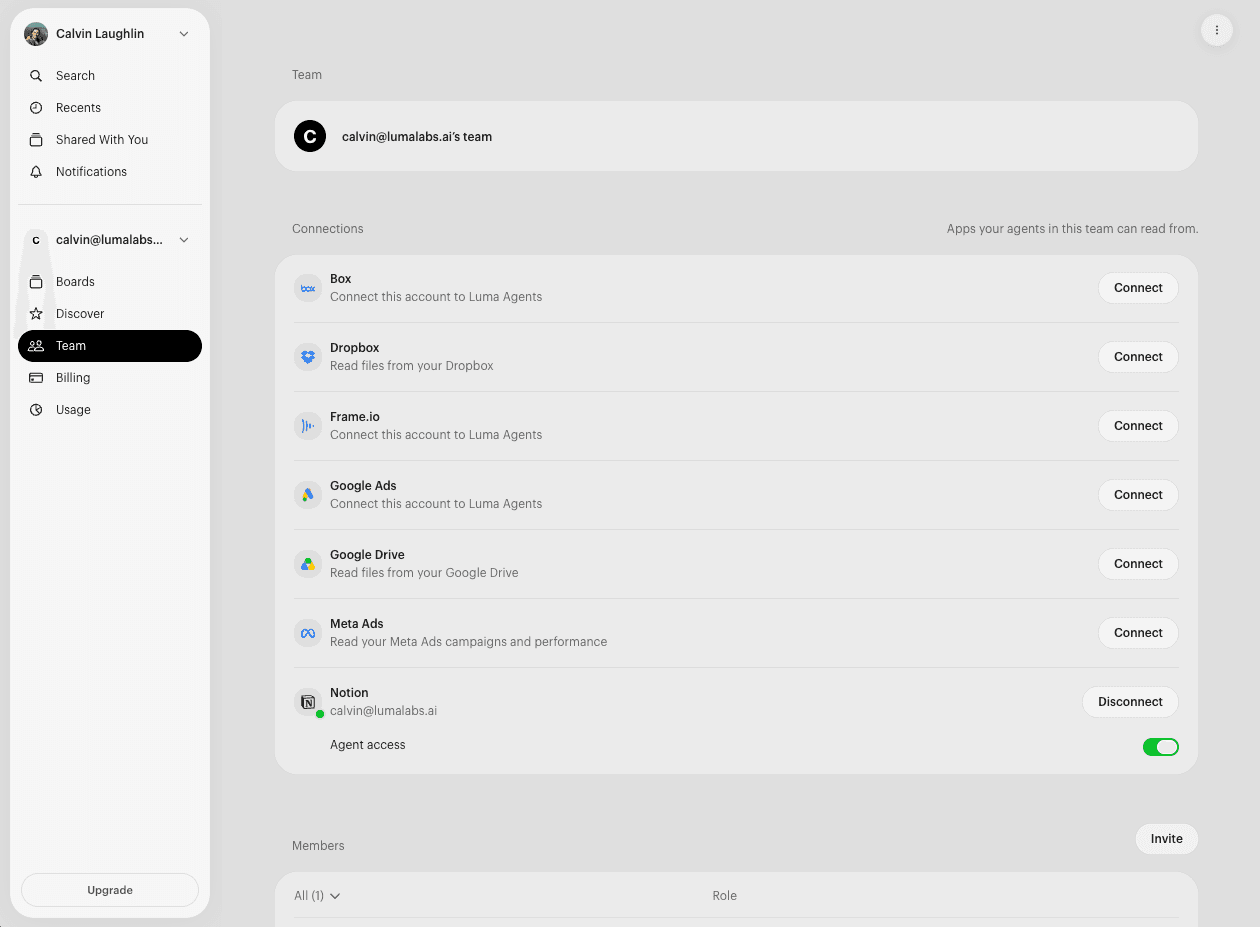
2. Open your team's settings and find the Connections section.
3. Click Connect next to Notion. You'll be taken to Notion to authorize.
4. Choose the pages to share. Notion will ask which pages and databases Luma Agents can access — select your briefs, brand docs, and campaign workspaces. You can change this selection in Notion at any time.
5. Put it to work. In any conversation, ask your agent to use your Notion content — for example: "Read the Q3 campaign brief in Notion and storyboard a 30-second spot," or "Generate launch visuals that follow our brand guidelines doc."
Need help? Reach us at [email protected].
Detalhes

- Design
- Marketing
- Gerenciamento de arquivos