How Notion uses Custom Agents

Por Drew Evans
Marketing
At Notion, we always look for ways to work smarter. Over the years, our workspace has evolved alongside our product.
Databases let us structure our knowledge. Project management connected work across teams. Calendar gave us better control of our time. Mail brought communication into context. Then we threw Notion AI into the mix—AI Meeting Notes made discussions actionable, and Enterprise Search made knowledge accessible.
Each development fundamentally changed how we collaborate.
¡Vaya! Parece que tu bloqueador de anuncios está impidiendo que se reproduzca el vídeo.
Dirígete a YouTube para verlo

We recently launched Custom Agents, and it’s changed not just how we work, but how we think about work altogether. In case you missed it, Custom Agents are built to handle work that repeats. Describe a workflow once, set a trigger or schedule, and the work happens automatically whether you’re online or not. They live in Notion and work across Slack, Mail, Calendar, and other tools, using your existing knowledge for context.
What started as one person building a Custom Agent to solve an annoying problem has turned into tons of agents running across the company. And a pattern has emerged—someone builds an agent for their workflow, others discover they can use it, and suddenly multiple teams benefit from one person’s tinkering.
We wanted to give you a peek behind the proverbial curtain to show you how we’re using Custom Agents to automate repetitive busywork.
Making knowledge instantly accessible
At Notion, we maintain comprehensive documentation across every team. Our CX team has a knowledge base covering product features, pricing, policies, and more. Engineering maintains detailed runbooks for services and infrastructure. Every team has wikis capturing institutional knowledge about how work gets done.
The information is there—the challenge is surfacing it quickly when someone needs an answer.
Dianmarie De Jesus works on the Customer Experience team’s knowledge base. It documents everything a support agent might need to know, even troubleshooting guides and FAQs.
Recently Dianmarie noticed the team was answering a lot of the same questions. Questions about pricing, SSO configuration, billing policies—all things included in the knowledge base. The information existed, but surfacing it meant tracking down the right person, who’d search for the doc, find the answer, and paste a link back into Slack. And sometimes, it would take a few hours for someone to reply, meaning the support agent on call couldn’t get back to the customer right away.
So Dianmarie and the team built a Custom Agent to handle these repeat questions. It lives in the CX team’s #cx-ask Slack channel. The workflow is simple: Someone asks a question, the agent searches the CX Knowledge Base and enablement docs, and it delivers an answer with links to the source pages. Instant, accurate, and it frees the team to focus on complex questions that actually need human judgement.
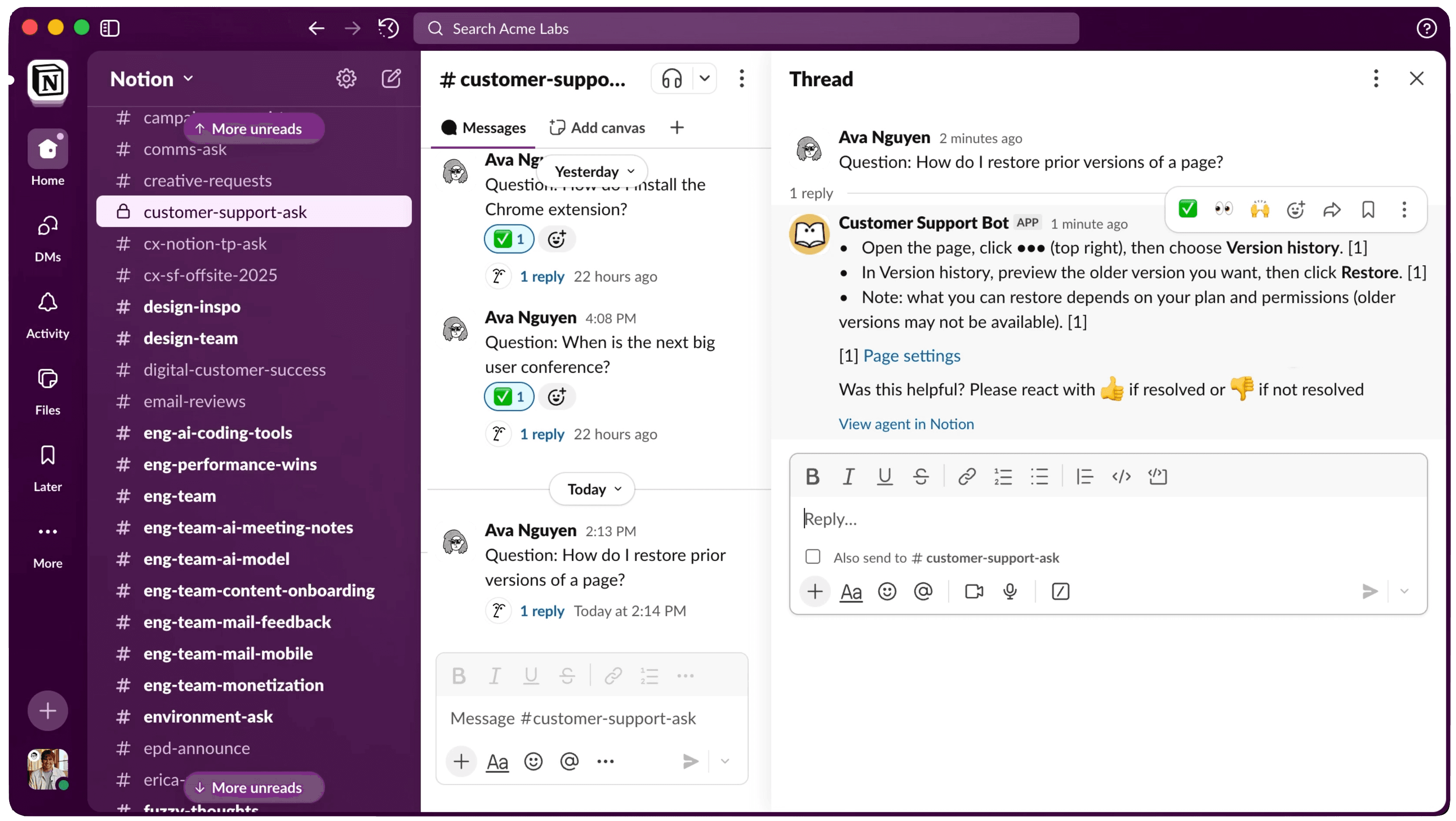
“Copy-pasting the same links again and again wastes time that adds up quickly,” she says. “Now our Custom Agent replies in minutes so our team can respond to customers faster and move onto the harder questions and more strategic decisions.”
Once CX proved the concept worked, other teams built their own Q&A agents. Engineering adapted the approach for service-ownership questions, like “Which team maintains auth?” and “Who owns payments?” Now a Custom Agent queries internal docs and runbooks to reply instantly—no more pinging a few people or trying to chase down the right doc.

Get the Customer support bot agent
The Customer Support Bot streamlines your support workflow by automatically answering customer questions from your knowledge base, creating tasks for gaps, and tracking all inquiries centrally.
Product built domain-specific Custom Agents for complex technical areas so engineers can get answers at 2 a.m. without hoping someone else is up. The Workplace team built a Custom Agent to answer all questions about office logistics: Meeting rooms, equipment requests, wifi passwords, and more.
For Dianmarie and the CX team, the shift was profound. Knowledge now scales beyond individual experts on the team since the right answers no longer require one person’s brain. Anyone can get an answer at any time, and the team can focus on new problems instead of answering questions they solved months ago.
Triaging work automatically
Making knowledge accessible is one way Custom Agents have had a big impact. Routing incoming work is another.
Product feedback flows into Notion constantly. Support tickets, Slack messages, and sales conversations—all valuable insights about what’s working, what’s confusing, and what people wish existed. Our Product team monitors the #all-feedback channel in Slack, where feedback from across the company gets surfaced. But routing that feedback to the right teams, creating tasks, and making sure nothing gets lost requires constant attention.
It’s why the Feedback Router was built. It monitors that Slack channel, identifies which product area the feedback relates to, then creates tasks for the appropriate teams to handle. It also sends out messages to other Slack channels to make sure the right teams have eyes on the feedback.
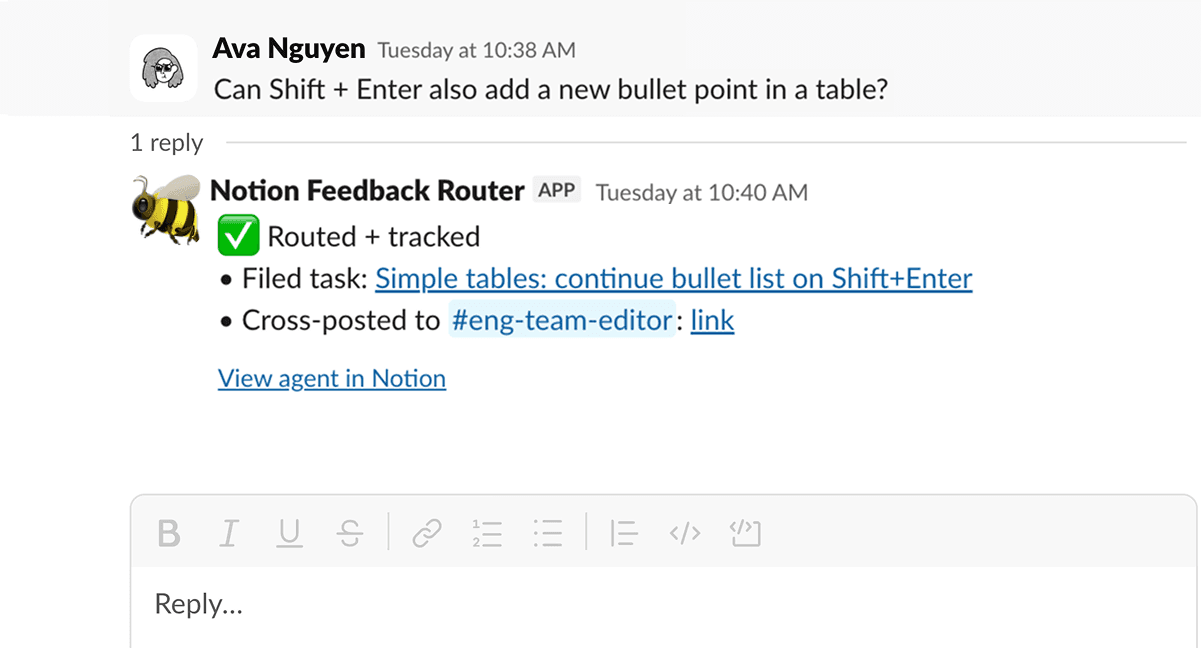
Since it’s a Custom Agent, it runs continuously with no hand-holding from the team. “Feedback is always coming in. It used to take a lot of manual work to route, transcribe, and create new tasks,” says Richard Kang from the Product Operations team. “Our Feedback Router has really freed us up to actually work on getting things implemented.”
Other teams took note of how helpful Custom Agents are when logging and triaging work. The Web team, for example, saw the success of the Feedback Router and built their own Custom Agent named Wilbur. It listens to the #web-team Slack channel and creates tasks for the team when something goes wrong and does the first pass to triage. If a link isn’t working on the website’s homepage or a translation isn’t right, Wilbur’s on it—it replies in Slack, files a task, and tags the right person to help.
Get the Feedback router agent
The Feedback router agent routes Slack feedback as it arrives, cross-posts to relevant channels, and ensures nothing falls through the cracks.
For the teams doing the work, everything gets captured and routed automatically so they can focus on solving problems rather than tracking them. And for everyone else, the barrier to suggesting changes or reporting bugs has been lowered to sending a simple Slack message—you can trust the team will take care of the rest.
How everyone is building Custom Agents
Repetitive questions and manual triage are two workflows where Custom Agents really shine at Notion. But there are tons more that show up all across the company. Teams are building for communications, security, recruiting, even personal projects.
What’s also striking is the diversity of who’s building Custom Agents. It’s not just engineers or technical tinkerers. It’s a mix of people from Marketing and Sales and IT, from individual contributors to team leads. And the variety of Custom Agents is endless:
Vera the Voice Coach is based on our style guide and works in two ways. Marketing can send Vera copy they’re working on for feedback on voice and style. Or, they can tag Vera in Slack for quick answers to general style guide questions, like whether we use the Oxford comma (we do).
The Work-in-flight Custom Agent helps team leads get a weekly pulse on how work is tracking from their respective teams. It tracks projects, tasks, and the latest docs to see what’s moving, what’s stuck, and what’s coming up.
Smilers helps our Environment team answer questions about our offices—how to order lunch, or where the printers are. Instead of pinging someone individually, Smilers answers all questions in Slack and shares helpful links on the latest in our global offices.
Mr. Nice Guy is a tone adjuster. It rewrites potentially harsh drafts and turns them into polite, constructive messages that keep the writer’s original intent. Originally built for one person, it’s now used across teams to keep comms honest and work moving in the right direction.
Scruff helps our Security team investigate and triage security alerts. This cuts down on the manual research and busywork that goes into figuring out which alerts are real and which are false positives, so the team can more quickly make important decisions.
¡Vaya! Parece que tu bloqueador de anuncios está impidiendo que se reproduzca el vídeo.
Dirígete a YouTube para verlo
Building a culture without busywork
Custom Agents have changed how we think about work at Notion. The question shifted from “How do I find time for this?” to “Can a Custom Agent do this?” That pivot in thinking has spread across every team.
“We have an immense amount of talent here and want everyone to experiment with AI,” said Notion CTO Fuzzy Khosrowshahi. “So many people have already created useful Custom Agents. The more we build, the more time we get to spend thinking critically about the problems that need solving—and finding creative ways to do so.”
Every week in our Slack channels, you’ll see this mentality coming to life. People share new Custom Agents in Slack regularly, and existing Custom Agents get adapted for different teams and contexts. One inspires another, which inspires another. And they all inspire better, smarter, more focused work.
Anyone can build a Custom Agent. Everyone will benefit. If you’re ready to get started with Custom Agents, check out this guide for a step by step.
And if you haven’t started yet, think about that one annoying, repetitive task and ask yourself—“Could a Custom Agent do this instead”?