
A few years ago, we started noticing an alarming pattern at Merge.
During standups, engineers were asking the same questions we’d answered a few weeks earlier. Sales reps were pinging our team for case studies we’d already shared. New hires were spending their first week just figuring out how to find their way around—Slack for this, Google Docs for that, tools they couldn’t access for other stuff.
Our company knowledge was everywhere. That really meant it was basically nowhere.
As a fast-growing startup, we knew the problem would only get worse. Each new hire led to more questions, and each new tool meant another place to search. We needed a way for every “Mergie” to get answers without having to know where to look or who to ask.
So we turned to Notion. More specifically, we turned to Notion AI to bring everything together.
Here’s how we made it happen, and some advice on how you can do it too.
Step 1: Figure out what should actually live in Notion
Because Notion AI needs knowledge and context to be most effective, the first challenge was obvious: What do we need to give it?
We started by connecting it to the tools we use most—Salesforce and Slack—so it has an additional layer of context. Then came what to put into Notion.
To help Mergies identify exactly what’s needed, one lead from Project Jarvis, our internal AI enablement initiative, put together guidance on what types of content work best with Notion AI. That way, each team could proactively apply it to the knowledge that matters most. It includes things like the level of detail needed in a project doc, why meeting transcripts are valuable to include, and how to structure databases to give Notion AI a strong knowledge foundation to pull from.
And since this guidance is documented in Notion itself, people can ask Notion AI about how to best use Notion AI—it’s all a bit meta, but it works well.

Step 2: Get teams to actually add important stuff
With that framework in place, each team started adding the information they reference constantly to our Notion workspace.
Marketing created a content calendar tracking every article, webinar, and ebook we’re producing. Sales built an enablement hub with POV decks, competitive battlecards, and AI meeting notes from weekly GTM calls. Recruiting documented hiring plans for every open role, with interview steps, core competencies, and take-home assignments—the works.

Some of this requires regular maintenance. The product roadmap, for example, needs to stay current so our marketing and sales teams know what’s happening with upcoming releases. But honestly, we’d need to update it all anyway, so having it in Notion just makes it more useful.
Step 3: Show people how to use it
Building a system is only half the battle. We also needed to train people to actually use Notion AI instead of defaulting to pinging someone on Slack.
We started demoing real use cases during all-hands meetings. During sales enablement calls, we showed reps how to find the best customer proof points in seconds. During R&D meetings, we showed engineers how to validate their implementation ideas by asking Notion AI about similar patterns we'd already built.
Our team leads also started building an "AI Prompt Library"—a database where people share prompts that work well for specific use cases. Each row includes a prompt name, an AI-generated summary, and the full prompt. This has made it easier to scale Notion AI across the company.
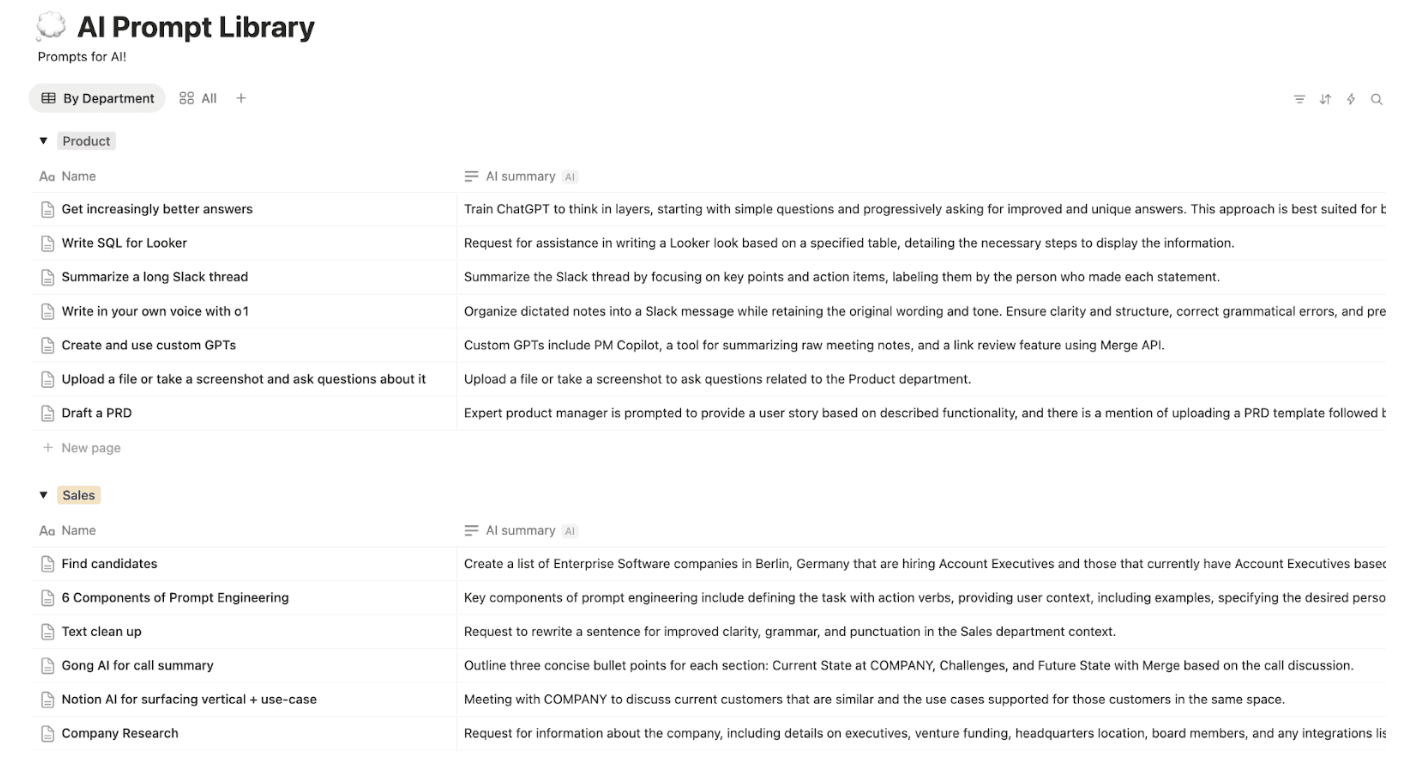
The goal wasn’t to be prescriptive about how to use Notion AI. Instead, we wanted to show what was possible, then let everyone experiment to find what works best for them.
Step 4: Track what’s working (and what isn’t)
Once people started using Notion AI regularly, we saw the impact pretty quickly. When Mergies have a question, they now ask Notion AI first.
A few examples:
CSMs can check when integration improvements will ship without having to ping engineering leaders for updates, which means they can spend more time on strategic accounts.
Engineering leaders can see, at a glance, how much progress their teams are making on open tickets, which types of issues keep recurring, and where bottlenecks are forming. Instead of manually pulling data from multiple tools, they can focus on identifying systemic issues and improving resourcing decisions.
Sales reps can find relevant case studies without digging through folders or messaging marketing. That saves them time they can spend personalizing decks or making more cold calls.

Each team member saves several hours per week that otherwise would be lost simply looking for information. Now, everyone can reallocate that time toward the more strategic (and more interesting) work.
But the metric that surprised us most was employee satisfaction. In our most recent company-wide survey, the ability to quickly search for and find information in Notion AI was one of the most-cited factors for improved satisfaction over the past year.
What we’ve learned
This experience probably isn’t unique to Merge. The pattern we were seeing—information scattered across tools, people wasting hours searching or re-explaining things—is common at fast-growing companies. If your team uses multiple tools daily just to find information, or if people are constantly pinging others for updates and context, you're dealing with the same problem we were.
Here’s some advice on how you can make Notion AI work for you:
Nominate champions. Find one or two people who already use Notion AI to define what should live in Notion and how to organize it.
Activate each team. Have team leads ensure their teams add key information and treat it as the source of truth.
Show, don't just tell. Demo real workflows during team meetings—people need to see it in action.
Measure and refine. Track what's working, gather feedback, and adjust as you go.
The best part is that momentum builds on itself. Once people experience how much faster they can find things, they’re motivated to add more to Notion. Which makes Notion AI more useful. Which motivates more people to use it. And so on.
It’s changed the way we work at Merge. Hopefully, it’ll do the same for you.