How we made Notion available offline

Par Raymond Xu
Software Engineer, Notion
Last August, we announced that users could create, edit, and view Notion pages without an internet connection. "Offline Mode" was our #1 requested feature for many years, but Notion's unique block architecture meant we had to solve several challenging problems around reference tracking, background syncing, and rich-text conflict resolution. This post explores the architecture and data model that took Offline Mode from just an idea to a production-ready feature.
Storage Layer
For years, Notion has used SQLite to cache records locally and speed up page loads. This cache was best-effort: It didn't have guarantees about which records would be available or for how long. In an always-online world, that was fine—whenever data was missing or stale, the client could simply ask our servers for the latest version.
Offline Mode required a much stronger guarantee. A page had to be fully usable without a network connection, which meant downloading every record that the page depends on and keeping those records up to date over time. To support this, we evolved our SQLite cache into a persistent storage layer that:
Tracks which pages are available offline
Stores all the data required to render each offline page
Records why each page is available offline
Tracking offline pages
We track which pages in your workspace are fully available offline and only let you access these pages when you have no internet connection.
This is done for two main reasons. First, pages that are marked as available offline are dynamically migrated to our new CRDT data model for conflict-resolution. Second, when offline, we never want to show a page that might be missing data. Opening a page and seeing half the content “missing” would be a worse user experience than not being able to open it at all, and make conflict-resolution less predictable.
Our first idea was straightforward: Keep a single set of pages that are actively synced for offline use. We would add a page to the set when “Available offline” was toggled on, and remove it when the toggle was turned off.
This broke down once we introduced automatic downloads and “offline inheritance” (pages becoming available offline because of their parent page). For example, consider a page that is both:
Explicitly marked “Available offline”, and
Automatically downloaded because you visited it recently
In the simple set model, turning off the explicit toggle would remove the page from the set entirely, and we would incorrectly lose offline access, even though the page should still be kept offline due to recent activity.

Offline inheritance adds another layer of complexity. Notion pages can contain databases, and databases contain pages. If you mark a database as available offline, we wanted to automatically download up to 50 pages in the current view. Those database pages would be available offline via inheritance, even if you never toggled them directly.
The above examples weren't possible with the simple set approach. Clearly, we needed a more nuanced data model.
Offline trees
Our solution was to maintain a forest of offline page trees that track the reasons that each page is being kept available offline.
The key ideas are:
A page can have multiple independent reasons that it is available offline (toggled, auto-downloaded, inheritance, etc.)
We should only remove a page from the offline set when the last reason disappears
We also need to track page hierarchy so that offline state stays consistent as pages move, databases change, or new pages are added
We model this with two tables:
offline_pageOne row for every page or database that is available offline. This is our offline set.
offline_actionOne row for each reason a page or database is available offline.
Columns
origin_page_idThe root of this offline tree: the page or database that was initially made available offline
from_page_idFor databases and database pages, the parent page in the offline tree, if it exists
impacted_page_idThe page kept offline as a result of the origin being made available offline. This can be the origin itself
typeThe reason, such as
toggledorfavorite
Invariant: every row in
offline_pagemust have at least one row inoffline_actionwhere it appears asimpacted_page_id. If a page has no such rows, it is removed fromoffline_page
Example: Suppose we have a database D with 2 rows, X and Y, and we toggle “Available offline” on D. We write into offline_action:
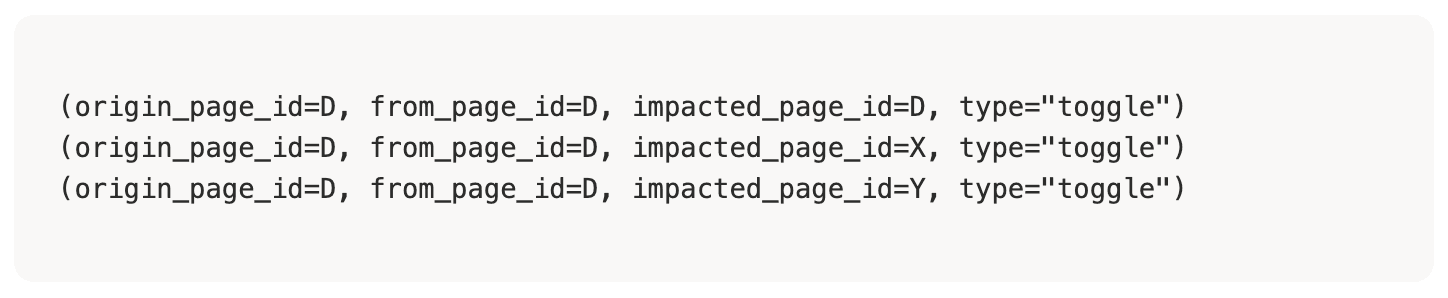
If X is also favorited, we add another action:

Now X has two reasons to be offline.
If we toggle off D, we delete all actions with origin_page_id = D, but X remains available offline because its type=favorite action still exists.
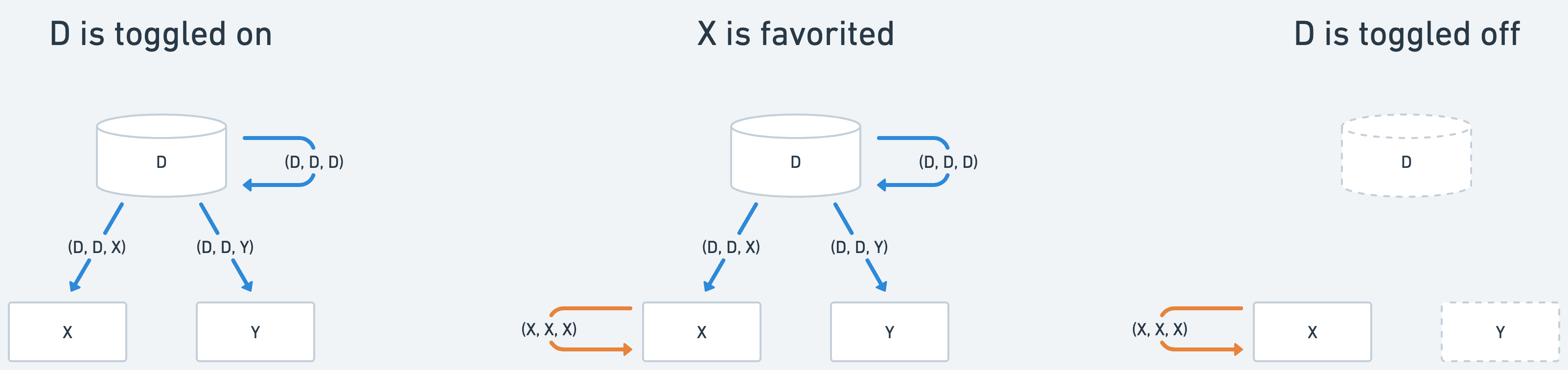
By keeping track of this metadata, we always know precisely which pages are available offline.
Keeping downloaded pages up-to-date
Making a page available offline is only half the problem. We also need to keep that page fresh as other people edit it from other devices. No one wants to open all their pages before a flight just to get the latest versions.
One approach was to have clients periodically poll the server for each of their offline pages and download the latest versions. This worked in early testing but wouldn't scale to millions of users and devices.
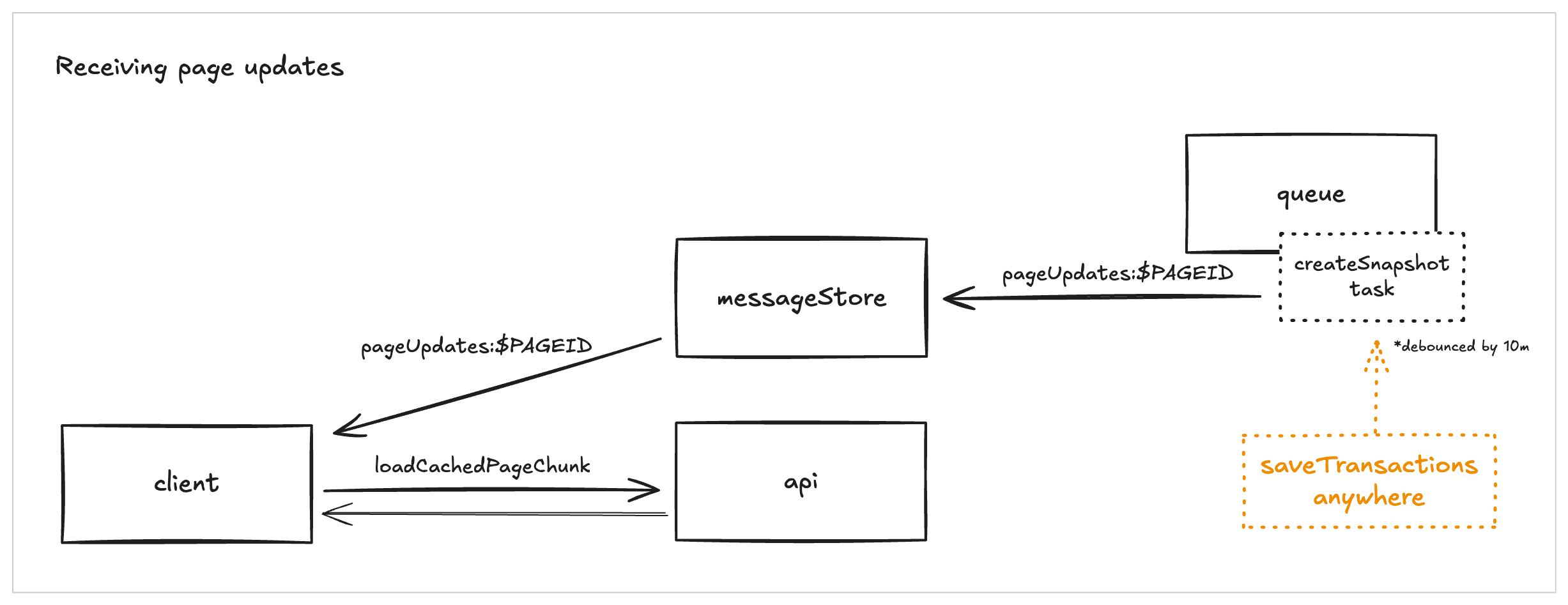
Instead, we wired up push-based updates into our existing page version snapshot system. Whenever a batch of updates is applied to a page, the server emits a message on a channel for that page. Clients subscribe to these channels for each of their offline pages, and when they receive a message, they fetch the latest changes for the page.
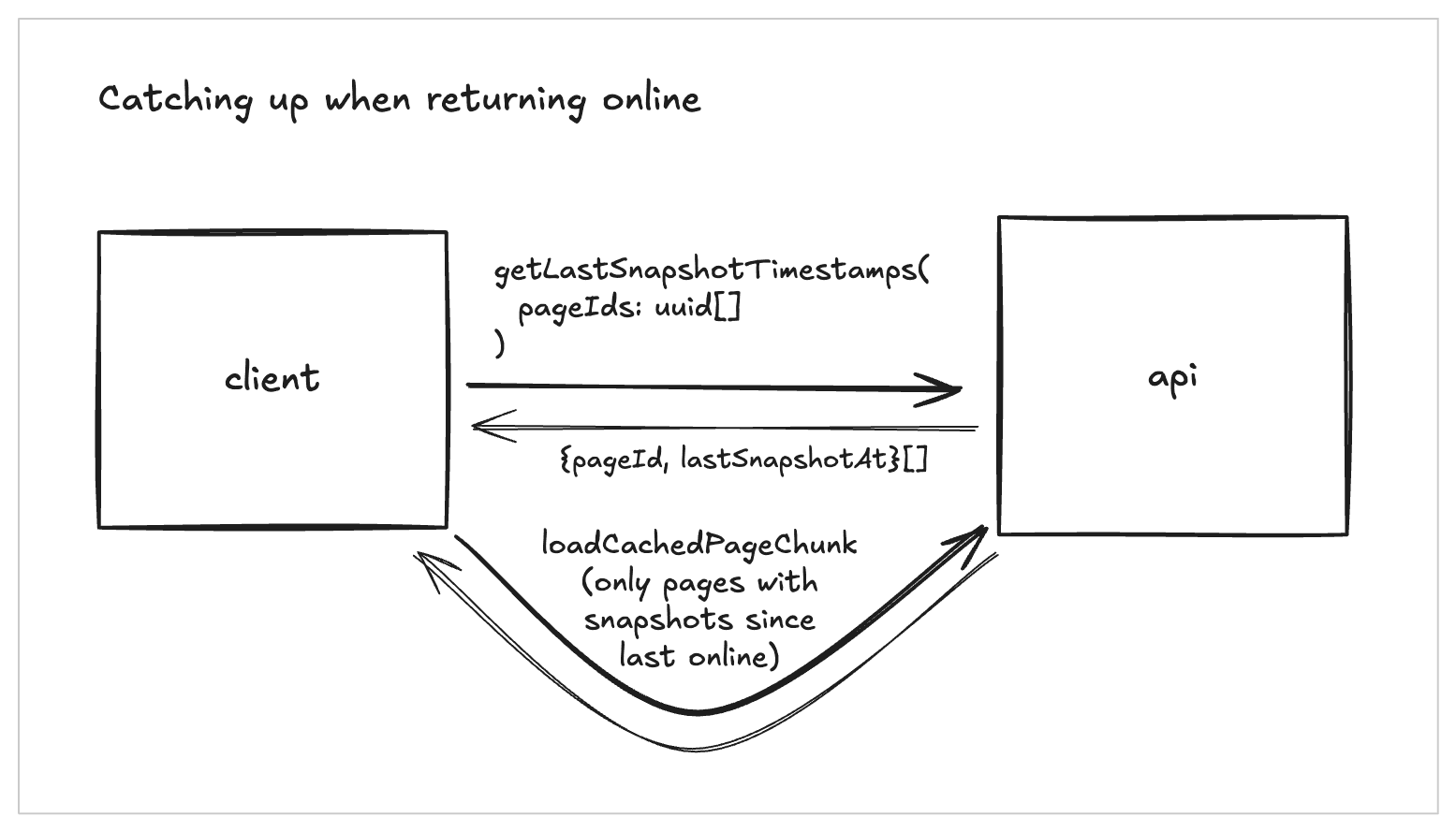
For clients coming back online after being offline, we avoid refetching everything. Each client tracks a lastDownloadedTimestamp for every offline page. On reconnect, we compare that timestamp with the server's lastUpdatedTime and only fetch pages where the server version is newer. This keeps offline pages closely synced to the server while avoiding unnecessary refetches of unchanged pages.
Pruning offline trees as content changes
Pages and databases in Notion are constantly changing: Pages get moved, databases gain or lose rows, and inline databases are added or removed. Our offline forest needs to keep up with these structural changes without leaving behind stale entries or dropping legitimate reasons to be available offline.
When we refetch an offline page, we:
Download the latest version of the page as well as the latest view of any databases
Compare this fresh snapshot with what is currently represented in the
offline_actiontableApply a minimal set of edits to the forest so that it matches the new hierarchy
Concretely, this means:
Inserting new
offline_actionrows when a page or database has gained new descendants that should inherit offline statusDeleting
offline_actionrows when inline databases are removed or database rows are no longer in the view
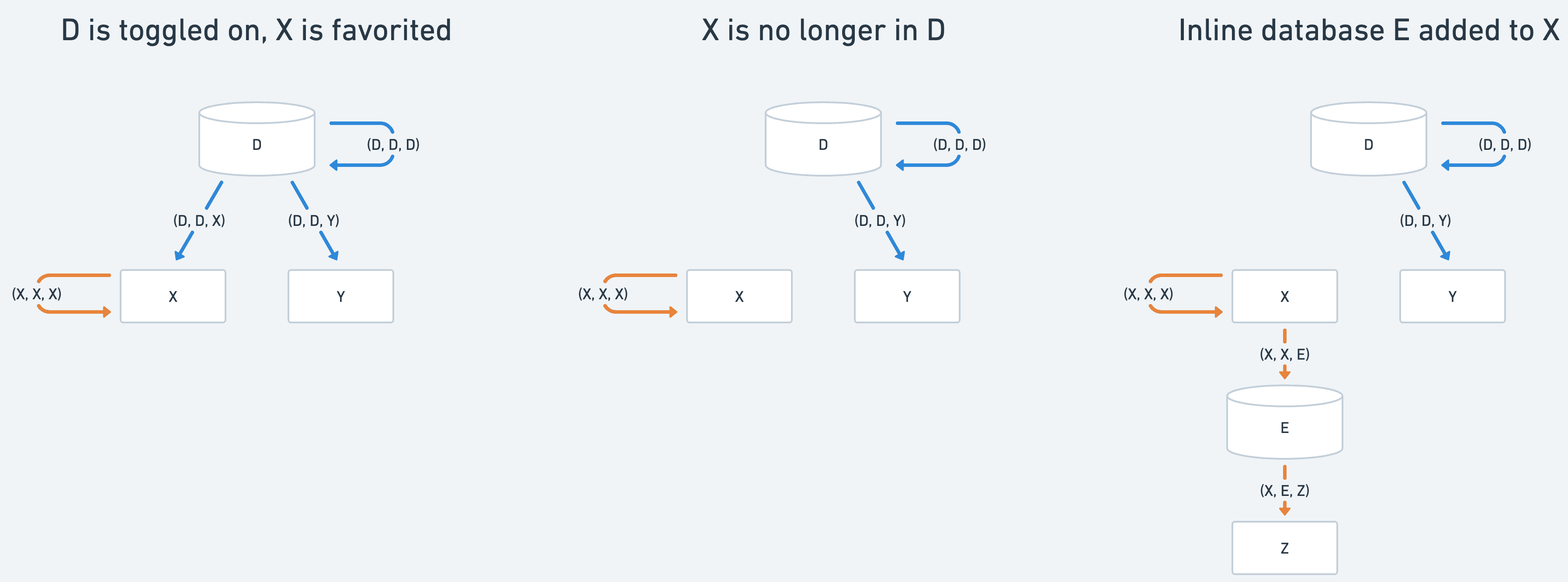
By always treating offline_action as the source of truth for “why is this page offline?” and carefully reconciling it with the latest server state, we keep the forest eventually consistent with the live workspace while avoiding expensive full rebuilds of offline trees.
Looking forward
We’re proud of what we launched as it enables the entire Notion user base to use the product in an entirely new way. But it's just the start. As we evolve our systems, we’ll continue to push the limit of how many pages we can sync to users’ devices and make Notion more and more local-first.